Search Results for 'buddypress'
-
Search Results
-
hello, good evening,
I am using buddypress with bbpress and I have a little problem: when I get a notification where a user mentioned me; I click on the notification and buddypress redirects me to my profile / activity / mention whereas I would like buddypress to redirect me directly to the post.
Does anyone have the solution?
Topic: title in header not working
Hello,
in all my buddypress pages in the header the title is only “<title>| name of website</title>.
It doesn’t show the title of the page before |.
In buddypress header.php is written <title><?php wp_title( ‘|’, true, ‘right’ ); bloginfo( ‘name’ ); ?></title>.
And I use German language po file.
Have I missed something in the settings to make page title work?
Thanks
Hello,
I have modify registration form to allow user send data without activation email, because i need than registered user activation only allowed for our admin users. About this I have customize “Activation email” from Buddypress Email managing to have different message when some user send data to register, selecting the “Situation” associated to “register users trigger . But i need than this trigger send another email with register entered data to admin system email (i have resolve already how to capture this data to add into email ) . 2 emails sending the same time, one to user registered and another to system email.
I do’nt know how do this because i don’t know how create new “situation” than to use system email to send this email. Now only i’m sending email to register user, and Buddypress Email management not allow to change this email. It’s diffuclt form me find how create new elements into “situation” list with this specific caracteristics to cerate new email entry to send admins.
Some solution.
I hope i have explain well and sorry for my english.
Thank you!
Hello,
I’m using the latest version of buddypress and wordpress. Unfortunately add friend, new post are not working its loading…..continuously . I’m using Nouveau template.
I’ve did everything rollback to older versions of theme and plugins nothing happened. Also deactivated all plugins, Change to legacy I did everything, nothing happened.Please help me to fix it.
Hello,
in all my buddypress pages in the header the title is only “<title>| name of website</title>.
It doesn’t show the name of the page before |.
In buddypress header.php is written <title><?php wp_title( ‘|’, true, ‘right’ ); bloginfo( ‘name’ ); ?></title>.
And I use German language po file.
Have I missed something in the settings to make page title work?
Thanks
Topic: “Name” fileld dupication
Hi,
In by BuddyPress I notice that I have everywhere “Name” filed listed twice. So new user during the registration will see required filed Name… and again required field Name, then First Name and Last name.
It looks ridiculous and looks like I can’t delete this field from the ‘profile fields’ page.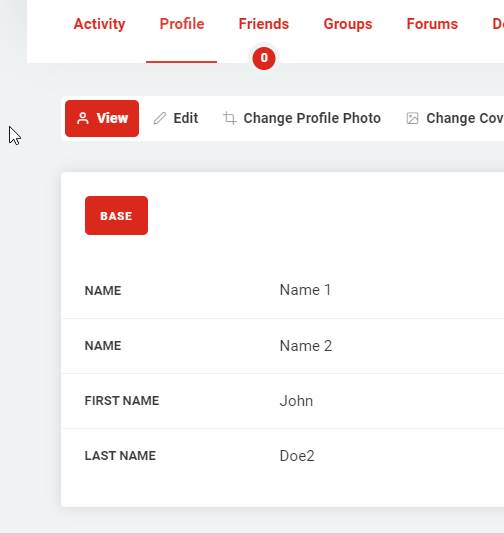
Hello, I’m trying to troubleshoot this error message I received in my admin inbox from my website I got after installing the Groups plugin. Any idea on where to start?
When seeking help with this issue, you may be asked for some of the following information:
WordPress version 5.7
Current theme: REIGN Child (version 3.0.0)
Current plugin: BuddyPress (version 7.2.0)
PHP version 7.3.27Error Details
=============
An error of type E_ERROR was caused in line 101 of the file /home/website/public_html/sa111.com/wp-content/plugins/buddypress/bp-groups/bp-groups-cache.php. Error message: Uncaught ArgumentCountError: Too few arguments to function bp_groups_clear_group_creator_cache(), 1 passed in /home/website/public_html/sa111.com/wp-includes/class-wp-hook.php on line 292 and exactly 2 expected in /home/website/public_html/sa111.com/wp-content/plugins/buddypress/bp-groups/bp-groups-cache.php:101
Stack trace:
#0 /home/website/public_html/sa111.com/wp-includes/class-wp-hook.php(292): bp_groups_clear_group_creator_cache(‘2’)
#1 /home/website/public_html/sa111.com/wp-includes/class-wp-hook.php(316): WP_Hook->apply_filters(”, Array)
#2 /home/website/public_html/sa111.com/wp-includes/plugin.php(484): WP_Hook->do_action(Array)
#3 /home/website/public_html/sa111.com/wp-content/plugins/groups/lib/core/class-groups-group.php(308): do_action(‘groups_created_…’, ‘2’)
#4 /home/website/public_html/sa111.com/wp-content/plugins/groups/lib/admin/groups-admin-groups-add.php(155): Groups_Group::create(Array)
#5 /home/website/public_html/sa111.com/wp-content/plugins/groups/lib/Hi, I’m new to BuddyPress and would like to know how to add a field (Prefix) to the name as displayed on the member directory page.
Wordpress version: 5.7
BuddyPress version: 7.2
Site: https://csdaustralia.comI’m using the Nouveau template pack. I have already created a child theme and have been experimenting with members-loop.php and index.php. Not sure if I’m looking at the correct place.
Any advice much appreciated. Thanks in advance.
Good afternoon
I received a fatal technical error last Thursday on my site while working with your plugin. The technical team that I am hosting with has since advised me to contact Buddy press as the error occurred with your plugin and is taking up my disk allocation on the domain.
These are the details provided to me.
the plugin generates errors due to the template:
PHP Warning: next() expects parameter 1 to be array, null given in /home/g0xbb53gf/public_html/wp-content/plugins/buddypress/bp-core/bp-core-template-loader.php on line 311 .
These errors end up creating a huge error log file, which occupies the entire disk allocated for your domain.I am currently using WordPress 5.6.2 and Buddy Press 7.2.0. I am also using Astra 3.1.2. I will really appreciate your urgent assistance as I am unable to continue modifying my site.
I noticed that my wordpress users aren’t showing as buddypress “members”… and actually they haven’t been syncing for quite a while.
Any idea why my WP users aren’t syncing to Buddypess “members”?
I updated all plugins, themes, etc and even disabled all plugins except Buddypress, then created a new wordpress user and that user is still not showing in Buddypress “Members” page.
I next checked to make sure that the Buddypress setting is turned on, “Enable BuddyPress to WordPress profile syncing” and that was already turned on.
Any ideas what could be causing my users to not show in Buddypress?
BP Version: 7.2.0
WP Version: 5.6.2
PHP Version: 7.3
Members Page: https://sciacademy.socialjack.com/members/Trying to understand how BuddyPress treats linked forums that contain sub-forums. I created a test and seems that if a linked forum has a sub-forum then the posts to that sub-forum are not displayed as that group’s activity. I created a test group. Linked a forum to it that has a sub-forum. Posted to the main forum and then the sub-forum. The group’s activity feed only shows the post to the main forum and not the sub-forum 🙁
Can anyone confirm that is the case and if there’s a way to change that? I would love to have sub-forums and they are part of the group’s activity.
What struck me as odd is that the main activity stream shows posts to both the main and sub-forum. It just shows EVERYTHING is seems like.
Good afternoon
I received a fata technical error last Thursday on my site while working with your plugin. The technical team that I am hosting with has since advised me to contact Buddy press as the error occurred with your plugin and is taking up my disk allocation on the domain.
These are the details provided to me.
the plugin generates errors due to the template:
PHP Warning: next() expects parameter 1 to be array, null given in /home/g0xbb53gf/public_html/wp-content/plugins/buddypress/bp-core/bp-core-template-loader.php on line 311 .
These errors end up creating a huge error log file, which occupies the entire disk allocated for your domain.I am currently using WordPress 5.6.2 and Buddy Press 7.2.0. I am also using a starter template. I will really appreciate your urgent assistance as I am unable to continue modifying my site.
Topic: High Level Design Diagram
Hi everyone,
I am using buddypress and extra functions were added using plugins and child theme.
Buddypress version 6.3.0
Wordpress version 5.5.3I observed that from frontend user accounts, if they change custom field visibility, the field value is deleted from the database table “bp_xprofile_data”. It happens in several ways, for example changing from adminsonly to public and also from public to adminsonly.
The function used for editing visibility is ” bp_nouveau_xprofile_edit_visibilty() ” in the edit.php file of the child theme.
I would like to know if this is the normal behaviour and if there is a way to maintain the data?
Thanks for your help 🙂
I’m using Buddypress for a side project.
But i cannot figure out how to disable the “side panels”
Does anyone know how to disable them both(Left and right)?Hello, I have buddypress and BuddyPress Private Community Pro.
I wanted to know if we can script in the possibility to remove access from ( Member Types or User Rolls) As I would like only a certain group who log into the page to have access to buddypress.
I was told it would be possible but found out after it is not. I want to know if there is a way we can work it in as it is important for me to make this happen.
Thank you guys so much
ioannisHello. I was wondering if someone could help me with this error.
When I try to delete any user, I receive the following:Fatal error: Uncaught Error: Call to undefined function ctype_digit() in /wp-content/plugins/buddypress/bp-core/bp-core-avatars.php:760
	760: if ( $item_id && ( ctype_digit( $item_id ) || is_int( $item_id ) ) ) {
	761: 	$item_id = (int) $item_id;
	762: } else {
	763: 	return false;
	764: }
Everything else seems to work fine. I can add users and modify them.
I am able to delete the user from the backend using phpmyadmin.WordPress Ver: 5.6.2
BuddyPress Ver: 7.2.0
BuddyX Theme Ver: 3.7.3
MySQL Ver: 5.6.32
PHP Ver: 7.4.10Thank you,
torres


