BP Better Messages – is a fully featured replacement for standard BuddyPress Messages and also can work as private messaging system for WordPress when using without BuddyPress.
Plugin is fully backward compatible with BuddyPress Messages.
BP Better Messages
BP Better Messages – is a fully featured replacement for standard BuddyPress Messages and also can work as private messaging system for WordPress when using without BuddyPress.
Plugin is fully backward compatible with BuddyPress Messages.
BP Better Messages
Hello.
There is a solution that you exactly looking for.
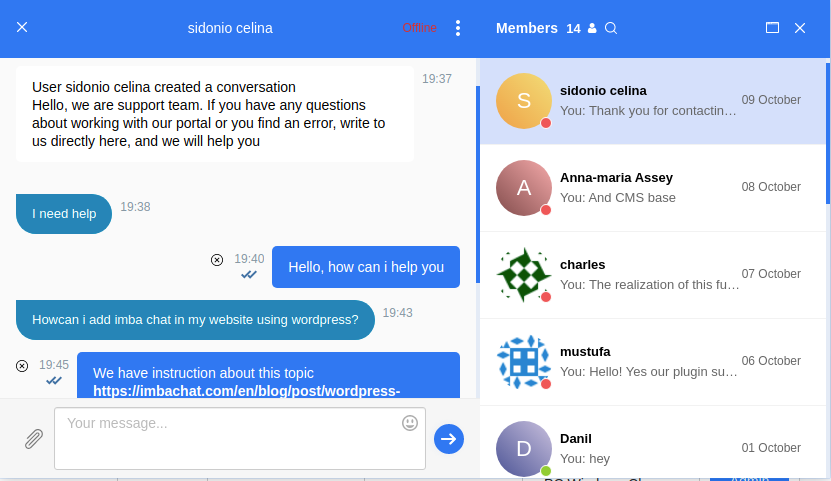
It is a chat plugin for BuddyPress and WordPress.
This chat has three basic feature such as:
- Text group chat between users
- Text private (one-to-one) chat between users
- Online chat support (chat with customers)
Besides these functions, the ImbaChat has also:
- Sharing files (any type of file)
- Chat moderation
- Video chat (group and private)
- Audio calls
The ImbaChat basic functions are free. Pricing for the additional features is from $4.99 to $19 per month. Easy and quick installation on BuddyPress. Full integration with the user base of your website.
Visit the official website of the plugin to learn more.
I haven’t seen any movement on it. I ended up doing a hack. In my theme’s bp template, I checked (in php) if it’s an invitation button then render a direct link instead of bp_nouveau_groups_loop_buttons()
I use WordPress 5.6 and Buddypress 7.1.0
if I go to the login page on my website and want to log in, I am directed to the start page but not logged in.
My Site:
Registrieren
To Test use:
Buddypress
Buddypress123
hello i kinda know the casue of the issue but i need some answers
when i remove the get_header(): from the buddypress template
it stops loading some files to run buddypress
and it’s not loading the function that buddypress need to check
members – activity this kind of stuff
so my question is :
what the files name’s that i should include to make the buddypress plugin work on a template that have not get_header(); function in it
thanks (:
never mind , thanks i figure it out after reading the
Template Hierarchy
hi vapvarun and thank you for replying back (: ,
i tried to write a code to override the main template – and i make the script run as a plugin
here what i did
<?php
/*
Plugin Name: PAGTEM
Plugin URI: https://www.example.com
Version: 0.0.1
Author: NULL
Author URI: https://www.example.com
*/

class PageTemplate {

	/**
	 * A reference to an instance of this class.
	 */
	private static $instance;

	/**
	 * The array of templates that this plugin tracks.
	 */
	protected $templates;

	/**
	 * Returns an instance of this class.
	 */
	public static function get_instance() {

		if ( null == self::$instance ) {
			self::$instance = new PageTemplate();
		}

		return self::$instance;

	}

	/**
	 * Initializes the plugin by setting filters and administration functions.
	 */
	private function __construct() {

		$this->templates = array();

		// Add a filter to the attributes metabox to inject template into the cache.
		if ( version_compare( floatval( get_bloginfo( 'version' ) ), '4.7', '<' ) ) {

			// 4.6 and older
			add_filter(
				'page_attributes_dropdown_pages_args',
				array( $this, 'register_project_templates' )
			);

		} else {

			add_filter(
				'theme_page_templates', array( $this, 'add_new_template' )
			);

		}

		// Add a filter to the save post to inject out template into the page cache
		add_filter(
			'wp_insert_post_data',
			array( $this, 'register_project_templates' )
		);

		// template assigned and return it's path
		add_filter(
			'template_include',
			array( $this, 'view_project_template')
		);

		$this->templates = array(
			'FullC.php' => 'Full Canvas',
			// this file exist in the same folder as the plugin like that

		/* Plugin Template ( Folder ) ========
		 		  |
		 		  |
		 		  |
		 	Index.php (file)
		 	FullC.php (file)
	================			*/

		);

	}

	/**
	 * Adds template to the page dropdown for v4.7+
	 *
	 */
	public function add_new_template( $posts_templates ) {
		$posts_templates = array_merge( $posts_templates, $this->templates );
		return $posts_templates;
	}

	/**
	 * Adds our template to the pages cache in order to trick WordPress
	 * into thinking the template file exists where it doens't really exist.
	 */
	public function register_project_templates( $atts ) {

		// Create the key used for the themes cache
		$cache_key = 'page_templates-' . md5( get_theme_root() . '/' . get_stylesheet() );

		// Retrieve the cache list.
		// If it doesn't exist, or it's empty prepare an array
		$templates = wp_get_theme()->get_page_templates();
		if ( empty( $templates ) ) {
			$templates = array();
		}

		// New cache, therefore remove the old one
		wp_cache_delete( $cache_key , 'themes');

		$templates = array_merge( $templates, $this->templates );

		// Add the modified cache to allow WordPress to pick it up for listing
		// available templates
		wp_cache_add( $cache_key, $templates, 'themes', 1800 );

		return $atts;

	}

	/**
	 * Checks if the template is assigned to the page
	 */
	public function view_project_template( $template ) {
		// Return the search template if we're searching (instead of the template for the first result)
		if ( is_search() ) {
			return $template;
		}

		global $post;

		// Return template if post is empty
		if ( ! $post ) {
			return $template;
		}

		// Return default template
		if ( ! isset( $this->templates[get_post_meta(
			$post->ID, '_wp_page_template', true
		)] ) ) {
			return $template;
		}

		// Allows filtering of file path
		$filepath = apply_filters( 'page_templater_plugin_dir_path', plugin_dir_path( __FILE__ ) );

		$file =  $filepath . get_post_meta(
			$post->ID, '_wp_page_template', true
		);

		// check if the file exist first
		if ( file_exists( $file ) ) {
			return $file;
		} else {
			echo $file;
		}

		// Return template
		return $template;

	}

}
add_action( 'plugins_loaded', array( 'PageTemplate', 'get_instance' ) );
now if you go to
Pages > Edit xor Add New Page > Page Attributes > A New Section Called Templates > I Click On the Full Canvas > [UPDATED]
Nothing Changed (:
Why’s Is That – Is There’s Wrong With The Code Or The Buddypress V that i use ?
i use ==> Version 6.3.0 | By The BuddyPress Community
@craigreilly it seems you have mapped login page as members template, from BuddyPress page mapping option select members page as for members and keep login page separate
@lilipilon you can try https://wbcomdesigns.com/downloads/bp-modify-member-directory-header/
it gives the option to select fields which you are willing to display at the member directory or single-member header. It will work with any standard BuddyPress theme.
@woahmazing you can override the template inside the child theme and apply custom design
Template Hierarchy
Client asked us to remove buddypress from website. They did not understand what it did apparently, and now want it back.
It has been reinstalled – but I can not get to the “Wall” of all the people. The /login (in this case /login-2) redirect just goes back to the home page…
The other pages seem to work, ie: https://domain.org/login-2/craigreilly/profile/edit/group/1/
but not https://domain.org/login-2
I hope I am explaining this correctly. I am not the primary person who works on this site.
why buddypress don’t work with page templates ?
i want to show the members page in custom templates (:
Hi, we are running into issue that might related to what you solved.
When using the default function of buddypress to message another user: messages_new_message()
Instead of getting the thread ID, we are getting a False.
How can we get the thread ID? Any suggestion is greatly appreciated.
Jing
We are using the native function of buddyPress to send message between users:
messages_new_message()
We follow the example of this page:
messages_new_message()
Instead of getting the thread ID, we are getting a False.
How can we get the thread ID?
Hello, I’m currently using bbpress 2.6.6 and buddypress 7.1.0, (wordpress 5.6, php 7.4.12, theme is siteorigin-unwind 1.6.6), and experiencing this problem as mentioned here, (members of hidden groups not being able to see the topics of the sub-forum). I’m a newbie with the background code, though my private and public groups are working. I can see the fix 7443 in buddypress.js that was indicated then, but am wondering if other people still have a problem with this, and if so if there is another fix available. Thank you.
Hello and happy new year to all buddies!
I have a boombox themed site where members can post photos or videos and these appear as tiles on main page.
Question is, if i import buddypress to expand the user experience abilities, members where post from buddypress can merge their activities to main page as post or they have to do double it? Can be bidirectional connection of posts?
example image:
https://prnt.sc/wkb4xu
Hello,
I am developing a social network site for parents of handicapped children. Using BuddyPress xProfile Plugin, I am collecting the child’s photo and displaying it alongside the parent’s photo. I am using the following snippets to achieve this:
Step 1: Get the image in nouveau templates
<div class="item-avatar">
<a href="<?php bp_member_permalink(); ?>">
<?php bp_member_avatar( bp_nouveau_avatar_args() ); ?>
<?php  echo xprofile_get_field_data( 'Child Profile Photo' , bp_get_member_user_id() ); ?>
<?php buddyx_user_status( bp_get_member_user_id() ); ?></a>
</div>
And then using CSS, I am overlaying it on the member’s avatar as follows:
/*childimage*/
div.item-avatar .bpxcftr-image {
    width: 50px;
    position: absolute;
    bottom: 1px;
    right: 9px;
    border-radius: 50%;
}
Although I am able to get the desired output on Member directory and also on the individual’s own activity page, I am not able to get the desired output on site wide Activity Stream.
When I looked at the template of Activity Stream, I came across the form template and it looks like it is using Javascript template to display the avatar. something like this:
file: buddypress/bp-templates/bp-nouveau/buddypress/common/js-templates/activity/form.php
<script type="text/html" id="tmpl-activity-post-form-avatar">
	<# if ( data.display_avatar ) { #>
		<a href="{{data.user_domain}}">
			<img src="{{data.avatar_url}}" class="avatar user-{{data.user_id}}-avatar avatar-{{data.avatar_width}} photo" width="{{data.avatar_width}}" height="{{data.avatar_width}}" alt="{{data.avatar_alt}}" />
		</a>
	<# } #>
</script>
My questions are:
1. How do I add xprofile field in the above javascript?
2. How do I add xprofile field in the main activity-stream (not inside the individual profile activity tab)?
Would be grateful for any support on this.
thanks
Naveen
Try myurl.com/gruppen/type/Inspiration
Otherwise Buddypress 7 added an admin screen for new group types. You can look at it here https://buddypress.org/2020/12/buddypress-7-0-0-filippi/
We have BuddyPress emails for many situations and they all work, but for the situation where you requested to join a group and it was accepted it does not send an email.
The situation description says “Recipient had requested to join a team, which was accepted.”
Any idea why it would not send an email in this situation?
I’m sorry I was not very precise I ask again the question:
I should organize a forum for my association to date we have managed communications with mailing lists, all posts (over one hundred thousand) are archived in a gmail box where the mailing list is indicated in the subject, so [ap-tech 10500] … is the number of msg 10500 from the ap-tech mailing list, [ap-comm 3000] … msg number 3000 from the ap-comm mailing list and so on …
Is it possible to import emails into BuddyPress and create as many forums as there are lists?
so the ap-tech forum will keep emails with the subject ap-tech, ap-comm those with the subject ap-comm and so on.
We need to historicize 20 years of emails and make them available in the forums.
thanks and best wishes for a happy new year
marcello
These are the forums for BuddyPress.
The forums for bbPress are here.
Hello,
I have the buddy form and the buddypress.
On the buddyform, I add checkboxes and values
When I validate my form, the checkboxes are not saved on the profile on the correspondinf field.
I have no problem with the other fields.


