 Anonymous User
Inactive
Hi there,
Although, I understand the frustration behind this need to find a new place to discuss about BuddyPress, I’m wondering if we could find ways to improve BuddyPress support forums to match everyone needs and have :
– A place to discuss about using BuddyPress
– A place to discuss about extending BuddyPress
– A place to discuss about designing for BuddyPress
If you have ideas and want to contribute about this subject, I’m totally in favor of having a specific & regular 1 hour chat into the BuddyPress slack channel.
Anonymous UserInactive
Hi @jenzgaard
You can read some case studies about how BuddyPress is used from our main blog’s case study category.
About your question about wether to Press or Boss: Boss has made its own fork of BuddyPress, meaning, if you choose Boss, then you choose it completely:
1. the BuddyPress community won’t be able to bring you support, you’ll need to contact Boss.
2. you won’t benefit from our security program, you’ll need again to contact Boss for this kind of issues also.
I agree with you, it’s too bad people post about everything except showcases here 🤷🏻♂️
Another solution I can implement is to insert the view I created (that shows author’s posts) into related source php file. Which source code can I add the view within Buddypress ?
@socialdigita On number 2 BuddyPress Moderation Pro it has the option to limit all new posted activities get approved by admin first https://prnt.sc/w8og4i, for activity comments, it can also cover it, you will have to contact plugin support for it.
Hi there, this topic ‘Showcase’, is that for displaying sites with BuddyPress? Almost all posts has nothing to do with showcases. Very strange.
Where can anyone suggest to find good examples? Shouldn’t there be a curation here somewhere in stead of only snippets in the documentation?
For your info, I’m making my mind up if I should go Press or Boss and therefore would like to see the potential as a whole 😉
Thanks and looking forward to any suggestions 🙂
Hi,
I want to send a message to all users. I’m admin (I don’t know if I’m the Super-Admin, but I can’t find any role like this) but I can’t find the checkbox in the message console like it’s described in the documentation:
Super Admin Only: Checkbox for “This is a notice to all users.”
Can anyone help? Was this checkbox kicked out in one of the Buddypress Updates? I can remember that it was there some time ago.
Thanks
Mario
Anonymous UserInactive
Hi @alersn,
bp_groups_get_group_types() is used into the group’s individual page header to list the group types it is assigned to. This function gets all registered group types : the ones that are created using the WP Admin screen and the ones that are registered using code. code argument of the array parameters is used to only get group types registered by code to make sure they can’t be deleted from the WP Admin Screen. BTW It’s not used into the Groups directory.
I’ve tested the “BuddyPress Create Group Type” plugin in BuddyPress 7.0.0. I confirm I’m able to set the Group Types of a Group during its creation process. It’s important to make it possible when adding a Group Type from the WP Admin Screen BuddyPress introduced in 7.0.0 activating the “Show on Group creation” checkbox. See the below screen capture.
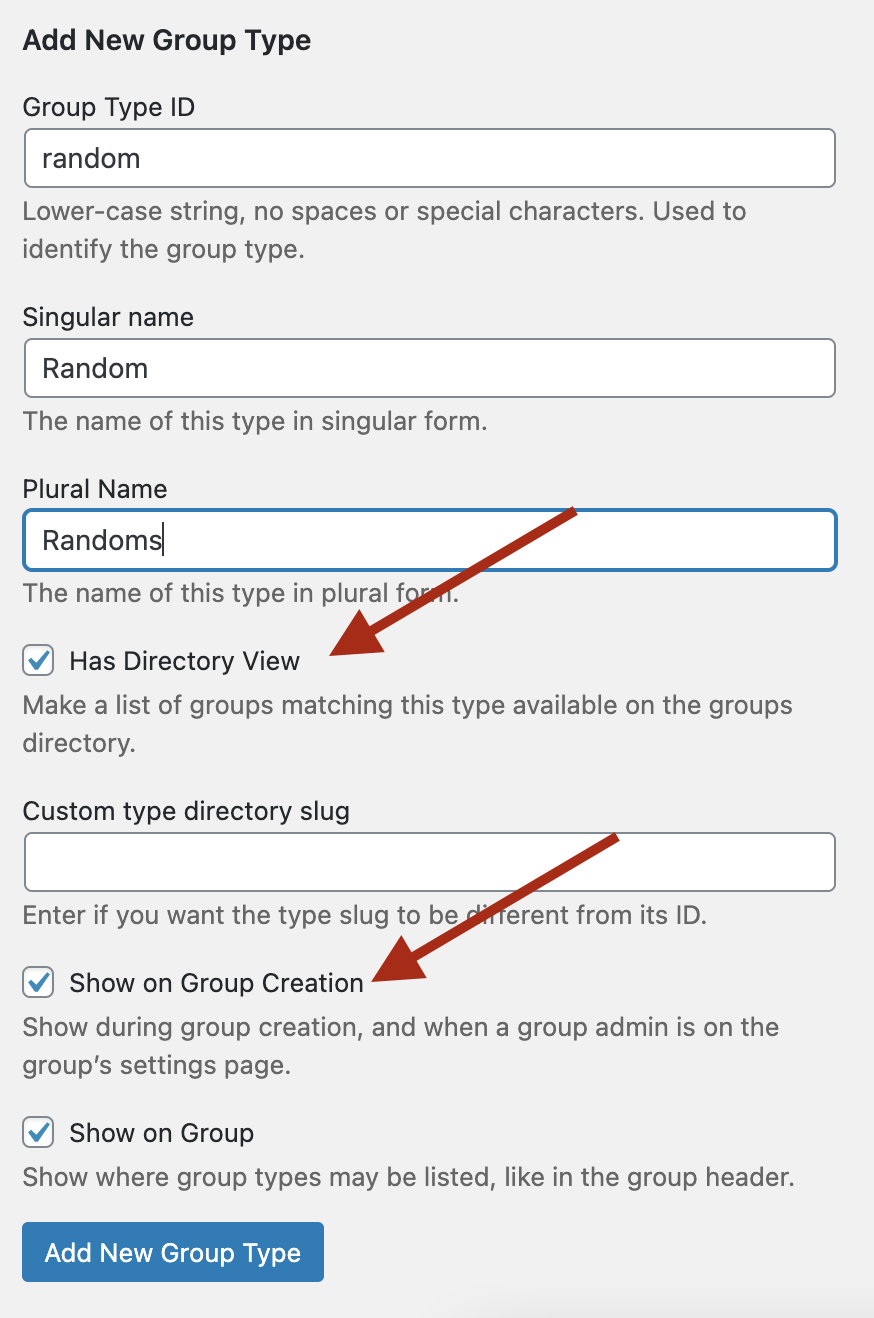
Of course, you won’t get the tabs the “BuddyPress Create Group Type” as it uses another way to store the Group Type properties.
That being said without using this plugin Admin UI, you can still enjoy these tabs with some custom code. Here’s a Gist containing the one I’ve used from a bp-custom.php file.
Hi there, buddypress works well with learnpress on my site. However, I want to use groups and notify the students in case of a new post in the group. Notifications with messages, friend requests and so on work well, but there is no notification if I set a new post in the group. Anyone any idea? Thanks and kind regards Priska
Hi everyone,
I think I found the conflict which I mentioned earlier … in the file “wp-content \ plugins \ buddypress \ bp-groups \ bp-groups-functions.php” the bp-nouveau template calls the function “bp_groups_get_group_types ()” , which has been modified in the new realization (BP7.0.0) and the condition was added:
`if ( ! isset( $args[‘code’] ) || true !== $args[‘code’] ) {
$types = bp_get_taxonomy_types( bp_get_group_type_tax_name(), $types );
}`
I’m dont know much about php but I think that this condition only show the taxonomies that have been created through the new release (BP7.0.0), leaving aside those created by the “BuddyPress Create Group Types” plugin. When deleting this condition, the opposite happens … it shows the types created by the pluging but forgets those created by the release (BP7.0.0) …
I am about to launch a project created with buddypress and this functionality is vital for me… so I have to make a decision whether to use the plugin (with the risk that in the long run I will not be able to use it) or use the default function of the new one release … I don’t know if you could guide me to make the decision. Thank you for your great work and your attention. My best wishes
Hello
i’m using BuddyX Theme and Buddypress. Without this theme, group description are displayed on the group page. But with this theme it’s not.
Here screens ( group page ) :https://prnt.sc/w7fwo2
( group page with a group type filter ) : https://prnt.sc/w7g7u1
How can i display group description again ? Also how can I show more letters ?
Thank you for your help
Cloé
Anonymous UserInactive
Hello everyone,
7.1.0 is a maintenance release. Please upgrade.
BuddyPress 7.1.0 Maintenance release
WordPress version 5.6
BuddyPress version 7.0.0
Gravity Forms version 2.4.21 with Advanced Post Creation add-on
Avada Theme
http://www.mgroupcorp.com
This site is using gravity forms to feed into an intranet posting feature, and they want to be able to tag other users. When I create a backend post, the dropdown list of mentions populates. When I try from the frontend (as most users would) there is no dropdown. If you know the entire username, the tag still works – it’s just the dropdown that won’t appear. Activity streams are turned on, and I have the following code in my functions.php
add_filter( ‘bp_activity_maybe_load_mentions_scripts’, ‘buddydev_enable_mention_autosuggestions’, 10, 2 );
function buddydev_enable_mention_autosuggestions( $load, $mentions_enabled ) {
if( ! $mentions_enabled ) {
return $load;//activity mention is not enabled, so no need to bother
}
//modify this condition to suit yours
if( is_user_logged_in() && bp_is_current_component( ‘gravity_forms’ ) ) {
$load = true;
}
return $load;
}
Am I missing something else? Thanks!
Hy Guys! I am developing a website in which I need to delete all those users who have default avatar if (‘BP_AVATAR_DEFAULT’) in BuddyPress, as i am new to wordress and web development I am unable to figure it out that how can I iterate through each user and delete its membership e.g. delete user from the database along with all its data and only leave those users who have uploaded their profile avatar.
WordPress 5.6, BuddyPress 7.0.0, all plugins up to date. StarKid theme by Thimpress.
I’m getting page not found with these types of URLs:
https://oncloudk9.co.uk/members/On%20Cloud%20K9/profile/edit/
https://oncloudk9.co.uk/members/On%20Cloud%20K9/courses/all/
I understand that it’ how the user name is formed, the link is being created as on cloud k9, rather than on-cloud-k9, but I don’t know how to correct it.
On Cloud K9 is an admin account, so it’s not feasible to delete the account and recreate it.
Thanks.
Hi,
I have a directory website that runs on the MyListing theme.
I created a staging site and installed BuddyPress to test the possibility of increasing the features. Everything was working fine except for the Group page. It returns an empty page.
Please could you help me.
WordPress version – 5.6
BuddyPress version – 7.0.0
Anonymous UserInactive
Hi @kerriem
Then, you have no other choice than to:
If I were you, I would deactivate plugins one by one, testing if the issue is still there after each plugin deactivated to find the problematic one. I would probably start with the ones that were lately updated. If you can narrow the cause this way you’ll be able to contact the right plugin’s support.
Because you can test by yourself BuddyPress 7.0.0 on a WordPress 5.6 fresh install with no other plugins, it works 😉
Re: Member Directory & Buddypress “Recently Online Members” widget stuck
Hello Mathieu,
sorry I have to come back to you about this problem. After you helped identify a Java Script error on the membership directory page (see above), I was meanwhile able to trace it back to the CAOS Google Analytics optimizer plugin. Disabling it (not critically needed) fixed the java error (no more errors in the console on the membership directory page) – but the member directory and widget remain “stuck” (do not update). The myCred team also fixed an issue in their plugin update done at the same time, but it turns out also no having an effect on this critical Buddypress function.
I recall you said you tested WP 5.6 and BP 7.0 and could not replicate the issue.
However, due to the BP widget being stuck, we also enabled another widget to augment showing currently online members (part of the GD BP Toolbox Suite – https://plugins.dev4press.com/gd-bbpress-toolbox/ – which we use extensively).
This GD widget works, and shows online members (albeit fewer and not as nice as the BP widget, and just a few active within the last few minutes) – while the BP widget does not work at all anymore.
I think both GD and BP widgets access the same core information (users/members online) – so it seems logical to me, that the problem must lie within BuddyPress (and the 7.0 update), if its widget and member directory is not working (“stuck” with myself at the top at the state of a week ago when the 7.0 update was performed, by me as admin)?
If you have any other idea how to go about it, my volunteer colleages and myself in the admin team at Scaffies would greatly appreciate your input.
Buddypress is a substantial part of our community website, and access to the member directory is obviously important; the BP “recently online” widget prominently displayed on our internal front page is very popular within in the community, and it being stuck for a week now is a downer for the members. That is why we are staying on top of it to get it resolved.
Thanks again for all your time and help,
Kerrie
Volunteer Admin, Scaffies community.
Hi,
Mega newbie on BuddyPress,
When a new user select a group (when he register) or when the moderator after a register select a group for this user,
how to attach / permission / a user to the same Forum Group (status private) ?
Thank you !
Thank @vapvarun and @imat for answer me 🙂
Sorry for my explanation…i did´t explain case clearly…The WordPress admin area works perfect for me…my problems come from the public-facing…When one user want to create a new group, this starts a group creation steps (group name and Description, Settings,Image); On the “step 2″(Settings), the user have to select one group type with a group type selection option. Before the release (before BP v 7.0.0) it was working successful but after the release, these group type selection option doesn’t appear…They only appear when i uninstall the pluging “BuddyPress Create Group Types”, but then I am not able to use the filter´s and Tap´s options…
@alersn with BuddyPress Create Group Types you will have two group type menus in the group section at the backend one with plugin and 2nd with BP itself you can create group type with any of option for now. Except for the menu display, there is no functionality conflict.
Filter option and tab options at the group directory page at the front are coming with BuddyPress Create Group Types which is not included in the core feature with BP v7.0.0 at present.
We will try to add those features in BP core and remove the plugin from wp.org or work on the plugin to have better compatibility.
Anonymous UserInactive
@vapvarun could you look into @alersn ‘s problem, if there’s something we need to do in BuddyPress, we’ll do it 😉
To order alphabetically user the bp_nouveau_get_members_filters.
function themename_bp_reorder_member_directory_filters( $filters, $context ) {
	if ( 'group' !== $context ) {

		$filters = array();

		if ( bp_is_active( 'xprofile' ) ) {
			$filters['alphabetical'] = __( 'Alphabetical', 'buddypress' );
		}

		$filters['active'] = __( 'Last Active', 'buddypress' );
		$filters['newest'] = __( 'Newest Registered', 'buddypress' );
	}

	return $filters;
}
add_filter( 'bp_nouveau_get_members_filters', 'themename_bp_reorder_member_directory_filters', 10, 2 );
Hi, thanks for answering me 🙂
I am trying to use “BuddyPress Create Group Types” with the new realise (BuddyPress 7.0.0) but i have a problem to display the group type option selection during group creation and when a group administrator is on the group settings page. The problem get solved when i uninstall the pluging (“BuddyPress Create Group Types”)…but then i am not able to add a group type filter on top group list page because of what i post mencione before…:(
Could be a conflict between “BuddyPress Create Group Types” and “BuddyPress 7.0.0”? or the conflict come from my theme (BuddyX)?
Thank for the atention


hi everyone, for a few days I have been having problems with comments in Buddypress activities.
When I comment, or a user comments, the comment is not visible and in the browser inspection this error comes out:
/wp-admin/admin-ajax.php:1
Failed to load resource: the server responded with a status of 403 ()