Search Results for 'buddypress'
-
AuthorSearch Results
-
March 24, 2011 at 9:32 am #108608
In reply to: [Resolved] Display username instead of full name
March 24, 2011 at 9:28 am #108606In reply to: How to change “Search anything…”
March 24, 2011 at 8:40 am #108603@mercime
Participant=== i want to disable the hole buddypress stuff to get a clean wordpressblog to use my old and self styled wp-theme. ===
Do you mean you want to delete BuddyPress? https://codex.buddypress.org/buddypress-site-administration/deleting-buddypress/
March 24, 2011 at 8:19 am #108601w11
Memberthat´s nice. but i think you got me wrong.
i want to disable the hole buddypress stuff to get a clean wordpressblog to use my old and self styled wp-theme.March 24, 2011 at 5:42 am #108597In reply to: Buddypress upgrade 1.1.2 to 1.2.8
pcwriter
ParticipantSee my earlier post above.
A couple of great themes at http://BuddyLite.com
A Google search would turn up many more.March 24, 2011 at 5:31 am #108596John James Jacoby
KeymasterFirst pass at this is now in BuddyPress trunk. It relies on this WordPress core patch to prevent the following from occurring:
 March 24, 2011 at 4:45 am #108595
In reply to: Buddypress upgrade 1.1.2 to 1.2.8
tmcandle
ParticipantYes that is what I am referring to the 103 theme. I used the current buddypress default theme when I did the update (to get the site working), but it appears to be a blogging theme (a more traditional WordPress one) and not a social networking theme like the 103 was. My home page had no blog at all on it and was oriented to widgets that provided resources and the blog area was on another page. I would like to get the 103 theme working in a compliant version but it is not listed in the themes section so I assumed it had not been updated. If you know where there is a compatible version please let me know and I will check it out (it would save me many hours of work).
Thanks
March 24, 2011 at 2:55 am #108593In reply to: Buddypress upgrade 1.1.2 to 1.2.8
ParticipantAre you talking about the “BuddyPress Default Home Theme 1.0.3 by Andy Peatling” ? If you are, that theme has long since been updated. Buddypress comes with its own default theme which is now at version 1.2.8… and 1.3 is coming soon to a browser near you!
March 24, 2011 at 1:29 am #108592In reply to: Buddypress upgrade 1.1.2 to 1.2.8
ParticipantWill do – anyone know what it would take to make that theme compliant? I would guess a number of people would benifit from it.
Thanks
March 24, 2011 at 1:18 am #108591In reply to: Facebook pages plugin.
Virtuali
ParticipantGo here for the full picture of all features that are a standard installation with Buddypress
March 24, 2011 at 1:17 am #108590Jean-Pierre Michaud
Participantyeah, sorry @Bowe , didn’t answer first…
actually, the plugin i created is inserting menu elements, not editing any existing one… i’ll see if i can handle it.March 24, 2011 at 1:13 am #108588In reply to: Searching the Codex is broken
March 24, 2011 at 1:06 am #108586ParticipantSounds like your install may be broken.
What versions of buddypress you are using?
I would re-install the buddypress plugin to ensure a clean install.
March 23, 2011 at 11:32 pm #108580gregfielding
ParticipantMakes sense. Sounds like we’re another 6-12 months off then. Ugh.
March 23, 2011 at 11:20 pm #108579Paul Wong-Gibbs
KeymasterAs much as I am aware, we’ve put in some ground work for the bbPress plugin, but I would not expect to see it supported in BuddyPress until bbPress plugin has had its first release and a bit of time in the wild. I do not think this will happen in time for 1.3.
Extra goodies? None planned. What do you think would apply well to all BuddyPress sites?
I don’t know about a forum/group specific tag cloud, why not leave a suggestion on https://trac.buddypress.org/ ?
Guest/anonymous posting requires support in bbPress. I think it has it in the plugin now, but no plans have been made for how that might fit into BuddyPress.
I am pretty sure John added to BuddyPress 1.3/trunk a view somewhere that shows a user’s forum posts. I can’t remember where it is, and I can’t take a look at the moment.
Forums will be moving away from being group dependant, but I’m not sure if this is happening in 1.3 or 1.4.
March 23, 2011 at 10:17 pm #108578Bowe
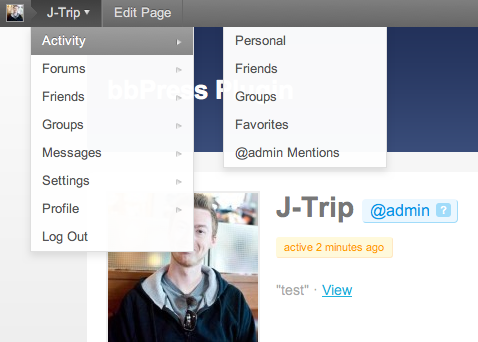
Participant@Nexia: Is it possible that you change the “Edit Profile” link to point towards the BuddyPress profile instead of the Admin background.
Here’s a screenshot of which link I mean:
http://cl.ly/172I300y110d2d2X2u1gMarch 23, 2011 at 9:42 pm #108576In reply to: How to Delete Spam Members
Hugo Ashmore
ParticipantIt’s not difficult, you should have two options on the buddypress bar there should be an Admin or User Admin link on that will be the option to mark as spammer or you can go to the dashboard -> admin or network admin -> users and check user, select mark as spam from bulk actions drop down.
March 23, 2011 at 9:38 pm #108575In reply to: How to Delete Spam Members
danbpfr
ParticipantMarch 23, 2011 at 9:36 pm #108574In reply to: [Resolved] Locating comments.php for editting
ParticipantSorry, i didn’t see you’re using 1.2.7….
The line you search is this one
https://trac.buddypress.org/browser/tags/1.2.7/bp-themes/bp-default/comments.php#L100
note that comments.php is the only file where this line exist.
if you search for specific things, this is a good starting point:
http://etivite.com/groups/buddypress/hooks/March 23, 2011 at 9:02 pm #108573Participantbtw, as i’m working on a tool right now that integrate the Buddypress Adminbar inside the official WordPress Adminbar, here is the setting i added when thinking of you:
http://nexialys.net/nex_bp_adminbar/nex_bp_adminbar_settings.png
 March 23, 2011 at 8:05 pm #108570
In reply to: Facebook pages plugin.
Face9000
MemberUmh,i never tried the “Groups” on buddypress :>
March 23, 2011 at 7:40 pm #108569In reply to: Subdomain Install – Pages Not Found
wescleveland
ParticipantJust ran across this article (https://codex.buddypress.org/extending-buddypress/bp-custom-php/) talking about bp-custom.php. Putting the above code in bp-custom.php is MUCH cleaner than modifying bp-core.php. So, bp-core.php is now back to it’s original state and my new bp-custom.php contains:
`<?php
/* Define on which blog ID BuddyPress should run */
if ( !defined( ‘BP_ROOT_BLOG’ ) )
define( ‘BP_ROOT_BLOG’, get_current_blog_id() );
?>`and all seems good. Haven’t found any yet, but don’t know if there might be any unintended side effects of using get_current_blog_id().
Thanks BP developers for a GREAT plugin!!!
March 23, 2011 at 7:30 pm #108568Participant@rossagrant shucks, before you mentioned that changing usernames/passwords affected all other themes, I was going to write that you should get theme support from @Bowromir again

Seriously though, there’s a silver lining to discovering about the perils/shortcomings of Fantastico this early in your installation – knowing never to use it again for another developer installation as @nexia said. There are many who have posted their woes in WP.org forums. Shaving off a few minutes of uploading WP manually, creating a database and installing WP is not worth the hours wasted on a shaky foundation set up via Fantastico.
At this stage, it’s a blessing you only have 4 members a few groups etc which you can recreate later on. So it would come as no surprise that I would recommend starting your installation from scratch – clean and solid – after making DB and server files backup (just in case). Contact your webhost tech support on how to delete WP and Fantastico files properly. There’s one topic in WP.org forums which gives a clue but no actual solution https://wordpress.org/support/topic/fantastico-problem?replies=1 so you need your webhost tech support on this one.
March 23, 2011 at 6:57 pm #108565In reply to: use buddypress as a template for a page
ParticipantYou could be right. http://ithemes.com/support/pre-sales-and-other-inquiries/buddypress-builder/?value=buddypress&type=1&include=1&search=1&ret=all
Having said that, just curious at what stage did the integration fail? I assume that with the Builder, after setting where you want your sidebar/s and content, you would be able to get the HTML going.
March 23, 2011 at 6:50 pm #108563In reply to: use buddypress as a template for a page
dodisabaruddin
MemberUgh.. it’s seems don’t work well with iThemes Builder.
-
AuthorSearch Results


