Search Results for 'buddypress'
-
AuthorSearch Results
-
November 12, 2015 at 6:51 pm #246684
In reply to: Profile Edit Link Doesn’t Resolve Correctly
ckchaudhary
ParticipantJust a wild guess… I’ve had this issue once and the plugin ‘nextgen gallery’ turned out to be the cause. If you too have nextgen gallery active, try deactivating it. More info at https://buddypress.org/support/topic/user-cant-edit-profile-page/.
November 12, 2015 at 5:50 pm #246672r-a-y
KeymasterThanks for the bug report, @wvmohzoibar.
Before I file a ticket about this, can you tell us how you triggered this bug?
We do some checks to ensure that the profile group ID is not blank before proceeding, so it would be nice to find out how you are encountering this error:
https://buddypress.trac.wordpress.org/browser/tags/2.4.0/src/bp-xprofile/bp-xprofile-functions.php?marks=241-244,258#L224I was changing some settings in another plugin
What plugin were you using that caused this bug?
November 12, 2015 at 5:24 pm #246671In reply to: REGISTER PAGE, ACTIVATE PAGE, BOTH INVISIBLE
@mercime
Participant@functionmunchkin there is no shortcode for the registration form. Deactivate all plugins except BuddyPress and change to the Twenty Fifteen/Fourteen theme to check if you have theme/plugin conflict. As to membership option, visitors who register and activate their account become regular members of the site, so it would be more helpful if you are more specific about what kind of option you are looking for.
November 12, 2015 at 5:12 pm #246670scoobs2000
Participantquick mention – I have the same problem – upgraded to buddypress Version 2.4.0 about 15min ago and now visibility settings when set to Enforce field visibility by admin is ignored on the front end.
before upgrade all base fields where set to “all members” and set to “Enforce field visibility” with no issues
after upgrade – no changes and been made to above settings, and are still applied – but members can change.
WordPress 4.3.1 running Kleo Child theme.
Cheers,
November 12, 2015 at 2:22 pm #246658November 12, 2015 at 10:48 am #246648In reply to: Private Messaging Limit with Membership plans
djsteveb
Participant@ahmed-dogan – if you find this somewhere, I’d love to get some details on doing the same thing.
If you find someone that can code it I may be willing to split to cost or something..
Are you looking at hooking into the buddypress membership levels or using a separate membership thing like s2 member or something else?
November 12, 2015 at 10:08 am #246643In reply to: 2.4 Cover Photo’s does not work with Graphene Theme
Anonymous User
InactiveFYI there’s a codex page you can read in case of problem. By default, the Cover Images feature is adding an inline style to
bp-legacy-css, you can see it in the head tag of your pages: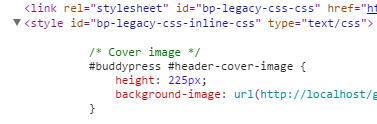
I’ve just tested with a child theme, your problem should only happen if you are overriding buddypress.css within your child theme. In this case you’ll need some extra work as explained here:
November 12, 2015 at 9:03 am #246639In reply to: Wish support was mobile friendly
Henry Wright
ModeratorThanks for the feedback. I’m assuming this is feedback regarding the BuddyPress forum, rather than the BuddyPress software. In your own forum, you can change the location of the new topic form by modifying your theme. See the Theme Compatibility article for more info. Any questions you may have feel free to ask on their support forum:
November 12, 2015 at 8:56 am #246638In reply to: 2.4 Cover Photo’s does not work with Graphene Theme
Venutius
ModeratorThats weird,I tested this on a fresh test site with just BuddyPress loaded. I’ll test it again
November 12, 2015 at 6:55 am #246635In reply to: Register and activate page both invisible.
Stacy (non coder)
ParticipantNo “membership” anywhere, not on my site admin, not in no settings (no “general”).
I’m using wp 4.3.1 and twenty fifteen theme.
November 12, 2015 at 5:09 am #246630Keymaster@freakyy85 – I’ve contacted the author of BuddyPress Activity Privacy with a fix.
In the meantime, to fix this manually, make the following change:
https://github.com/messaoudi-mounir/buddypress-activity-privacy/pull/4/filesNovember 12, 2015 at 4:54 am #246629In reply to: profile not found
Keymaster@thood32 – I’ve merged the two forum threads you created that were identical to each other.
Can you try deactivating all plugins on your WAMP install except for BuddyPress and see if the BuddyPress member pages work as expected?
November 12, 2015 at 1:44 am #246620In reply to: button is unresponsive + a few other issues
Paul Wong-Gibbs
KeymasterHi @josephz94
Users can upload profile pictures (in theory) however I was not able to upload a picture. I kept getting a http error.
Do you do anything like upload the media library onto Amazon S3 or some other cloud service?
-the Favorite button was unresponsive
It sounds you’ve got several button problems. Do you know how to look at your web browser’s Javascript error console, and see if there is any output? (On page load, and also when you try to click the button)
BuddyPress Activity Plus
Have you tested disabling this plugin to see if it had any affect?
Buddy press is activated on a per site basis in a multi-site, multi-network installation.
Multi-network is a pretty advanced configuration, so to cover bases, it would be interesting to know what you’ve done to enable multi-network in both WordPress and BuddyPress, please?
November 12, 2015 at 1:11 am #246615In reply to: add comment custom comment type to activity stream
polykrom
ParticipantI don’t find any answer browsing the web…
Possible to add custom comment type to buddypress ?
thanks a lot
François
November 12, 2015 at 1:10 am #246614In reply to: No Profile Tabs
InactiveI’m really sorry to read this thread. I think we’ve done our best to prevent this kind of situation by including some easy ways to deactivate the cover images if the theme you are using haven’t upgraded to support it.
On september 3Oth, more than a month ago, we’ve posted on our blog to explain to everyone how the Cover Images could impact themes, see https://bpdevel.wordpress.com/2015/09/30/buddypress-2-4-0-will-introduce-cover-images-for-members-groups/
At the end of this post i’ve insisted on this point :
If you are a theme designer or the author of a plugin managing Cover images, we recommend that you don’t forget to test that everything works fine for you during the 2.4.0 beta period.
Then, a month ago, we’ve added a codex page to explain to everyone how to implement cover images for specific themes : https://codex.buddypress.org/themes/buddypress-cover-images/
Then we published a beta and a release candidate to let people test it, to make sure everything was working fine.
I understand your frustration, but be sure we’re always trying to do our best. BuddyPress is free, open source and is maintained by volunteers like @r-a-y and me. We’ve been testing as much themes as we could, unfortunately your particular theme wasn’t available for us. I’m convinced the TagDiv team will soon implement the cover images feature into their themes, and if they have any question, i’ll be happy to help them.
Best wishes.
November 12, 2015 at 12:52 am #246612In reply to: profile not found
thood32
Participanthello,
I am running newstest versions of wordpress and buddy press and tried 2015 and 2013 themes but cant get profile tabs to work. the site in running locally in WAMP. With new BP install permalink structure is set to post name. Buddypress was installed through wordpress plugins and not ftp. Pages in buddy press setting are associated with correct pages but buddy press does not populate on member, groups, activity pages. im sure its a simple fix but im a newbieNovember 12, 2015 at 12:44 am #246611In reply to: No Profile Tabs
Michael Bryner
ParticipantSo basically your not going to do a thing about it? Okay, I will just remove BuddyPress, and thanks for the support I wouldn’t expect. I doubt Tagdiv is going to do a thing about it. Since, I get told that I have to go to theme author to get the styling done for BuddyPress too. I might as well give up on the whole BuddyPress thing. As soon as I am done with this reply, I am removing BuddyPress.
November 11, 2015 at 11:09 pm #246600In reply to: 2.4 Cover Photo’s does not work with Graphene Theme
KeymasterI tested the Graphene theme that is listed on wordpress.org:
And it works for me:
What is the exact problem?
November 11, 2015 at 10:47 pm #246585In reply to: No Profile Tabs
KeymasterI just installed NewsMag and the profile tabs and cover image feature look fine on an unmodified install:
Again, we cannot account for every single variant of every available theme out there. If you have some CSS knowledge, you’ll have to adjust it yourself.
November 11, 2015 at 10:38 pm #246581In reply to: BuddyPress 2.4.0 – Pietro
ParticipantUninstalling BuddyPress and reinstalling did nothing at all. Data repair did nothing. I disabled cover photos and it works fine. It is the cover photos enabled and I lose the whole tabs in profile.
November 11, 2015 at 8:25 pm #246572In reply to: BuddyPress 2.4.0 – Pietro
KeymasterCongrats imath!
 November 11, 2015 at 8:21 pm #246570Keymaster
A BuddyPress user is a WordPress user, so you should be able to use WordPress user API functions for this.
For BuddyPress groups, check out
groups_create_group():
https://buddypress.trac.wordpress.org/browser/tags/2.4.0/src/bp-groups/bp-groups-functions.php#L70November 11, 2015 at 11:24 am #246562In reply to: HTML or WYSIWYG in text profile fields?
Participant@djpaul – Wholy! Bleep!
So it may be easier for me to add two new buttons to the comment replies things all around buddypress in the near future?! IS the wordpress editor button API )think it came out like 3 versions ago?) going to flow through to this in BP?
So glad to see this!
November 11, 2015 at 11:22 am #246561Participant@redgard
seems to be a similar question with a couple of intersting answers here: https://buddypress.org/support/topic/html-or-wysiwyg-in-text-profile-fields/November 11, 2015 at 6:52 am #246553In reply to: HTML or WYSIWYG in text profile fields?
KeymasterBuddyPress 2.4 — probably due out this week — changes multi-line text area fields to use TinyMCE, like the WordPress post editor.
-
AuthorSearch Results


