Search Results for 'buddypress'
-
AuthorSearch Results
-
February 7, 2015 at 12:12 am #234009
Henry Wright
ModeratorHi @@garrett-eclipse
Is this something that happened on here in these forums, or did it happen on your own BuddyPress website?
February 6, 2015 at 11:50 pm #234007In reply to: Private messaging user blocking/ignoring?
donburikun
ParticipantThank you for the link. I have also found the below:
I am leaning toward Buddyblock but would like to wait for this functionality to be introduced to the core product to ensure compatibility and support down the road. It will really bring Buddypress to another level to have this added in and it is very encouraging to hear they are considering to add it.
February 6, 2015 at 11:13 pm #234005In reply to: Edit Profile Redirects to different page
BaldEmotions
ParticipantI have found the same out through my communications with them. Its lame because I have purchased pro and probably wouldn’t have if I knew it interfered with BuddyPress.
February 6, 2015 at 9:33 pm #234003SlothLoveChunk
ParticipantDone. https://buddypress.trac.wordpress.org/ticket/6195#ticket. I hope this helps. Thanks @r-a-y.
February 6, 2015 at 8:14 pm #233996r-a-y
Keymaster@slothlovechunk – Thanks for your in-depth debugging.
This does seem like a bug. Can you create a new ticket with exactly what you wrote here:
https://buddypress.trac.wordpress.org/newticket (use the same credentials as you use here on buddypress.org)And reference this ticket where the meta SQL changes were made:
https://buddypress.trac.wordpress.org/ticket/5919Thanks so much!
February 6, 2015 at 6:34 pm #233992In reply to: Make wp Admin bar visible
Laura
ParticipantI understand. I actually did that but when I look at the site from a computer that I am signed into meaning if they are a member of the site signed in, there is a vertical admin bar with all of the buddypress links on it. I wanted to make that visible.
February 6, 2015 at 6:06 pm #233991In reply to: BP 2.2 also broke Drop-Down Menu
Hugo Ashmore
ParticipantLooking at that theme I can see it states it’s BP compatible, however they state compatible to:
BuddyPress 2.1.x.Plugin authors and theme authors are the ones that need to check and if necessary update their work to be fully compatible with each BP release, same goes for WP releases, so hopefully the theme authors will check their theme over and release any necessary updates, if, that is, it is a theme issue.
February 6, 2015 at 5:43 pm #233988In reply to: Noob recommendations
danbp
ParticipantPlease don’t double post. Wait at least 24 hours before bumping…
This forum is maintained by volunteers, and we can only answer or help on our free time.Closed your previous post.
February 6, 2015 at 5:37 pm #233984Garrett Hyder
ParticipantCross-Reference to Tickets on BP Groups Extras.
Wordpress Support – https://wordpress.org/support/topic/buddypress-22-breaks-vimeo-url-embeds-on-group-pages
Github Issue – https://github.com/slaFFik/BP-Groups-Extras/issues/56February 6, 2015 at 5:28 pm #233983In reply to: Custom Post Type Support for Activity
Anonymous User
InactiveAt What priority does Easy Custom Post Types hooks ‘init’ ?
You need to be sure the post type has been defined before using
bp_activity_set_post_type_tracking_args()so change ‘bp_init’ to ‘init’ and try to add a very late priority, eg:// Don't forget to add the 'buddypress-activity' support! add_post_type_support( 'sd_article', 'buddypress-activity' ); function customize_page_tracking_args() { // Check if the Activity component is active before using it. if ( ! bp_is_active( 'activity' ) ) { return; } bp_activity_set_post_type_tracking_args( 'sd_article', array( 'component_id' => 'activity', 'action_id' => 'new_sd_article', 'bp_activity_admin_filter' => __( 'Neuer Artikel veröffentlicht', 'custom-domain' ), 'bp_activity_front_filter' => __( 'Artikel', 'custom-domain' ), 'contexts' => array( 'activity', 'member' ), 'bp_activity_new_post' => __( '%1$s hat den neuen <a href="%2$s">Artikel</a>', 'sozialdynamik' ), 'bp_activity_new_post_ms' => __( '%1$s hat den neuen <a href="%2$s">Artikel</a>, on the site %3$s', 'sozialdynamik' ), 'position' => 100, ) ); } add_action( 'init', 'customize_page_tracking_args', 1000 );February 6, 2015 at 5:09 pm #233981In reply to: bp_get_member_type() is not working in the loop
InactiveYou’re welcome 🙂 BuddyPress 2.2 is awesome !
February 6, 2015 at 5:06 pm #233980In reply to: Custom Post Type Support for Activity
Inactive1/ I don’t understand why you are switching to the page post type ?
2/ Where is registered the
sd_articlepost type ?3/ if you’re the one registering the post type, maybe you should define the BuddyPress activity support directly when registering it. eg:
function plugin_registers_post_type() {
	$args = array(
		'public'   => true,
		'labels'   => array(
			'name'                     => __( 'Artikel', 'your-plugin-textdomain' ),
			'singular_name'            => __( 'Artikel', 'sozialdynamik' ),
			'bp_activity_admin_filter' => __( 'Neuer Artikel veröffentlicht', 'sozialdynamik' ),
			'bp_activity_front_filter' => __( 'Artikel', 'sozialdynamik' ),
 			'bp_activity_new_post'     => __( '%1$s hat den neuen <a href="%2$s">Artikel</a>', 'sozialdynamik' ),
 			'bp_activity_new_post_ms'  => __( '%1$s hat den neuen <a href="%2$s">Artikel</a>, on the site %3$s', 'sozialdynamik' ),
		),
		'supports'    => array( 'title', 'editor', 'buddypress-activity' ),
		'bp_activity' => array(
			'component_id' => 'activity',
			'action_id'    => 'new_sd_article',
			'contexts'     => array( 'activity', 'member' ),
			'position'     => 100,
		),
	);
	register_post_type( 'sd_article', $args );
}
add_action( 'init', 'plugin_registers_post_type' );
Just like it’s explained here: https://codex.buddypress.org/plugindev/post-types-activities/#adding-the-buddypress-support-and-specific-labels-at-post-type-registration
February 6, 2015 at 4:29 pm #233978In reply to: Unable to Access Dashboard, Update Plugins
John James Jacoby
KeymasterNote that there is a Trac ticket for this also, should it turn out to be some kind of BuddyPress bug: https://buddypress.trac.wordpress.org/ticket/6194
February 6, 2015 at 3:52 pm #233971In reply to: Custom display of sitewide notices
chlab
ParticipantI checked out the code and sadly, buddypress only seems to notice if there isn’t any notice to display while displaying them. I had to write a slightly modified version of the widget to get the desired functionality. For anyone who needs this too, feel free to use this: https://gist.github.com/chlab/ad608eafe2e1262140fb
It’s no more than a copy of the regular widget which fetches the notices in an output buffer and aborts when there isn’t any content to display.February 6, 2015 at 3:22 pm #233962In reply to: Custom Post Type Support for Activity
Monkey1980
ParticipantSorry!
Indeed, the New Post generates an activity item with ‘user wrote a new item’ – if a then change the CPT to ‘page’ but leave the action ID as my custom one the WordPress Admin and the Frontend both show my custom activity message! my code is below – the %3$s makes sense as I not running multi-site:
// Don't forget to add the 'buddypress-activity' support!
add_post_type_support( 'sd_article', 'buddypress-activity' );

function customize_page_tracking_args() {
    // Check if the Activity component is active before using it.
    if ( ! bp_is_active( 'activity' ) ) {
        return;
    }

    bp_activity_set_post_type_tracking_args( 'sd_article', array(
        'component_id'             => buddypress()->activity->id,
        'action_id'                => 'new_sd_article',
        'bp_activity_admin_filter' => __( 'Neuer Artikel veröffentlicht', 'custom-domain' ),
        'bp_activity_front_filter' => __( 'Artikel', 'custom-domain' ),
        'contexts'                 => array( 'activity', 'member' ),
        'bp_activity_new_post'     => __( '%1$s hat den neuen <a href="%2$s">Artikel</a>', 'sozialdynamik' ),
        'bp_activity_new_post_ms'  => __( '%1$s hat den neuen <a href="%2$s">Artikel</a>, on the site %3$s', 'sozialdynamik' ),
        'position'                 => 100,
    ) );
}
add_action( 'bp_init', 'customize_page_tracking_args' );

----->
I hope this is clearer!! :0)
February 6, 2015 at 3:21 pm #233961In reply to: BP 2.2 Broke Chat and Messenger
Scaffies
ParticipantHello,
we just received “official” confirmation from our Chat & Messenger vendor in Hongkong that they completed the adaptation to the new BuddyPress code last night, shortly after we reported the trouble after the BP v2.2 update, breaking both products.
Thanks to them and everyone else who helped resolve these issues!
Brandon, London UK
for the Scaffies Admin Team.February 6, 2015 at 3:05 pm #233960In reply to: Custom Post Type Support for Activity
InactiveHi i’m sorry. It must be because i’m french, but i’m not sure to understand what you reported 🙁
If i “rephrase” like this :
When adding the buddypress-activity support for my custom post type and specifying custom action strings arguments i don’t manage to have my custom strings displayed into the activity stream but instead the default action string eg : user wrote a new item
Would it be ok with your description of the trouble ?
%3$s should do something if your config is multisite. Is your config multisite ?
I would also prefer to show the page title as is shown when a blog is posted as supposed to just showing “User has posted a new ‘item’” – perhaps a %4$s can be added???
This would require some more activity meta. I haven’t included this part in core, so you’ll need to add a filter to achieve your goal. But let’s try to fix things step by step. I’m going to investigate on the “rephrase” i’ve just done.
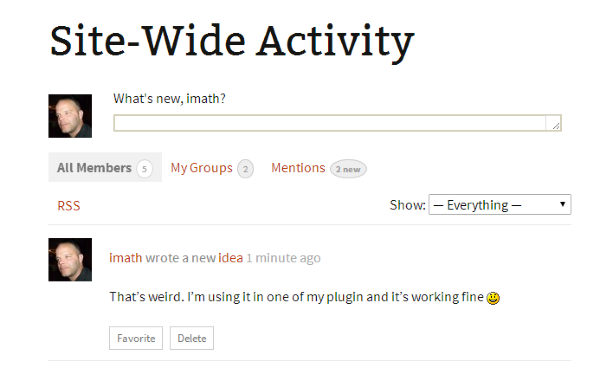
My first impression is i’m a bit surprised as i’m using Post type activities for one of my plugin and everything seems to be ok… See this image :
 February 6, 2015 at 2:33 pm #233959
In reply to: bp_get_member_type() is not working in the loop
InactiveOk got it.
First i’ve just created this ticket and suggested a patch to solve the issue.
Now, you can still have it working by simply requesting a ‘not single’ member type using false as an extra argument eg :
bp_get_member_type( bp_get_member_user_id(), false );So you’ll get the member type name, but not the singular name. If you want to have the singular name, here’s another gist :
https://gist.github.com/imath/3a5c5ade44eae997fdfdFebruary 6, 2015 at 12:54 pm #233951In reply to: Custom Post Type
InactiveLet’s take an example : Custom Tags for your custom post type.
if the question is : “is it possible to have an activity generated each time a custom post type tag is created ?”
My reply is it’s not included in core. And by the way, creating a post tag doesn’t generate an activity.
Post types activities is easing the process of generating activities when an item of a ‘buddypress-activity’ supported post type is added.
We still need to work on generating activitiies when a comment is made on a post type.
About generating an activity when a taxonomy (hierarchical or not) is created is an interesting idea but seems inmho specific to a given post type. For example i have difficulties seeing an interest for post categories or post tags (but why not afterall!) but i do see an interest for one of my plugin. So i will explore this for the plugin i have in mind 😉
February 6, 2015 at 11:26 am #233940In reply to: Broken Links [Resolved]
ModeratorHi @jessy-marco
Thanks for pointing this out. I’ve opened a Trac ticket to try to get this fixed.
February 6, 2015 at 9:58 am #233934In reply to: bp_get_member_type() is not working in the loop
Participanthi @philippmuenchen,
here’s a gist published by @imath to sort the member directory by member_type.
That (working)example is based on this Codex article
February 6, 2015 at 9:53 am #233933February 6, 2015 at 8:25 am #233925In reply to: Forum page template
gatelli
ParticipantI agree but it doesn’t pickup specific page template (the one I put in “Groups”) but generic template…
I use WP4.1 and BP2.2
Anyway I could achieve what I want by modifying generic page setting in my theme, and also SEO title with this topic.February 6, 2015 at 8:09 am #233921In reply to: BP 2.2 also broke Q&A Plug-In
mcpeanut
ParticipantHmm, it sounds harsh that you get burned and have problems on each update because ive not really had many problems when updating in the past, maybe a few small ones but not many, and if i have had a few problems ive just held off updating for a couple of weeks until the fixes have been issued into buddypress or the plugins.
After trying out “ALOT” of themes (paid and free) with buddypress and wordpress over the past 2 years i have made my own conclusion that the best themes to use in both cases are usually the bare bones and lightweight themes that can have things integrated by yourself as and when needed, this way you are cutting out alot of problems that can be caused within the theme itself, i know some themes look amazing but they can also cause alot of problems for you in the future if not regular updated by the developer.
If your comfy with design i would always opt for a lightweight and barebones theme and build upon that. less things built into a theme = easier to troubleshoot! (This is just my opinion)
I have tried numerous themes that have caused wiered things to happen with certain plugins, yet work fine on the default themes for example.As for setting up a local test server, this is quite easy to do now, you should definitely look into using something like XXAMP and give it a try.
I still havent got round to testing the new buddypress update yet on my themes and plugins as i fell asleep lol.
February 6, 2015 at 8:07 am #233920In reply to: Add Friend only with Admin Role
jeremy_LV
ParticipantHi Henry,
I’m just new with wordpress and buddypress 🙂 it’s gonna be hard for me to start coding something.
As you said, i’m gonna try to open a topic in ideas forum.
thx for your support 🙂
-
AuthorSearch Results


