Search Results for 'buddypress'
-
AuthorSearch Results
-
February 6, 2015 at 6:39 am #233916
In reply to: Buddypress 2.2.0-bp-languages doesn't work
r-a-y
KeymasterYou have to merge your .pot file with the latest one located in
/wp-content/plugins/buddypress/buddypress.pot.Read the “Updating your custom language file” section of this codex article:
—
For other plugins, placing your custom translations in
/wp-content/pluginsor/wp-content/languages/plugins/should work.February 6, 2015 at 5:46 am #233912In reply to: Buddypress 2.2.0-bp-languages doesn't work
KeymasterPut your language file here:
/wp-content/languages/buddypress/And you will not have to worry about upgrades removing your language file.
February 6, 2015 at 5:40 am #233911disha76
ParticipantFebruary 6, 2015 at 5:36 am #233910In reply to: Disallow Non logged users on certain pages
mrjarbenne
ParticipantThis is what I use. It blocks access to all the BP and bbPress components, but allows visitors to see the blog. I’m sure you could customize it to kill access to that too.
When you attempt to access a page you shouldn’t be able to see, you are redirected back to the home page
/**
 * Block public access to site with some exceptions.
 */
function hwdsb_block_access() {
	if ( is_user_logged_in() ) {
		return;
	}

	$redirect = is_buddypress();

	$site_path = bp_core_get_site_path();

	// subdirectory install
	if ( is_multisite() && ! is_subdomain_install() ) {
		global $current_blog;
		$site_path = $current_blog->path;
	}

	// strip site path from URI
	$path = substr( esc_url( $_SERVER['REQUEST_URI'] ), strlen( $site_path ) );

	if ( ! $redirect && function_exists( 'is_bbpress' ) ) {
		$redirect = is_bbpress();
	}

	// redirect if we match a condition and we're not on the homepage
	if ( (bool) $redirect === true && $path != '' ) {
		bp_core_redirect( bp_core_get_root_domain() );
		exit();
	}

}
add_action( 'template_redirect', 'hwdsb_block_access', 0 );
February 6, 2015 at 5:27 am #233908In reply to: Private messaging user blocking/ignoring?
ParticipantAnother option might be something like this: https://wordpress.org/plugins/buddypress-private-message-for-friends-only/. I haven’t used it myself, so I’m not positive it still works.
February 6, 2015 at 5:20 am #233907ParticipantIf P2 fits your needs, there is a P2-Likes plugin. https://wordpress.org/plugins/p2-likes/
P2 is not a standard theme. There is a lot of custom stuff going on there, so unlike most themes, you will have trouble making BP and P2 play nice.
If you need Likes on BP, this looks to be an option: https://wordpress.org/plugins/buddypress-like/
February 6, 2015 at 5:15 am #233905In reply to: how to add new members to groups automatically?
ParticipantYou could add a snippet of code like that to the bp-custom.php file. This file isn’t there by default so you might not have one yet, but you can create it if you have FTP access to your site. It should be placed in the wp-content/plugins directory.
You can read more about it here: https://codex.buddypress.org/themes/bp-custom-php/
If you are creating it for the first time, remember to include a the <?php tag on the first line before the function @modemlooper has provided for you here.
February 6, 2015 at 2:27 am #233897In reply to: BP 2.2 also broke Q&A Plug-In
Scaffies
ParticipantThanks for your efforts!
We use a cmmercial theme (i.e. paid for) called DynamIX version 3.1.2 by themeva
http://themeforest.net/item/dynamix-business-corporate-wordpress-theme/113901We do not really have that kind of background, skills, or resources to run test sites with default and other themes, and test all plug-ins against every change (I estimate we use about 50 plugins – we make sure that they are compliant with the latest WP versions, and are popular, i.e. proven on many thousands of sites).
A test site seems like a major pain in the butt, but given today’s events, may not be such a bad choice. We had expected there was more communication between developers, since WordPress and Buddypress are usied in such a HUGE number of sites – yet fairly simple updates break major stuff across many sites. So there may not be much of a choice of running a separate test site, or simply wait several weeks after new releases until the bugs are worked out – we do run another commercial security package, which may not make this too bad of a choice.
We got burned on EVERY BuddyPress update this is just by far the worst one so far. Sadly … since the software allows us to run a popular site.
February 6, 2015 at 1:50 am #233894ParticipantPlease test it with BP 2.2 – it takes one second!
The problem is with Buddypress – it does not pickup gallery thumbnails in activity stream or comments made on images in the activity stream. Its not their problem – they say. So I was wondering if anyone has used it and found alternative ways or has already made a default theme for BP out of it.February 6, 2015 at 1:24 am #233893SlothLoveChunk
ParticipantThis is definitely strange @r-a-y. If I revert back all works as it should. I’ve debugged a bunch of the functions and they seem to be returning the proper values. It seems that ‘post_update’ action in buddypress.js is not receiving a response though. e.g.
jq.post( ajaxurl, {
	action: 'post_update',
	'cookie': bp_get_cookies(),
	'_wpnonce_post_update': jq('#_wpnonce_post_update').val(),
	'content': content,
	'object': object,
	'item_id': item_id,
	'since': last_date_recorded,
	'_bp_as_nonce': jq('#_bp_as_nonce').val() || ''
},
function(response) {
    (removed for sake of shorting the reply here)
}
Any guesses as to why not? When debugging Akismet I was able to get a 200 response back no problem.
[response] => Array
	(
		[headers] => Array
			(
				[server] => nginx
				[date] => Fri, 06 Feb 2015 01:00:40 GMT
				[content-type] => text/plain; charset=utf-8
				[content-length] => 5
				[connection] => close
				[x-akismet-server] => 10.4.64.80
				[x-akismet-guid] => 42e6a5b9b7e87435df0bd1812654520f
			)

		[body] => false
		[response] => Array
			(
				[code][/code] => 200
				[message] => OK
			)

		[cookies] => Array
			(
			)

		[filename] =>
	)
February 6, 2015 at 1:04 am #233891In reply to: BuddyPress doesn't save Search page choice
Nathan Pinno
ParticipantIt could be from the X2 theme, but it was under WordPress -> Settings -> BuddyPress -> Pages, so I assumed it was BuddyPress.
If that’s the case, I need to find a good BuddyPress-powered theme that would work for my music site until I can afford a custom one. Any suggestions?
February 6, 2015 at 12:52 am #233890In reply to: how to add new members to groups automatically?
5high
ParticipantNeither of these plugins have been updated in over 2 years (according to w/p plugin directory), and I’m currently testing the BuddyPress Registration Groups plugin, but again it hasn’t been updated in ages, and although it works well, it has some styling issues that aren’t being addressed as yet.
So… I was looking how to do this myself with the code – the function code you gave above, which php file should I add it into? And does this code mean that all new members would be automatically added to all groups?
Thanks for your help with this – much appreciated.
February 6, 2015 at 12:36 am #233888In reply to: BuddyPress doesn't save Search page choice
KeymasterSearch is not a default BuddyPress page.
You are probably using a plugin for this. Can you list which plugin you are using?
February 6, 2015 at 12:18 am #233885In reply to: BuddyPress 2.2.0 Breaks Featured Posts
KeymasterDidn’t know “Featured Posts” was a Twenty Fourteen thing. Oops! 🙂
For anyone else reading, some more info on the “Featured Content” option in Twenty Fourteen can be found here:
https://codex.wordpress.org/Twenty_FourteenWill try to look this when I have some more time.
About the member widget avatar CSS, looks like Twenty Fourteen showcases a bug 🙁
Try this patch to fix the staggering issue:
https://buddypress.trac.wordpress.org/attachment/ticket/5817/5817.clear.patchFebruary 5, 2015 at 11:54 pm #233883In reply to: BuddyPress 2.2.0 Breaks Featured Posts
kkradel
ParticipantThanks @r-a-y !
I think I’m going to leave all as is for a while. Having the activity stream as a secondary page solves a few other problems as well.
I can’t find where to edit the size of the images in the Members widget. I looked in the theme CSS, BuddyPress CSS and Members-Widget.php and the theme functions to no avail. I’m just going to leave it.
Thanks!
February 5, 2015 at 10:36 pm #233875In reply to: Fatal error 113
Keymaster@onesmart –
Can you list exactly which plugins you are using with links to the repo?There are numerous reCAPTCHA plugins. I tried WP-reCAPTCHA by itself, but that doesn’t include any BuddyPress integration
and doesn’t create the error?.Update – Error duplicated (needed to submit the form!). Doing some more research. More to come.
February 5, 2015 at 10:34 pm #233874In reply to: BP 2.2 also broke Q&A Plug-In
mcpeanut
Participant@scaffies it seems your having a hard time since the new update with the amount of posts about what has broke, ive got a good few test sites setup on my other computers that all run different plugins so i will test this new update with about 100 different plugins on different themes and sites over the weekend and see if anything breaks with any of these plugins too, what theme do you use? and have you tested the plugins together on default themes too to make sure its not just theme specific?
Like mentioned in another thread i really think you should test any major update with your current plugins on a test server to check out what may or may not of broken, this way you can report the issues to either the buddypress devs or plugin authors and wait for them to catch up or apply a quik fix until they do. I might actually test one of my dev sites tonight that is running 40 plugins to see what happens.
February 5, 2015 at 10:27 pm #233870In reply to: BuddyPress 2.2.0 Breaks Featured Posts
ParticipantOH, WAIT A MINUTE … I see what it does.
I have my site set with a static front page, which is the Activity Stream page, and the blog posts are reached via the navigation bar.
Prior to upgrading the BuddyPress plugin to 2.2.0, my front page was the Activity page AND I had six Featured Posts/stickies just under the header. (This is the way I want it to act).
After upgrading the BuddyPress plugin to 2.2.0, if the front page is the Activity page, then the Featured Posts/stickies go missing, so only the Activity Stream shows up underneath the header. But if I make the Activity Stream a secondary page and put the blog posts back out front, then the Featured Posts/stickies are under the header. Not quite what I want.
February 5, 2015 at 10:13 pm #233865In reply to: Make wp Admin bar visible
KeymasterWhat modemlooper meant to say was, try adding a custom menu under “Appearance > Menus” in the WP admin dashboard.
Follow the steps in step 2 of this codex article:
https://codex.buddypress.org/getting-started/how-to-set-up-your-main-site-navigation-using-the-built-in-wordpress-menus/#step-2-create-your-main-navigation-menuFebruary 5, 2015 at 10:06 pm #233864In reply to: BP 2.2 Broke Chat and Messenger
KeymasterI’ve approved the post that was previously marked as spam so it should be visible now:
https://buddypress.org/support/topic/bp-2-2-broke-chat-and-messenger/?view=all#post-233839February 5, 2015 at 10:00 pm #233860In reply to: BuddyPress 2.2.0 Breaks Featured Posts
ParticipantI’m tentatively saying that it may have been Google Analytics … I deactivated Google Analytics and reactivated BuddyPress and it seems to be working.
February 5, 2015 at 9:51 pm #233856In reply to: BuddyPress 2.2.0 Breaks Featured Posts
ParticipantI found that last night right before I fell asleep and am just now getting online for the day – I will experiment a little with the plugin to see if I can figure it out.
1. Yes, I did do the bulk plugin update and one of them was Contact Form 7 and the other was Google Analytics. But deactivating Buddypress was the only one that brought the Featured Posts back as they should be – I had the Activity Stream on my front page but switched it out last night since it ended up being blank (because of the deactivation).
2. I have six sticky/Featured Posts – the posts themselves did not disappear, just the six stickies that sat just below the header.
3. I had a post go a tiny bit viral yesterday so instead of mucking with it, I just deactivated the BuddyPress plugins that I have installed.
4. The URL is artist-at-large.com As I work on this today, things will appear and disappear.
5. I’ve never had problems before with the bulk updater.
6. The spacing on the widget that gives a list of members is also spaced all zig-zaggy. I usually keep that in the footer.
February 5, 2015 at 9:45 pm #233850In reply to: how to add new members to groups automatically?
modemlooper
Moderatordid these plugins not work?
https://wordpress.org/plugins/buddypress-groupomatic/
https://wordpress.org/plugins/buddypress-auto-group-join/or function
function automatic_group_membership( $user_id ) {
   if( !$user_id ) return false;

   groups_accept_invite( $user_id, $group_id );
}
add_action( 'bp_core_activated_user', 'automatic_group_membership' );
February 5, 2015 at 9:43 pm #233848In reply to: BP 2.2 Broke Chat and Messenger
ParticipantWe did put “NSFW” in front of every link to potentially irritating content, after the very first of our posts (problem with links) was changed today to include the reference.
Post to admin screen shots etc were not tagged with “NSFW” as they only show the admin interface (and the BuddyPress problems)
We have great respect for peopls work lifes 🙂
February 5, 2015 at 9:25 pm #233839In reply to: BP 2.2 Broke Chat and Messenger
ParticipantHello,
and thank you for the response.
Of course we do not know how this all works with the development; but of course one would think since BuddyPress thrives on all the other plug-in developers for it, it would make some kind of an effort to communicate important changes, instead of just doing it, and saying “well if you guys don’t check our blog for changes…”?
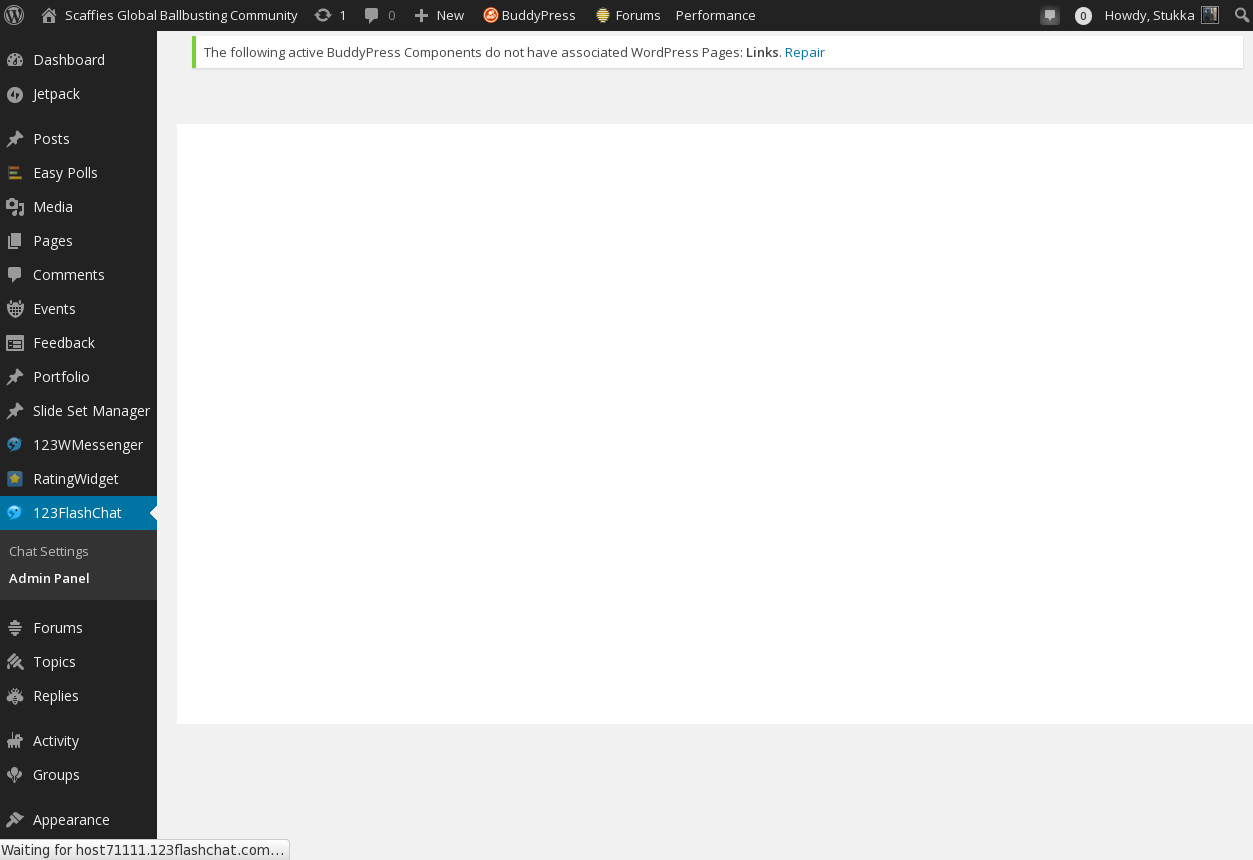
This upgrade broke so many things, and so severely that we cannot even load the admin interfaces for both the chat and the messenger in the WP dashboard:
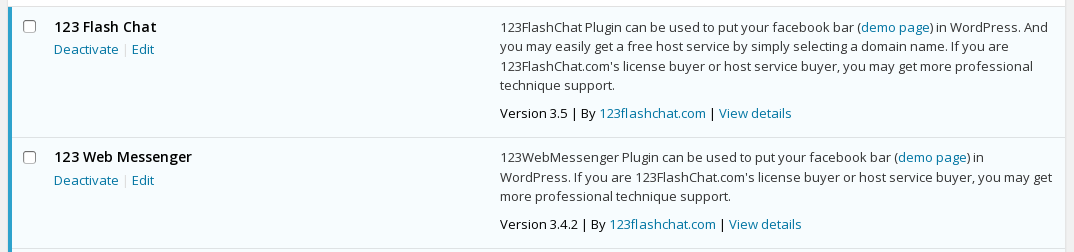
NSFW: http://scaffies.nl/wordpress/wp-content/uploads/2015/02/flashchat-admin-panel.pngFrom the Plugin Page:
NSFW: http://scaffies.nl/wordpress/wp-content/uploads/2015/02/chat-messenger-plugins.pngThese are the (Commercial) plugins – meaning we pay for both, several hundred $ per year:
Messenger:
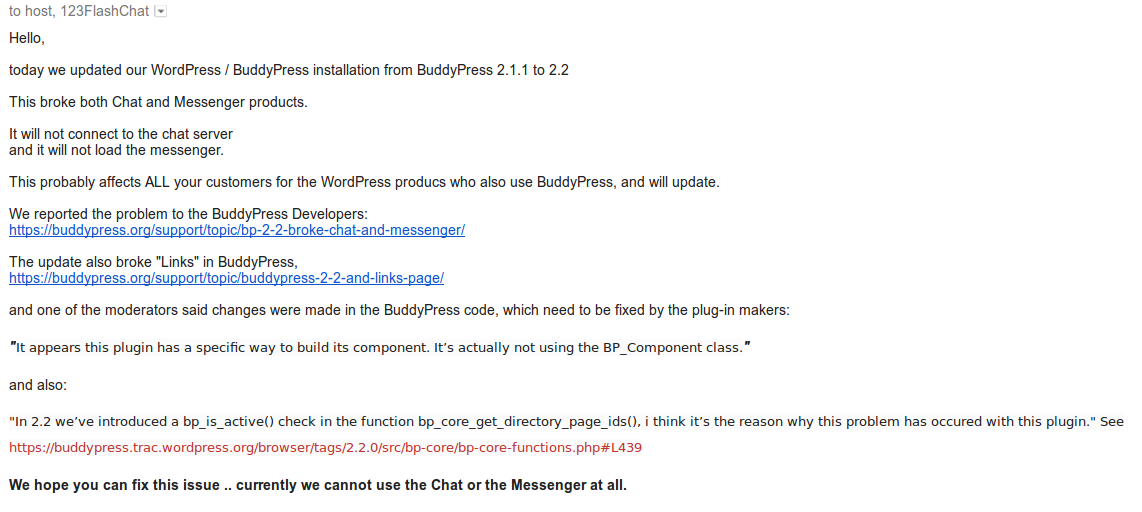
NSFW: http://scaffies.nl/wordpress/wp-admin/plugin-install.php?tab=plugin-information&plugin=wordpress-instant-messaging&TB_iframe=true&width=600&height=550We also informed the vendor in Hongkong about it (by email, since we could not submit a support ticket through the admin interface…):
NSFW: http://scaffies.nl/wordpress/wp-content/uploads/2015/02/FlashChat-Support-re-BP-2-2.pngWe certainly appreciate every bit of help we can get!
Stukka
(Creator & Admin of Scaffies – in Dallas, Texas) -
AuthorSearch Results