a. You should consider upgrading the php version.
b. Also install te BP Rewrites plugin which delays buddypress execution.
—
Alternatively, our plugin (free) overrides the standard BuddyPress profile and loads a Gutenberg / Elementor template in its place which loads it really fast and can be 100% cached.
This is a very common issue with WordPress & BuddyPress.
WHEN The pages are cached, the hits do not reach the server and .htaccess returns the request from a cached page usually a html version right from the cache folder.
I am attempting to have every image uploaded by buddypress users renamed to a md5 hash. I am using a very old plugin called “md5 media renamer”. This plugin surprisingly still “just works”. It however causes the buddypress profile avatar upload process to fail. I suspect that buddypress also handles this process in a similar way causing a conflict.
The plugin is available in the WP repository but is unsupported. I am unable to find an alternative.
Is there anything your team can do to make this process work? …or maybe an option to extent the renaming of the profile avatar to all images uploaded by users?
Your kind assistance would be very much appreciated
My site is having problem with logging in: When a user signs in it still shows that the user has to log in. If I keep trying to log in , nothing is different and the user does not see the site as a authorized user.
But if I wait 5-10 minutes and refresh the page – I am then logged in and have authorized access to the site as intended.
Hi, I have website with elementor and now i want to activate buddypress for members handling and add on with yozify butonce i activate buddypress its create the issue with elementor. once buddypress is activate i cant able to upload media in elemento. can you look into it why its happen. http://windailysports.org/
One possibility is to customize the landing page for visitors who are not logged in to your BuddyPress site, you have a few options. One option is to use a plugin like BuddyPress Redirect to Home Page, which lets you set any page as the home page for non-logged-in users. Another option is to use some code snippets in your functions.php file or a custom plugin, which can check the user’s login status and redirect them accordingly. For example, you can use something like this:
function bp_redirect_non_logged_in_users() {
if ( ! is_user_logged_in() && bp_is_component_front_page( ‘activity’ ) ) {
wp_redirect( home_url( ‘/welcome/’ ) ); // change this to your desired page
exit();
}
}
add_action( ‘template_redirect’, ‘bp_redirect_non_logged_in_users’ );
This code will redirect non-logged-in users who try to access the activity page to a welcome page instead. You can modify this code to suit your needs and preferences. You’d need to find the equivalent for the Jumble page in question.
I am using BuddyPress in combination with Jumble wishlist plugin.
Only persons who have an account made via BuddyPress are able to add items to a wishlist.
When a person without an account clicks on “Add to wishlist” he now goes automatically to the standard WordPress login page – without being prompted that an account is needed for this functionality.
Is there a way to prevent those without an account to go to this page, but instead go to a page informing them on this functionality for site members / logged in users?
The blog I have been working on provides information regarding technology, the latest tech news, reviews, and other information that is relevant to the industry. Since I’m using a WordPress customized theme on that blog, now I’m looking to change the theme to BuddyPress. How can I migrate my Desktop Bold website without losing traffic and ranking? Moreover, I also don’t want to change the UI/UX.
@opsyche, it depends on what you want to achieve. Creating a completely separate page is not the solution. Instead, all single profiles or groups should use the same slug which is mapped with BuddyPress pages.
If you want to add a global header or footer to all BuddyPress pages, you can do it with Elementor instead of editing the BuddyPress member loop or group loop.
Hi all
Im getting this kind of error as well.
Installed buddypress into a new elementor site – no other plugins.
When trying to edit the pages with elementor (the assosiated pages) I get error 500.
If anyone knows how to fix this would be really appreciated.
Thanks
Uncaught TypeError: Argument 1 passed to Elementor\Controls_Stack::sanitize_settings() must be of the type array, null given, called in /mnt/customers/customers-7/customers-el-3401699-59958-lrpobxcm-wordpress-pvc-64b91dd215efec0023d00804/wp-content/wp-content/plugins/elementor/includes/base/controls-stack.php on line 1084 and defined in /mnt/customers/customers-7/customers-el-3401699-59958-lrpobxcm-wordpress-pvc-64b91dd215efec0023d00804/wp-content/wp-content/plugins/elementor/includes/base/controls-stack.php:2389
Stack trace:
#0 /mnt/customers/customers-7/customers-el-3401699-59958-lrpobxcm-wordpress-pvc-64b91dd215efec0023d00804/wp-content/wp-content/plugins/elementor/includes/base/controls-stack.php(1084): Elementor\Controls_Stack->sanitize_settings()
#1 /mnt/customers/customers-7/customers-el-3401699-59958-lrpobxcm-wordpress-pvc-64b91dd215efec0023d00804/wp-content/wp-content/plugins/elementor/includes/base/controls-stack.php(2138): Elementor\Controls_Stack->get_data()
#2 /mnt/customers/customers-7/customers
WP Ver: 6.3; BuddyPress Ver: 11.2.0; BBPress Ver: 2.6.9
Hi, as creating a group and applying it to an existing private forum A is not possible, a new, empty, private forum B is created by default instead. Once the existing forum A is added to the group, will it break anything to remove the newly created empty forum B?
The two forums appeared to be linked in some way.
Thanks.
Hello,
I have added Paid Membership Pro and Buddypress plugins in my website. I need only Paid members to add posts in groups. Free members can see posts in groups but not able to add posts in groups.
About the CSS override: you need to put the buddypress.css & buddypress.min.css inside the /wp-content/themes/your-child-theme-name/css folder. I just tested with a Twenty Nineteen child theme and it behaves as expected.
About the WP Nav Menus we use for the logged in user BP links, the issue is fixed into our development version, it will be included into our 12.0-beta2 release.
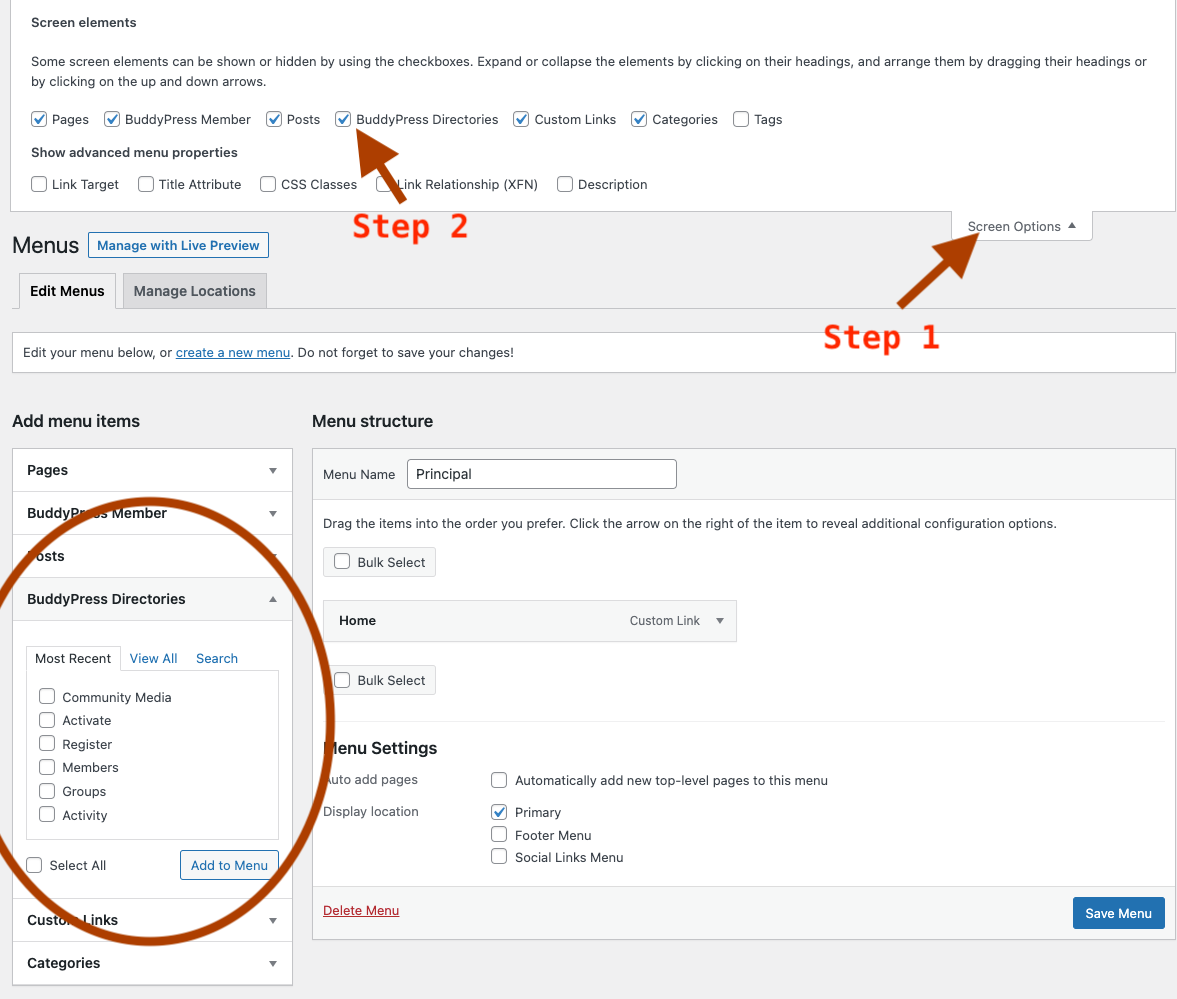
As I’ve explained here, 12.0.0 no longer uses regular WordPress pages as the directory page of a BuddyPress component. You’ll see a “BuddyPress Directories” section into the Customizer UI to manage menus. If you use the regular Admin screen, you’ll need to activate the “BuddyPress Directories” checkbox into your screen options > See the screenshot above.
Hi @imath,
I don’t know if one of the below might be related to what @vapvarun posted, but in my early testing of 12.0.0-beta1 (with latest WP and using Blocksy theme and Nouveau) there are a few things cropping up; firstly I don’t seem able to customise the css by duplicating Nouveau’s css in my Blocksy child theme folder, either inside a buddypress folder or just in the child theme folder, and can only achieve changes in my child theme’s style.css (I suspect this is unrelated to the new Buddypress but I haven’t yet tried it with Legacy); secondly, it doesn’t seem possible to add a main menu link to the currently logged in user that is visible at all times – I have created a custom link but it only appears in the menu when viewing the various sections (i.e. Profile, Activity etc); thirdly, I was struggling to add a sidebar to any of the BP pages, even though my default Blocksy setting is for each page to have one, and discovered that (in Blocksy at least) in Customizer it is counting BP pages as Blog Posts, whereas intuitively I would have thought this should be set in the BP specific sections, and without extensive css work means that Blog Pages and BP pages will always have to be the same. Are you considering adding/improving what can be done in the Customizer at some point? I have found I have to make an awful lot of CSS edits anyway to get BP to match my colour scheme and preferences in previous versions of BP and it would be a huge boon if at least some of this can be achieved with the Customizer settings (or a settings page in the plugin). BP has never followed my theme defaults, but I don’t know if that is because of the theme (and the two standard BP templates) I use or if it is like this for everyone.
I’m also interested, I would like to remove all notifications when he changes photo when he changes poster when he joins a group etc etc. It would be great to be able to manage this directly from the buddypress settings and I honestly can’t understand how they haven’t thought of this before.
I hope someone can assist me. I am building a wordpress site for an association that will use memberpress to manage memberships, but I would like to have a public directory of all members that can be managed / edited by each member but is visible to all visitors to the website. Is this possible with Buddypress? Is there is another solution than memberpress that I should consider. Thank you in advance. Kim
The error message you’re encountering indicates an issue related to accessing an array offset on a boolean value in a specific file of the Buddypress plugin. Deactivate other plugins one by one and test the update process to check if the issue is caused by a conflict with another plugin. This will help you identify if a specific plugin is causing the problem. Ensure that your PHP version is compatible with the Buddypress plugin. Check the plugin documentation or support resources for recommended PHP versions.
I’m using your plugin and I have a problem – when I open a member’s profile page, it takes at least 20 seconds to load. And while debugging, I found out that just this check of the bp_has_profile() function takes 18-19 seconds. I want to somehow speed up the page and the main problem is that.
I’m using your plugin and I have a problem – when I open a member’s profile page, it takes at least 20 seconds to load. And while debugging, I found out that just this check of the bp_has_profile() function takes 18-19 seconds. I want to somehow speed up the page and the main problem is that.
I forgot to mention that, in order to add a BuddyPress directory page into a WP Nav Menu, you now need to activate the “BuddyPress directories” menu type from the WP Admin Menu Screen options. See screenshot below: