Search Results for 'buddypress'
-
Search Results
-
I installed the plugin “Block, Suspend, Report for BuddyPress”.
But I noticed that on smaller screens not all buttons fit underneath the profile pic and so my Theme Gwangi will create a Button “More” with some type of submenu with more options.See screenshot:
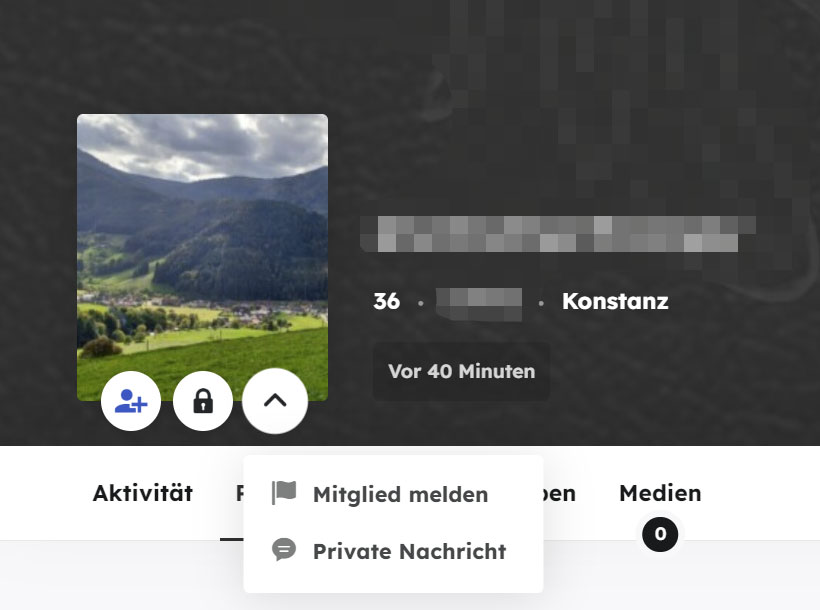
The most imprtant buttons for me are “Add as Friend” and “Private Message”
The Buttons “Bock user” and “Report User” are not soo important .Is there a way to arrange the buttons in some other order?
I want the “Bock user” and “Report User” buttons in the submenu (More).Topic: Groups Page Selector
In the groups page the Selector does not work with the options “Newest”, “Oldest”, “Alphabetical” I have the latest version of WordPress 6.1 it is not a multisite installation, version BuddyPress 10.6.0 I have tried both with the Kadence theme and the BuddyX theme and both have the same problem.
Can someone please confirm if it is a problem only with my site?
My site is a private intranet and I can’t pass a link for them to test.
Is there a place where I can check that the new version of Buddypress works on the groups page with the “Newest”, “Oldest”, “Alphabetical” Selector?
Thank you very much.I wish to disable users from changing their email address so only admin can do it.
one way to delete the lines from general.php however when updating this will cause issues and come back. i need a code to enter into my child theme functions.php<label for=”email”><?php _e( ‘Account Email’, ‘buddypress’ ); ?></label>
<input type=”email” name=”email” id=”email” value=”<?php echo bp_get_displayed_user_email(); ?>” class=”settings-input” <?php bp_form_field_attributes( ’email’ ); ?>/>This is the field i want to make read only/disable
thank you
I’m new so excuse me if this is a simple fix. I have a private/login required buddypress area.
-how do I remove the upper left dashboard access for site users?
-What user roll would I set up new users under? I don’t want them to have any dashboard permission, they just need to be able to do user functions (set up profile, posts, etc. etc.) Thanks.
I am currently testing an installation where
- User registration is handled by WordPress and not BuddyPress
- I can register a user through the above interface without interference from BP registration
- BuddyPress’ Extended Profile fields is enabled
- I have added custom Profile fields and I am able to update them as a user (not during registration)
All of the above seem to work without issues. BP’s Name field is never touched.
But there are several support requests, such as this, asking that the field ‘Name (required)’ not be a required field and, invariably, the standard reply appears to be ‘here some code to fix that’, ‘this is not an easy fix’ or ‘there is a plugin for that’.
I have also seen tickets on Trac logged for this.
There was even a comment by Boone somehwere (either here or on Trac) saying that this field is so deeply embedded in BP that this modification is not easy (I can’t find this reference right now).
So I am trying to understand why I don’t have any issues with this field not being populated (see above) when much of the documentation saying it is required.
As it stands, all I’d have to do is to hide the “Base” Profile Group from my profile template with a hook or something and not worry about it being ever populated.
Am I missing something?
ThanksI have more than 13.000 users in my Buddypress.
But my search directory member search has a big issue:
If you search for users and filter them usually you get more pages right?
On the first page the search filter is correct: you get all the results you were looking for.BUT
when you move on to the next pages, suddently all the filters are gone.
You will not see the results anymore. In that way you cannot find ALL the users you were looking for.Example:
I make a selection off all users from the UK.
After clicking to page 2, I see also users from the rest of the world.
Where are the remaining UK-users??This is very important to me. Please help me!
Hello,
I’m creating a website with a OneCommunity WordPress theme. The site is multi-lingual, and for that, I’m using polylang pro plugin. The default language is Arabic, and the Registration page, it works fine. To add the page for the English translation, I created a copy of the Arabic Register page and set the same default page template. But the problem is, Bp Member Register Page is only showing for the Arabic language, and for the English language, it is blank. I tried to assign the Register page in Buddypress settings for each language, but it didn’t work for me. So I want to know, that how I can assign different register pages for each language.Hi, after a recent update BuddyPress is now causing a critical error on all my social pages, those correlating with the BuddyPress plugin, e.g. https://www.pachion.com/members/
This may be related to a 10.4.0 issue i wrote about here: Fatal Error When Activating Pending Account
I installed BP 10.5.0 with WordPress 6.0.3 and the error mentioned above seems fixed. Thank you!
However…
When a new user signs up for an account the default email received by the admin uses a token {{{manage.url}}} which takes the admin to a confirmation page that says “Approve Membership Requests // You are about to send an approval email to the following user:”
When i click “Confirm” i am sent to the pending user page and the user is still pending and i receive an email saying a fatal error occurred. (See below for messaging.)
If i then click “Activate” for the pending user i go to a page that says: “Activate Pending Accounts // You are about to activate the following account:” I click confirm and the user is activated with no issue.
Obviously, there’s an issue with the “Approve Membership Requests” page. Maybe the user needs to be activated first? What’s the difference between activating and approving?
The main question: The default email sent to the admin has a token {{{manage.url}}} which takes me to the “Approve Membership Requests” page. What’s the token that takes the admin to the “Activate Pending Accounts” page?
~~~~~~~~~~~~~~~~
Here’s the error generated by the “Approve Membership Requests” page:
Since WordPress 5.2 there is a built-in feature that detects when a plugin or theme causes a fatal error on your site, and notifies you with this automated email.
When seeking help with this issue, you may be asked for some of the following information:
WordPress version 6.0.3
Active theme: Avada Child (version 1.0.0)
Current plugin: BuddyPress (version 10.5.0)
PHP version 7.4.32Error Details
=============
An error of type E_ERROR was caused in line 213 of the file /home/nondualhealersas/public_html/wp-content/plugins/buddypress/bp-members/bp-members-notifications.php. Error message: Uncaught Error: Class ‘BP_Notifications_Notification’ not found in /home/nondualhealersas/public_html/wp-content/plugins/buddypress/bp-members/bp-members-notifications.php:213
Stack trace:
#0 /home/nondualhealersas/public_html/wp-includes/class-wp-hook.php(307): bp_members_mark_read_submitted_membership_request_notification(”)
#1 /home/nondualhealersas/public_html/wp-includes/class-wp-hook.php(331): WP_Hook->apply_filters(NULL, Array)
#2 /home/nondualhealersas/public_html/wp-includes/plugin.php(476): WP_Hook->do_action(Array)
#3 /home/nondualhealersas/public_html/wp-admin/admin-footer.php(78): do_action(‘admin_footer’, ”)
#4 /home/nondualhealersas/public_html/wp-admin/admin.php(297): require_once(‘/home/nondualhe…’)
#5 /home/nondualhealersas/public_html/wp-admin/users.php(11): require_once(‘/home/nondualhe…’)
#6 {main}
thrownHello, i have created a wordpress social website with buddypress, but when i try to show the social icons on user profile header, only facebook twitter behance dribbble instagram and youtube can be shown.
i’m using xprofile fields and i can’t add more social icons like Linkedin Twitch etc.. so after i searched on this error i managed to find some codes but it didn’t work this is the code that i added to my Bp-custom.php :
//Social Media Icons based on the profile user info
function member_social_extend(){$dmember_id = $bp->displayed_user->id;
$twitch_info = xprofile_get_field_data(‘twitch’, $dmember_id);
echo ‘<div class=”socialv-profile-left col-lg-4″>’;
echo ‘<ul class=”class=”item-social list-inline””>’;if ($twitch_info) {
echo ‘<li class=”Phone”><i class=”icon-phone”></i>‘;
}
echo ‘‘;
echo ‘</div>’;
}
add_filter( ‘bp_before_member_header_meta’, ‘member_social_extend’ );i will be grateful for any kind of help
thanks.


