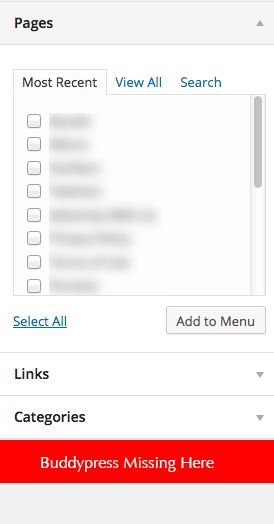
@dylss505 click on the “Screen Options” tab at the upper right area of your screen and check “BuddyPress” to show
I accidently deleted the path in this field in my blog settings. Is this important for Buddypress to work or wordpress for that matter? If I need it, how do i recover the path? And how to tell if buddypress still works?
I would like to be able to use buddypress combined with multisite, so that user profiles are linked to individual wordpress installs with predefined/configured themes and plugins, is there an easy way to this?
Thanks
Magical1
Ok so when a user clicks on register and then fills out their info on the page and then clicks complete sign up it doesn’t sign them up it refreshes the page. Please help I don’t know why this is happening. Ive gone through 3 WordPress installations hoping that would help but it didn’t. Please help!
Luckily I found it from a thread:
Here’s in the plugin in buddypress-xprofiles-acl
Comment the below function!
/* function filter_xprofile_groups_with_acl() {
    global $bp, $profile_template, $current_user;
    get_currentuserinfo();
    foreach($profile_template->groups as $key => $profile_group) {
      if( ! in_array($profile_group->id, $this->user_allowed_xprofile_groups) ) {
        unset($profile_template->groups[$key]);
      }
    }
  }
  */
I still get this issue, now only User can see his xProfile – Even Admin can’t see other user xProfile. I have tried to switched to the Twenty Theme, but it still happens.
I have traced to here:
//I have two profile Groups, the Base group and one more I created.
// I created a User with full profile fields data.
<?php while ( bp_profile_groups() ) : bp_the_profile_group(); ?>
<?php if ( bp_profile_group_has_fields() ) : ?>
If the user view his own profile the bp_profile_group_has_fields() will return True two times. But if another user view this user profile it will only return True 1 time and the 2nd time is false – that makes it display only Base group profile Fields and xProfile fields can’t display.
I use WP 3.9 Latest BuddyPress and installed a lot of plugins.
Hi!
I would like to display the buddypress group a user belongs to on a wordpress page, something like this. I was wondering what function I need to use. Can anybody help me?
Thanks in advance!
Silly me – copy the legacy templates over to your child theme …… but don’t forget to add the following line to your child theme’s function.php file:
add_theme_support( 'buddypress' );
Doh! My excuse – it’s a Friday afternoon!
Hi @canadadre and @mercine
Ron R. advises that this plugin is no longer required with BuddyPress v2 onwards
To solve your redirection problem in a Genesis child theme, simply create a file in your Genesis child theme called register.php
Copy the contents of page.php from the main Genesis theme into this file and save.
Create a new page in the Dashboard e.g. “my new registration page”, assign it as the registration page in the Dashboard > Settings > BuddyPress > Pages et voila!
From my admittedly limited understanding, copying the legacy templates across from the plugin into your child theme as per the BuddyPress Codex doesn’t work with Genesis – please correct me if I’m wrong dear reader!
I found that my custom post type and page Im using for the archive have the same slug. I have read in various places that this commonly causes a 404 error. I added a submenu item for single posts to display under the pages slug like so.
$single_item_link = $bp->current_item;

if ( bp_is_my_custom_component() && bp_is_single_item() ) {

	// Reset sub nav
	$sub_nav = array();

	// Add single music page but dont display in navigation
	$main_nav = array(
		'name'                => __( 'Single Music', 'bp-music' ),
		'slug'                => $single_item_link,
		'position'            => -1, // Do not show in BuddyBar
		'screen_function'     => 'custom_component_screen_single',
		'default_subnav_slug' => $this->default_extension,
		'item_css_id'         => $this->id
	);
}
This menu item loads a function in the screens file of the component
function custom_component_screen_single() {

	if ( ! bp_is_single_item() )
		return false;

	$bp = buddypress();

	do_action( 'custom_component_screen_single' );


	bp_core_load_template( apply_filters( 'custom_component_screen_single', 'custom-component/single/home' ) ); //this loads a template file within the template folder of the component or within the theme

}
And for now all is good. I would still like to find a way to load my custom taxonomy into the permalink structure so things would look like this.
mydomain.com/custom-component/custom-taxonomy/single-item
If anyone has any ideas on how I can get this to work as well please let me know. My guess is I could make another menu item to capture that instance and if the genre exists then it loads a template file. Then I need to find a way to make sure a single item and a custom taxanomy dont end up with the same name.
Thanks,
Jesse
Hi,
In the buddypress recent members widget shows only the gravatars, after changing the profile picture in the wordpress profile. I am using wordpress profile as the default profile, instead of buddypress profile. How can I alter this. Somebody please help me.
Thanks in advance
Chinchu
Can some kind person explain how to do this. Alot of the info on the web and specific plugins are outdated. It doesn’t seem complicated, but maybe I’m wrong. Please help!!!
Wordpress 3.91
Buddypress 2.01
Thanks, @henrywright –
I think TML just handles redirects after logging in or out. What I’m looking for is a way to manage the redirect when someone who isn’t logged in tries to visit a page that’s only for members, or someone visits a page that their membership type doesn’t allow them access to.
For example, I’d like anyone to be able to see the member and group directories, but only members should be able to look at individual profiles and the group pages and forums.
That being said, I was thinking today that I’d actually like separate pages for visitors or people who aren’t logged in to be able to see those things and other info, so maybe I’ll handle it that way. I guess then what I’m actually looking for is a way to change the top menu depending on whether someone is a logged in member or not.
Sorry for a babble. This is my first swing at BuddyPress, so it’s all trial and error for me right now! Thanks for the help!
Hi, I’m running BuddyPress 2.0.1, and I want to change how it handles restricted access. Currently, it just redirects to the home page with no message, which I think looks like a broken site.
What I’d like it to do is handle it the same way bbPress and PMPro are handling forum access, which is to redirect back to the page the user was on, and display a message indicating the content is for members.
Open to other options as well, especially if there’s something out there that will allow me to have a consistent user experience and will handle forums(bbPress) and the BuddyPress pages.
Thanks,
Amanda
Ok so when a user clicks on register and then fills out their info on the page and then clicks complete sign up it doesn’t sign them up it refreshes the page. Please help I don’t know why this is happening. Ive gone through 3 WordPress installations hoping that would help but it didn’t. Please help!
Before installing any plugin, consider this translation into persian from the official translation repo for WP/BP/bbP
https://translate.wordpress.org/projects/buddypress/dev/fa/default
You can also contribute to this persian translation. Everithing to do so is explained on Goltpress.
@ancavreasy really depends on the scale your company is willing to engage with the customers.
If you only need forums, you do not need BuddyPress, just install bbPress plugin. For a more engaged community interaction via groups, friending, profiles, etc, then BuddyPress is your plugin.
e.g. of BP in action with some customizations
university – http://www.bpinspire.com/cuny-academic-commons/
newspaper – https://wordpress.org/showcase/my-telegraph/
Hi,
I have a BuddyPress Group – and have activated the Activities tab functionality. I also added the Groups Announcements feature limiting the creation of a new status on the activities tab to just Admins.
But now I want to remove the ‘comments’ button on the activity feed in hopes of forcing people to comment on the forum instead of in the activities section. Whats the best method to do this? Thanks in advance!
I want to have separate inboxes for users, all users are divided in two categories according to their profile fields. now suppose if a user from category1 posts a private message, it should go to inbox1, and if a user from category2 posts a private message, it should go to inbox2. I am using wordpress 3.9.1 Buddypress 2.0.1