Search Results for 'disable registration'
-
Search Results
-
I am being inundated with spam registrations (hundreds).
Running a network install of WP version 3.7.1
Running BuddyPress 1.8.1 and bbPress 2.5Very generic settings, as far as I know.
Forums are enabled (it’s a primary purpose for the site)
I disabled registrations using “Registration is disabled” from the network admin settings/network settings and the spam registrations continue.
My search of the forum did not seem to bring clarity to this problem (I’m probably missing something) except that it’s a known problem.
Side issue: viewing users from the network admin section, there is a category called “Users with Unconfirmed Email Address (7168)”. When I click on the link I get “You do not have sufficient permissions to access this page”. Does anyone know how to view this category. I’d like to delete them.
Please help!!
Rick.Topic: Extended Profiles deleted
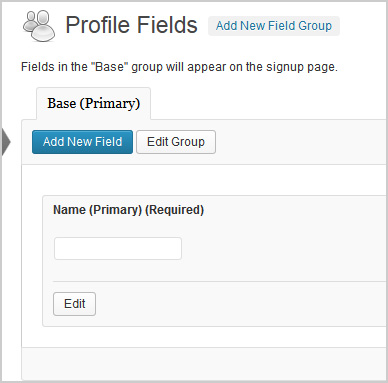
Hi,
The pic above shows what the extended profile field should look like. I had a plugin called Buddypress Real Names which allowed me to delete that field above. Silly me, now my extended profiles are not working. It shows blank under profile fields on my registration page and does not send a confirmation email to new users. However, if extended profiles are turned off, all works fine.
1. Which version of WordPress are you running?
3.7.12. Did you install WordPress as a directory or subdomain install?
Directory3. If a directory install, is it in root or in a subdirectory?
root4. Did you upgrade from a previous version of WordPress? If so, from which version?
No5. Was WordPress functioning properly before installing/upgrading BuddyPress (BP)? e.g. permalinks, creating a new post, commenting.
Wordpress seems to be working fine6. Which version of BP are you running?
1.87. Did you upgraded from a previous version of BP? If so, from which version?
No8. Do you have any plugins other than BuddyPress installed and activated? If so, which ones?
Yes.
Admin Toolbar Remover
All In One WP Security
AVH First Defense Against Spam Plugin
BP Profile as Homepage
BuddyPress
BuddyPress Activity Plus
BuddyPress Activity Privacy
BuddyPress Wall
Contact Form
Custom Meta Widget
Disable RSS
Dynamic Widgets
Email Login
EU Cookie Law Compliance
Facebook Friends Inviter
Google Analytics for WordPress
Google XML Sitemaps
Restrict Usernames
Velvet Blues Update URLs
W3 Total Cache
WordPress SEO
WP-SpamFree
WP Block Admin
WP Content Filter
WP FLogin9. Are you using the standard BuddyPress themes or customized themes?
Standard10. Have you modified the core files in any way?
No11. Do you have any custom functions in bp-custom.php?
No12. If running bbPress, which version? Or did your BuddyPress install come with a copy of bbPress built-in?
Not running bbPress13. Please provide a list of any errors in your server’s log files.
14. Which company provides your hosting?
Mweb15. Is your server running Windows, or if Linux; Apache, nginx or something else?
UnixHi everyone. I run a few WP websites, and this is my first attempt at BuddyPress. This is a new install, created just a couple of days ago.
WP: 3.7.1
BP: 1.81 (Standard Buddypress theme)
Site: http://www.ebcalumni.net (closed to the public using BP-Registration-Options)Problem: Whenever I try to upload a file to change avatars, I get “Upload Failed! Error was: No editor could be selected.” The problem exists in FF, Chrome & IE.
I can upload images from the Dashboard Media page, and they upload wither I drag/drop them onto the WP window, or whether I upload them using the traditional browser upload feature. But I can’t upload them from the “Change Avatar” section.
I believe GDLibrary is installed (ran apt-get just to make sure).
I looked around here and saw a couple other people had the same problem. Any solution they found did not work for me.
Any other suggestions?
**EDIT**
– I’ve disabled all plugins except BuddyPress, and still have the problem.
– No errors show up in the Apache error_log
****LC
Having trouble with this feature of Invite Anyone in BuddyPress. I have BuddyPress installed via Commons In A Box (Version 1.0.6).
I have researched this issue and still not found resolve. This thread seemed to address the issue but was not relevant as I did not change the slug on my register page or assign it a parent.
I require site invitations by email only. Using a WordPress (Version 3.7.1) multisite network configuration where ‘Registration is disabled’. I have enabled ‘Allow email invitations to be accepted even when site registration is disabled’ at network/settings.php?page=invite-anyone
I currently get the ‘User registration is currently not allowed.’ message when accepting email invitations (register/accept-invitation/test1%40gmail.com).
I seem to recall this was working fine before I switched over to a multisite setup as I needed to enable the BuddyPress GroupBlog plugin.
Have toggled theme and plugins with no luck. Would appreciate any help you can offer.
Topic: Link to profile field
Hi,
I was able to link a member to their profile page. Members can now view the complete profile page of other members. However I prefer to show only one field (biography) to other members. So if someone visits its own profile it shows all profile fields. I someone else visits his profile it only shows the biography. How can I fix that? The code that I’am now using is added.
<?php
/* @var $EM_Event EM_Event */
$people = array();
$EM_Bookings = $EM_Event->get_bookings();
if( count($EM_Bookings->bookings) > 0 ){
?>
<?php
$guest_bookings = get_option('dbem_bookings_registration_disable');
$guest_booking_user = get_option('dbem_bookings_registration_user');
foreach( $EM_Bookings as $EM_Booking){
if($EM_Booking->status == 1 && !in_array($EM_Booking->get_person()->ID, $people) ){
$people[] = $EM_Booking->get_person()->ID;
echo '<li><a>get_person()->ID ).'>'. get_avatar($EM_Booking->get_person()->ID, 50) .'<br> '. $EM_Booking->get_person()->display_name .'</a></li>';
}elseif($EM_Booking->status == 1 && $guest_bookings && $EM_Booking->get_person()->ID == $guest_booking_user ){
echo '<li><a>get_person()->ID ).'>'. get_avatar($EM_Booking->get_person()->ID, 50) .' '. $EM_Booking->get_person()->display_name .'</a></li>';
}
}
}
?>
For buddypress and wordpress I use the latest verstions
I hope someone can help. Please let me know if I have to use other sources to find an answer on my question. 😉
Thanks in advance!
Marco


