`
Save files.
 rcain
rcainditto – both the above suggestions.
i think lack of forums search + no way to find ones own posts limits the community activity here somewhat – essential for BP community to grow and develop – IMHO.
 @mercime
Do post this at the bbPress.org forums.
Log in using same username and password.
 shanebp
Avatars, for most of us, are not allowed.
And no, you can’t search the forums either.
Hopefully that will be fixed soon.
 teoh89
Thanks so much Boone. It finally worked. Didn’t know I have to tick the group setting over there. 
Just saw your profile and glad that the developer of CUNY replied me Really appreciate it here.
By the way, would it be advisable for me to remove the login function created by BuddyPress and just have the wp-fb autoconnect plugin to allow users to login with their Facebook? If so, how do I remove the default login from the sidebar?
Thanks.
 Paul Wong-Gibbs
Yes, each part (or component) off BuddyPress can be turned on/off individually. If you *just* want forums, however, it makes more sense to use https://bbpress.org/
 BOW
BOWI don’t mean to be a pain but this is a shocking example of a thread being hijacked. Where are the moderators on this? Some of the responses are from long time members who should know better too. The forums here are bad enough as it is without allowing threads to go off topic like this.
Anyway to get this back ‘on topic’…
There do not seem to be any clean and current examples for custom post types generating a custom message.
Seeing as CPT’s are so popular these days this would seem like a very cool piece of code to have.
A single snippet that would allow you to…
1) turn on activity stream messages from a custom post type
2) turn on the commenting for that custom post type to appear in the activity stream (BTW: this doesn’t seem to work in the current release at all)
3) set the custom activity stream message template for that post type
4) be able to do it for more than one post type elegantly
Has anyone got the guts of a function pulled together for the above? (1&2 are simple enough – I have posted a code snippet in another thread – but like I said above commenting doesn’t seem to work can anyone else confirm this and I’ll raise a ticket?)
@mercimeCheck the content of your wp-content/themes/wp-davinci-prem/ folder it should at least contain the 6 BP folders I mentioned in my previous post – /activity, /blogs, /forums, /groups, /members, and /registration
If one or more are absent, something went awry with the BP compatibility process. You should download a zipped copy of BP to your hard drive; unzip the folder, then open up the unzipped folder and open the bp-default theme folder in buddypress/bp-themes/bp-default/ and upload the the missing BP folder/s note above to your theme folder in server – wp-content/themes/wp-davinci-prem/
 aces
acesThere is something wrong with your register page as, I think, it should have Name ( at least ) as a required field under the profile details section.
If I click on ‘complete sign up’ without filling anything in then it redirects to the home page whearas I think it should stay on the same page but with error messages.
What plugins are your using? Single or multi-site? Any unusual permalink or .htaccess settings?
Have you altered the Name field in any way from the default:
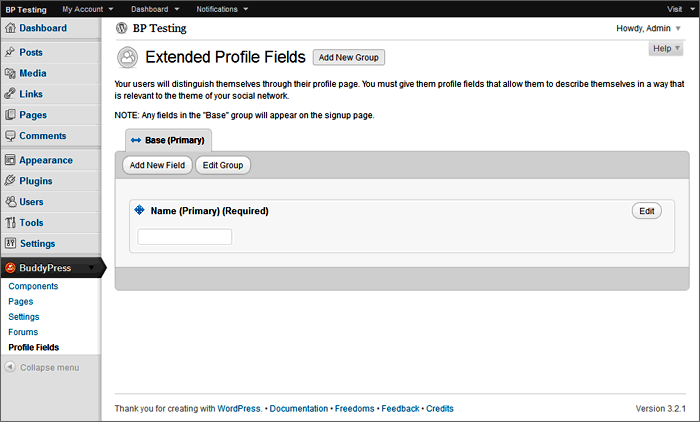
This seems to be similar to @allentan‘s problem: https://buddypress.org/community/groups/installing-buddypress/forum/topic/registeration-doesnt-work/
 notpoppy
@boonebgorges Thanks for the reply!
I’m not quite sure how to use your solution, though. is it something that goes in functions.php? If so, how do I then use it in the theme?
 Boone Gorges
> I got this error when I click on the groups tab
This is a problem with the BuddyPress Groups Extras plugin. Try disabling it. You should also turn down the PHP error reporting level; it should never show this kind of (relatively harmless) error on the public site.
> And I can’t seem to create my test group’s own forum. In the link I gave in my first post, they have their own forum separately each in each group.
You’ll have to give more details about “can’t seem to create”. Are you getting an error message? What are you doing to try to set it up? You should have done the following:
1) Gone through the Group Forums setup at Dashboard > BuddyPress > Forums Setup
2) Gone to an individual group’s Admin tab, and then to Settings
3) Checked the ‘Enable group forum’ checkbox, and saved changes.
Boone GorgesAnything’s possible 
You won’t be able to do it with `bp_the_topic_pagination()` because that function requires that you are inside of a single topic loop, which you’re not.
Try something like:
`global $forum_template;
$per_page = 5;
$total_posts = $forum_template->topic->topic_posts;
$pag_links = paginate_links( array(
‘base’ => add_query_arg( array( ‘topic_page’ => ‘%#%’, ‘num’ => (int) $per_page ), bp_get_the_topic_permalink() ),
‘format’ => ”,
‘total’ => ceil( (int) $total_posts / (int) $per_page ),
‘mid_size’ => 1
) );
echo $pag_links;`
notpoppyI still can’t figure out how or if this is possible – can anyone help?
@mercime@dsmndwng Based on the HTML structure of your theme, you’d need to use the first option, i.e., change 16 template files within the 6 BP folders transferred to your TheStyle theme folder in server during the compatibility process.
If you’ve previously changed any of the BP template files in your theme folder, replace all of them for a clean slate by deleting the 6 BP folders in server – /activity, /blogs, /forums, /groups, /members, and /registration – then re-run Appearance > BP Compatibility.
Download the 6 clean BP folders to your computer hard drive.
A. At the top of each of those 16 template files I linked to above, replace
`
with
`
Save files.
teoh89Hi @mercime,
Thanks so much for your reply. I did according to the instructions of the web and came up with the current site – forum.ultiasia.com
I got this error when I click on the groups tab:
Warning: in_array() [function.in-array]: Wrong datatype for second argument in /home/teoh89/public_html/forum_ultiasia/wp-content/plugins/buddypress-groups-extras/bpge.php on line 106
And I can’t seem to create my test group’s own forum. In the link I gave in my first post, they have their own forum separately each in each group.
Where did I go wrong? Hope you can help me out. Thanks!
 ajshanahan
More for anyone else finding this thread than anything else:
Well – after literally two hours of scrolling back through the support forum (seriously dudes, fix the forum search issue, then maybe you’d get fewer help requests!) I find this:
The gist of which is that it’s nothing to do with plugins, etc – it’s to do with a corrupted database. In my case I think this was caused by installing and deactivating plugins, I can’t think that I did anything other than that, so I would suggest it should be a bug, but not sure whether to add it to Tracker. Any thoughts?
 richardpd
How do I find my BP forum posts here at BP support? I can find my WP forum posts at wordpress.org but not BuddyPress!
My ‘Your Activity’ link tells me the number of my posts but nowhere can I find a link to my posts (so I cannot review them!).
I follow Mercime (a moderator on this site)-but I cannot see a way to private message her for help?!
I am having lots of trouble running BP on my site and am finding help hard to get here.
NB Why does my post say ‘Deleted User’ when I am logged in as richardpd?
NNB-Fixed ‘Deleted User’ issue…I was not logged in properly?! I am not sure how that happened but I changed my WP.org settings & relogged in & is fine now!!
@mercime== It appears that my comments on my wall are threaded, but my comments in the forum are not. ==
That is correct, that is the default layout – activities are threaded just like comments in blog posts while forums have no threads.
== This has the effect of having people able to reply on the wall and it not showing in the forum. ==
You can “Disable activity stream commenting on blog and forum posts” so that your members can respond directly in your blog posts and forum posts instead. Go to dashboard menu > BuddyPress > Settings and click disable on that setting.
@mercime@teoh89 No, you do not need a plugin for that. You just need to install the Forums for Groups under dashboard menu BuddyPress > Forums and you’re good to go https://codex.buddypress.org/getting-started/installing-group-and-sitewide-forums/
@mercimeYou should post in courseware plugin developer’s forums https://buddypress.org/community/groups/buddypress-courseware/forum/
 ninjatekservices
I am having the same problem. When you say you reinstalled it, do you mean that you did a “from scratch” re-install of buddypress or just that you re-installed the bbconfig.php file? I have a forum/group that is active and I want to make sure I don’t lose that. New to all of this so trying to be extra cautious.
Thanks,
-marc
 Unit9
Unit9Hi guys, FYI: I tried to raise this via the ‘report bugs here’ link but my login details wouldn’t work.
 Mettezz
Fixed it. removed the bbconfig.php in my file manager and reinstalled it
 yadigit
Just double check to make sure you have the
Member
groups
forums
activity
blogs
registration
files in your root theme.
( that was my problem )
Let me know if that helps.
 allentan
Yes, I was told to modified this:
https://buddypress.org/community/groups/creating-extending/forum/topic/buddy-press-pages-not-working-1/
SCroll down to the link and i follow the instruction to change the 16 files…
I Change the script as suggested in the list in above link…total 16 files in total i have changed.
Some files i can’ t find this script
so i just remove those line which looks exactly the same on top and bottom of scripts.
Let me know if this is what causes the problem…
@mercime== but asked that I start my own thread. ==
@katandmouse Yes, because you have different themes and I’ll be posting different codes/instructions
Based on the HTML structure of your theme, you’d need to use the first option, i.e., change 16 template files within the 6 BP folders transferred to your Diner theme folder in server during the compatibility process.
If you’ve previously changed any of the BP template files in your theme folder, replace all of them for a clean slate by deleting the 6 BP folders in server – /activity, /blogs, /forums, /groups, /members, and /registration – then re-run Appearance > BP Compatibility.
Download the 6 clean BP folders to your computer hard drive.
A. At the top of each of those 16 template files I linked to above, replace
`
with
`
‘,’
‘); } ?>
Save files.

