Search Results for 'theme'
-
Search Results
-
I encountered a strange behavior: in a WP 5.9.3 / bbPress 2.6.9 / BP 10.2.0 environment, when logged out, when leaving ANY page I get the JS warning “Leave this site? Changes that you made may not be saved.”
I took the old path of deactivating all plugins and activating them one by one. The culprit was BuddyPress.
Furthermore, I found out that changing BP template pack to “Nouveau” instead of “default” solved the warning issue.
Now, my problem is solved, but I have no explanation. Maybe someone could come with an answer to that…—
Theme: GeneratePress
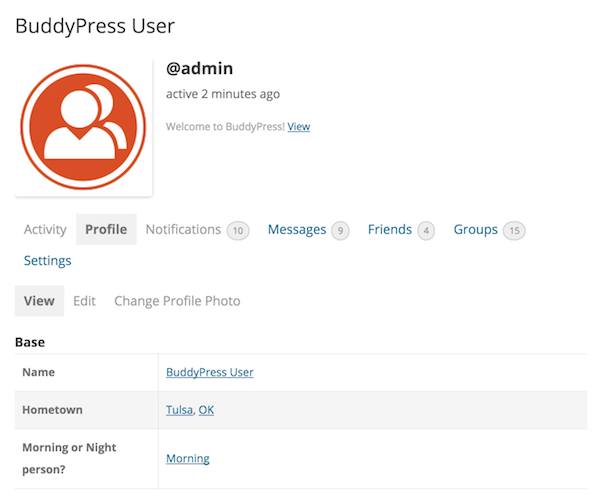
Builder: Elementor ProHi all, I am new to buddypress and my coding skills are almost nule. I am sorry. So far I have been able to set up few things in my website but I cant find an option to hide some large tags (Base and other H4 tags) from users profile. I am using woostify theme (child) and everything is updated. I need help. Thank you !
Topic: Join group ajax not working
I’m getting an admin-ajax 403 error when clicking the Join Group button. It seems to be the switch case in the functions. It seems to be completely ignored somehow. Logging within any of the cases returns nothing at all. Also a quick note… it’s not every group. It’s only on random ones
function bp_legacy_theme_ajax_joinleave_group() { if ( ! bp_is_post_request() ) { return; } // Cast gid as integer. $group_id = (int) $_POST['gid']; if ( groups_is_user_banned( bp_loggedin_user_id(), $group_id ) ) return; if ( ! $group = groups_get_group( $group_id ) ) return; // Client doesn't distinguish between different request types, so we infer from user status. if ( groups_is_user_member( bp_loggedin_user_id(), $group->id ) ) { $request_type = 'leave_group'; } elseif ( groups_check_user_has_invite( bp_loggedin_user_id(), $group->id ) ) { $request_type = 'accept_invite'; } elseif ( 'private' === $group->status ) { $request_type = 'request_membership'; } else { $request_type = 'join_group'; } // NOTE: WHY IS THIS BROKEN?!!? switch ( $request_type ) { case 'join_group' : if ( ! bp_current_user_can( 'groups_join_group', array( 'group_id' => $group->id ) ) ) { esc_html_e( 'Error joining group', 'buddypress' ); } check_ajax_referer( 'groups_join_group' ); if ( ! groups_join_group( $group->id ) ) { _e( 'Error joining group', 'buddypress' ); } else { echo '<a id="group-' . esc_attr( $group->id ) . '" class="group-button leave-group" rel="leave" href="' . wp_nonce_url( bp_get_group_permalink( $group ) . 'leave-group', 'groups_leave_group' ) . '">' . __( 'Leave Group', 'buddypress' ) . '</a>'; } break; case 'accept_invite' : if ( ! bp_current_user_can( 'groups_request_membership', array( 'group_id' => $group->id ) ) ) { esc_html_e( 'Error accepting invitation', 'buddypress' ); } check_ajax_referer( 'groups_accept_invite' ); if ( ! groups_accept_invite( bp_loggedin_user_id(), $group->id ) ) { _e( 'Error requesting membership', 'buddypress' ); } else { echo '<a id="group-' . esc_attr( $group->id ) . '" class="group-button leave-group" rel="leave" href="' . wp_nonce_url( bp_get_group_permalink( $group ) . 'leave-group', 'groups_leave_group' ) . '">' . __( 'Leave Group', 'buddypress' ) . '</a>'; } break; case 'request_membership' : check_ajax_referer( 'groups_request_membership' ); if ( ! groups_send_membership_request( [ 'user_id' => bp_loggedin_user_id(), 'group_id' => $group->id ] ) ) { _e( 'Error requesting membership', 'buddypress' ); } else { echo '<a id="group-' . esc_attr( $group->id ) . '" class="group-button disabled pending membership-requested" rel="membership-requested" href="' . bp_get_group_permalink( $group ) . '">' . __( 'Request Sent', 'buddypress' ) . '</a>'; } break; case 'leave_group' : check_ajax_referer( 'groups_leave_group' ); if ( ! groups_leave_group( $group->id ) ) { _e( 'Error leaving group', 'buddypress' ); } elseif ( 'public' === $group->status ) { echo '<a id="group-' . esc_attr( $group->id ) . '" class="group-button join-group btn" rel="join" href="' . wp_nonce_url( bp_get_group_permalink( $group ) . 'join', 'groups_join_group' ) . '">' . __( 'Join Group', 'buddypress' ) . '</a>'; } else { echo '<a id="group-' . esc_attr( $group->id ) . '" class="group-button request-membership" rel="join" href="' . wp_nonce_url( bp_get_group_permalink( $group ) . 'request-membership', 'groups_request_membership' ) . '">' . __( 'Request Membership', 'buddypress' ) . '</a>'; } break; } exit; }Hi,
I have a big Problem.
I used the BuddyPress Version 10.2.0 Plugin in combination whith Ultimate Member Version 2.3.2 and bbPress Version 2.6.9. I think this combination is a little bit difficult but it finaly worked well.I just changed some settings in the BuddyPress and then i got this Error:
Fehler-Details
==============
Ein Fehler vom Typ E_ERROR wurde in der Zeile 349 der Datei /mnt/web114/d1/63/5855963/htdocs/STRATO-apps/wordpress_10/app/wp-content/plugins/buddypress/bp-core/admin/bp-core-admin-functions.php verursacht. Fehlermeldung: Uncaught ArgumentCountError: 3 arguments are required, 2 given in /mnt/web114/d1/63/5855963/htdocs/STRATO-apps/wordpress_10/app/wp-content/plugins/buddypress/bp-core/admin/bp-core-admin-functions.php:349
Stack trace:
#0 /mnt/web114/d1/63/5855963/htdocs/STRATO-apps/wordpress_10/app/wp-content/plugins/buddypress/bp-core/admin/bp-core-admin-functions.php(349): sprintf()
#1 /mnt/web114/d1/63/5855963/htdocs/STRATO-apps/wordpress_10/app/wp-includes/class-wp-hook.php(307): bp_core_activation_notice()
#2 /mnt/web114/d1/63/5855963/htdocs/STRATO-apps/wordpress_10/app/wp-includes/class-wp-hook.php(331): WP_Hook->apply_filters()
#3 /mnt/web114/d1/63/5855963/htdocs/STRATO-apps/wordpress_10/app/wp-includes/plugin.php(474): WP_Hook->do_action()
#4 /mnt/web114/d1/63/5855963/htdocs/STRATO-apps/wordpress_10/app/wp-content/plugins/buddypress/bp-core/admin/bp-core-admin-actions.php(120): do_action()
#5 /mnt/web114/d1/63/5855963/htdocs/STRATO-apps/wordpress_10/app/wp-includes/class-wp-hook.php(307): bp_admin_init()
#6 /mnt/web114/d1/63/5855963/htdocs/STRATO-apps/wordpress_10/app/wp-includes/class-wp-hook.php(331): WP_Hook->apply_filters()
#7 /mnt/web114/d1/63/5855963/htdocs/STRATO-apps/wordpress_10/app/wp-includes/plugin.php(474): WP_Hook->do_action()
#8 /mnt/web114/d1/63/5855963/htdocs/STRATO-apps/wordpress_10/app/wp-admin/admin.php(175): do_action()
#9 /mnt/web114/d1/63/5855963/htdocs/STRATO-apps/wordpress_10/app/wp-admin/plugins.php(10): require_once(‘…’)
#10 {main}
thrownAnd no – of corse I dont have an up to date back up 🙁
What can I do to fix the problem?Great thaks to all hwo want to help me
WordPress-Version 5.9.3
Aktives Theme: ColorMag (Version 2.1.2)
Aktuelles Plugin: BuddyPress (Version 10.2.0)
PHP-Version 8.0.17I am sure this has been asked before but I can’t find it. I would be very appreciative if someone could help me change the grey to my theme colors. The search bar and other navigation are all greys despite the customizer being the theme color. I use Youzify so all those pages and styling are perfect.
Anyone else seen this? My admin can upload an Avatar but my Users can’t. I deactivated all of my plugins and found that the conflict lies with WooCommerce. I have a store on my site so I need to keep WooCommerce running but I also need people to be able to upload Avatar photos. It is definitely Woo that is doing it as I turned off every plugin but that.
I am running WordPress 5.9.3 and BuddyPress 10.2 and woo 6.4.1 This happened on several themes including 2012. It is for the site http://www.13hikes.com
I had an issue with a client site that the BP team may want to look into, in the event that it is affecting more sites than just mine.
The issue: Running the latest version of BuddyPress (10.2), I had a client site and server that were seeing spikes to 100% CPU and high RAM usage — but only when a logged-in user opened the WordPress media library (/wp-admin/upload.php).
My hosting support first told me it was a plugin error, then I was told it was a theme error. But we were unable to find any evidence of this. I cloned the live site, deactivated all plugins and switched to a default WP theme, and the issue still occurred.
There were no related items in the Apache or Nginx error logs, but the PHP access log fills with lines like this, seemingly for every media file:
(server IP) – [15/Apr/2022:15:57:37 +0000] “GET /index.php?bp-attachment=13109/NorthCrawford-300×225.jpg” 301 0 – 798 14702 0.648 8388608 9.27% 3.09% “/?bp-attachment=13109/NorthCrawford-300×225.jpg”
The solution: This is what I received from my hosting support:
The issue is BuddyPress created htaccess that redirects all wp-content/uploads/bp-attachments/ to ?bp_attachments= URL. The redirects spawn heaps of apache and php-fpm which also cause the issue . They created this sample htaccess found on the directory below
/public_html/wp-content/uploads/bp-attachments# cat .htaccess
RewriteEngine On
RewriteBase /
RewriteRule (.+) ?bp-attachment=$1 [R=302,NC]The htaccess has been renamed so, when you load medias, it should no longer reach 100%
The solution was to take the .htaccess file out of the equation by renaming it, which is only a temporary fix. I presume this file would be overwritten upon the next BP update?
If that’s the case, how would I keep this from happening, aside from renaming the offending .htaccess file each time there is a BP update?
Wordpress v. 5.9.3
Buddypress v. 10.2.0
Theme. BuddyXIn Private Messages – the message body part ‘shows’ at the top that you can attach a file or a link,
the link option works, but when you click on the image attachment, it gives a popup that asks for the ‘source’ of the image. It doesn’t open a normal file explorer window to select the image.
Please, how do I FIX this?Topic: NSFW site =
Hi all.
Working on this build https://swingsocial.co/ThemeStage/
I’ve been going thru 4 different old versions of site, and I’ve managed to confuse myself horribly.I KNOW this is a simple item ,but for the life of me I can’t track it down. I’m hoping someone can direct my ID10(t) self to where this can be corrected.
When you click ‘Register’ on the above link ,next page comes up “content restricted”. Where do i go to clear that, what setting have I screwed up??
Thanks in Advance for any/all help on this~Regards
BlakeTopic: Private Messages
In BuddyX theme, there is two options to contact members. Either via Public Message or Private Message.
My theme does NOT show the PRIVATE MESSAGE option anymore!
PLEASE HELPI am not sure if anyone else is facing the same problem.
I have been testing and debugging for several hours for this problem.
I am using premium theme boombox , but also tried on Twenty Twenty-Two. Everywhere the same issue.I have deactivated all plugins, minimum set up.
My website is on GR language in the frontend and i get the url of invitations component like that /members/user/προσκλησεις/ (with the GR translation). It should be /members/user/invitations/ like the rest of the components. I get an error page as a return. The component is not active.
When i change default front lang to UK that i can see the /invitations/ component and invitations are working normal.
Of course i have been saving permalinks, disabling-enabling invitations settings
Could anyone help please??
I am experiencing an issue with Smash Balloon YouTube Feed when loading more of the videos. If I disable BuddyPress the “Load More” button works normally.
When displaying the feed (say about 6 videos) there is a button to “Load More” below the videos. When the button is clicked a new browser tab will open and display in the url “about:blank#blocked”. When I go back to the website page, it does “Load More” however I need to prevent this new blank tab from opening.
Wordpress v. 5.9.2 with Olympus Theme
BuddyPress V. 10.2.0
Smash Balloon YouTube Feed V 1.4.4Hi,
WordPress Version 5.9.2
Theme: MagicVersion: 1.10.0 By Bdaia
Website: miComunidad.comWhen I install the BuddyPress.10.2.0 I get these errors:
WordPress database error: [Table 'micomuni_wpcristiana.wp_wkkr_bp_notifications' doesn't exist]
SELECT COUNT(*) FROM wp_wkkr_bp_notifications n WHERE user_id IN (1) AND component_name IN ('xprofile','friends','messages','activity','groups','members') AND is_new = 1

WordPress database error: [Table 'micomuni_wpcristiana.wp_wkkr_bp_messages_recipients' doesn't exist]
SELECT SUM(unread_count) FROM wp_wkkr_bp_messages_recipients WHERE user_id = 1 AND is_deleted = 0 AND sender_only = 0

WordPress database error: [Table 'micomuni_wpcristiana.wp_wkkr_bp_friends' doesn't exist]
SELECT id FROM wp_wkkr_bp_friends WHERE (initiator_user_id = 1 OR friend_user_id = 1) ORDER BY date_created DESC

WordPress database error: [Table 'micomuni_wpcristiana.wp_wkkr_bp_invitations' doesn't exist]
SELECT DISTINCT i.item_id FROM wp_wkkr_bp_invitations i WHERE user_id IN (1) AND class IN ('bp_groups_invitation_manager') AND type = 'invite' AND invite_sent = 1 AND accepted = 0

WordPress database error: [Table 'micomuni_wpcristiana.wp_wkkr_bp_groups' doesn't exist]
SELECT DISTINCT g.id FROM wp_wkkr_bp_groups g WHERE g.id IN (0) ORDER BY g.date_created DESC

WordPress database error: [Table 'micomuni_wpcristiana.wp_wkkr_bp_groups' doesn't exist]
SELECT COUNT(DISTINCT g.id) FROM wp_wkkr_bp_groups g WHERE g.id IN (0)

WordPress database error: [Table 'micomuni_wpcristiana.wp_wkkr_bp_notifications' doesn't exist]
SELECT id, user_id, item_id, secondary_item_id, component_name, component_action, date_notified, is_new, COUNT(id) as total_count FROM wp_wkkr_bp_notifications n WHERE user_id IN (1) AND component_name IN ('xprofile','friends','messages','activity','groups','members') AND is_new = 1 GROUP BY user_id, component_name, component_action ORDER BY date_notified desc
How do I create these database tables? Please help?
Thanks,
Carlos
I have created “Professional Experience” repeater field set and inside it I created :
- current job (yes or no)
- end date (date) hide when current job is yes
The issue is when I edit the profile the end date hid only in the first field not working on other fields. Also, it’s not working at all when I view the profile.
Does anyone have a solution, please?BuddyBoss Platform Pro v 1.2.0
Conditional Profile Fields for BuddyPress v 1.2.5
BuddyBoss Theme v 1.8.7


