Search Results for 'theme'
-
AuthorSearch Results
-
January 31, 2012 at 12:43 am #128879
In reply to: How to restart the installation wizard
AtlantasRealtor
MemberThank you so much for your response. I read some of your insightful comments and thought about writing you a PM earlier today. I did not in order to respect your time.
I’m using WP 3.1.1,Genesis 1.8 and Genesis Connect 1.1 with an AgentPress v 1.0 Child Theme. It turns out I thought it through and followed your advice on my own, though I didn’t do all the manual code deletions.
Upon re-install, I still didn’t get the wizard to display or launch. Accordingly, I followed the outline provided by the link and completed the process manually.At this point, members are loading, activity stream is posting, and I have posted 10 forums in the group forum page.
Missing are any data or forms on the register page. Activate ask for an activation key that I assume comes from an email. I don’t know how to create the log in for the register page????
Should I update to AgentPress 2.0 as a possible solution.
Thanks for any further help you may be kind enough to offer.
Mike
January 31, 2012 at 12:09 am #128874In reply to: Activity stream commenting
allwest
MemberJanuary 30, 2012 at 11:18 pm #128869In reply to: Alligning Buddypress with Swatch theme
BlendNZjnr
Memberhttp://pastebin.com/69imGjt4 (header.php)
http://pastebin.com/ATQBREyP (footer.php)
http://pastebin.com/nrQnxNwJ (sidebar.php)
http://pastebin.com/BKYJTTLZ (index.php)
http://pastebin.com/1mZQ18gC (page.php)Thank you, I really appreciate you helping!!!
And I’ve managed to fix one of the button problems, will look into the other January 30, 2012 at 11:05 pm #128868
In reply to: Another 404 issue – IIS server
FuriousCigars
MemberI am too after the fresh install
@mercime…after the fresh install i tried what you said…still 404’s everywhere in buddypress theme too.January 30, 2012 at 10:38 pm #128864@mercime
Participant`function bp_dtheme_page_menu_args( $args ) {
$args = false;
return $args;
}
add_filter( ‘wp_page_menu_args’, ‘bp_dtheme_page_menu_args’ );`January 30, 2012 at 10:06 pm #128859In reply to: Another 404 issue – IIS server
Participant@palmdoc it’s usually the issue with needing to add /index.php/ to your permalink. Check out if the following link will help you https://codex.buddypress.org/developer-docs/iis7-web-config/
@FuriousCigars after changing to bp-default theme, clear cache and run Settings > Permalinks.
January 30, 2012 at 9:48 pm #128858In reply to: Another 404 issue – IIS server
MemberI too am having the same issue, getting 404’s on anything member account related, can’t even view the profile page. The only difference is, my site is live and not a fresh install, I have already disabled plugins, and tried the default buddypress theme, and still get the same errors. I have searched online all over and not found a solution. I will gladly provide a login to someone who fixes buddypress.
Help!
January 30, 2012 at 8:28 pm #128855In reply to: Another 404 issue – IIS server
palmdoc
ParticipantOh forgot to mention – no other plugins other than the default WordPress ones, and using the default Buddypress theme.
This is a clean install and I am perplexedJanuary 30, 2012 at 4:23 pm #128845In reply to: How to disable responsive css?
Hugo Ashmore
Participantstyles and scripts are enqueued in a function run from the bp-default functions.php file
Mid way down this page explins the workings:
https://codex.buddypress.org/releases/1-5-developer-and-designer-information/You can either call the function yourself in your child themes function.php file – which will override the running of the bp version – and then simply declare the files you want omitting the ones you don’t or you can go another route and de-register the responsive stylesheet.
The example I linked to above doesn’t actually show the responsive sheet as being declared so was probably written before that stylesheet was included so you may get away with copy pasting the function to your functions.php file.
However I would think rather than remove ‘responsive’ a better course of action is to id where the issue is happening first, as collapsing the sidebar doesn’t sound right and I wouldn’t have thought the responsive sheet would have done this.
January 30, 2012 at 9:18 am #128836In reply to: Alligning Buddypress with Swatch theme
ParticipantOpen up your theme’s header.php, copy the code and paste onto pastebin.com, click submit and post the generated URL here. Do the same for footer.php, sidebar.php, index.php and page.php
As for the buttons, you can use Firebug, a Firefox add-on, or use Chrome and right-click to inspect element and check button style conflict.
January 30, 2012 at 3:42 am #128826ParticipantI have no idea just looking at the images. Site url? If not, you could ask the theme developer to look over the information above and give the correct template structure.
January 30, 2012 at 3:20 am #128824doctorwhobbc
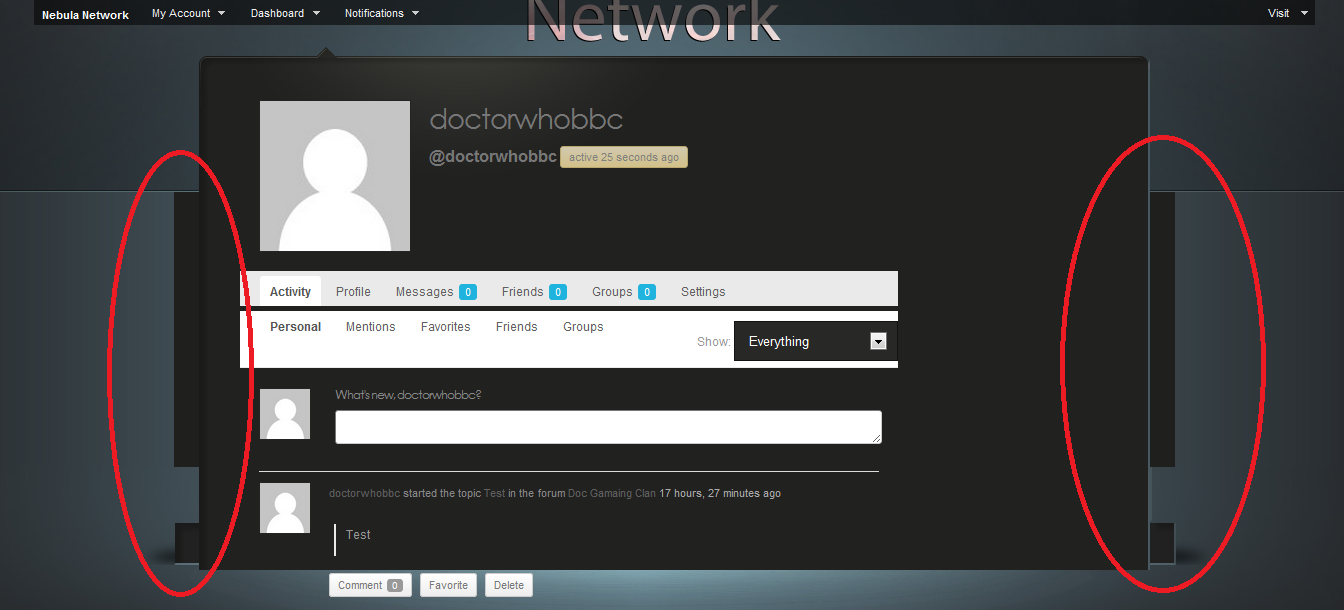
Member@mercime It all works and is now inside the page. However i have black lines on either side of the page area. I have two images to demonstrate what i mean. The first image is just a random page from my website where everything is displayed correctly. The second image is a BP page and i have used red circles to show the areas in question.
Image 1: http://i44.servimg.com/u/f44/14/24/97/08/buddyp11.png
Image 2: http://i44.servimg.com/u/f44/14/24/97/08/buddyp10.pngThanks
January 30, 2012 at 12:18 am #128815In reply to: HELP! Buddypress/Platform theme Pages not aligned
ParticipantPagelines has video about this http://www.pagelines.com/docs/buddypress or get a free forum account there at http://www.pagelines.com/launchpad/signup.php?price_group=-128&product_id=128&hide_paysys=free or do a search in theme’s forums
There’s also a year-old solution which you might want to check out https://wordpress.org/support/topic/problem-with-buddypress#post-1796598
January 29, 2012 at 11:53 pm #128812ParticipantOpen up you 13thfloor theme’s header.php and Save As > header-buddypress.php in the same theme folder. Open up header-buddypress.php and at the very bottom of the file, below other code, add:
``
Save and upload to theme folder in server in same level as header.php fileOpen up your theme’s sidebar.php and Save As > sidebar-buddypress.php. Open up sidebar-buddypress.php and at the very top of the file, above other code, add:
``
Save and upload to theme folder in server in same level as sidebar.php fileYou have to add the following to your 13thfloor’s stylesheet:
`#content div.padder {
float: left;
width: 560px;
}`
the above will take the place of #content-area which is not available in BP template files.Furthermore, you might want to modify the styles included in BP Template Pack, check out the mods used in this page https://codex.buddypress.org/theme-development/theme-dev-bp-template-pack-walkthrough-twenty-ten-bp-1-5/3/
January 29, 2012 at 11:06 pm #128810Member@mercime I reinstalled the theme. I updated the pastebin file to have the proper index.php
Heres the link: http://pastebin.com/AHzreFnt
I checked with cpanel file manager and all 6 folders are there, and there is an index.php in the /blogs/ folder.
Thanks
January 29, 2012 at 10:22 pm #128809In reply to: HELP! Buddypress/Platform theme Pages not aligned
kclein
Memberthanks @mercime, I did that and it fixed that problem but now I have another problem. activity/group/member pages are working but plugin is not playing nice with the sidebar. I tried the BP Compatibility process and step 3 just threw me for a loop, couldn’t figure it out. I’m not a programmer, I know enough to be dangerous, that’s it! How do I fix the sidebars on these pages?
January 29, 2012 at 9:01 pm #128805rhek
ParticipantThanks for clearing all that up for me!
RhekJanuary 29, 2012 at 6:55 pm #128802@ChrisClayton
Participanti’ve never changed the ID of what blog buddypress runs on, but assuming it talks to wordpress the same way as having it on the root blog (which it should, and if it doesn’t it should be reported as a bug) then all your questions are a yes.
1. Yes, activity stream tracks site-wide activity.
2. yes, one username (it doesn’t modify the way WordPress Multisite runs much…)
3. If you are using the bp-default them, then yes it does, if your using another theme then it wont by default. you will have to modify the theme (refer to bp-default theme for how it’s done their)
4. I’ll leave the languages questions to someone else (i dont mess with doing things with different languages)January 29, 2012 at 5:42 pm #128799In reply to: everything goes blank
Participant== I’m trying to install buddypress on my custom theme ==
Change to Twenty Ten or Twenty Eleven theme then activate BuddyPress then change to bp-default or your custom theme.
If that doesn’t work, it may be that you need to increase memory https://codex.buddypress.org/troubleshooting/blank-pages/
January 29, 2012 at 5:03 pm #128797Participant== So if I use the BuddyPress Template Pack I need to modify a number of templates or modify the header.php, footer.php, and sidebar.php and rename them header-buddypress.php, footer-buddypress.php, and sidebar-buddypress.php. ==
You don’t modify header.php, footer.php and sidebar.php. You copy those files and name the copies as header-buddypress.php, footer-buddypress.php and sidebar-buddypress.php respectively. You only copy and rename copy of such file/s only if you need it/them. And, only the BP template files transferred to your theme folder in server will use them, i.e. your regular WP theme files won’t use those xxxx-buddypress.php files.
== I think I actually only need to modify sidebar-buddypress.php. Do I leave the name of the file sidebar-buddypress.php? . ==
sidebar-buddypress.php will only affect the sidebar of the BP Template files transferred to your WP theme’s folder in server. If there’s no sidebar-buddypress.php, the BP template files will take on your WP theme’s sidebar.php
== I have also considered creating a child theme using my current theme as the parent theme. Would this be a better way to go then editing template files? ==
If your WP theme is actively maintained/updated by theme developer, and contains info that encourages you to build a child theme for your customizations, then do so. Whether you use your WP theme or create a child theme of your WP theme, you would still need to install and activate the BP Template Pack and go through the BP Compatibility Process.
If you have ascertained that you only need to create header-buddypress.php and/or footer-buddypress.php and or sidebar-buddypress.php in Step 3 of the compatibility process, then good for you. When you need to upgrade BP Template Pack plugin later, you won’t have to change anything with either of 3 xxx=buddypress.php files in your theme folder..
January 29, 2012 at 4:42 pm #128796In reply to: HELP! Buddypress/Platform theme Pages not aligned
Participant== I’m using the Platform theme version 1.4.2 which during installation said was compatible.==
That’s because the theme author tagged the theme “buddypress” which is misleading since the theme may be BP-friendly but it doesn’t contain any BuddyPress templates. You will need to install and activate BP Template Pack plugin and go through the BP Compatibility process to make your WP theme compatible with BuddyPress. https://codex.buddypress.org/theme-development/wordpress-to-buddypress-theme/
January 29, 2012 at 4:16 pm #128794Participant>> However the index.php file seemed to be a buddypress file
It is the BP Blogs Directory template file. How did it get at the root of your 13th floor theme? I suggest that you get another copy of your 13thfloor theme, and double-check the index.php file which I’m pretty sure won’t be the BP file and re-upload to your theme file in server.This leads to — could you just make sure first that you have 6 BP template folders – activity, blogs, forums, groups, members, register – transferred into your 13thflor theme folder in server? Check the /blogs/ folder and make sure there’s at least an index.php file there. Have to make sure everything’s in order before we proceed.
January 29, 2012 at 9:10 am #128785MemberHi @mercime, i have done as you requested and have put the links below. However the index.php file seemed to be a buddypress file (i dont think my theme uses it).
Header.php http://pastebin.com/sSZhKUvt
Index.php http://pastebin.com/AHzreFnt
Page.php http://pastebin.com/aJdNpK4t
single.php http://pastebin.com/mBmpZgYH
sidebar.php http://pastebin.com/X5eW4piVThank you so much
January 29, 2012 at 5:56 am #128778In reply to: Bad navigation bar css in members area
ParticipantViewing source, looks like you’re using Genesis child theme. I believe you need to purchase Genesis Connect plugin to make your Genesis child theme compatible with BuddyPress.
January 29, 2012 at 3:16 am #128776In reply to: can’t add borders with css to anything
aces
Participantyes, most probably. But the active one should also be apparent in chrome.
You could try using `!important` ie
`
.your-class {
border:5px!important;
}
`
But it is better practice to try to improve the importance by including more of the css cascade ‘tree’, not just the last bit `.yourclass` (start at `#body` or `#wrapper` if necessary).
However if `!important` works then your are going along the right linesIt would help to know which parent theme you are using……
-
AuthorSearch Results