Mainly if you want to rename or customise the user table, or share that table between separate WordPress installs, etc.
Same problem also for me. I dont know how to remove hello world
I saw a tip on Internal Configuration Settings, to Set a custom user database table for BuddyPress (and WordPress to use). I am curious– what’s the benefit of this setting?
My question is :
In a multisite environment , when registered user create their own blog the first comment “Hello World” in their blog is by Mr WordPress …
I want to change this Mr WordPress name to something of my choice ….
How can I do this ?
I have just upgraded to latest versions of buddypress and wordpress and my menus have wrapped. They look different but bad in both ie and firefox. See leckhamptononline.co.uk for my problem. Does anyone know how to fix this. I am using the default buddypress theme.
How do I redirect to the wordpress login page and not the buddypress registration page? I want to create all the user accounts myself and prevent random people registering for my site. Thanks!
I have used the Nicer Permalinks for Vietnamese code to force my BuddyPress permalinks to show in Roman characters rather than Thai characters, because BuddyPress does not allow %post_id% in its permalink structure as far as I can tell. The Thai characters which automatically appeared in the permalink on the post page were a problem for my translation plugin (Transposh). Since I have multiple Thai authors on my site, I could not be sure they would always change the peramlink to Roman characters. If they forgot, their post would result in a broken link. So I just substituted random Roman characters for Thai in this script, and wanted to share in case anyone else was having the same problem.
Please note:
1. This is NOT a phonetic transcription of the Thai letters; it is simply a hack to allow my BuddyPress permalinks to automatically display Roman characters because the Thai characters were confusing my translation plugin.
2. I left the Vietnamese characters in the code.
3. To use, simple install the Nicer Permalinks for Vietnamese plugin and copy below code over the existing code in the nicer-permalinks-for-vietnamese/np4v.php page in WordPress’s plugin editor.
Code available at this link: http://wordpress.org/support/topic/plugin-nicer-permalinks-for-vietnamese-nicer-permalinks-for-thai-in-buddypress?replies=1#post-1628880
Best wishes!
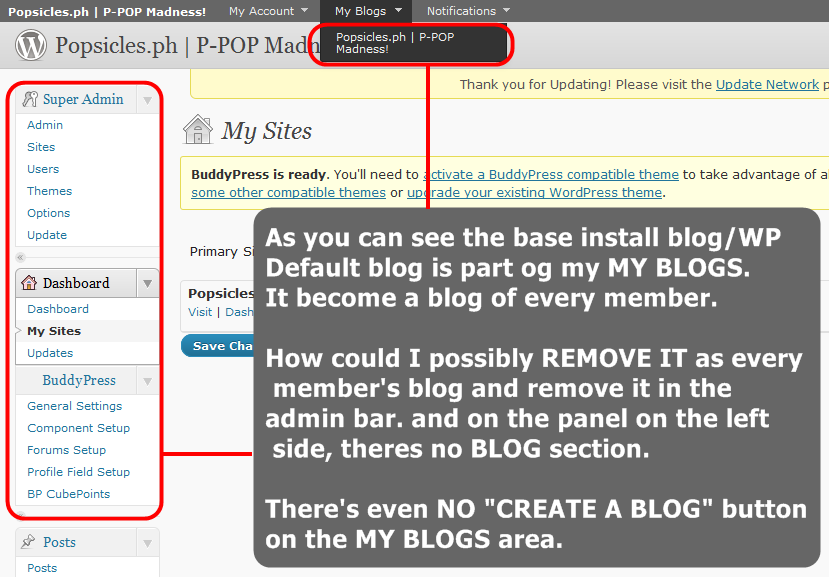
Please make a new post, @ri-kun. This one is two months old and is on a different topic. We’ll reply in the other post, but what I think you need to do is go in and remove everyone from the root blog (they’ll be assigned as a ‘contributor’ or other user role by default). An alternative would be to edit the template so it always skips that item; I’m not sure what the consequence of removing that default user role would be.
Unless you want to run multiple sites (the correct terminology, not “blogs”), you don’t need to run multisite. Regular WordPress will be fine.
There’s no technical difference as to how to structure your site. If you just want your site to look the same on the homepage, but for visitors to dive deeper before they get into “BuddyPress land”, then maybe sticking everything under what appears to be a directory would be best (take a look at the URL for this page, for example. We’re under /community but the main blog isn’t).
I agree it’s the wrong way around. I’m advertising my own plugin here, but what I have done on some sites is use the Welcome Message part of Welcome Pack to send a private message to the new user and to say hello and remind them to complete their profile / picture, etc.
Is this on regular WordPress or on multisites?
Hi people, I hope you guys can help me a little bit, even though the topic is old quite old. Mine BP says exactly the same thing as EZD described. I have to go to gravatar.com etc etc. BUT, I have wordpress.com. This is really bugging me out at the moment so please help!
Ralf
@rhivanz: If your site running on WordPress MS, you can put BuddyPress in the sub-blog, so all BuddyPress features, including user profiles, put there. About how to make it, can be viewed at https://codex.buddypress.org/how-to-guides/changing-internal-configuration-settings
Looking at this codex page: https://codex.wordpress.org/Template_Tags/wp_tag_cloud Is there an easy way to use the taxonomy parameter with this? Don’t know.
I am having this problem with WordPress 3.0.1 and BuddyPress 1.2.5.2. I’ve disabled every plugin except for BuddyPress and I keep getting this error in Firefox’s error panel:
Error: jQuery(“#avatar-to-crop”).Jcrop is not a function
Source File: http://www.bladdyblah.com/groups/test/admin/group-avatar
Line: 38
Viewing the page source, I do see that the following js is being included:
http://www.bladdyblah.com/wp-includes/js/jcrop/jquery.Jcrop.js?ver=0.9.8
The uploaded avatars are there an in multiple sizes, but the crop tool doesn’t appear on the page (thus the javascript error). This happens with both user and group avatars.
Any ideas?
Are you using a normal WP theme? If so you have to install BuddyPress template pack plugin.
https://wordpress.org/extend/plugins/bp-template-pack/
Then in admin>> reading chose a different front page
Ok… I am an idiot. I guess that happens when you don’t get enough sleep. Just in case others experience this issue, it is because the permalinks in wordpress 3.0.1 default to http://url/index.php/month/etc. I switched to custom and took out the index.php and all works. DUH.
Can you guys help me with this:

We are running BuddyPress on a WordPress 3.0 install that was originally built on WordPressMU. So theoretically our people could have blogs but we are not allowing that. I would like to have our main blog (and comments) show up in the activity stream but the only way I can do that apparently is by letting people create blogs when they create accounts. Is there a way to change this?
TIA,
Dawn
http://www.supportforspecialneeds.com
For my PRIVATE groups, I did the following to enable forums.
First, I reinstalled the forums from the dashboard (superadmin )
Then, from the buddypress nav bar, I followed
My Account > Groups > Admin >
Under the Admin submenu, I selected Group Settings and did the following:
UNchecked the “Enable discussion forum” checkbox
Clicked save
Checked the “Enable discussion forum” box
Clicked save AGAIN
That enabled forums in the private groups.
Still trying to figure out why these posts are not showing up in the main forum tab though…. ((scratches head))
Hope this helps someone else.
EDITED: Duh! The forums of private groups do not show up in the general forums page! Related, the site Pressography.com posted the phpMyAdmin version of the fix I outlined above: http://pressography.com/wordpress/daily-tip-fix-for-buddypress-group-forums-error-when-creating-a-new-topic/
fresh new install of wordpress and buddypress.
if i try uploading an avatart, it shows a white box only and doesn’t seem to be uploading images although it does not give any error messages about paths not correct. I noticed in my wp-content folder, there was no uploads folder, so not sure if somehow its not uploading files properly. Any ideas?
PMs for Friends Only works; I just haven’t bumped the compatibility tag.
Also do check the oEmbed for BP v0.6 beta.
—
I’d say that most of the BP plugins should work. Only plugins that interact with WordPress in some manner should be flagged for testing.