Skip to:
Content
Pages
Categories
Search
Top
Bottom

Search Results for 'wordpress'

Viewing 25 results - 25,351 through 25,375 (of 32,681 total)
  • Author
    Search Results
  • #87840
    alanchrishughes
    Participant

    @pcwriter “It does everything you want a dropdown menu to do, and it does it all automatically behind the scenes.”

    That’s what my problem is though, it does too much and all behind the scenes. From a design stand point, when I’m trying to figure out programs like wordpress or buddypress I try to break everything down to its most basic state so I can completely control things, so I can make a website function around an attractive user friendly design instead of limiting my design to the functionality I am stuck with because I can’t figure out what is going on hidden behind the scenes. It would be great if there was a buddypress codex with individual lines to generate single links to each page.

    #13968
    Dave Simpson
    Participant

    Hello,

    I am in need of some help with 2 plugins for my wordpress/buddypress site, My site is aimed at kids aged 8-16 years old, as my daughter went on holiday with granparents, when she returned she wanted to use a well know social media site to keep in contact with her friends, worried about the content exposed to her i decided to have ago at creating my own, I am a Computer hardware/software engineer but not a programmer, I have tried all the social media script out there but when i found WordPress/Buddy press i loved it and have been using it for some time.

    I need 2 thing for my site,
    1. i need a plugin for the registration/activation process that sends and e-mail to a parent/carer email address entered at sign up informing the parent/carer thier son daughter has joined my social network site, with a customizable e-mail template.
    2. when Date of Birth is entered i would like a plugin that refuses registration if date of birth works out to be younger or older that 8-16

    I know regardless of what security you put in place you can not 100% stop wiredos trying to sign up but i am implementing the CEOP panic buttons throughout so kids can report inapropriate behaviour striaght to authorities, and i have knowledge as a parent to use discretion on content posted to the site, i can then make dessisions on weather to remove a user, i am also creating a parents section so if parents are worried they can contact us and we can look into thier childs content within the site. Parents can also use the CEOP button to report worrying behaviour. The loca media has also taken great interest in my project and are willing to give me interviews once the site is up and running as i want it,

    Unfortunatly i don’t have much money to spend on this project as i fell ill a year ago and i have been unable to work since, i have started this project now and i want to see it through, you never know it may become famous lol, i am also looking into ways of making my site more entertaining.

    Thank you for taking the time to read this and any suggestions or help is much appreciated

    Regards

    David Simpson
    Snetkids

    #13967
    techguy
    Participant

    I’m trying to find an easy way to get the name for a user without having to scroll through all the xprofile fields. This is easy if the user is logged in ($bp->loggedin_user->fullname), but in this case I want to get the name of a different user to that I can display it for the logged in user.

    I could use the WordPress functions to get the display_name:
    $user_info = get_userdata($referring_user_id);
    $referring_user = $user_info->display_name;
    But the display_name is just the username and not the value in the name field.

    Any ideas on how to get this?

    #87788
    pcwriter
    Participant
    #87782
    pcwriter
    Participant

    @Jens Wedin @alanchrishughes

    I was looking for a way to include all navigation links in one navbar. Jens’ code snippet is brilliantly simple. Thanks!
    The only drawback is you have to add links manually to get them to appear in the adminbar.

    I’ve modified the code (borrowing inspiration from a snippet previously written by @David Lewis) so that:
    1 – all “standard” BP Directory links appear automatically in their own dropdown;
    2 – all BP plugin directories (Links, Gallery, etc) are automatically added to that dropdown;
    3 – all WP pages are added automatically to the adminbar;
    4 – all added WP pages respect whatever page order is set in the WP-Dashboard.

    The code is here: http://pastebin.com/8FJmcgRF

    To ensure that unwanted pages DON’T show up in the adminbar navigation (password-protected, Thank You pages, etc), install the Exclude Pages plugin:
    https://wordpress.org/extend/plugins/exclude-pages/

    #87766
    JPS Bhullar
    Participant

    My plugin is available on WordPress.org and Buddypress.org. Here is wordpress link — https://wordpress.org/extend/plugins/bp-profile-as-homepage/

    #13961
    alanchrishughes
    Participant

    I’ve ran the Buddypress Template Pack plugin on a number of standard WordPress thems and it has always worked fine, but for some reason the back end pages still always say “you will need to activate a Buddypress compatible theme.” Is this just an overlooked detail on Buddypress’ part because it always works fine, but this message still appears.

    #13956
    oferwald
    Member

    Hello,

    Trying to upload a group avatar for my plugin group here, and I get bounced to
    http://buddypress.org/community/groups/transposh-translation-filter-for-wordpress/admin/group-avatar

    Which is an empty page.

    Tried multiple browsers. Anyone else sees that?

    #87751

    In reply to: Pages not found

    Karen Zook
    Participant

    Here’s exactly what I have in my wp-config.php file (everything below the unique authentication key code). Actually examining this I think it’s pretty clear I’m missing something, but I don’t know what:

    /**
    * WordPress Database Table prefix.
    *
    * You can have multiple installations in one database if you give each a unique
    * prefix. Only numbers, letters, and underscores please!
    */
    $table_prefix = ‘wp_’;

    /**
    * WordPress Localized Language, defaults to English.
    *
    * Change this to localize WordPress. A corresponding MO file for the chosen
    * language must be installed to wp-content/languages. For example, install
    * de.mo to wp-content/languages and set WPLANG to ‘de’ to enable German
    * language support.
    */
    define (‘WPLANG’, ”);

    define( ‘MULTISITE’, true );
    define( ‘SUBDOMAIN_INSTALL’, true );
    $base = ‘/’;
    define( ‘DOMAIN_CURRENT_SITE’, ‘classicalfieldwork.com’ );
    define( ‘PATH_CURRENT_SITE’, ‘/’ );
    define( ‘SITE_ID_CURRENT_SITE’, 1 );
    define( ‘BLOG_ID_CURRENT_SITE’, 1 );

    define( ‘AUTH_SALT’, ‘.~rFFv>Rie|T7C^:Wzl|MdW:1LS{Dr.x+V}U2qrc?Crmhd+Q+sIf7D%#p+$;p<5U' );
    define( ‘SECURE_AUTH_SALT’, ‘yFH.Ecyc:_UaMA:8XZc9n7^v#yZHb~(>+D,H<V| rI[AL5Lk<qrv8BfVFzAJT' );
    define( ‘LOGGED_IN_SALT’, ‘r*?|QwI=q>#hN-0-[a0$E&Ymv}+Zl39+A^)?(T!Q8%ZB%UiMkK`;(!(@qC-Z]iID’ );
    define( ‘NONCE_SALT’, ‘hVh_eHa)*r|MqURj:ciAcu=+.k]D0`R7*0Hu[l<(Iqz}#/A3%#_YmlE/e2tl4al,' );

    /* That’s all, stop editing! Happy blogging. */

    /** WordPress absolute path to the WordPress directory. */
    if ( !defined(‘ABSPATH’) )
    define(‘ABSPATH’, dirname(__FILE__) . ‘/’);

    /** Sets up WordPress vars and included files. */
    require_once(ABSPATH . ‘wp-settings.php’);

    define(‘WP_ALLOW_MULTISITE’, true);

    #13945

    Topic: Pages not found

    in group forum Installing BuddyPress
    Karen Zook
    Participant

    Please forgive me, I’m an educator trying to get BuddyPress to replicate some of what I used to do with a Ning network, and I’m having some trouble.

    You can view my site at uconnlatin.classicalfieldwork.com; my regular blog is at classicalfieldwork.com.

    I am running WP3.1, with Multisite enabled.

    As you can see if you look at my site, none of my links go anywhere – it’s all just “Page not found.” I looked at the information here (http://codex.wordpress.org/Create_A_Network), but I’m not sure what exactly I should be changing, and I’m really worried about messing up something for my main, non-BP site.

    Thanks so much to this great community for any help you can give me!

    #13944
    Wythagy
    Participant

    When trying to view my BuddyPress (1.2.5.2) / WordPress (3.0) website on Safari (5.0) browser it seems to have problems loading the permalinks on the first try. If I click on a link, for example “edit profile” (www.website.com/user/profile/edit), it immediately loads a blank page….however, if I then click the refresh button after it’s “loaded” the blank page – it loads the intended page just fine…

    Any ideas?

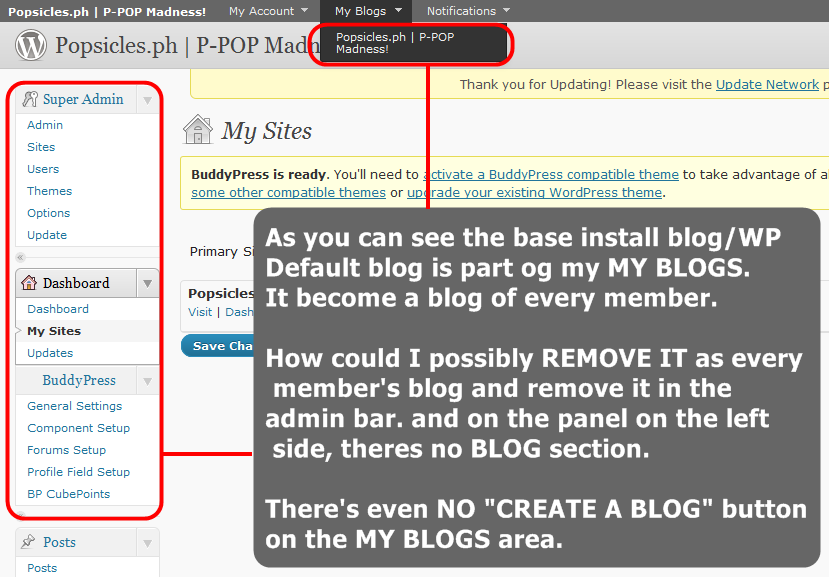
    ri-kun
    Participant

    for everyone reading this topic to properly understand my problem. Here is the actual stuff in my admin area:

    DIRECT LINK: http://i630.photobucket.com/albums/uu22/s2ne1/myblogsremove.png

    #13941
    Anne
    Participant

    Just watched this video on wordpress.tv and I liked it. I already know more about BP but several new things to me were brought to my attention:
    http://wordpress.tv/2010/07/10/sabin-wilson-buddypress-boulder10/

    #87719

    as the follow is not entirely inclusive, i have posted it with a password p=events

    http://www.countingrows.com/event-calendar-for-wordpress-with-gravity-forms/

    @mercime
    Participant

    This topic answered in this bp.org thread and wp.org forums

    #87714
    @mercime
    Participant

    @ri-kun – answering you in wp.org forums – WP 3.0 multisite must be enabled

    #13928
    Jason
    Participant

    Hello,

    I believe I found a bug. I recently upgraded WordPress and Buddypress and if you do the following, you will find out that the homepage will not load.

    1. Register a user account and create a blog.
    2. Activate the account.
    3. Access the blog’s dashboard.
    4. View the blog.
    5. Now, try to go to the site’s homepage.

    As you will see, when you try to access the homepage, it will come up blank. The only way to solve this problem is to either wait a while or access the admin dashboard. The homepage will not load up but you can access control panels and blogs. It’s weird.

    #87687
    Hugo Ashmore
    Participant

    Very often with errors in either scripting or markup the reported point of error is not necessarily where the actual problem starts from it’s just where the validation finally fails to be able to parse the logic.

    You are saying ‘IF’ something then do something and we are waiting for that to be finished, however you are only showing a snippet of code out of context which does mean one can only base things on what is shown.

    looks like you have lifted the code that is used for the ‘if no widgets run the add widgets error markup’ that is really used more for distributed themes, the ! ‘not’ operator is useful for saying if these functions don’t exist and can’t be called then fallback to this following markup/script. Your code as written needs endif;

    You can write the dynamic sidebar call in a more straightforward manner?

    if ( function_exists(‘dynamic_sidebar’) )
    dynamic_sidebar(“Profile Groups Area”) ;

    The WP codex page gives more info:
    https://codex.wordpress.org/Function_Reference/dynamic_sidebar

    Driftless
    Participant

    Howdy,

    I find the same issue – almost a full screen of deprecated function notices and the like, my site is entirely unusable. Of course, as you point out, one can disable the debug function – but since I am developing sites and plugins, I find the debug to be extremely valuable…

    Any roadmap on when those errors might be cleaned out? Any way a guy can help?

    Thanks

    #87685
    footybible
    Participant

    The ms field update Paul talks about is found here:

    https://wordpress.org/support/topic/recover-super-admin-access-after-username-change

    I have now changed my username but I have no idea how I was hacked. I was already using login lockdown. And, through ‘login log’ I can see failed login attempts, of which there were none. So it wasn’t a brute force attempt – I’m thinking I have a loophole somewhere :-(

    #87673
    modemlooper
    Moderator
    sddmbr
    Member

    Hi hnla, thanks for the response. Yes to all your questions except that I was not aware that localhost is a loopback address. So I should have typed in my website address where it ask me what was my url and where to put wordpress? I suspect that is where I messed up. I there anything I can do? Or should I just start all over again?

    Thanks in advance, Fernando :)

    #13925
    Alexander
    Participant

    How should I write the htaccess so that everyone that for example writes http://mysite.com in Google Reader will be redirected to http://feeds.feedburner.com/mysite, inclusive the Site Activity feed.

    I looked at this blogpost (http://perishablepress.com/press/2008/03/25/redirect-wordpress-feeds-to-feedburner-via-htaccess-redux/) but couldn’t make the regular expression right.

    Or does it exist a Feedburner-plugin suitable for a Buddypress-installation?

    #87667
    Paul Wong-Gibbs
    Keymaster

    The key thing that hnla refers to is the user login name. Google tells you instantly how to change this in the database, for example http://www.goldfries.com/websites-blogging/wordpress-change-admin-login-name/. Note if you are running WordPress MS then there will be another field you need to update.

Viewing 25 results - 25,351 through 25,375 (of 32,681 total)
Skip to toolbar