Search Results for 'wordpress'
-
Search Results
-
Topic: A Mess of Issues
Hey BuddyPress friends,
For several days I’ve been getting emails from users of my website Pack Poetry. They sign up for an account, go to activate their account, and some report an Invalid Activation Key error. They also get redirected to the login page after clicking log in, and get this message even though their login details are correct: “ERROR: The password you entered for the username TESTUSERNAME is incorrect. Lost Your Password?” If you click the lost password link and reset your password, you can log in just fine.
I’ve contacted my website host about this issue and they found this in the backend log and told me to contact the plugin developer:
WordPress database error You have an error in your SQL syntax; check the manual that corresponds to your MariaDB server version for the right syntax to use near ‘WHERE activation_key = ‘AW85TRgGLm7ktpvDgcVfWdKH6oq9NiZL” at line 1 for query SELECT * FROM WHERE activation_key = ‘AW85TRgGLm7ktpvDgcVfWdKH6oq9NiZL’ made by require(‘wp-blog-header.php’), require_once(‘wp-includes/template-loader.php’), do_action(‘template_redirect’), WP_Hook->do_action, WP_Hook->apply_filters, bp_template_redirect, do_action(‘bp_template_redirect’), WP_Hook->do_action, WP_Hook->apply_filters, bp_actions, do_action(‘bp_actions’), WP_Hook->do_action, WP_Hook->apply_filters, bp_members_action_activate_account, bp_core_activate_signup, do_action(‘bp_core_activated_user’), WP_Hook->do_action, WP_Hook->apply_filters, xprofile_sync_wp_profile, wp_update_user, wp_insert_user, apply_filters(‘wp_pre_insert_user_data’), WP_Hook->apply_filters, ub_signup_password->pre_insert_user_data, wp_generate_password, apply_filters(‘random_password’), WP_Hook->apply_filters, ub_signup_password->password_random_password_filter\n, referer: https://packpoetry.com/activate/AW85TRgGLm7ktpvDgcVfWdKH6oq9NiZL/
They’ve created several accounts to test, and one of them is that activation URL above. I’ve switched themes and tested the login and get the “ERROR: The password you entered for the username TESTUSERNAME is incorrect. Lost Your Password?” error. I’ve also deactivated plugins and get the same error. I’ve even deactivated and reactivated BuddyPress to see if that may fix the issue, but nope.
Topic: Member workout tracking
Good evening,
I run a small CrossFit gym in Kyoto, Japan where the workout methodology is very new. This will pertain to the second part of this quandary. As of right now, I’ve set up WordPress, buddypress and bbpress to provide students with the ability to discuss, and for instructors to provide various how-to updates via the stream and forums.
1) I’d like students to be able to log their workout results. And I would like this to be in fields that can be drawn on for statistical data.
2) I’d like the instructor to be able to do the same thing on behalf of those students. Plus give the instructors the ability to comment on the workout specifically.
3) I’d like to be able to track this data for individual students for counseling purposes.
So, to do all of this, I’m assuming I need to make components (I got this from a search of this forum), but I don’t even know where to start for the above, so my question is that I’m hoping someone can point me in the right direction.
Hi,
I’m using WordPress 4.9.8, BuddyPress 3.0, BuddyPress Xprofile Custom Field Types 1.0.6 and Conditional Profile Fields for BuddyPress 1.2.4.
I created a a group of profile fields with only one field that is be a drop down list with a list of categories. A second group with fields that depend on the category selected in the first group, and a third group that the fields depend also on the category selected in the drop down list. When I go to the users profile edit and select a category from the drop down list, I can complete the info for that category. That works as a charm. But my intention is that the user could select more than one category.
When I select the second category I can fill all the fields and save, but the first category disappears. Is there any way to display two or more tabs with custom fields?Thank you
Topic: Dropdown Field Not Saving
Buddypress V.4.0.0
Wordpress V.4.9.8My website is an adult company that has not launched yet. So with respect to those viewing this thread I will not share a link to site. But I am using the BeSocial Theme.
My Problem is:
I create a dropdown profile field. Save it in admin. But when a member edits on the front end, the selection is not saved. Nothing shows in database. Doesn’t show on their profile etc. Its as if they never made a selection even though the site says the save was successful.I am at a lost on what is going on. It is also happening on multi-select box. Other forms are saving though.
Only the dropdown style fields are not saving.
Please help anyone
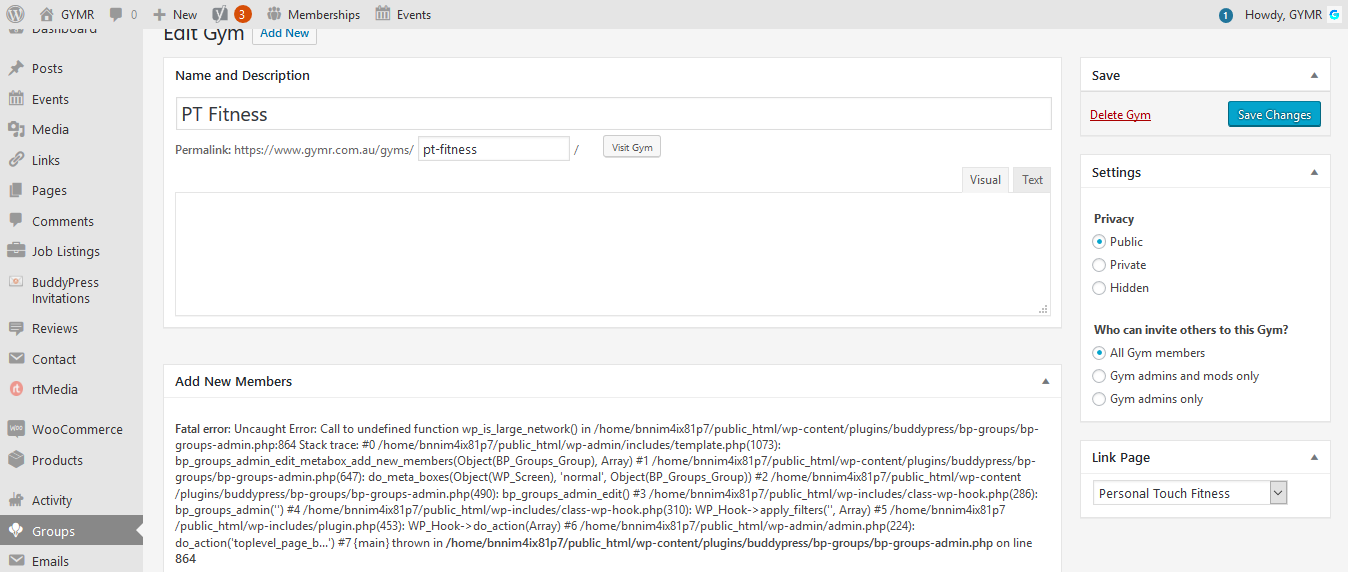
I deactivated numerous plugins and really have absolutely no idea of this errors origins!
Please help when you have the chance as I am unable to add members to groups.
Hi everyone! I have one strange issue with my WordPress site and I hope someone can help resolve it. So my website is a social network. It requires a user to log in, once logged in as a user I can open the title bar menu and buddy panel menu with no problem. However, when I click on my profile, which ultimately sends me to the buddy press site, for some reason buddy press is adding username slug/prefix to menu urls. So basically it’s like this:
My original menu url is: http://mywebsite.com/pagename
When I click on my profile and then want to click on menu item then it’s like: http://usernamemywebsite.com/pagenameI tried to resolve this by adding menu item as a custom link but that solution won’t work.
Is there some option in Buddypress to turn it off or maybe some code in php file needs to be changed?
I appreciate your time reading my post and hope to get some solution. Thanks
Topic: Suggestion for plugin
Hi i would like to know what third party plug in will work as a business directory for buddypress, also recommend me please what theme will work with it
Buddypress version 3.2.0
Wordpress version 4.9.8
thanks to the community“HTTP Error 404.0 – Not Found”
Basically, wordpress\members directory and sub-directories seem to be missing from my IIS WordPress install. I am using the “Alliance” theme from Themeforest.net for a company intranet I was tasked with creating, however, it relies on buddypress which I cannot seem to get working for the past month..
I have tried everything I can think of including pretty permalinks, web.config file, a fresh Windows Server 2016 load, fresh PHP 7.2, fresh MySQL 5.5, and fresh PhpMyAdmin.
The Alliance theme comes with one click demo data import which should show a few users with messages in their inbox, etc. Everytime I try to visit one, it gives 404 error. I follow the Physical Path in error output to discover the wordpress\members\….etc doesn’t exist.Help! lol
Topic: Logged in user link to Inbox
Hi all,
Any help greatly appreciated.
I need to allow logged in users to see their inbox in my site moovrmatch.co.uk. It’s available at moovrmatch.co.uk/members/<user name> but I can’t see how to add this to a page. I’d thought I’d find a shortcode / attribute to include within the ‘members’ page but can’t find one.
I’ve installed WordPress 4.9.8, Buddypress 4.0.0 and using the Memberlite theme.
Thanks in advance,
Richard.
Topic: BuddyPress Errors
I am getting the following errors in my log. Smart Slider has advised these are all in relation to BuddyPress.
Can you advise please:
[:error] [pid 26609] [client 82.13.30.68:43414] WordPress database error Table ‘wp_nextstagechoir.g’ doesn’t exist for query SELECT COUNT(DISTINCT g.id) FROM g /* From [nextstagechoir.com/backstage-dashboard] in [/nas/content/live/nextstagechoir/wp-content/plugins/buddypress/bp-groups/classes/class-bp-groups-group.php:1376] */ made by require(‘wp-blog-header.php’), require_once(‘wp-load.php’), require_once(‘wp-config.php’), require_once(‘wp-settings.php’), do_action(‘plugins_loaded’), WP_Hook->do_action, WP_Hook->apply_filters, call_user_func_array, smart_slider_3_pro_plugins_loaded, require_once(‘/plugins/nextend-smart-slider3-pro/includes/smartslider3.php’), require_once(‘/plugins/nextend-smart-slider3-pro/nextend/nextend.php’), require_once(‘/plugins/nextend-smart-slider3-pro/nextend/library/library.php’), N2Loader::import, N2Loader::importPath, require_once(‘/plugins/nextend-smart-slider3-pro/nextend/library/libraries/localization/localization.php’), N2LocalizationAbstract::load_plugin_textdomain, N2Localization::getLocale, get_user_locale, wp_get_current_user, _wp_get_current_user, wp_set_current_user, do_action(‘set_current_user’), WP_Hook->do_action, WP_Hook->apply_filters, call_user_func_array, membershipcore->set_current_user, membershipcore->generateSession, apply_filters(‘memberium_session_filter’), WP_Hook->apply_filters, call_user_func_array, BP_Groups_for_MemberiumAutoJoin, BP_Groups_Group::get
Hey All!
It’s me again. I upgraded from BuddyPress 3.2.0 to 4.0.0. After the Upgrade the “Add Members” Form on the Group Page in the Backend was empty. I only got the title “Add new member”.
Is there any workaround?
Thanks in Advance
frostthoWordPress Version 4.9.8
BuddyPress Version 4.0.0
BuddyPress Plugin: LH Private BuddyPress 1.0.8
Running on Apache / Ubuntu 18.04WordPress version 4.9.8
BuddyPress version 4.0.0
theme SocialChef – Social Recipe WordPress ThemeTo the right sidebar’s member widget,
The profile image is not displayed.
What should I do now?


Running wordpress 4.9.8 with Antenna theme.
I am having an issue where some of the comment threads do not show all the comments in the thread once it gets over a certain amount of comments in the thread (usally around 5-7) and it does not show the “show all comments” option either like it normally does on a post with a lot of comments in the thread.
Please let me know how I can fix this. Thank you!
-JPMorgains