Skip to:
Content
Pages
Categories
Search
Top
Bottom

Search Results for 'wordpress'

Viewing 25 results - 751 through 775 (of 32,678 total)
  • Author
    Search Results
  • #328143
    Jakob Helmer
    Participant

    Hello, since the new version I can not update posts anymore. I reverted it back to version 10.6.0 and everything is working fine. It would be nice if someone could help me out. Thank you!

    WordPress version 6.1.1
    BuddyPress (version 11.0.0)
    PHP version 8.0.26

    Foutdetails
    ===========
    Een fout van het type E_ERROR werd veroorzaakt op regelnummer 233 van het bestand /home/deb74155/domains/rugzaklopers.nl/public_html/wordpress/wp-content/plugins/buddypress/bp-blogs/bp-blogs-activity.php. Foutmelding: Uncaught ArgumentCountError: 3 arguments are required, 2 given in /home/deb74155/domains/rugzaklopers.nl/public_html/wordpress/wp-content/plugins/buddypress/bp-blogs/bp-blogs-activity.php:233
    Stack trace:
    #0 /home/deb74155/domains/rugzaklopers.nl/public_html/wordpress/wp-content/plugins/buddypress/bp-blogs/bp-blogs-activity.php(233): sprintf()
    #1 /home/deb74155/domains/rugzaklopers.nl/public_html/wordpress/wp-includes/class-wp-hook.php(308): bp_blogs_format_activity_action_new_blog_post()
    #2 /home/deb74155/domains/rugzaklopers.nl/public_html/wordpress/wp-includes/plugin.php(205): WP_Hook->apply_filters()
    #3 /home/deb74155/domains/rugzaklopers.nl/public_html/wordpress/wp-content/plugins/buddypress/bp-activity/bp-activity-functions.php(1633): apply_filters()
    #4 /home/deb74155/domains/rugzaklopers.nl/public_html/wordpress/wp-content/plugins/buddypress/bp-activity/classes/class-bp-activity-activity.php(209): bp_activity_generate_action_string()
    #5 /home/deb74155/domains/rugzaklopers.nl/public_html/wordpress/wp-content/plugins/buddypress/bp-activity/classes/class-bp-activity-activity.php(167): BP_Activity_Activity->populate()
    #6 /home/deb74155/domains/rugzaklopers.nl/public_html/wordpress/wp-content/plugins/buddypress/bp-activity/bp-activity-functions.php(2379): BP_Activity_Activity->__construct()
    #7 /home/deb74155/domains/rugzaklopers.nl/public_html/wordpress/wp-content/plugins/buddypress/bp-activity/bp-activity-functions.php(4176): bp_activity_post_type_update()
    #8 /home/deb74155/domains/rugzaklopers.nl/public_html/wordpress/wp-includes/class-wp-hook.php(308): bp_activity_catch_transition_post_type_status()
    #9 /home/deb74155/domains/rugzaklopers.nl/public_html/wordpress/wp-includes/class-wp-hook.php(332): WP_Hook->apply_filters()
    #10 /home/deb74155/domains/rugzaklopers.nl/public_html/wordpress/wp-includes/plugin.php(517): WP_Hook->do_action()
    #11 /home/deb74155/domains/rugzaklopers.nl/public_html/wordpress/wp-includes/post.php(5347): do_action()
    #12 /home/deb74155/domains/rugzaklopers.nl/public_html/wordpress/wp-includes/post.php(4607): wp_transition_post_status()
    #13 /home/deb74155/domains/rugzaklopers.nl/public_html/wordpress/wp-includes/post.php(4819): wp_insert_post()
    #14 /home/deb74155/domains/rugzaklopers.nl/public_html/wordpress/wp-admin/includes/post.php(426): wp_update_post()
    #15 /home/deb74155/domains/rugzaklopers.nl/public_html/wordpress/wp-admin/post.php(227): edit_post()
    #16 {main}
    thrown

    wingflap
    Participant

    I’m using the latest WordPress and Buddypress. From the Dashboard, If I click Settings and then Buddypress, there are 3 tabs to change settings: Components, Options, and Pages. When I select Components or Options, I don’t see the “Save Changes” button below the tables with the settings. On the Pages tab, the button apprears.

    I’m using the Phlox theme. When I change to the Twenty-Twenty-Three theme, the buttons do show.

    When I examine the elements in my browser, I can see that the button is in the HTML for Components and Options, but is wrapped by a <p> tag with a class of Submit and Clear. On the Pages tab, the button is wrapped by a <p>tag with only a class of Submit.

    The Phlox Theme is using a class Clear which includes overflow: hidden and visibility: hidden. The Twenty-Twenty-Three theme is using a class Clear without the overflow or visibility attributes.

    Is the “Clear” class in the <p> for the Components and Options tabs a mistake or does Phlox need to change the way it defines Clear?

    It’s frustrating to have to inspect elements and change the overflow and visibility every time I want to change any of these settings.

    Advice on this would be greatly appreciated.

    #328116
    la_ri_za
    Participant

    Hi,
    I noticed one strange thing when I checked BuddyPress Emails section on WordPress Dashboard. Many of the “situations” are missing. So it looks like the emails are not connected to any situation. That would explain why the system is not sending them. What about you?
    I wonder also if this has something to do with my multilingual setup: I’m using Polylang and Multilanguage BuddyPress with Polylang plugin (https://github.com/awsmug/multilanguage-buddyPress-with-polylang). It used to work perfectly…

    #328107
    Anonymous User 18187419
    Inactive

    Storml, recently a similar issue was caused by a custom theme, try testing with a default WordPress theme.

    #328104
    Shuvo Sarker
    Participant

    I use BuddyPress And Paid Memberships Pro on my website. So, My Problem is, When Members post anything in BuddyPress. Then non-members can’t see their posts. I want when any member posts anything then this post can see any user. Please give me a solution. How to make this. My website link is: https://nachbarschaftshilfe-ostholstein.de/

    My WordPress version: 6.0.3
    BuddyPress Plugin Version: 10.3.0
    Paid memberships pro version: 2.9.8
    Paid Memberships Pro – BuddyPress & BuddyBoss Add On: 1.3.1

    #328103
    Anonymous User
    Inactive

    Hi @fantamily

    Thanks a lot for your feedback. The issue is actually caused by some custom code wrongly using the bp_get_send_message_button_args filter. Instead of returning an empty array to disable the private button on members profile header, this custom code retuns false.

    That being said. We should be more cautious about this potential wrong usage, so we’ll have it fixed asap (next minor version 11.1.0).

    See https://buddypress.trac.wordpress.org/ticket/8800 to follow our progress about it.

    #328095
    Anonymous User
    Inactive

    Hi @yoshibot,

    Here’s the link to download previous version of BuddyPress: https://downloads.wordpress.org/plugin/buddypress.10.6.0.zip

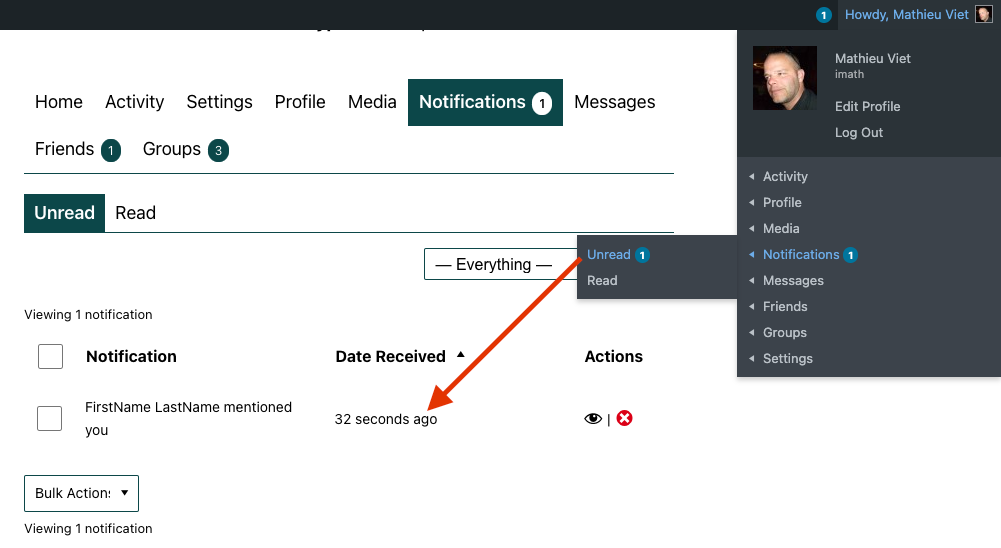
    FWIW, I can’t reproduce the issue you shared about notifications. For me everything works as expected, see:

    Notifications screen

    #328068
    Moench87
    Participant

    Hello, I have the following questions. Does buddypress use the user roles of wordpress?
    I would like to include a separate forum for individual events on my website, that relates only to the topic of the event. Is this possible?

    #328051
    saiwin12
    Participant

    Hello, I immediately apologize for my language. In general, the versions are all the latest and wordpress and buddypress. website https://withoutbadhabbits.ru / The problem is that if you log in via social networks, then it is not possible to change the avatar, and if you register through the standard form, everything works (login via social networks via the socializer) . Tell me what’s wrong I’m new to this business

    terminus
    Participant

    Hello,

    I’m using WordPress 6.1.1 running Twenty Twenty-Three theme, BuddyPress Version 11.0.

    https://math.cwelms.org/

    I’ve seen similar topics to mine here, which is this:

    BuddyPress Forum works fine, but I cannot create any BuddyDocs, linked to a BuddyGroup. When I try to create on the frontend, I end up on a page that says, “Archives: Doc, Create a Doc” but when I click on the Create a Doc link, nothing happens.

    I can create BuddyDocs on the Dashboard, but can’t connect them to a group.

    I created an open ‘beta’ group if you want to try yourself.

    when i drop back to the Twenty Twenty theme, I can create docs, which makes me think that the issue is somewhere with the WordPress editor.

    When I revert to the Twenty Twentythree theme, the docs I created when using the TwentyTwenty theme are still there and editable.

    What do I need to do with the TwentyTwenty-Three theme to create BuddyDocs?

    robert lewis

    #328038
    AWOL
    Participant

    @officialmymilestonecard
    I think you have a different issue – this is just an error appearing in debug logs, and certainly in my case it is not visually affecting anything I am aware of, maybe slowing the site down though. I would start a new thread if you haven’t already, and include any extra information you can to help others diagnose the problem, such as any errors in the console, debug logs, or any other info like which version of wordpress, theme etc. You might also want to try deactivating then reactivating Buddypress before all that to see if it helps.

    #328030
    wearebitcoin
    Participant

    Hello, my WP version is 6.1.1 my BuddyPress version is 11.0.0

    I used the Theme https://themeforest.net/item/armadon-gaming-community-wordpress-theme/27957394?gclid=Cj0KCQiAiJSeBhCCARIsAHnAzT_68l6iD7qmpDX1_KFM-VnNqRGmsOrPpQ1dfq7xAjjg6jMI0PdAUDkaAlK0EALw_wcB

    I get this issue when users attempt to log in into my website they get the message “Method not Allowed” and I can’t seem to be able to fix it

    #328019
    AWOL
    Participant

    I would like to add my name to this list but I am only getting the line 1577 error. I am wondering if it might be related to either or both of the following things – I have Better Messages plugin installed and I am running PHP version 8.1. Can the other two who have posted say if they have one or both of these things? There might be a common denominator. I am running the most recent updates of WordPress and of course Buddypress.

    #328018
    luixv
    Participant

    I am using the following:
    WP Version: 6.1.1
    Permalink: /%postname%/
    Active Theme: BuddyX 4.4.5
    Platform: Windows
    Browser Name Chrome
    PHP Version: 8.0.7
    MySQL Version: 5.5.5
    The plugins I have are these:

    Activity Plus Reloaded for BuddyPress 1.0.8
    Akismet Anti-Spam 5.0.2
    BP Friends Suggestions Widget 1.1.0
    BP Profile Search 5.4.7
    BuddyPress 11.0.0
    BuddyPress Activity ShortCode 1.1.8
    BuddyPress Extended Friendship Request 1.2.1
    BuddyPress Global Search 1.2.1
    BuddyPress Login Redirect to Profile 1.2.3
    BuddyPress Profile Completion 1.0.8
    BuddyPress Simple Terms And Conditions 1.3
    BuddyPress Xprofile Custom Field Types 1.2.5
    Classic Editor 1.6.2
    Classic Widgets 0.3
    Colorlib Login Customizer 1.3.1
    CookieYes | GDPR Cookie Consent 3.0.8
    Custom Font Uploader 2.0.0
    Duplicator 1.5.1
    Easy Registration Forms 2.1.1
    Force Login 5.6.3
    GEO my WP 3.7.2.1
    Kirki Customizer Framework 4.0.24
    Quick and Easy FAQs 1.3.6
    Shared Counts 1.4.1
    Verified Member for BuddyPress 1.2.6
    Wbcom Designs – BuddyPress Member Reviews 2.8.3
    WordPress Username Availability Checker 1.1.8

    I have configured a new Register page using ERForms. I’ve created just a wordpress page which has only a shortcode to the ERform.
    I’ve set it at buddypress settings-> Pages -> register. Buddypress is redirecting to the wordpress regitration page instead of my page.
    I’ve also changed the redirection at buddypress setting to whatever page (for example my FAQ page) and always redirects to the wordpress registration page.

    I’ve tried also deactivating all plugin but buddypress and ERforms and no, buddypress is always redriecting to the standard wordpress registration page instead of what I am setting.

    Any hint / idea what to cope this problem?

    Thnks in advance

    #328011
    Anonymous User 18187419
    Inactive

    Hi, I’m not sure about that, reach out to your theme developer for advice.

    Meantime, easiest & safest way for you to add code snippets to your site would be to use the free plugin Code Snippets, get it from the wordpress.org plugins page.

    #327978
    sidman01
    Participant

    Wordpress version is 6.1.1
    Buddypress version is 11.0.0
    my website ULR is https://mymuslimlover.com/
    I need help in fixing the issue about creating group, the link works fine and after allowing me to create the group name and descriptions it wont load to next page it will only say the link as expired.
    that’s why I come for support to help me fix this issue cus this is the only thing that delay the website from being lunch to audience.
    please any help to fix this issue once and for all.
    Thanks in advance

    #327965
    Anonymous User
    Inactive

    Hi @philippklaschka

    Thanks for your report, this issue seems to be caused by this plugin https://github.com/projectestac/wordpress-invite-anyone/ It hooks to bp_core_install_emails to run the function ass_install_emails that does not exist see: https://github.com/projectestac/wordpress-invite-anyone/blob/master/by-email/by-email.php#L1710

    I advise you to deactivate this plugin, update BuddyPress and then reactivate this plugin once done. The bp_core_install_emails hook is only fired by BuddyPress when you install/upgrade and use the tool to reinstall emails, so it should be ok. But I strongly advise you to contact the plugin author so that he fixes this issue.

    Hi @netmanuth

    Thanks for your report, I’ll check BuddyX, but I doubt issue is with this theme.

    #327964
    philippklaschka
    Participant

    tried 3 times to update and every time it blows up my backend with this fatal error. Have to roll back all plugins via database and reactivate all just to roll back this patch.
    Can someone decipher whats going on here?

    Fatal error: Uncaught TypeError: call_user_func_array(): Argument #1 ($callback) must be a valid callback, function “ass_install_emails” not found or invalid function name in /homepages/17/d4296816486/htdocs/wordpress/wp-includes/class-wp-hook.php:308 Stack trace: #0 /homepages/17/d4296816486/htdocs/wordpress/wp-includes/class-wp-hook.php(332): WP_Hook->apply_filters(”, Array) #1 /homepages/17/d4296816486/htdocs/wordpress/wp-includes/plugin.php(517): WP_Hook->do_action(Array) #2 /homepages/17/d4296816486/htdocs/wordpress/wp-content/plugins/buddypress/bp-core/admin/bp-core-admin-schema.php(555): do_action(‘bp_core_install…’) #3 /homepages/17/d4296816486/htdocs/wordpress/wp-content/plugins/buddypress/bp-core/bp-core-update.php(770): bp_core_install_emails() #4 /homepages/17/d4296816486/htdocs/wordpress/wp-content/plugins/buddypress/bp-core/bp-core-update.php(291): bp_update_to_11_0() #5 /homepages/17/d4296816486/htdocs/wordpress/wp-content/plugins/buddypress/bp-core/bp-core-update.php(159): bp_version_updater() #6 /homepages/17/d4296816486/htdocs/wordpress/wp-includes/class-wp-hook.php(308): bp_setup_updater(”) #7 /homepages/17/d4296816486/htdocs/wordpress/wp-includes/class-wp-hook.php(332): WP_Hook->apply_filters(NULL, Array) #8 /homepages/17/d4296816486/htdocs/wordpress/wp-includes/plugin.php(517): WP_Hook->do_action(Array) #9 /homepages/17/d4296816486/htdocs/wordpress/wp-content/plugins/buddypress/bp-core/admin/bp-core-admin-actions.php(120): do_action(‘bp_admin_init’) #10 /homepages/17/d4296816486/htdocs/wordpress/wp-includes/class-wp-hook.php(308): bp_admin_init(”) #11 /homepages/17/d4296816486/htdocs/wordpress/wp-includes/class-wp-hook.php(332): WP_Hook->apply_filters(NULL, Array) #12 /homepages/17/d4296816486/htdocs/wordpress/wp-includes/plugin.php(517): WP_Hook->do_action(Array) #13 /homepages/17/d4296816486/htdocs/wordpress/wp-admin/admin.php(175): do_action(‘admin_init’) #14 /homepages/17/d4296816486/htdocs/wordpress/wp-admin/plugins.php(10): require_once(‘/homepages/17/d…’) #15 {main} thrown in /homepages/17/d4296816486/htdocs/wordpress/wp-includes/class-wp-hook.php on line 308

    #327960
    smithparker7
    Participant

    As one of the most popular content management systems, WordPress is, unfortunately, a target for hackers and other malicious individuals. That’s why today, you’ll learn all about WordPress security statistics.

    WordPress Security Statistics
    Here are some of the most widely known WordPress security statistics.

    37 WordPress Security Statistics 2022
    1- WordPress is the most attacked CMS
    2- WordPress remains the most lucrative target for hackers
    3- 90,000 attacks per minute attacks on WordPress
    4- Number of sites attacked due to weak password
    5- Number of WordPress sites hacked every day
    6- WordPress vulnerabilities caused due to out-of-date plugins
    7- Automated attacks on WordPress sites
    8- WordPress is the most vulnerable CMS
    9- Number of sites hacked due to fake plugins

    Here are few WordPress security statistics

    Helani De SIlva
    Participant

    Hello,

    First of all, this plugin is pretty cool. But I’m stuck on a problem. That’s I create forum using bbpress. I gave the registered visiters the Moderator forum role. But I tested it as a user(like visitor), when I submit it, that forum showing in the site without approving admin. And also the new user role in site as Contributor. So I want a help from you to solve this issue. Please reply as soon as possible.

    Thank you & Best regards,
    Helani

    #327952
    The Network Manager
    Participant

    My experience is the same as Helga006’s. I also reach-out out to the developer of the theme I use since Lars appear not to have any challenge updating using the BuddyX-theme.
    Here is the error I receive.

    “There has been a critical error on this website. Please check your site admin email inbox for instructions.
    Learn more about troubleshooting WordPress.”

    After the update I am not able to access the admin backend.

    Lars Henriksen
    Participant

    Hello

    I use the BuddyX theme, and hide the WordPress menu for my users.

    Is there any way to let users change email via the Buddypress user menu?

    Thanks,
    Lars

    CGC studio
    Participant

    WordPress v 6.1.1
    BuddyPress v 11.0.0

    Theme Onecommunity (latest version 3.7.8) (https://themeforest.net/item/onecommunity-buddypress-theme/3713046?gclid=CjwKCAiAqt-dBhBcEiwATw-ggL19B1O2bH4PjCwmpFyse_KZ7o4KEGnurStZcFrqDBd1d-3rDApwZxoC22cQAvD_BwE)
    My frontend test Site: https://staging-rezodenthodenthcom-staging.kinsta.cloud/

    Hi there!

    1/ After updating my hosted site from php 7.4 to 8.0 (Kinsta hosting), buddypress causes the following critical syntax error !

    2023/01/06 13:48:41 [error] 43493#43493: *668 FastCGI sent in stderr: “PHP message: PHP Parse error: syntax error, unexpected token “;”, expecting “)” in /www/rezodenthodenthcom_528 /public/wp-content/themes/onecommunity/buddypress/groups/single/group-header.php on line 29

    The site (front and backend) is still visible but the groups are not displayed anymore in groups single page
    Could you please be kind enough to help solving this first problem?

    2/ I usually use a child theme with two small custom codes that worked fine in php 7.4 but with php 8.0, I have a new FTAL error. So it appears that this function somehow is not working correctly with the child theme enabled: call_user_func_array()
    From that stack trace in the Fatal error, it is referencing BuddyPress with it:
    #2 /www/rezodenthodenthcom_528/public/wp-content/plugins/buddypress/bp-core/bp-core-dependency.php(407): do_action(‘bp_widgets_init’)

    As far as I know, our custom codes were very limited in 2 templates :

    Template 1: group-sidebar.php  :
    WE CHANGED THIS CODE:
    $group_id = bp_get_current_group_id();
    echo do_shortcode( ‘[rtmedia_gallery context=”group” per_page=”6″ context_id=”5″ context_id=”‘ . $group_id . ‘”]’ );
    BY THAT ONE:
    if ( bp_group_is_visible() ) :
    $group_id = bp_get_current_group_id();
    echo do_shortcode( ‘[rtmedia_gallery context=”group” per_page=”6″ context_id=”5″ context_id=”‘ . $group_id . ‘”]’ );
    endif;

    Template 2: group-sidebar.php (for customiszation image ads in widget column) with this code:
    <div class=”bp-sidebar-details”>
    <div class=”bp-sidebar-details-category first”><?php _e(‘Advertisement’, ‘onecommunity’); ?></div>
    <div class=”col-1-ads”>
    [widget id=”media_gallery-3″]
    </div>

    I don’t understand what could interfere in php 8.0 environment!
    What do you think about it? and could you help me to solve this second issue?

    Thank you for your appreciated help ; )

    C. GARCIA

    #327881
    mwatkins197
    Participant

    Hi, I have set up buddy press on a newly installed website, however I am encountering the following error (see below) after I create group after filling in the name and description and pressing create group and continue. Can anyone help. Thanks

    Notice: Function WP_Object_Cache::delete was called incorrectly. Cache key must be integer or non-empty string, NULL given. Please see Debugging in WordPress for more information. (This message was added in version 6.1.0.) in /homepages/42/d941307253/htdocs/clickandbuilds/imaginarhub/wp-includes/functions.php on line 5835

    Warning: Cannot modify header information – headers already sent by (output started at /homepages/42/d941307253/htdocs/clickandbuilds/imaginarhub/wp-includes/functions.php:5835) in /homepages/42/d941307253/htdocs/clickandbuilds/imaginarhub/wp-content/plugins/buddypress/bp-groups/actions/create.php on line 171

    Warning: Cannot modify header information – headers already sent by (output started at /homepages/42/d941307253/htdocs/clickandbuilds/imaginarhub/wp-includes/functions.php:5835) in /homepages/42/d941307253/htdocs/clickandbuilds/imaginarhub/wp-content/plugins/buddypress/bp-groups/actions/create.php on line 172

    Warning: Cannot modify header information – headers already sent by (output started at /homepages/42/d941307253/htdocs/clickandbuilds/imaginarhub/wp-includes/functions.php:5835) in /homepages/42/d941307253/htdocs/clickandbuilds/imaginarhub/wp-includes/pluggable.php on line 1416

    Warning: Cannot modify header information – headers already sent by (output started at /homepages/42/d941307253/htdocs/clickandbuilds/imaginarhub/wp-includes/functions.php:5835) in /homepages/42/d941307253/htdocs/clickandbuilds/imaginarhub/wp-includes/pluggable.php on line 1419

    boxhamster
    Participant

     Hi,

    WordPress: 6.1.1
    BuddyPress: 10.6.0

     I wanted to inform you of the warning I just got on
     https://scanner.pcrisk.com/ in regards to BP. I’m aware this might just be
     a false positive. In that case, please ignore, but is this something other people also get or something up with my particular setup?

     /wp-content/plugins/buddypress/bp-core/js/vendor/jquery-
     cookie.min.js?ver=10.6.0
     Severity: Potentially Suspicious
     Reason: Detected potentially suspicious initialization of function pointer
     to JavaScript method String.replace Ccode E __tmpvar1170183340 =
     String.replace; Ccode/ E
     Details: Detected potentially suspicious content.
     Offset: 264
     Threat dump: View code (see below)
     File size[byte]: 1229
     File type: ASCII
     MD5: AD70A8BA0464EF7223BA502399938847
     Scan duration[sec]: 0.045

     The following code was shown under “View code”:
     [[==e.indexOf(‘”‘)%26%26(e=e.slice(1,-1).replace(/\\”/g,'”‘).replace(/\\\\/g,”\\”));try{return
     e=decodeURIComponent(e.replace(n,”
     “)),x.json?JSON.parse(e):e}catch(e){}}(e);return”function”==typeof
     o?o(e):e}var x=d.cookie=function(e,o,n){var i,t;if(void 0!==o%26%26″f]]

Viewing 25 results - 751 through 775 (of 32,678 total)
Skip to toolbar