Search Results for 'wordpress'
-
Search Results
-
I have wordpress 3.7.1, buddypress and s2member pro installed. I have two membership levels created, s2member_level1 (level 1) paying members, and s2member_level0 (subscribers) free users. I would like to remove the subscribers from my member list. How would I go about doing this?
Hi,
We have a search members plugin on this page https://members.aelert.net/groups/aelert-members-discussion-forum/ . the search only returns active members and we wanting it to be able to search for all BP members. How do we get the search to search all members?
Wordpress 3.7.1
Buddy Press 2.5.1Thanks,
DebbieHi,
I am currently using the Follow plugin : http://wordpress.org/plugins/buddypress-followers/
So I’d like to remove the ‘Add as friend’ feature to avoid my users to choose between ‘Adding as a friend’ and ‘Follow’ another user.
Do you guys know how I could do that ?
Thks
Laurent
hello, i have a strange tag on the top of the member profile page.
I have try differents themes, but still the same.
I give you a image :

I use wordpress 3.7.1
buddypress 1.8.1
buddypress activity plus 1.5How to fix that?
thank youTopic: Profile Link in Plugins
I use WordPress and the buddypress default template
Now i have installed the Plugin named custom login widget… whatever
i would add the profile link for the buddypress profile in this widget but
is not working.
any solutions?
mercime know that 😀 im sure
Hello All,
I am using WordPress + BuddyPress. and I want to integrate social networks like Facebook, twitter, linked in, YouTube, Google+, Flickr and more.
my requirement is when i am posting my status (any type like simple status or video or images) from buddpress it will automatically posted to buddypress and my social networks and my friends social networks also which is available with site and authorized social network.
when any one can commented on that status on their social networks it will display on buddypress as well. means i need two way sync with social networks.
Is this possible with buddypress?
Topic: edit profile fields missing
Searched endlessly without a clear answer. Don’t get why we can create endless profile custom profile fields but they’re totally inaccessible afterward. Clicking the “your profile” link in the backend brings up a page that has none of the custom fields and a ton of wordpress junk that we don’t even use.
Think this should be more plug n play instead of requiring massive PHP editing. 🙁
Topic: bp-custom code not working
The development is running the following versions of software:
WordPress v3.7.1
BuddyPress v1.8.1
Custom BuddyPress theme based on Genesis Framwework v2.0.1I have the following code in my bp-custom.php file which I placed in the mu-plugins folder
add_action( ‘bp_setup_nav’, ‘vm_setup_nav’ );function vm_setup_nav() { global $bp; // Remove a menu item //$bp->bp_nav['activity'] = false; // Change name of menu item $bp->bp_nav['settings']['name'] = "Password & Cart Settings"; // Change name of menu item $bp->bp_nav['groups']['name'] = "Circles"; }It wasn’t working. I changed the plugin location from wp-content/mu-plugins to wp-content/plugins and it didn’t work there either. When I put this same code in the theme’s functions file, it works.
What am I doing wrong?
Topic: Username Validation
Hi, I am not entirely sure if this should be posted on the wordpress forums or here. I think that since this PHP script is using data in the buddypress registration page, that here is the place.
Anyway, I am trying to set up a website for my Minecraft Server that I have been hosting for the past few months. I am using the code below to only allow players with a premium Minecraft account to register on the website, in order to block spammers. The link in the code (http://www.minecraft.net/haspaid.jsp?user=) will print a boolean changing if the account name is valid or not. The name is put after the “=” and if it is valid, “true” will be printed, and if it isn’t valid “false” will be printed.
I am trying to make it that the name is checked before the account is made. What should happen is that the username is taken and checked on the Minecraft database, and allow the user to register if “true” is echoed, and if “false” is echoed, the registration will not be allowed to continue.
The issue is, that I am really not skilled in PHP at all, and I can’t find out why this code isn’t working. It makes no visible change to anything, and registration continues as if it wasn’t there. If anyone could give me a hand here, that would be great. Here is my Code.
<?php
/*
   Plugin Name: Minecraft Username Validator
   Description: Minecraft username Validation
   Version: 0.1
   Author: JeremyPark123999
*/

/* Register actions */
add_action('registration_errors', 'verify_mc_account', 10, 3);
add_action('admin_menu', 'add_mcval_options');

/* Check account on minecraft.net */
function verify_mc_account( $errors, $login, $email ) {
	//$user_info = get_userdata(1);
	$user_info = get_user_by('login', $login );
	$options = array(
        'timeout' => 5,
    );
    $mcacct = wp_remote_get('http://www.minecraft.net/haspaid.jsp?user='.$user_info->user_login);

    if ( $mcacct == 'false' ) {
        if ( $mcacct == 'false' ) {
            $errors->add('mc_error',__('<strong>ERROR:</strong> Minecraft account is invalid.'));
        } else {
            $errors->add('mc_error',__('<strong>ERROR:</strong> Unable to contact minecraft.net.'));
        }
    }
    return $errors;
}
/* Activation/Deactivation */
function set_mcval_options() {
    add_option('hide_me', 'false');
}

function unset_mcval_options() {
    delete_option('hide_me');
}

register_activation_hook(__FILE__, 'set_mcval_options');
register_deactivation_hook(__FILE__, 'unset_mcval_options');

/* Add admin menu */
function add_mcval_options() {
    if ( get_option('hide_me') != "true" ) {
        add_options_page('Minecraft Validator Options', 'Minecraft Validator', 8, 'mcval-options', 'mcval_options');
    }
}

/* Display options page */
function mcval_options() {
    ?>
<?php }
My website is at tumbleweed-mc.net
Topic: Extended Profiles deleted
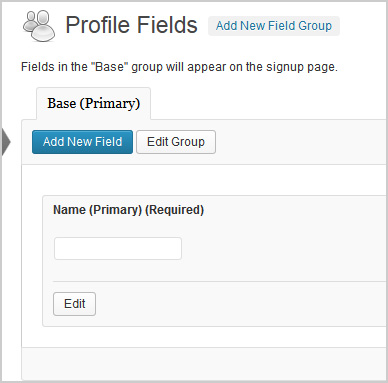
Hi,
The pic above shows what the extended profile field should look like. I had a plugin called Buddypress Real Names which allowed me to delete that field above. Silly me, now my extended profiles are not working. It shows blank under profile fields on my registration page and does not send a confirmation email to new users. However, if extended profiles are turned off, all works fine.
1. Which version of WordPress are you running?
3.7.12. Did you install WordPress as a directory or subdomain install?
Directory3. If a directory install, is it in root or in a subdirectory?
root4. Did you upgrade from a previous version of WordPress? If so, from which version?
No5. Was WordPress functioning properly before installing/upgrading BuddyPress (BP)? e.g. permalinks, creating a new post, commenting.
Wordpress seems to be working fine6. Which version of BP are you running?
1.87. Did you upgraded from a previous version of BP? If so, from which version?
No8. Do you have any plugins other than BuddyPress installed and activated? If so, which ones?
Yes.
Admin Toolbar Remover
All In One WP Security
AVH First Defense Against Spam Plugin
BP Profile as Homepage
BuddyPress
BuddyPress Activity Plus
BuddyPress Activity Privacy
BuddyPress Wall
Contact Form
Custom Meta Widget
Disable RSS
Dynamic Widgets
Email Login
EU Cookie Law Compliance
Facebook Friends Inviter
Google Analytics for WordPress
Google XML Sitemaps
Restrict Usernames
Velvet Blues Update URLs
W3 Total Cache
WordPress SEO
WP-SpamFree
WP Block Admin
WP Content Filter
WP FLogin9. Are you using the standard BuddyPress themes or customized themes?
Standard10. Have you modified the core files in any way?
No11. Do you have any custom functions in bp-custom.php?
No12. If running bbPress, which version? Or did your BuddyPress install come with a copy of bbPress built-in?
Not running bbPress13. Please provide a list of any errors in your server’s log files.
14. Which company provides your hosting?
Mweb15. Is your server running Windows, or if Linux; Apache, nginx or something else?
UnixMy Info:
WordPress 3.7.1
BuddyPress 1.8.1
Site Link : http://duffitness.com/coachportalMy Question:
I am editing the display of profile information on individual profiles. Some files that I have edited are edit.php and profileloop.php… I have the file structure as plugins > buddypress > bp-templates > bp-legacy > buddypress > members > single > profile > “filename.php”
How do i insert this into my child theme so that it isn’t overwritten each time I complete an update…I did try using the complete structure listed above directly inside my child theme, but this did not produce any results. I am assuming this has to do with the fact that plugins are not in a theme orginally…?
Thanks so much for your help!!
Topic: Help with Buddy & bbpress
First, my site is Inspiration Point – http://inspiration-point.org Yesterday, I spent the bulk of my time in figuring out the best way to set up a forum for my WordPress blog. I’m using WordPress 3.7.1 and I downloaded buddypress 1.8.1 and bbpress 2.5.
I was admittedly confused by the LabSecret videos; as it didn’t have some of the stuff seen there. Sorry, I’m overtired and settled for Simple:press.
My blog is for showing off stories that I’ve written. I am not looking to major in running a forum and I don’t really want to get technical. My main like for Simple:press is the user interface used when configuring the groups, forums, usergroups and permissions.
Is there something similar for buddypress? Here’s a secondary question. Is it my imagination or are the two forum apps merging to become one? It’s almost like I need to have both bbpress and buddypress.
Topic: Custom Homepage. Please help
Hey everyone,
sorry in advance if there is a similar topic or if I posted in wrong forum. But, is there a possibility, for users to choose what blog categories, or authors post should be displayed on their homepage. Of course they have to be registered users. For example, out of categories, politics, sport, tech, wordpress, php, etc etc he chooses, in his control panel, just sport, tech and php.
Thank you!!


