Search Results for 'wordpress'
-
Search Results
-
Hiyya,
Firstly.. My Info :
WordPress Version 3.7.1
BuddyPress Version 1.8.1
Site : duffitness.com/coachportal/ – this site is private and only accessible by registered coaches, however I have attached an image of the title I am referring to.Okay, so I can activate new accounts with Google Chrome, Firefox, Opera and Safari but IE(8) redirects to login without activating…
I can have users go to the activate page and enter the activation key but that is not very user friendly.
I do receive this message when other browsers activate, but they do still activate the account…
“Warning: unserialize() expects parameter 1 to be string, array given in /”mysitedirectory removed for privacy”/wp-content/plugins/buddypress-notifications-manager/loader.php on line 77”
I did locate the source of this warning and I have attached a screenshot of the code…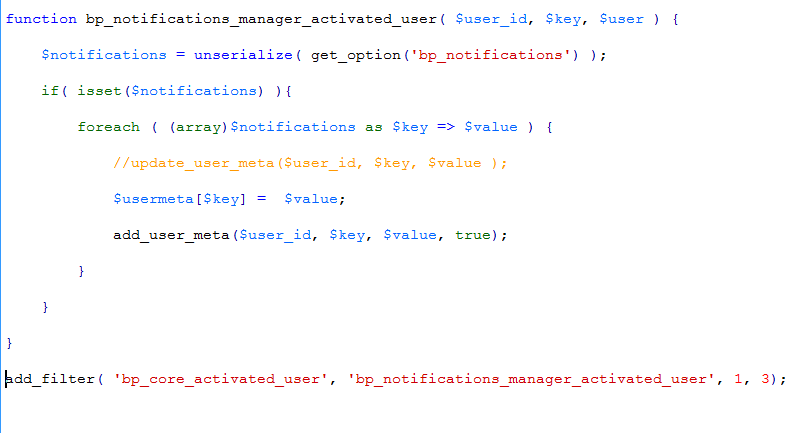
However, Upon disabling the notifications manager plugin I found that this is not the source of the problem. I now get no errors with any of the other browsers but IE redirects to log in without completing the activation process when a user clicks the link from their email and then returns the error…
“ERROR: Your account has not been activated. Check your email for the activation link.”
…when attempting to log in.Thanks for any insight into this problem… (Go figure it’d be IE that decides to be difficult, lol)
CasseyI’m trying to add og tags and inorder to do it I have to grab the content of a status update and the status update title (which would be so and so posted this and that so long ago) and put them in the <head> element.
To do that, I need to grab the info before entry.php fires, but after bp_Head();
I’ve scowerd your codex and can’t find any hint of how to do this.
For wordpress I’d just do something like $post->post_title() and $post_post_content()
.. super easy!!!How can this be done with bp posts? You know bp stuff is terribly lacking in SEO and I also want to add microdata to everything and I dont want to do it with action hooks.
please any BP devs here??? I’d appreciate the help.
Hello,
Before coming to problem I give u my website details
URL: http://www.nucleionline.info
wordpress: 3.7.1, (before it used to be 3.6.1)
Buddy press: 1.8.1Yesterday I received mail from Bluehost(my hosting provider) that they will stop support for Php 5.2 ina week and asked me to change config to php 5.4.
When I changed the version my site appears blank. But, when i Deactivate Buddypress Theme and also Plug-in it works fine.right now i revert the config to php 5.2. But, i hav only 5 days time to make it work in php 5.4. Could you Please help me out?
Thanks & Regards,
AkshayThis topic has been always important to my community project. Throughout the last 4 years I’ve tried several ways to reach a way working with different user profiles. If you search the forums you’ll see that others also did and still do.
Maybe my approach/solution will fit some of the requests.
First of all, I’ve to say THANK YOU to the following people/users:@henrywright-1 for some hints into the right direction
donmik, publisher of the wonderful Buddypress Xprofile Custom Fields Type plugin
and Brajesh Singh @sbrajesh for his usefull code snippets.So, what I needed and what was the solution?
I’m working on a platform for musicians and music fans. To give both usertypes different capabilities in their profiles I decided to give them different user roles.
To achive this, there are several wordpress plugins. Below you will find a list of the plugins I use.
In earlier versions of Buddypress I’ve used the WP Roles at Registration plugin together with Buddypress xProfiles ACL plugin. So I had the possibility to make the user chose a role at registration and a way to define what buddypress profile groups are shown in the different profile types. Both plugins haven’t been updated in the last two years but both still work. xProfiles ACL needs to be hacked – see this support thread .So far so good. But there is no way to include the user role (in my case “band” and “fan”) in buddypress search. My first attempt was to include the user role via some code snippet in my member-loop, but that seemed a bit complicated to me. I wanted a conjunction between the user role and buddypress search. So there had to be a way to select the user role through a xprofile field, ’cause xprofile fields can be searched and also displayed in the member-loop in several ways.
To stop confusing you, here’s what I’ve done:
required plugins:
- Buddypress xProfiles ACL with the hack mentioned a few lines earlier.
- Capability Manager Enhanced to define custom user roles, if you’re not satisfied with the default wordpress roles (subscriber, contributor,…).
The first step is to create your user roles, modify the ACL plugin and define some profile field groups that can be finally added to the different user roles/types.
Create a xprofile field (selectbox) with the title “User Role” and name the options “Band Role” and “Fan Role” – in my case. You can call them whatever you want. Place this field in the “base” profile group, otherwise it won’t be shown during registration. Also make the field “required”. In my case the user can’t decide, if the visibility of the field can be changed.In a second step you need to create a bp-custom.php in the root of your wordpress plugin folder (if you haven’t done this yet, cause you have other custom functions).
Put the following snippet in your bp-custom:<?php function custom_bp_core_signup_user($user_id) { $user_role = strtolower(xprofile_get_field_data('User Role', $user_id)); switch($user_role) { case "Band Role": $new_role = 'band'; break; case "Fan Role": $new_role = 'fan'; break; } wp_update_user(array( 'ID' => $user_id, 'role' => $new_role )); } add_action( 'bp_core_signup_user', 'custom_bp_core_signup_user', 10, 1);As you can see, I’ve included the title of the xprofile field in line 3. It’s important to put in the exact title of your xprofile field. The case “Band Role” and case “Fan Role” is the place to put your select options of the field. Finally $new_role has to be filled with the wordpress or custom user roles – important, otherwise it won’t work: in lowercase letters – in my case “band” and “fan”.
Save your bp-custom.php and you’re nearly done.
In my case I want to prevent the users to change their user role after registration (if you want to give them the possibility to do so, more hacking has to be done – but I’m not sure how to). Put another snippet in your bp-custom.php://hide the user role select field in edit-screen to prevent changes after registration add_filter("xprofile_group_fields","bpdev_filter_profile_fields_by_usertype",10,2); function bpdev_filter_profile_fields_by_usertype($fields,$group_id){ //only disable these fields on edit page if(!bp_is_profile_edit()) return $fields; //please change it with the name of fields you don't want to allow editing $field_to_remove=array("User Role"); $count=count($fields); $flds=array(); for($i=0;$i<$count;$i++){ if(in_array($fields[$i]->name,$field_to_remove)) unset($fields[$i]); else $flds[]=$fields[$i];//doh, I did not remember a way to reset the index, so creating a new array } return $flds; }Again, fill in the title of the profile field (User Role), where it’s indicated in the code.
That’s it. I hope I haven’t been too confusing. Ask if you need help.
Hi everyone i have installed buddypress in my wordpress site.
How do i use my own theme.?How can i use shortcode to page, so that buddypress forum automatics shows up ?
Regards
PromishStats: WP 3.7.1, BP 1.9, custom theme.
Hi there,
I’m a PHP/CSS3/HTML5/JS developer and I’ve managed to create my own theme with wordpress. While wordpress codex has helped me mostly along the way, I’m stumped on BP.
I’ve been studying the codex and also lurking among the forums. Searching high and low through the google, and really could use your help.
I need to change the HTML that is generated from multiple tags, specifically all the tags used in BP 1.9.
I would prefer to be able to grab the content that entry.php does Outside the loop, and throw it in the <head> title.
Everything I look up is just function after function. BP has functions that seem to go on an endless chain of functions and is very hard to understand when looking under the hood. So, how does one just grab the raw content?
Would like to be able to do sometihng like with wordpress: $post->date,author,image,content,excerpt,title. How would this be done with $bp???
Hiyya,
My Info :
WordPress Version 3.7.1
BuddyPress Version 1.8.1
Site : duffitness.com/coachportal/ – this site is private and only accessible by registered coaches, however I have attached an image of the title I am referring to.I want to change the titles of my buddypress pages. For example: I want to make “Sitewide Activity” read “Community Lounge” on that page. I have used my own page with the title Community Lounge and directed the activity feed to that page rather than buddypress’s default activity page. I have explored the code and found where it is but I have been unable to get the desired effect thusfar. Is there a specific file I need to access to change these titles?
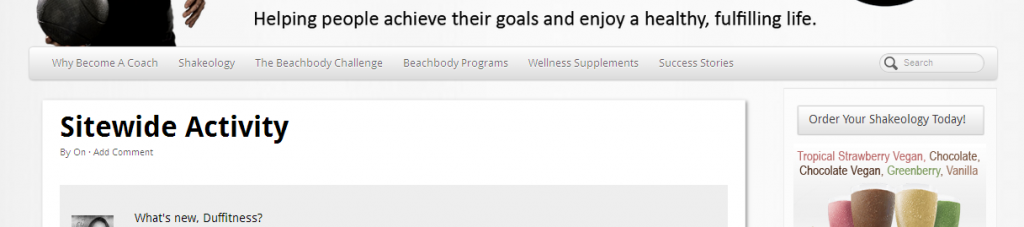
Any help is greatly appreciated!! Thanks,
CasseyHello,
Before coming to problem I give u my website details
URL: http://www.nucleionline.info
wordpress: 3.7.1, (before it used to be 3.6.1)
Buddy press: 1.8.1Yesterday I received mail from Bluehost(my hosting provider) that they will stop support for Php 5.2 ina week and asked me to change config to php 5.4.
When I changed the version my site appears blank. But, when i Deactivate Buddypress Theme and also Plug-in it works fine.right now i revert the config to php 5.2. But, i hav only 5 days time to make it work in php 5.4. Could you Please help me out?
Thanks & Regards,
AkshayTopic: Crop image not working
Hi,
I have recently installed latest version of buddypress on my website (www.pace2race.com).
When i upload a new avatar image it gives me a pre-cropped image and there are no crop tools.
Details:
Wordpress – 3.7.1
Theme – Dynamik theme on Genesis frameworkWhen i activate twenty ten theme, crop works correctly, so this is a theme issue. But i am unable to find what is causing the problem. This is the link of development site on which twenty ten is activated with all other setting exactly as the production site. (http://pace2race.staging.wpengine.com/)


