Search Results for 'wordpress'
-
Search Results
-
I noticed that users have to go to the WordPress backend to edit their account settings and this confuses a lot of them. Any suggestions?
Topic: Registration does not work
Hi all,
My site, hiddencove.villagegate.com, is having registration issues pertaining to Buddypress. When Buddypress is not activated, registration works entirely. However, once activated, the register link on the log in page (accessed by clicking on the link to any of the three portals) simply redirects back to the log in, preventing new user registration.
We have tried adding the following code as well:
function my_disable_bp_registration() {
remove_action( ‘bp_init’, ‘bp_core_wpsignup_redirect’ );
remove_action( ‘bp_screens’, ‘bp_core_screen_signup’ );
}
add_action( ‘bp_loaded’, ‘my_disable_bp_registration’ );add_filter( ‘bp_get_signup_page’, “firmasite_redirect_bp_signup_page”);
function firmasite_redirect_bp_signup_page($page ){
return bp_get_root_domain() . ‘/wp-signup.php’;
}and subsets of it. When put into the theme’s function.php, it seemed to have no effect. When put in bp-custom.php, the registration page is activated and an email is received to activate accounts, but clicking on the activation link redirects you to the log in page, before you ever receive a password.
We are using WordPress 3.7.1 and Buddypress version 1.8.1, and have a network installation. Please note that we do have a multisite that currently only consists of the provided subdomain (hiddencove). Expansion is planned later but we are starting off as a multi-site from the get-go. This issue existed before switching to a multisite, and exists regardless of whether Buddypress is site- or network-activated. It persists when all other themes and plugins are disabled as well. We have tried rolling back to a previous version of WordPress (3.6) to check for compatibility issues, but issues persisted and we are back at 3.8.1.
Finally, registration is enabled in network settings, and the registration page has been set in Buddypress settings.
Thank you ahead of time for any leads you provide!
How can I Link Buddypress tiny chat or Buddypress profile to wordpress profile ?
Or if a plugin exists. that
1. can place or exchange links between Buddypress Group profile and wordpress profile
2. can show if the profile owner or author is online or offline and can link to chatI am using wordpress 3.7.1 , Buddypress 1.8 and theme classipress 3.2.
Please help these two profiles are completely different, I want a vistor on Buddypress profile to click a link to view posts, or ads, posted by the profile owner in wordpress.
I am getting complaints from people trying to subscribe to my site that they are not getting login emails. In fact they seem to be going into junk folders. Is there a way to avoid this?
If there is no way to avoid, I am trying to edit the ‘join our site’ page to remind people to check their junk folder. However I am not able to edit the page at all. Whatever I write gets ignored. What am I doing wrong or if nothing, what can I do to edit the text on the page.
Thanks for any help in advance,
ChrisLatest WordPress and Buddpress versions. URL: houndlounge.co.uk
Topic: Paid Themes
Hi- Is it true that if i use a paid for buddypress theme, i can’t ask questions in the forum?
Do you think it is wise for someone skint and unable to do anything but all their own coding to use a paid for theme ($55).
I have used wordpress before. I’m new to buddypress.
Thanks
Hi- I have an online school and would like to be able to have students from each course or grade level be able to socialize together, exclusive of other courses and grades.
For example, I’d like all the students from “Course A” to be able to socialize, but have it so that no one from any other course can access or infiltrate the social network of “Course A”. “Course B” would have its own social network, exclusive of “Course A” and all other courses.
The purpose of this is to protect the younger students in one course from older students in other courses, and also to allow students in older courses to engage in a mature setting free from concern of younger eyes and ears.
Does this make sense?
We do have groups divided up per age (we have courses divided by Middle School, High School, and Adult) and per topic (e.g. Drawing 101, Film 101, Film 201, etc.). We use LearnDash LMS (www.learndash.com) to organize courses and lessons.
If someone knows how to set up BuddyPress in this way, please let me know.
– WordPress version 3.7.1
– BuddyPress version 1.8.1Thanks for your help. I searched for something along these lines, but came up empty. If this has been discussed, can you direct me to the conversation? Thanks!
Tim
I´m using wordpress + buddypress and I think it is great.
But i would like to integrate the following option:
When a user writes a comment, I would like the user to publish it in his/her profile or his/her groups.
Is there any option that could publish in his profile + Twitter (like LinkedIn)??
Thank´s for your time
Hello,
I use Buddypress for my college. Every semester the members (students) were automatically joined to the groups (courses) that they took using Groups-O-Matic Plugin. It is running as expected for now.
What I want is, when the semester will be over, I want to remove all member from the groups (also the group admin) and reset their certain page of profile field that contains the list of group names (myurl…./profile/edit/group/3).
So the members are forced to complete their profile field again and automatically joined the relevant groups as they complete their profile field for their next semester.I think that it is related to functions.php and header.php.
Buddypress 1.8.1, WordPress 3.7.1
This is what I have written in functions.php:
/** Reset MatKul */
if ( current_user_can( ‘administrator’ ) )
{ add_action(‘admin_bar_menu’, ‘admin_bar_reset_matkul’, 100); }function admin_bar_reset_matkul($admin_bar){
$admin_bar->add_menu( array(
‘id’ => ‘reset-matkul’,
‘title’ => ‘Reset MatKul’,
‘href’ => ‘?reset_matkul=true’,
‘meta’ => array(
‘title’ => __(‘Reset Mata Kuliah’),
//’onclick’ => ”,
),
));}
function reset_matkul() {
if (current_user_can(‘administrator’))
{
reset_matkul_111(); reset_matkul_222();
}
else
{ echo “<script>alert(‘Access Deny’);</script>”; }
}
function reset_matkul_111() {
global $wpdb;
$wpdb->query(” DELETE FROM wp_bp_xprofile_data WHERE field_id = ‘3’ and user_id <> ‘1’ “);
echo “<script>alert(‘Reset Mata Kuliah Selesai’);</script>”;
}
function reset_matkul_222() {
global $wpdb;
$wpdb->query(” DELETE FROM wp_bp_groups_members WHERE user_id <> ‘1’ “);
echo “<script>alert(‘Reset Group Selesai’);</script>”;
}** I also make a button on my backend admin bar on header.php for this function.
Could you guys please help?
Big thanks!
I am using the Salutation theme, from ThemeForest, which is made to use with BuddyPress. Per their installation video and the directions I have gleaned from this Support site, the plugin should have taken me through a 5 step installation procedure before activating.
The plugin did not do this. I have deactivated and deleted the plugin at least 3 times to see if it would do the set-up process and it doesn’t.
I cannot get the Registration page to work because it never set up the page. Whenever I try to set it up myself it just sends the page to Home, not to the page I created.
I am becoming extremely frustrated, and I would really appreciate any and all help since the support for my theme is crap.
Thank you!!!
(this is the website http://pilot.bekindtodogs.com/)
1. Which version of WordPress are you running? 3.7.1
2. Did you install WordPress as a directory or subdomain install? I don’t know.
3. If a directory install, is it in root or in a subdirectory? I don’t know.
4. Did you upgrade from a previous version of WordPress? If so, from which version? I don’t know.
5. Was WordPress functioning properly before installing/upgrading BuddyPress (BP)? e.g. permalinks, creating a new post, commenting. Yes.
6. Which version of BP are you running? Version 1.8.1
7. Did you upgraded from a previous version of BP? If so, from which version? No
8. Do you have any plugins other than BuddyPress installed and activated? If so, which ones? Yes: bbPress, Revolution Slider, Shareoholic, SG Cache Press, Limit Login Attempts, WordPress Importer
9. Are you using the standard BuddyPress themes or customized themes? Not sure, customized I guess
10. Have you modified the core files in any way? No
11. Do you have any custom functions in bp-custom.php? I don’t know.
12. If running bbPress, which version? Or did your BuddyPress install come with a copy of bbPress built-in? Version 2.5.1. I am not sure if it came with it, it might have.
13. Please provide a list of any errors in your server’s log files.
14. Which company provides your hosting? Site Ground
15. Is your server running Windows, or if Linux; Apache, nginx or something else? I don’t know.
Hiyya,
Firstly.. My Info :
WordPress Version 3.7.1
BuddyPress Version 1.8.1
Site : duffitness.com/coachportal/ – this site is private and only accessible by registered coaches, however I have attached an image of the title I am referring to.Okay, so I can activate new accounts with Google Chrome, Firefox, Opera and Safari but IE(8) redirects to login without activating…
I can have users go to the activate page and enter the activation key but that is not very user friendly.
I do receive this message when other browsers activate, but they do still activate the account…
“Warning: unserialize() expects parameter 1 to be string, array given in /”mysitedirectory removed for privacy”/wp-content/plugins/buddypress-notifications-manager/loader.php on line 77”
I did locate the source of this warning and I have attached a screenshot of the code…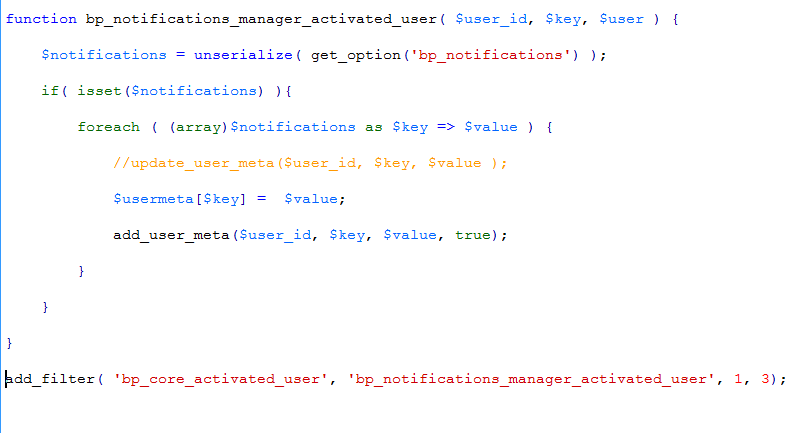
However, Upon disabling the notifications manager plugin I found that this is not the source of the problem. I now get no errors with any of the other browsers but IE redirects to log in without completing the activation process when a user clicks the link from their email and then returns the error…
“ERROR: Your account has not been activated. Check your email for the activation link.”
…when attempting to log in.Thanks for any insight into this problem… (Go figure it’d be IE that decides to be difficult, lol)
Cassey


