Search Results for 'wordpress'
-
AuthorSearch Results
-
April 10, 2012 at 11:39 pm #132790
@mercime
Participant@jcaynes this plugin https://wordpress.org/extend/plugins/buddypress-private-community/ has not been updated for BP 1.5+. Delete it from your installation.
April 10, 2012 at 7:58 pm #132781In reply to: WordPress theme with buddypress
nookeet
Member@Hugo BuddyPress Template Pack creates the folder eg. /Activity/index.php but when I try to choose the Pages, the system does not see them and I can not select anything.
Thanks
April 10, 2012 at 6:56 pm #132779In reply to: Creating link to BP feature in Page/Post?
coderaider31
MemberThat code string is essentially what I had and it is producing a similar broken link. I am just trying to create this link on a standard wordpress page. Is that not going to work? I just want a link on a member login page that will allow them to maintain their profile and do other BP related tasks. It is producing this kind of broken link “http://myurl/profile/”>My ProfileManage your <a href=". For example, the broken link contains text from after the code string for the url. That part that says "my profile" is the url text and "Manage your" comes after the . I am really trying to eliminate the need for the admin bar, but can’t until I figure out this hardcoded links.
April 10, 2012 at 5:28 pm #132778In reply to: WordPress theme with buddypress
Hugo Ashmore
ParticipantDo the pages actually exist? you have to have empty pages created and there to be selected, either named as conventionally or named as you wish.
April 10, 2012 at 5:21 pm #132776In reply to: WordPress theme with buddypress
Member@mercime I did what you told me by changing almost to all available permalink and the issue still exists. The error I am getting is:
The following active BuddyPress Components do not have associated WordPress Pages: Activity Streams, Discussion Forums, User Groups, Members.
but when I go Buddypress pages I can not find any of the above pages to associate Activity, Streams and so on.
Plus I am using Templatic GeoPlaces theme.Thanks for your help.
April 10, 2012 at 5:12 pm #132774Participant@indieconnect Good luck.
@hnla I know, I know, Atahualpa’s tables and all. But it’s a valid request for a popular theme plus it’s much much much better than the Artisteer” themes which I have declined to “template-pack-it” even if table-less. Having said that, all customization requests for BP-Atahualpa layout should be sent to theme author

== you must have a good working list of themes now? for a codex list ? ==
Done it, I did I’d already started compiling and adding to the list of all template-packed themes (45+) assisted in forums and 3 posted in Codex. My last update includes Atahualpa.https://codex.buddypress.org/theme-development/wordpress-to-buddypress-theme/#template-packed-wordpress-themesApril 10, 2012 at 3:18 pm #132770In reply to: [Resolved] BuddyPress strategy for a newbie…
Dave953
Member@mercime Thanks very much for the reply. I was concerned that adding BuddyPress, say 6-12 months after launching a WordPress/bbPress site, would be more technically challenging to ‘interface’ with the existing WP/bbPress setup, than starting out initially with a WordPress/BuddyPress configuration.
From your reply, I’m inferring that it really doesn’t make any difference…BuddyPress will ‘play’ as nice coming onboard later to a WP/bbPress configuration, as it would have if the site was initially launched as WP/BP. Am I understanding you correctly?
ThanksApril 10, 2012 at 3:45 am #132755In reply to: WordPress theme with buddypress
Participant== I have already running custom permalinks as /%city_name%/%post_id%/. ==
@nookeet Change custom permalink to what’s available on panel other than default and see if issue is resolved.What WP theme are you using with BP Template Pack plugin?
April 10, 2012 at 2:54 am #132752In reply to: [Resolved] how move the sidebar to right
Participant@jafar1374 Change the styles of div#sidebar and div#content .padder in your RTL stylesheet to
[UPDATED 04-24-2012 From default.css for right sidebar structure]
`div#content {
-moz-border-radius-topleft: 6px;
-webkit-border-top-left-radius: 6px;
-moz-border-radius-bottomleft: 6px;
-webkit-border-bottom-left-radius: 6px;
border-top-left-radius: 6px;
border-top-right-radius: 6px;
float: left;
width: 100%;
}div#content .padder {
border-right: 1px solid #ddd;
-moz-border-radius-topleft: 6px;
-webkit-border-top-left-radius: 6px;
-moz-border-radius-bottomleft: 6px;
-webkit-border-bottom-left-radius: 6px;
border-top-left-radius: 6px;
border-bottom-left-radius: 6px;
margin-right: 225px;
}div#sidebar {
border-left: 1px solid #ddd;
-moz-border-radius-topright: 3px;
-webkit-border-top-right-radius: 3px;
border-top-right-radius: 3px;
float: left;
margin-left: -226px;
margin-top: 1px;
width: 224px;
}`April 10, 2012 at 12:30 am #132745In reply to: Buddypress & Thesis
Participant@coxis123 It’s the other way around. You need to make your Thesis theme compatible with BuddyPress. We use the BP Template Pack plugin to make WP themes compatible with BP.
Overview to the compatibility process and the list of WP themes at the bottom of the same page that we’ve made BP-compatible at https://codex.buddypress.org/theme-development/wordpress-to-buddypress-theme/
April 9, 2012 at 10:03 pm #132740In reply to: [Resolved] Remove the buddybar.css from loading
@ChrisClayton
Participantremove_action( ‘bp_init’, ‘bp_core_load_buddybar_css’ );
https://buddypress.trac.wordpress.org/browser/trunk/bp-core/bp-core-buddybar.php#L671You could also filter it.
April 9, 2012 at 9:53 pm #132739In reply to: Enable Capital Letters in Usernames
ParticipantThis has been fixed in the currently unreleased 1.6.
https://buddypress.trac.wordpress.org/ticket/2207April 9, 2012 at 9:40 pm #132738In reply to: Buddypress & Thesis
Participant@coxis123 Their site states “The Thesis Theme framework is a premium template system for WordPress that is designed to serve as the rock-solid foundation beneath any kind of website.”
With “any” emphasized… So, you can assume so.
But, it’s up to the theme developer to make their themes compatible, so you should ask them.
April 9, 2012 at 6:56 pm #132733In reply to: WordPress theme with buddypress
Member@mercime
The version of WordPress is 3.3.1 and Buddypress is 1.5.5. I installed wordpress manually via FTP. I have only 1 plugin installed and I deactivated and still the same issue. I installed Buddypress both through FTP and WordPress online. The issue is still there, and can’t figure out why none of files are seen except blog.April 9, 2012 at 6:04 pm #132731In reply to: WordPress theme with buddypress
ParticipantWP/BP versions? Did you install WordPress manually or via webhost script like fantastico or simplescripts etc? Have you tried re-uploading BuddyPress again manually via FTP to plugins folder. Basic troubleshooting includes deactivating all plugins except BuddyPress and change to bp-default theme.
April 9, 2012 at 5:46 pm #132730In reply to: WordPress theme with buddypress
Member@mercime
I have already running custom permalinks as /%city_name%/%post_id%/.
2. As far https://codex.buddypress.org/getting-started/configure-buddypress-components/#bp-pages I have problem that I can not associate the pages, because /Acitivity/index.php or others are not even seen. That is my issue and don’t know how to fix this problem.Thanks
April 9, 2012 at 5:32 pm #132729In reply to: Emails Not Sending After Update to 1.5.5
aces
Participantwhat happens when you send a test/debug email from https://wordpress.org/extend/plugins/wp-mail-smtp/ ?
April 9, 2012 at 4:44 pm #132727In reply to: Moving default sidebar widget
ParticipantSo what you want to add another widget area after the login form in your sidebar. You would have to register a new widget area in your child theme’s new functions.php file, then add a new get_sidebar call under the code of the login form in your sidebar.php. See how: http://justintadlock.com/archives/2010/11/08/sidebars-in-wordpress
April 9, 2012 at 2:54 pm #132724In reply to: WordPress theme with buddypress
Participant1) BuddyPress requires “pretty permalinks” so go to Settings > Permalinks and set to something other than default and Save.
2) If you do not see any “Repair” link after that announcement, go to BuddyPress > Pages and create or associate the pages https://codex.buddypress.org/getting-started/configure-buddypress-components/#bp-pages
April 9, 2012 at 2:30 pm #132723In reply to: Emails Not Sending After Update to 1.5.5
bigjosh
MemberThe same issue here: I’m a new user of Buddypress the version I installed is:
( buddypress.1.5.5 ) And i installed it on ( wordpress-3.3.1. )
what can i do to adjust the error?April 8, 2012 at 6:21 pm #132688In reply to: Weird Space in wp-admin at top of every page
iosconsultancy
MemberHi there,
I have also found another issue that seems to be related. When the user doesn’t have a avatar set, there is weird spacing issues when you roll over the “Howdy [username]. in the top right.
Also, I enabled a plugin for easy site switching in the admin bar – https://wordpress.org/extend/plugins/multisite-switcher/ – and this is not fitting either as expected.
A screenshot is below:
http://www.iosconsultancy.co.uk/bpscreenshot2.pngAny help would be greatly appreciated. This site is meant to be going live in 48 hours.
Thanks and Best Regards
Matthew CaseyDevilish Concept
Participantthe latest one i think, its a plugin for my wordpress site, dont think its been updated for a while tho
April 8, 2012 at 5:54 am #132656ParticipantDo post at https://buddypress.org/community/groups/bp-album/forum/ which is monitored by BP Media plugin devs
The alternative is a premium plugin, BP Gallery
April 8, 2012 at 2:59 am #132649In reply to: 2 Questions – Files & Redirection
Participant1. /wp-content/plugins/buddypress/bp-themes/bp-default/
You shouldn’t need to touch those files, instead create a child theme: https://codex.buddypress.org/theme-development/building-a-buddypress-child-theme/
2. https://buddypress.org/community/groups/welcome-pack/
https://github.com/sbrajesh/bp-redirect-to-profile/blob/master/bp-redirect-to-profile.php
http://wordpress.stackexchange.com/questions/29545/login-redirect-to-certain-bp-profile-page
?
April 8, 2012 at 12:46 am #132647In reply to: Specify Friend, Family or Colleague
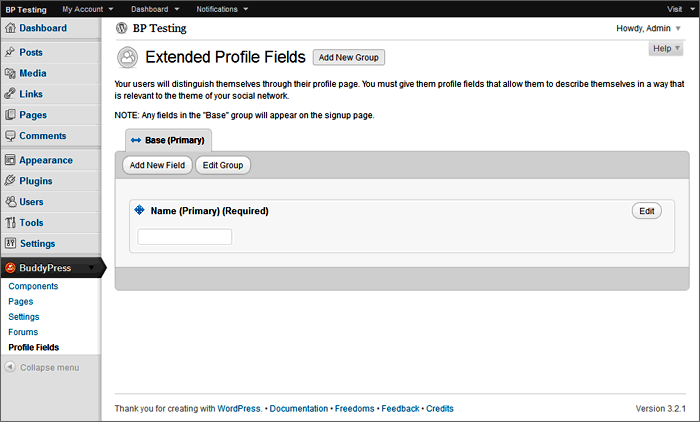
Participantadd new field:
-
AuthorSearch Results


