Search Results for 'wordpress'
-
AuthorSearch Results
-
April 2, 2012 at 9:11 pm #132287
In reply to: creating child theme in BP
@mercime
Participant@emaarkhan if you have a WordPress theme (or a child theme thereof), install and activate the BP Template Pack plugin and go through Appearance > BP Compatibility process. Walkthrough of Twenty Ten Child theme with BP Template Pack – https://codex.buddypress.org/theme-development/theme-dev-bp-template-pack-walkthrough-twenty-ten-bp-1-5/
April 2, 2012 at 12:42 pm #132273In reply to: Problem editing xprofile fields
claudeg
ParticipantAs I said, I’ve tried to desactivate all plugin except Buddypress.
Common plugins related to Buddypress on those site: BpDev Stealth Mode for Site admin, BP Group Management, BuddyPress Group Email Subscription, Events Manager, U BuddyPress Forum Attachment.
I only see one thing that may have made a difference: before I’ve reverted the primary field to its original state (Name), I was using a different name (Prénom et Nom). Usually this primary field was related to the WordPress field “Name to be displayed publicly” (or something like that). Can it make the data not beiing save because it can’t find the user’s related ID? (It is only speculation, I have no understanding of how it works) And if so, how can I reverted this primary field data value? Deleting it from the database and recreating it?
ThanksApril 2, 2012 at 1:09 am #132255In reply to: [Resolved] Registation ’not available’
aces
ParticipantWordpress Admin Settings > General > Membership – select Anyone can register ?
April 1, 2012 at 7:12 pm #132243In reply to: Buddypress breaks https
Paul Wong-Gibbs
KeymasterAfter spending an hour trying things, I’ve discovered that if you’re on https, the user avatar includes are always http.
EDIT: Made a ticket https://buddypress.trac.wordpress.org/ticket/4110
April 1, 2012 at 4:43 pm #132239In reply to: [RESOLVED]Hide pages from non-members
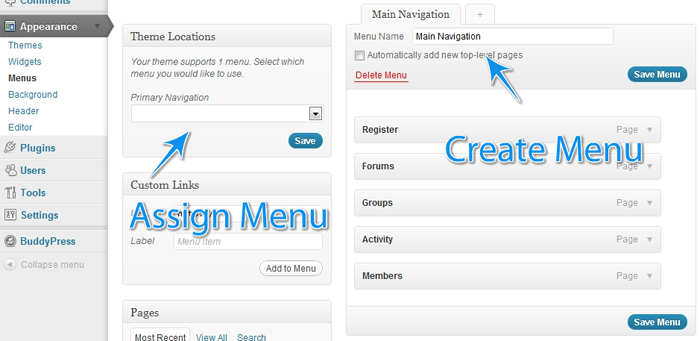
ParticipantYou need to create both menus. Without it wordpress has it’s own default menu which you have been relying on
A good guide for understanding wordpress menus is http://justintadlock.com/archives/2010/06/01/goodbye-headaches-hello-menus
April 1, 2012 at 4:34 pm #132238In reply to: [RESOLVED]Hide pages from non-members
DRAGUIAN
MemberIt’s frustrating because that’s almost it. I leave the Header navigation as blank because my buddypress/wordpress pages automatically fill in that menu. So when I am logged in all the pages I want to see are there. I only made my homepage and about page available to the nonmembers, and that works fine too. However, when a user is logged off, they can still see all the pages available to a logged in user aswell as the pages which are available to them. So instead of having one smooth menu for the non member, theres the members menu and below it a non members menu. Note this is only for logged out members everything is fine as far as signed in users are concerned.
April 1, 2012 at 3:54 pm #132235In reply to: [RESOLVED]Hide pages from non-members
MemberOK alternative menu etc is all set up on menus page. I am using the Elbee Elgee child theme at the moment. Do I still have to do the first step of implementing that code in the headers menu (<?php
// https://codex.wordpress.org/Function_Reference/wp_get_current_user
$current_user = wp_get_current_user();……April 1, 2012 at 3:42 pm #132234In reply to: [RESOLVED]Hide pages from non-members
ParticipantYou should make a child of bp-default and backup files and db just in case…
You don’t add or remove any pages from the code. The point is that it works from the built in wordpress default menu system. ( https://codex.wordpress.org/Navigation_Menus )
To get the second menu to appear – In your child theme’s functions.php file add:
`function register_my_menus() {
register_nav_menus( array(
‘primary’ => __( ‘Header Navigation’ ),
‘secondary-menu’ => __( ‘Alternative Menu’ ),
‘another-menu’ => __( ‘Another Menu’ )
) );
}
add_action( ‘init’, ‘register_my_menus’ );
`April 1, 2012 at 2:27 pm #132229In reply to: [RESOLVED]Hide pages from non-members
ParticipantYou shouldn’t touch wp or bp core files.
What theme are you using?
In your child theme’s header.php file you replace the `wp_nav_menu` section with either of the above ( not both ).
Then you can define two menus on appearance > menus ( primary and secondary-menu on the above example ) Set one for logged in users and one for everyone else.
April 1, 2012 at 2:26 pm #132228In reply to: Buddypress breaks https
PJ
ParticipantPaul,
Ideally I’d like to have the whole site forced https since I have a private ssl. So, WP+BP in all https if possible.
I did a fresh install of WP and just installed BP, so I doubt it’s an image issue. Is there a way to go totally https?
I also went to Settings > General and changed WordPress Address (URL) to have an https rather than http. Anytime I click BP parts of the site it goes back to regular http.
April 1, 2012 at 1:46 pm #132225In reply to: [RESOLVED]Hide pages from non-members
MemberI am guessing that I need to make a change in the wordpress-includes pluggable.php
April 1, 2012 at 1:02 pm #132223In reply to: [RESOLVED]Hide pages from non-members
MemberI prefer the first option of serving different menus whether the user is logged in or not. Should I put that code into the themes header or funtion.php? Do I need to add to the given code it to specify which pages I want to hide from logged out users. Using latest version of wordpress and buddypress
April 1, 2012 at 9:30 am #132220In reply to: Buddypress breaks https
KeymasterYou need to figure out and tell us what is being included over http. Also your WordPress and BuddyPress versions. Thanks.
March 31, 2012 at 11:48 pm #132209In reply to: fake user signup
Participant== how can they sign up to my database without filling in the recaptcha or confirming their mail? ==
There is a possibility that your old BP1.2.7/WP3.2 installation has been hacked. I would start backing up DB and server files to your hard drive. See https://codex.wordpress.org/FAQ_My_site_was_hacked== but for some reason the search field always brings me to the homepage instead of search results. ==
Yes we are aware of this and the issue will be resolved soon.March 31, 2012 at 11:23 pm #132205In reply to: [Resolved] Is this the correct Registration Page?
ParticipantMarch 31, 2012 at 9:24 pm #132198In reply to: Buddypress plugin of WordPress remote SQL Injection
ParticipantThat is why BP 1.5.5 was released https://buddypress.org/2012/03/buddypress-1-5-5/
https://buddypress.org/community/groups/installing-buddypress/forum/topic/1-5-5-imortant-update/
All users should upgrade BP ASAP.March 31, 2012 at 9:01 pm #132196In reply to: Buddypress plugin of WordPress remote SQL Injection
shanebp
ModeratorReported to developers and fixed in version 1.5.5
March 31, 2012 at 8:17 pm #132195In reply to: [RESOLVED]Hide pages from non-members
ParticipantOne way of doing that is by serving different menus depending whether someone is logged in or not such as
`
<?php
// https://codex.wordpress.org/Function_Reference/wp_get_current_user
$current_user = wp_get_current_user();
if ( 0 == $current_user->ID ) {
wp_nav_menu( array( ‘container’ => false, ‘menu_id’ => ‘nav’, ‘theme_location’ => ‘secondary-menu’, ‘fallback_cb’ => ” ) );
// Not logged in.
} else {
wp_nav_menu( array( ‘container’ => false, ‘menu_id’ => ‘nav’, ‘theme_location’ => ‘primary’, ‘fallback_cb’ => ” ) );
// Logged in.
}
?>
`
or another approach:
`
<?php
if ( is_user_logged_in() ) {
wp_nav_menu( array( ‘container’ => false, ‘menu_id’ => ‘nav’, ‘theme_location’ => ‘primary’, ‘fallback_cb’ => ” ) );
} else {
wp_nav_menu( array( ‘container’ => false, ‘menu_id’ => ‘nav’, ‘theme_location’ => ‘secondary-menu’, ‘fallback_cb’ => ” ) );
}
?>
`
replacing the `wp_nav_menu` bit in the ( child ) theme’s header.php file. It may need adapting depending on theme etc. Remember to make backups before editing!Then use the walled garden or similar techniques to redirect users if they try to reach the page directly…
March 31, 2012 at 5:46 am #132181In reply to: Unified Profile Page?
@ChrisClayton
Participant@BossX – As in, similar to the wordpress profiles (https://profiles.wordpress.org/matt)?
Yes, it’s possible through a custom theme.The top part with the profile information is simply the members/single/member-header.php file with code to insert their bio and other info – See: http://bp-tricks.com/snippets/displaying-certain-profile-fields-on-your-members-profile-page/
The bottom part is the members/single/profile.php template (their activity is an external custom built activity stream, but the theory is the same… just add the activity loop) – See: https://codex.buddypress.org/developer-docs/custom-buddypress-loops/the-activity-stream-loop/
And then they changed the default profile view from the activity view to profile with – define( ‘BP_DEFAULT_COMPONENT’, ‘profile’ );
March 31, 2012 at 2:02 am #132180In reply to: The Register Button goes to Home page?
ParticipantI am also http://testbp.org/members/aces/ You should be able to pm me there, although I haven’t tested it with pm before and I’m not sure I can help…..
Did you use an auto installer provided by your host to install wordpress and/or buddypress etc? Autoinstallers have been the cause of many problems in the past.
March 30, 2012 at 1:58 pm #118377In reply to: Replies shouldn’t bump Activity Updates to top
Prince Abiola Ogundipe
ParticipantMarch 30, 2012 at 1:22 pm #118375Participant@enderpal, don’t have time to actually look closely at the stackexchange atm. but if it helps, you actually don’t need to unhook it.
The way wordpress works is it will always look through your child theme first, so if you copy the function into your child theme – when wordpress goes through default and finds `if ( !function_exists( ‘bp_dtheme_comment_form’ ) ) :` since it DOES exist inside your child theme, it will pretend that the function inside the default theme doesn’t exist essentially doing the exact same thing as ‘removed all the filters’ would do.
March 30, 2012 at 6:43 am #118371In reply to: Does theme 2011 work with BuddyPress?
BOW
ParticipantUnfortunately as @mercime has stated to use 2011 you will have to go through the process of theme compatibility.
In a related question, is there a plan to try and make bpuddypress theme independent?
On the surface it looks to me like it should be possible using some smart and unique CSS class naming that buddy press could be installed as a plugin with a set of additional CSS files rather than replacement CSS files.
I see in the dev chats that some folk are working on yet another child theme, but to be honest having buddy press so tightly coupled to the theme has been one of the main setbacks of this project (imho)
Surely the resource and time of these talented and dedicated members would be better spent on decoupling buddy press from the theme rather than creating another theme that existing users are unlikely to benefit from and gives yet another unrequired decision (and potential dead end) during the early process of getting started.
Buddy press components appear typically in:
The top navigation (can be handled using the menu builder or manually)
The main content area
The side bar
The buddy bar (now the wordpress tool bar)Most themes contain these areas (to be compatible with other plugins) so we must surely be at the stage where serious thought is being given to starting the decoupling process?
Future versions of buddy press should be tested to death on the wordpress default theme and and let theme owners take it from there.
Is this possible or it the task immense?
March 30, 2012 at 2:49 am #132166In reply to: The Register Button goes to Home page?
walkingcloud
MemberI have WordPress experience, and after I installed BuddyPress there was no errors shown as I have seen on other plugins. I know from experience if a plugin has problems a message box appears stating an error of the plugin being installed. After I installed BuddyPress no error messages appear, yet we see the ‘You have no groups’ message, and it’s starange…
Perhaps the server “Godaddy” is not loading all theBuddyPress files properly?
March 30, 2012 at 1:22 am #132162In reply to: The Register Button goes to Home page?
MemberI also noticed this post…?
https://buddypress.trac.wordpress.org/ticket/3725 -
AuthorSearch Results


