`
Save files.
 thedzigner
Okay, so upon trying everything I could think of, I deleted the entire WordPress install and started again.
The problem came up precisely the same!
However, when I changed the url from [link removed] to [link removed] all of a sudden I can see the content I’m supposed to see!!
What does that mean, and what on earth is going on?
 Paul Wong-Gibbs
Best place for this is https://buddypress.trac.WordPress.org as an enhancement ticket. Patches welcome! 
Question, though: what happens if it inserts multiple items into the table_name_fields?
 aces
acesThere is something wrong with your register page as, I think, it should have Name ( at least ) as a required field under the profile details section.
If I click on ‘complete sign up’ without filling anything in then it redirects to the home page whearas I think it should stay on the same page but with error messages.
What plugins are your using? Single or multi-site? Any unusual permalink or .htaccess settings?
Have you altered the Name field in any way from the default:
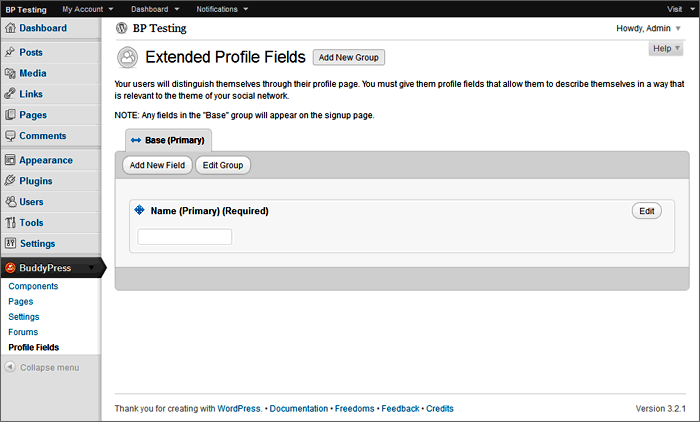
This seems to be similar to @allentan‘s problem: https://buddypress.org/community/groups/installing-buddypress/forum/topic/registeration-doesnt-work/
 @mercime
@dsmndwng Based on the HTML structure of your theme, you’d need to use the first option, i.e., change 16 template files within the 6 BP folders transferred to your TheStyle theme folder in server during the compatibility process.
If you’ve previously changed any of the BP template files in your theme folder, replace all of them for a clean slate by deleting the 6 BP folders in server – /activity, /blogs, /forums, /groups, /members, and /registration – then re-run Appearance > BP Compatibility.
Download the 6 clean BP folders to your computer hard drive.
A. At the top of each of those 16 template files I linked to above, replace
`
with
`
Save files.
 Etienne ROSENSTIEHL
I made many changes. I probably did both. Now you know the problem, do you know a solution ?
(I use a very basic structure : WordPress, BussyPress, bd-default theme and Private BuddyPress.)
 richardpd
How do I find my BP forum posts here at BP support? I can find my WP forum posts at wordpress.org but not BuddyPress!
My ‘Your Activity’ link tells me the number of my posts but nowhere can I find a link to my posts (so I cannot review them!).
I follow Mercime (a moderator on this site)-but I cannot see a way to private message her for help?!
I am having lots of trouble running BP on my site and am finding help hard to get here.
NB Why does my post say ‘Deleted User’ when I am logged in as richardpd?
NNB-Fixed ‘Deleted User’ issue…I was not logged in properly?! I am not sure how that happened but I changed my WP.org settings & relogged in & is fine now!!
@mercime@faithcoach first of all, you’re using a theme which needs to be updated to recommended coding standards 🙂
At this point however, we will proceed with the original tags in your template files. Based on the HTML structure of your theme, you’d need to use the first option, i.e., change 16 template files within the 6 BP folders transferred to your WP DaVinci theme folder in server during the compatibility process.
 allentan
I have deleted the BP files and Reinstall back manually.
The result is still the same.? Is it due to my WP wordpress installation, how can i reinstall wordpress, can this be the issue?
I tested with Twenty Eleven theme and there is NO changes, I can’t see the Name Field on registration page. See below.
http://learningdigitalphotography.net/registration
 Hugo Ashmore
And are permalinks working? You have to have them set to something other than the default i.e you cant have /?p=1234
It sounds as though your permalinks are not working so you may need to investigate that, establish that your .htaccess file can be writen to by the server.
I would have a read through of the WP Codex guide on permalinks:
 Boone Gorges
> By default on my install, BP_ENABLE_USERNAME_COMPATIBILITY_MODE was “true”. I’m not sure why.
I’m not sure why either. By default, BP does not define it at all, much less to `true`. It sounds like setting it to `false` has solved your problem. (In brief, when `BP_ENABLE_USERNAME_COMPATIBILITY_MODE` is true, BP uses the `user_login` to create URLs; otherwise it uses `user_nicename`.)
The reason the `/ragnar/` URL is not working is because, as you can see in the first query above, the user_nicename has been changed to `ragnar-2`. You’ll want to change it back manually, in this case and in any other case where changes have occurred.
There does appear to be a bug somewhere here. I opened a Trac ticket: https://buddypress.trac.wordpress.org/ticket/4101 Thanks for your help debugging – feel free to follow along there.
@mercimeThis is the original registration form from bp-default theme https://buddypress.trac.wordpress.org/browser/tags/1.5.5/bp-themes/bp-default/registration/register.php
Back up your current registration/register.php then download register.php from link above and upload to your theme’s /registration/ folder. If that doesn’t work, I suggest deactivating BuddyPress and BP plugins then changing to Twenty Eleven theme. Check if registration is working on WordPress alone.
@mercime== but asked that I start my own thread. ==
@katandmouse Yes, because you have different themes and I’ll be posting different codes/instructions
Based on the HTML structure of your theme, you’d need to use the first option, i.e., change 16 template files within the 6 BP folders transferred to your Diner theme folder in server during the compatibility process.
If you’ve previously changed any of the BP template files in your theme folder, replace all of them for a clean slate by deleting the 6 BP folders in server – /activity, /blogs, /forums, /groups, /members, and /registration – then re-run Appearance > BP Compatibility.
Download the 6 clean BP folders to your computer hard drive.
A. At the top of each of those 16 template files I linked to above, replace
`
with
`
‘,’
‘); } ?>
Save files.
@mercime@foundsheepgmailcom Based on the HTML structure of your theme, you’d need to use the first option, i.e., change 16 template files within the 6 BP folders transferred to your TheSource theme folder in server during the compatibility process.
If you’ve previously changed any of the BP template files in your theme folder, replace all of them for a clean slate by deleting the 6 BP folders in server – /activity, /blogs, /forums, /groups, /members, and /registration – then re-run Appearance > BP Compatibility.
Download the 6 clean BP folders to your computer hard drive.
A. At the top of each of those 16 template files I linked to above, replace
`
with
`
<?php if (get_option('thesource_integration_single_top') ” && get_option(‘thesource_integrate_singletop_enable’) == ‘on’) echo(get_option(‘thesource_integration_single_top’)); ?>
<div id="top-shadow">
Save files.
@mercime@johnsonapeter this is not a BuddyPress issue. Please post at https://wordpress.org/support/forum/how-to-and-troubleshooting
@mercimeYou can create a new ticket for this enhancement at https://buddypress.trac.wordpress.org/newticket
Log in using same username and password.
aces starship87
wordpress version 3.3.1
buddypress Version 1.5.5
Custom Community Theme
Plugins:Akismet , BuddyPress Sliding Login Panel, Buddypress.
I have enabled Group forums in the group admin, I’ve changed the theme and deactivated each plugin to see which is causing the problem, no luck with any of those things.
everything else on my buddypress is working fine and I never had a problem with my groups before.
Hugo AshmoreHave you any plugins running – not necessarily BP but WordPress specific- that may be interfering with signups?
If you are are running your site with all non-essential (WP or BP) plugins disabled and have changed from your custom child theme to the bundled bp-default theme and you are using latest version of stable BP release and the issue persists and also is evident on creation of new members under these absolute default conditions, then it’s sounding like you have a corrupted DB and fixing that may not be straightforward.
However it is essential to absolutely ensure that NO plugins are running other than BP for testing purposes and that we are running bp-default – apologies for labouring this point – when I visit the site url I do always see your custom theme, can we see just the bp theme running for the moment?
Paul Wong-Gibbs dianeinatlanta
I set the site up, so if there’s something wrong, I’ll need to fix it. What is your recommendation for reinstalling wordpress? I’ll reinstall both. I used my site’s file manager in the control panel to do so last time. I’ll also ask my isp why the pages are hanging up.
Etienne ROSENSTIEHLThis is probably not a BuddyPress specific issue. You can solve it in WordPress.
You first create a blank page with a title and nothing. Let’s say the title is ‘This is my blog’
You go to ‘Settings’ and ‘Reading’ then select ‘a static page’ in the ‘Front page display’. You select the Front Page you want to appear first. Then for the posts page you select ‘This is my blog’.
 tucsonsam
Thank you Hugo. You’ve answered my question, and I feel comfortable going forward with the installation.
Hugo AshmoreIt does not change any of your posts or pages, however it does require that a compatible BuddyPress theme is running and that means you will need to do a little work if you have a theme in use already and don’t want to use the bp-default theme bundled with BP.
To modify an existing theme to work with BP you need to run the template pack plugin, details of which and step by step guide you will find in the BP codex.
 paul_ross
hi i have a simular problem except when i attempt a registration i get redirected to /?bp_pc_redir_to=%2Fregister which jut show my home page some help would be Greatly appriciated as i am not to familiar with wordpress Thanks
allentan @mercime
Need your help to see why my registeration page is not displaying the right information field to allow user to key in name.
This is my code for the register.php
http://pastebin.com/Jg2Wxq1D
I have disable most plugin which potential is a conflict. My other plugins which are active are:
fast secure contact form
google analytics
get the image
mail from
max banner ads
seo friendly image
seo pressor
seo smart link
TinyMCE advanced
Wordpress SEO (Yoast)
wordpress related posts
Tweetmeme
Google xml sitemap
comment luv
Thanks

