Search Results for 'wordpress'
-
Search Results
-
Hi, We are getting a 500 server error after upgrading from 1.7.3 to 1.8. We are running 3.5.2. PHP 5.3.10 on Windows Server 2007.
Got some php logs if it helps…
Thanks for any help 🙂
“[18-Jul-2013 10:39:35 UTC] WordPress database error Multiple primary key defined for query ALTER TABLE wp_fm_forms ADD PRIMARY KEY (
ID) made by activate_plugin, do_action(‘activate_wordpress-form-manager/wordpress-form-manager.php’), call_user_func_array, fm_install, fm_db_class->setupFormManager, dbDelta[18-Jul-2013 10:39:36 UTC] WordPress database error Multiple primary key defined for query ALTER TABLE wp_fm_settings ADD PRIMARY KEY (
setting_name) made by activate_plugin, do_action(‘activate_wordpress-form-manager/wordpress-form-manager.php’), call_user_func_array, fm_install, fm_db_class->setupFormManager, dbDelta[18-Jul-2013 10:39:36 UTC] WordPress database error You have an error in your SQL syntax; check the manual that corresponds to your MySQL server version for the right syntax to use near ‘set
setINT DEFAULT ‘0’ NOT NULL’ at line 1 for query ALTER TABLE wp_fm_items CHANGE COLUMN setsetINT DEFAULT ‘0’ NOT NULL made by activate_plugin, do_action(‘activate_wordpress-form-manager/wordpress-form-manager.php’), call_user_func_array, fm_install, fm_db_class->setupFormManager, dbDelta[18-Jul-2013 10:39:36 UTC] WordPress database error Duplicate column name ‘index’ for query ALTER TABLE wp_fm_items ADD
indexINT DEFAULT ‘0’ NOT NULL made by activate_plugin, do_action(‘activate_wordpress-form-manager/wordpress-form-manager.php’), call_user_func_array, fm_install, fm_db_class->setupFormManager, dbDelta[18-Jul-2013 11:38:04 UTC] WordPress database error Multiple primary key defined for query ALTER TABLE wp_fm_forms ADD PRIMARY KEY (
ID) made by activate_plugin, do_action(‘activate_wordpress-form-manager/wordpress-form-manager.php’), call_user_func_array, fm_install, fm_db_class->setupFormManager, dbDelta[18-Jul-2013 11:38:04 UTC] WordPress database error Multiple primary key defined for query ALTER TABLE wp_fm_settings ADD PRIMARY KEY (
setting_name) made by activate_plugin, do_action(‘activate_wordpress-form-manager/wordpress-form-manager.php’), call_user_func_array, fm_install, fm_db_class->setupFormManager, dbDelta[18-Jul-2013 11:38:05 UTC] WordPress database error You have an error in your SQL syntax; check the manual that corresponds to your MySQL server version for the right syntax to use near ‘set
setINT DEFAULT ‘0’ NOT NULL’ at line 1 for query ALTER TABLE wp_fm_items CHANGE COLUMN setsetINT DEFAULT ‘0’ NOT NULL made by activate_plugin, do_action(‘activate_wordpress-form-manager/wordpress-form-manager.php’), call_user_func_array, fm_install, fm_db_class->setupFormManager, dbDelta[18-Jul-2013 11:38:05 UTC] WordPress database error Duplicate column name ‘index’ for query ALTER TABLE wp_fm_items ADD
indexINT DEFAULT ‘0’ NOT NULL made by activate_plugin, do_action(‘activate_wordpress-form-manager/wordpress-form-manager.php’), call_user_func_array, fm_install, fm_db_class->setupFormManager, dbDelta[18-Jul-2013 12:33:38 UTC] WordPress database error Incorrect datetime value: ‘JJJJ-MM-TT 00:00:00’ for column ‘start’ at row 1 for query INSERT INTO
wp_teachpress_courses(name,type,room,lecturer,date,places,start,end,semester,comment,rel_page,parent,visible,waitinglist,image_url,strict_signup) VALUES (‘iLive Certified User’,’Lecture’,”,’Allen & Heath’,”,0,’JJJJ-MM-TT 00:00:00′,’JJJJ-MM-TT 00:00:00′,’Example term’,’A test for the iLive Certified User course using teachpress.’,0,0,1,0,’http://109.203.103.61/wp-content/uploads/2013/07/ah.jpg’,0) made by do_action(‘course_page_teachpress/add_course’), call_user_func_array, tp_add_course_page, tp_add_course[18-Jul-2013 12:35:58 UTC] WordPress database error Incorrect datetime value: ‘JJJJ-MM-TT 00:00:00’ for column ‘start’ at row 1 for query INSERT INTO
wp_teachpress_courses(name,type,room,lecturer,date,places,start,end,semester,comment,rel_page,parent,visible,waitinglist,image_url,strict_signup) VALUES (‘Test’,’Lecture’,”,’me’,”,0,’JJJJ-MM-TT 00:00:00′,’JJJJ-MM-TT 00:00:00′,’Example term’,”,0,0,1,0,”,0) made by do_action(‘course_page_teachpress/add_course’), call_user_func_array, tp_add_course_page, tp_add_course”Hi,
I’m using version 4 of Artisteers Theme creation software where I export a very nice customized theme for my clients’ website. My problem is that the headers (From Chrome’s inspect element function: item-list-tabs activity-type-tabs) are all overlapping to my two sidebars, my theme is a three column theme with a header and footer as well.
I have run through the bp-Compatibility steps and on step three where I have to adjust the layout through FTP connectivity, I tried method 1 and 2 without pass. My major problem is that my page.php and index.php both have no div tags, just some php code though I was expecting a similar batch of code to the index.php file I find inside a folder like activity for example, where there is a lot of HTML along with the PHP code.
Following is my page.php code:
<?php get_header(); ?>
<?php get_sidebar(‘top’); ?>
<?phpif (have_posts()) {
/* Start the Loop */
while (have_posts()) {
the_post();
get_template_part(‘content’, ‘page’);
/* Display comments */
if (theme_get_option(‘theme_allow_comments’)) {
comments_template();
}
}
} else {
theme_404_content();
}
?>
<?php get_sidebar(‘bottom’); ?>
<?php get_footer(); ?>I also tried to copy the header, footer and sidebar files and save them as sidebar-buddypress.php and so on but saw no difference, the site’s buddypress headers were still overlapping with my site’s two left and right sidebars.
I have been struggling with this issue for so long, I even tried to create a css folder and copied the bp-default.css and called buddypress.css as I was instructed by one of your support documents on this site, when I changed any of the css I saw no change to the style on the page as I used this with the inspect element feature of the Chrome Browser.
I really have no clue how to fix this now as it also affects some of the buttons on my site, causes them not to drop-down on my All-In-One-Event calendar plugin controls, though when I use the default buddypress plugin it works fine.
Please help me, I wish there was a source of information about this that would just work, but the documentation I have found expects particular files which turn out to look different from what I have on the site’s files – Just a reminder, my theme was created using Artisteer 4.0 software.
Appreciate any assistance.
Regards [Addition: I am using the latest buddypress 1.8 (Upgraded this morning) and the latest wordpress 3.5.2]
Topic: problem with account
after create an account it does not send any activation link on my mail-id.wordpress version is 3.5.2 and buddypress version is 1.8.its not working properly.i have tried it a number of times.please reply
I updated to 1.8 and on all Buddypress pages (activity, members, profile etc…) at the bottom it displays all the content from a page in WordPress. I tried deleting that page and it started showing another page. So I reverted back to 1.73 and all is fine again. very strange. Anyone else have this issue?
Topic: Link Author posts to new tab
Hello Guys,
I am trying to get Author posts to appear on BuddyPress profile for http://fitnessblogger.net
I have just downloaded @azchipka plugin but my site is multisite so not sure if that is causing a problem or if plugin no longer works ???The “My posts” tab appears as seen here http://fitnessblogger.net/perform_rev/
But on clicking I get blank members page ??http://fitnessblogger.net/perform_rev/posts/
Is there a way to make this link to the users author page instead ??
example :http://fitnessblogger.net/author/perform_rev/Would really appreciate any help on this one
Thank You in advance
James
AKA The Fitness Blogger
I also added this to a previous post here http://buddypress.org/support/topic/resolved-show-posts-written-by-user-on-profile/
But is was marked resolved so not sure if anyone would see it 🙂
WordPress : Version 3.5.2
BuddyPress : 1.8
Website http://fitnessblogger.netHi, I’ve upload Buddypress (1.8 version) manually through FTP. I’ve activate the plugin and designated the pages for each topic (activity, register, etc.). The register page is completely blank. I’m using a wordpress theme I purchased from themeforest. How can I fix this issue? I have the latest version of wordpress.
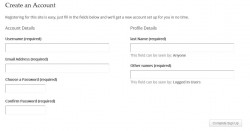
Hi, I have a question – How can I remove the Profile details field from the WordPress registration page?
I would like people to sign up and then edit their profile, but as well as the wordpress fields (Account Details… Username, Email Address, Choose a Password, Confirm Password) there is a Profile Details field – Name, that can’t be deleted.
Thanks
Hi there, after installing Buddypress, i get the following:
“Fatal error: Allowed memory size of 67108864 bytes exhausted (tried to allocate 122880 bytes) in /home/ef/public_html/wordpress/wp-admin/includes/file.php on line 949”
Or
“Fatal error: Allowed memory size of 67108864 bytes exhausted (tried to allocate 122880 bytes) in /home/ef/public_html/wordpress/wp-content/plugins/jigoshop/jigoshop_template_functions.php on line 984”– My memory allocation of php.ini is set to 256M
– I installed Buddypress via built-in installer
– Buddypress cannot be found in the wordpress plugin directory
– Deactivating all plugins on the server by renaming the plugins folder to plugins-xxx does not change anythingAny help appreciated.
I have a WordPress site with Buddypress plugin in WildCommunity theme.
Successfully custom taxonomy was created and the respective terms were added from admin panel.
“get_the_term_list” function was working fine in activity loop when the user is logged in, same code is showing error
WP_Error Object
(
[errors] => Array
(
[invalid_taxonomy] => Array
(
[0] => Invalid taxonomy
))
[error_data] => Array
(
))
when the user is not logged in. if we write custom code to show the terms that case I am getting page not found error in taxonomy page, but all are working fine while I am logged in and showing
Array
(
[0] => stdClass Object
(
[term_id] => 1018
[name] => Book Store
[slug] => book-store
[term_group] => 0
[term_taxonomy_id] => 1052
[taxonomy] => books-26
[description] =>
[parent] => 0
[count] => 2
))
Please help me to solve this problem
Thanks & regard
PrakashHi all, enjoying BP very much, still learning. My question is a bit specific, but I was hoping someone could at least point me in the right direction if there is an actual solution available.
Current WP (3.5.2) and BP (1.7), current Tablepress plugin. I was hoping to create a custom tab within a groups page that will display a Tablepress table using their shortcode. Example of Tablepress table here: http://adamfratino.com/tcbeta/frame-data/alex/
Sorry if this belongs on the Tablepress forums, but I figured I could ask here since my question could be asked for most any plugin’s shortcode.
Basically, wondering if it’s possible to embed plugin shortcode within a BP group tab either by editing the core or with additional plugins.
Still new to BP and not an expert in PHP or WordPress customization, any and all beginner-friendly advice is appreciated.
Topic: Back up
Hi,
I am running wordpress with buddypress and bbpress and I would like to backup my site before upgrading to buddypress 1.7.3 –Can someone point me in the right direction without codes and such
Thank you
Is it possible with BuddyPress to add members. However, these members will not get a WordPress BuddyPress account to login. This way I can keep track of certain sport results. As soon as someone registers on my website, I want to connect this member to one of the existing members.
For example, I’ve added John Doe to keep track of this tennis results. As soon as John Doe actually creates a user account on my website (for example to start replying on articles), I want to match this user account with the existing account in BuddyPress.Also, this way only people can register on my website, that are present in BuddyPress.


