Search Results for 'wordpress'
-
Search Results
-
Hello,
Our members are experiencing issues with our ‘Groups’ on our website. I’m not an expert on BuddyPress or WordPress, so I’m not sure where this issue is stemming from. The top of our ‘Ticket Exchange Group’ shows the following error. Also, new users can not even get access to the group, even though they are supposed to be added automatically. It will not allow us to add any members manually, either. Along with this, the members that can actually enter the group cannot get past the first page of postings, and are not receiving email notifications. Please help!
Warning: call_user_func_array() expects parameter 1 to be a valid callback, function ‘bp_group_new_topic_button’ not found or invalid function name in /nfs/c09/h02/mnt/128956/domains/ndchicago.org/html/wp-includes/class-wp-hook.php on line 286
Hi,
Being rather new to programming in WordPress, I would like to know how I could add a value to a user meta field for the simple restrict plugin.
The table that is used is _usermeta and the fields used are user_id and meta_key which should have the value simple-restrict-leden with the meta_value yes.
This would cause the registered user to have member page access without admin intervention.
Anyone any idea how to do this?Hello Please Help ! when any member registers and admin can approve the members or add into the participants but the members directory not growing up still after doing this can any one please help that i need that member not need login and members directory should goes up when admin approve them by using plugin in wordpress Thank you !
Hello,
My users and myself are having a problem where we recieve friend request notifications, and can see the number of friend requests notifcations we have but when we go the the “Requests” page there are no friend requests to be found. The only thing there is a message that says, “No friend requests pending”.
After some investigation I found that going in and manually changing the name of the user in the extended profile will make that specific user show up in friend requests. This is something that used to happen automatically.
Is there a fix for this?
Thanks in advance.
I will try to answer as many of the Mod questions as I can here:
Wordpress Version: Version 5.2.3
Recently upgraded from wordpress version: 5.2.2
Wordpress was functioning fine before I made this install. So was Buddypress
Current Version of Buddypress: Version 4.4.0
Updated Buddypress from Version: 4.3.0
I have many plugins installed.
Using BuddyBoss theme
Hi everyone,
Here is my setup:
WordPress 5.2.3
Buddypress Version 4.4.0
Events Manager 5.9.5
@LocalhostI did search through the forum and a famous search tool but didn’t find it yet:
I would like to link, via the url and $_GET[‘r’] data, to the “compose buddypress profil page” with more than one recipient. Something like:
a href=”mysite.com/members/user/messages/compose/?r=user1…user2…user3″>link</aIs it possible and what would be the semantic for?
If Not, what solution should I use to get the existing compose page with the field “to” containing “@user1 @user2 @user3”.
I can get the user with all data (name, login, id), as an array for exemple. And I don’t need to manage large list of user (mostly up to 5-10).Thanks for helping.
Topic: Registration fail on mobile
Hi,
My registration seems to work fine on the computer but I get reviews that some users can’t register on their mobile device. I tried to register through mobile and have the same issues. After completing the form I get redirected to the same registration form with no errors.Website info:
– WordPress version: 5.2.3–nl_NL
– Website: mierenmarkt.be
– Registration form: mierenmarkt.be/registratieI tried:
– Disable plugins (-> didn’t work)
– Change theme to default (-> didn’t work)Anyone knows any fixes? I don’t get error reports in my error logs.
Topic: Buddypress Docs & Multisite
I have a complex WordPress/BuddyPress site that now needs to be part of a multisite. I have come up with a migration plan, which includes moving most of the BuddyPress & profile tables manually. This site is the only pre-existing site to be moved to the new multi-site. It’s imperative that we don’t lose any of the site’s functionality or data. My question is to whether or not to network activate BuddyPress doc. Since documents will be connected to a group within a site I was inclined to activate BuddyPress docs on a site by site bases, BuddyPress & bbpress will be network activated. But I wasn’t sure if that was correct or should BuddyPress Docs be network activated? If so how would I ensure that docs from one subsite didn’t bleed into another? Thanks
Topic: Use Cyrillic Names
Hi, I use social logins plugin. When guest register by fb and in fb his name writed in Cyrillic – login in his wordpress profile also will be in Cyrillic. In this case nawigation in buddypress not work – https://i.imgur.com/CfLjbt4.png is it possible fix it?
Topic: RTMEDIA HACKED?
Hey Guys,
I installed WordFence… and it notified me of a malicious file
uploads/rtMedia/tmp/upme.PhP.jpgFilename: wp-content/uploads/rtMedia/tmp/lc.PhP.jpg File Type: Not a core, theme, or plugin file from wordpress.org. Details: This file appears to be installed or modified by a hacker to perform malicious activity. If you know about this file you can choose to ignore it to exclude it from future scans. The matched text in this file is: $root = $_SERVER['DOCUMENT_ROOT']; $files = $_FILES['idx_file']['name']; $dest = $root.'/'.$files; if(isset($_POST['upload'])) {\x0d\x0a if(is_writable($root)) { \x0d\x0a\x0d\x0a if(@copy($_FILES['idx_file']... The issue type is: Suspicious:PHP/upload.docroot.6578 Description: Suspicious uploader that places files in docrootWhen I checked the directory /rtMedia/tmp I found a bunch of PDF files..
If you were to google “rtmedia/tmp pdf files” you will find a bunch of sites with random PDF files..Anyway.. RTMEDIA seems to be a popular Buddypress related plugin — im surprised I havent heard about this..
any thoughts @buddydev @imath and everyone else?
Hi,
My site is http://www.tipua.com, WordPress 5.2.3, Buddypress 4.4.0
I’m still struggling with reducing the default number of comments displayed on updates in the activity stream from 5 to 2.
Based on a couple of older posts here I’ve tried editing the function bp_dtheme_hide_comments() found in global.js at /plugins/buddypress/bp-themes/bp-default/_inc
However, that doesn’t work, can anyone point to where I need to make this change?
Any guidance you give me would be much appreciated.
Cheers
ChrisAs of (I think the last WordPress update but not 100% sure) the images for groups do not show up on the groups page or the widget. It was working yesterday (prior to the latest update).
Any idea what is causing that?
Topic: Error 2019
Newly, this error has tormented me how to fix it.
Thanks to all friends’ attention and answers
I really want to know what the problem with the theme is.
Explain that WordPress is a multi-site network.
The theme was okay before.
php 7.3Fatal error: Uncaught Error: Call to undefined function bp_notifications_get_notifications_for_user() in /home/banoyeir/domains/mysite.com/public_html/wp-content/themes/jannah_v3.2.0/jannah/framework/plugins/class-tielabs-buddypress.php:120 Stack trace: #0 /home/banoyeir/domains/banoyeirani.com/public_html/wp-includes/class-wp-hook.php(286): TIELABS_BUDDYPRESS->get_notifications(”) #1 /home/banoyeir/domains/mysite.com/public_html/wp-includes/plugin.php(208): WP_Hook->apply_filters(”, Array) #2 /home/banoyeir/domains/banoyeirani.com/public_html/wp-content/themes/jannah_v3.2.0/jannah/templates/header/components.php(121): apply_filters(‘TieLabs/BuddyPr…’, ”) #3 /home/banoyeir/domains/mysite.com/public_html/wp-content/themes/jannah_v3.2.0/jannah/framework/classes/class-tielabs-helper.php(81): include(‘/home/banoyeir/…’) #4 /home/banoyeir/domains/mysite.com/public_html/wp-content/themes/jannah_v3.2.0/jannah/templates/header/nav-top.php(113): TIELABS_HELPER::get_template_part(‘templates/heade…’, ”, in /home/banoyeir/domains/mysite.com/public_html/wp-content/themes/jannah_v3.2.0/jannah/framework/plugins/class-tielabs-buddypress.php on line 120
We have set the setting to where there’s is no login needed. The engineers still can’t access my WP admin. Can you please help to solve this issue. I also having issues on the forum post I have added a contact form along with my post for the forum, however the coding for that form is showing in the web site itself when clicking on the forum menu page. I have done another post without adding a contact page and I am not able to see how other members can comment back. Please let me know what is the best way to have members to comment back. My web site is https://busspro.com
Topic: BuddyPress Tables Lost
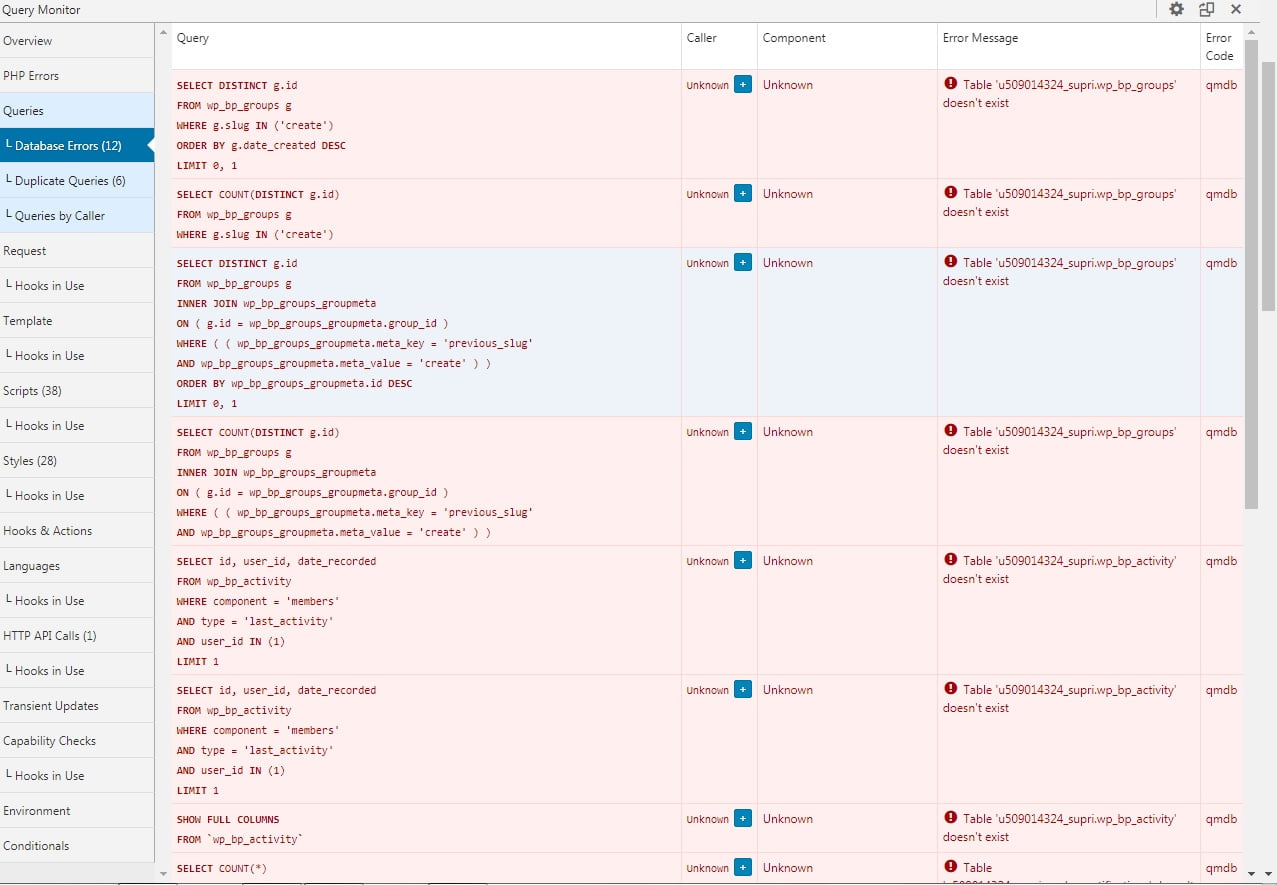
Hello, good afternoon, I have a very serious problem, causing the malfunction of the community.
I’ve done all the installation and reinstallation procedures of the plugin, but the tables are not recreated.
I deleted the tables via PHP admin, but I can’t get them back there.
https://suprimatec.com/wp-content/uploads//2019/09/tables.jpg
BP Versão 4.4.0
WordPress 5.2.2 with the theme Jannah.I tried to upload the tables from another installation, but it didn’t work, is there anything I can do via php admin to connect the tables?
I already reinstalled WordPress, reinstalled the theme, but nothing works.
Hello everyone! 🙂
I have a site in Joomla that I would like to switch to WordPress. On this site, the Community Builder plugin is installed and I read that the WordPress correspondent is BuddyPress.I tried (with local sites, to do the tests) to migrate users from Joomla to WordPress wanting to keep the fields in CB. I tried to export from CB to CSV and import them into BuddyPress, using the “Import users from CSV with meta” plugin, and adding, on the BP side, the profile fields that are CB side and modifying the CSV to match.
Am I having a useless job or is this a good way? Are there any alternatives?
Thank you all!