@Everyone with 3.1 network we should make a group to discuss this in and to organize the problems because theres alot and if bp 1.3 is going to be ready or bp 1.2.9 is going to be ready then lets fix this. Im all for better development and my goal for this year is to at least make it in the development credits for bp or wp. So I will go make a group so we can tackle this beast to the ground and pin it. So Lets do this 1………3!
@kirtank Most bp plugin are not ready for 3.1 NETWORK so if your not on network mode your smooth sailing with 3.1 but if your on network your screwed if you hit upgrade.
Hello , m new to buddypress, just wanted to ask, is it really necessary to upgrade to WP 3.1 or should i continue with WP 3.0.5. i dont want my plugins to crash .
Hi everyone,
everything was working correctly until few (3/4) days ago. Unfortunately I don’t know exactly when it stopped working but I realized it when I saw in activity, blog posts and post comments where no longer tracked.
At the beginning I thought it was because of a plugin, so I disabled them all, but to no results…
I changed DB to try a fresh install and see if some plugin had installed tables or data that was in conflict, but nothing. I thought I misconfigured something, but I can’t find anything wrong…
This is a fresh install of wordpress 3.1 and buddypress 1.2.8 Bp default theme and no other plugin installed.
http://buxula.it (user:demo password:demo if you wish to see what I’m saying)
With wp single comments to blog posts are not tracked in activity.
With WP multi-site, which is what i need, also new blog posts are not appearing in activity stream!!!
This is the debug log : http://buxula.it/wp-content/debug.log
This is the php info : http://buxula.it/info.php
Server is a dedicated i7 920 intel processors and 24gb ram
What am I missing here?
Thanks in advance to anyone willing to help me with this!
P
Does anyone else have an issue with random user/bog in the admin bar not redirecting with WordPress 3.1 and BuddyPress 1.2.8.?
Mine nows goes to /?random-member and /?random-blog
if it is not too late you can try this plugin https://wordpress.org/extend/plugins/bp-rss-character-fixer/
it worked for me
Thanks @r-a-y
The combination of the 2 setting did the trick.
/* Remove the BuddyPress Admin bar */
define(‘BP_DISABLE_ADMIN_BAR’, true);
/* Remove the WordPress Admin bar */
add_filter( ‘show_admin_bar’, ‘__return_false’ );
Thanks again.
i just add
body {margin-top: -28px;}
in wp-includes/css/admin-bar.css
and edit
body {
margin-top: 25px;
}
in _inc/css/adminbar.css
to
body {
margin-top: 0px;
}
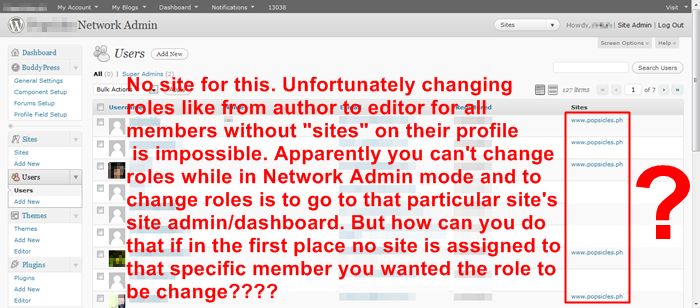
how to direct or stored registration files/users/members to a specific site (im in multisite mode) in the new wordpress 3.1.
I want all new registered members to have http://www.popsicles.ph in the sites area. see the pic below for you to understand what I mean:
http://i630.photobucket.com/albums/uu22/s2ne1/PROB1.png
Notice how some members have no site in the sites area. I wanted it all new members to have http://www.popsicles.ph
thanks @mercime, changing all ‘admin_menu’ references in plugins to ‘network_admin_menu’ did the trick.
Now my multisite enabled plugins have their links under the network manager buddypress menu.
Great article from @boonebgorges
Thanks!
Hey, I understand some of the criticism in this thread, but let’s try to keep things on-topic (BuddyPress-related) and constructive. WordPress feedback should go on wordpress.org.
I’m interested in working with anyone in this thread to help make BuddyPress work better with WordPress 3.1, and as I don’t have much multisite experience with 3.1 so far, I would find it very useful for a brief comment as to how to reproduce an issue which you feel needs addressing.
@josh101 I totally hear ya!
i found another (insert curse word here) bug. When you mark someone as a spammer from their profile in Buddypress – they don’t actually get marked as a spammer on backend. Probably because of this (insert curse word here) way of separating the stupid (insert curse word here) network admin from regular admin. This is totally reedonkulas. So now… deleting spam got even harder. And I know for certain some of my spam plug-ins got broken too. So they are descending upon me like …. it’s not even worth discussing anymore. I’m just going to get angrier.
edit:
and… (am i angrier… yes) when you delete the (cuss word) spam after you’ve clicked on “registered” to make it show last joined and first joined, it reverts to alphabetical again just to piss you off and make you have to click the stupid “registered” button again to show first joined or last joined. Welcome to HOURS of spam deleting made possible to you by WordPress… the official WP motto “we aren’t into efficiency, we’re just into kicking all of you in the stomach”
Just like everyone eles said on the NETWORK admin pannel AKA The Extreme Back End Buddypress settings there Plugin settings on Vacation and are MIA. You’d think if you activate them you be able to use them.So I did some work with it instead of network I’d just local site set it still NONTHING. It made it worst! What I learn is if you have network mode on buddypress can only do network or atleast in 3.1. Next time I wont upgrade for like a mo. I was so happy to see 3.1 now I hate it. Its like getting a 2012 Dodge Viper just to find out it has 1,000,000 miles on it and sugar in the gas tank but you did not know this before you drove it. Now you got a mess you cant even afford to fix even if the maker of buddypress sold there software to fix it.
@travel-junkie – I get over 2 million hits per month to my site. I get at least 400 spam sign ups a week. This is not an efficient change!
Did you read the link posted by Avi M?
The BuddyBar and the WP Admin bar are two separate things at the moment.
The WP admin bar was introduced in WP 3.1.
BP_DISABLE_ADMIN_BAR only disables the BuddyBar (contrary to the blog post on bpdevel.wordpress.com).
To disable the WP admin bar, you can simply add the following in your theme’s functions.php:
`add_filter( ‘show_admin_bar’, ‘__return_false’ );`
 Anonymous User 96400
Inactive
@zkwc
Well, I get around 1 spam signup a week, if that. On any of my BP sites. For me, alphabetic ordering makes sense. And it would be for most WP sites (most of which aren’t BP enabled sites, btw). Obviously, WP development is separate from BP development, so changes made to WP might not make much sense for some BP users, but a lot of sense for the majority of WP users. Just some food for thought…
I just upgraded 7 of my sites to WP 3.1 plus a few client ones and didn’t have any plugin problems at all. With the widespread adoption of WP it’s natural that some sites will experience problems, but don’t make this out to be an issue for everybody, when in fact it isn’t.
As for the network admin page, this way is more organized. Stay on the current blog admin page to handle everything to do with this particular blog, go to the network page for anything related to running the network, like sitewide enabled plugins. To me this makes sense…
@zkwc apologize, you’re right, bp-album is showing up but doesn’t load any image.
i just discovered this tread to understand what is happening:
https://buddypress.org/community/groups/bp-album/forum/topic/unable-to-upload/
@chouf1 try uploading a picture. It doesn’t work. Where is the settings options on the BP drop down menu in the plug-in list? Not there! He is aware and was on my website testing it. It broke their plug-in and many others. And the other change only makes sense if you want an hour tacked onto your administrative duties. Do you get at least 50 slogs and spammers a day? Good luck clicking around trying to delete them in the minute it used to take. UGH! I don’t know why you insist upon arguing about that. Unless you have a vested interest. I just feel sorry for all the plug-in developers who are frantically trying to make their stuff work. And now my site is broken. I’m screwed. Tried downgrading. Sucked. Didn’t work.
@ewebber I wish I had waited. You are making a wise decision!
— Any other things to notice? —
I recall BP 1.2.5.2 was compatible with WP 3.0.1
Having said that, you would need to upgrade to WP 3.0.5 because of important security updates. With the upgrade to 3.0.5, BP compatibilty is version 1.2.7 at least.
Here’s a log of BP/WP release timeline
– BuddyPress 1.2.6 – October 21, 2010
– WordPress 3.0.2 – November 30, 2010 mandatory security update
– WordPress 3.0.3 – December 8, 2010 a security update
– BuddyPress 1.2.7 – December 22, 2010
– WordPress 3.0.4 – December 29, 2010 Important Security Update
– WordPress 3.0.5 – February 7, 2011 security hardening update
Good luck with whatever you decide.
Hello everyone,
I’m still developing my community and everything was working correctly until few days ago. Unfortunately I don’t know exactly when it stopped working but I realized it when I saw that in activity, blog posts and post comments where no longer tracked. Another issue comes when logging in: wp-login.php does not redirect anywhere but display a white screen.
At the beginning I thought it was because of a plugin so I disabled them all, but to no results…
I changed DB to try a fresh install and see if some plugin had installed tables or data that was in conflict, but nothing. I thought I misconfigured something, but I can’t find anything wrong…
Now I can only think that latest version of Wp and Bp aren’t doing their job at all or the problem reside on my server set up. (but until few days ago it was working…)
This is a fresh install of wordpress 3.1 and buddypress 1.2.8 Bp default theme and no other plugin installed.
http://buxula.it (user:demo password:demo if you wish to see what I’m saying)
With wp single blog probs are wp-login.php white screen after login and comment not being tracked down in activity.
With WP network, which is what i need, also blog posts aren’t tracked in activity.
This is the debug log : http://buxula.it/wp-content/debug.log
This is the php info : http://buxula.it/info.php
Server is a dedicated i7 920 intel processors and 24gb ram
Thanks in advance to anyone willing to help me with this!
Paolo
both Server timezone and the wordpress timezone, both are same.
What is already set? The WordPress timezone or your server’s timezone?
Your server’s timezone is different; get a system admin to verify that the server timezone is correct.
Gotcha.
Sounds like a timezone issue. Your server might need to be set to the correct timezone. Also try manually setting the timezone in the WordPress admin area:
https://codex.wordpress.org/Settings_General_SubPanel
Hello,
I searched (a lot) but not found a plugin to publish banners in BuddyPress (like QuickAdsense in WordPress). Doesn’t exist. I want to put banners (adsense or others) in forum threads (after the 1st post), before the 1st record of activity, before the 1st register of members and before the 1st record in the group directory. I searched files from BuddyPress but do not found which file must be edited to insert these codes. I think many users will like this information… If you know post here … I will test and give feedback …
I’d like to say the work that that plugin developers do for nothing is great.
I am choosing not to upgrade my WP and BP for the moment because during the testing of my own specific set of plugins on my development environment I found some of them didn’t work, which such a big upgrade is somewhat to be expected.
My site works for now, so there is no rush to upgrade.
I’ll keep on eye on those plugins for if and when they are updated and take the step to upgrade at a later date.