Skip to:
Content
Pages
Categories
Search
Top
Bottom

Search Results for 'buddypress'

Viewing 25 results - 2,676 through 2,700 (of 69,129 total)
  • Author
    Search Results
  • #317218
    ppp12345
    Participant

    It is very strange and worrying to see that Buddypress is still controlling my registration form, even if there are no visual signs of it on the form and page.

    I’m awaiting a response.

    #317211
    ppp12345
    Participant

    I’ve decided not to use your registration form. No registrations can (or should) now be made on my site through Buddypress, and I have hardcoded my WordPress password restrictions which seem to work fine in my login/- and lost-password pages/forms. STILL there is something in your code overriding my new registration form, allowing this to happen.

    Please, provide a solution ASAP.

    #317209
    purityboy83
    Participant

    Hi

    I use to wordpress + bbpress + buddypress

    When sending a private message between members, I want to put an image in the body
    Right now the only way is to use the image url link.

    I would like to upload a file using the upload button like a reference image and put it in the body

    Ref img : https://ibb.co/4pvMLDg

    This image is the “Inline Image Upload for BBPress” plugin

    Currently, images are not attached to buddypress’s private messages (inline).

    Is there any possible way?

    Best Regards,
    Hyunho

    #317198
    Venutius
    Moderator

    For the menu options one slight gotcha is that the BuddyPress menu options are not displayed by default; go to the menu page, select screen options (from the top right) and check BuddyPress Members, then ligin is shown in the logged out options

    #317189
    paulw32
    Participant

    No one knows the outgoing SMTP settings for BuddyPress and why they are different from the native WordPress settings?

    Really?

    #317182
    shanebp
    Moderator

    Yes, you can add BuddyPress to an existing site.
    It will add some database tables, but won’t overwrite any files or existing code.
    However, it is a major plugin and the best approach is to try it on your dev site first.

    paulw32
    Participant

    I’m trying to send emails from my site via SendGrid.
    Everything except for BuddyPress is sending correctly. No BuddyPress emails are sent through the SendGrid SMTP.
    The emails are being sent, but they art not being sent via SMTP settings I have set up.
    I also use an email logger plugin to keep track of emails sent from WordPress. No BuddyPress emails are logged at all.
    How are BuddyPress emails sent, and how do log them, and how do I get them sent through the correct SMTP server?

    #317146
    ppp12345
    Participant

    P.S. I’ve checked my bp_nouveau_signup_form() as well, code seems to be set to display Password =

    function bp_nouveau_signup_form( $section = ‘account_details’ ) {
    $fields = bp_nouveau_get_signup_fields( $section );
    if ( ! $fields ) {
    return;
    }

    foreach ( $fields as $name => $attributes ) {
    if ( ‘signup_password’ === $name ) {
    ?>
    <label for=”pass1″><?php esc_html_e( ‘Choose a Password (required)’, ‘buddypress’ ); ?></label>
    <div class=”user-pass1-wrap”>
    <div class=”wp-pwd”>
    <div class=”password-input-wrapper”>
    <input type=”password” data-reveal=”1″ name=”signup_password” id=”pass1″ class=”password-entry” size=”24″ value=”” <?php bp_form_field_attributes( ‘password’, array( ‘data-pw’ => wp_generate_password( 12 ), ‘aria-describedby’ => ‘pass-strength-result’ ) ); ?> />
    <button type=”button” class=”button wp-hide-pw”>
    <span class=”dashicons dashicons-hidden” aria-hidden=”true”></span>
    </button>
    </div>
    <div id=”pass-strength-result” aria-live=”polite”><?php esc_html_e( ‘Strength indicator’, ‘buddypress’ ); ?></div>
    </div>
    <div class=”pw-weak”>
    <label>
    <input type=”checkbox” name=”pw_weak” class=”pw-checkbox” />
    <?php esc_html_e( ‘Confirm use of weak password’, ‘buddypress’ ); ?>
    </label>
    </div>
    </div>

    … so question remains unanswered.

    #317144
    ppp12345
    Participant

    P.S. Or alternatively changing this default…

    <div class=”user-pass1-wrap”>
    <div class=”wp-pwd”>
    <div class=”password-input-wrapper”>
    <input type=”text” data-reveal=”1″ name=”signup_password” id=”pass1″ class=”password-entry empty” size=”24″ value=”” data-pw=”” aria-describedby=”pass-strength-result” spellcheck=”false” autocomplete=”off”>
    <button type=”button” class=”button wp-hide-pw” aria-label=”Hide password”>
    <span class=”dashicons dashicons-hidden” aria-hidden=”true”></span>
    </button>
    </div>
    <div id=”pass-strength-result” aria-live=”polite” style=”display: block;” class=”empty”> </div>
    </div>
    <div class=”pw-weak” style=”display: none;”>
    <label>
    <input type=”checkbox” name=”pw_weak” class=”pw-checkbox”>
    Confirm use of weak password </label>
    </div>
    </div>

    to…

    <div class=”user-pass1-wrap”>
    <div class=”wp-pwd”>
    <div class=”password-input-wrapper”>
    <input type=”password” data-reveal=”1″ name=”signup_password” id=”pass1″ class=”password-entry empty” size=”24″ value=”” data-pw=”” aria-describedby=”pass-strength-result” spellcheck=”false” autocomplete=”off”>
    <button type=”button” class=”button wp-hide-pw” aria-label=”Hide password”>
    <span class=”dashicons dashicons-hidden” aria-hidden=”true”></span>
    </button>
    </div>
    <div id=”pass-strength-result” aria-live=”polite” style=”display: block;” class=”empty”> </div>
    </div>
    <div class=”pw-weak” style=”display: none;”>
    <label>
    <input type=”checkbox” name=”pw_weak” class=”pw-checkbox”>
    Confirm use of weak password </label>
    </div>
    </div>

    Also looked at https://github.com/buddypress/BuddyPress/blob/master/src/bp-templates/bp-nouveau/buddypress/members/single/settings/general.php … and the same goes there, I’m just seeing “password” set as default.

    P.S. I’m using elementor

    #317143
    ppp12345
    Participant

    I need the default setting…

    <input type=”text” data-reveal=”1″ name=”signup_password” id=”pass1″ class=”password-entry empty” size=”24″ value=”” data-pw=”” aria-describedby=”pass-strength-result” spellcheck=”false” autocomplete=”off”>

    to be….

    <input type=”password” data-reveal=”1″ name=”signup_password” id=”pass1″ class=”password-entry empty” size=”24″ value=”” data-pw=”” aria-describedby=”pass-strength-result” spellcheck=”false” autocomplete=”off”>

    Unfortunately I can’t identify the default “text” input type coded anywere- https://buddypress.trac.wordpress.org/changeset/12397 … looking in /bp-templates/bp-nouveau/buddypress-functions.php at least… everywere I look I see “password” set.

    Am I the only one facing this issue? :/ What am I missing, ANYONE?

    djintelbe
    Participant

    Hello,

    Some mathematical objects written in mathjax/latex use backslash (\). For example, one use \sqrt{} for the square root function, \mathbb{} for the set of numbers. In bbpress forums, these objects work perfectly but when the forums are displayed in buddypress activities streams, the backslash disappears and therefore the mathematical symbols are not rendered and make the texts difficult to read. If the texts are typed directly in buddypress side, things are also alright. So, the problem seems to be in the transition from forum to the buddypress activities.

    I tried some solutions but nothing work. So I am asking for help; how can I do to solve the problem

    Thank you in advance

    Wordpress 5.6.1
    Buddypress 7.1.0

    Regards

    Nestor

    sytou34
    Participant

    Hi,

    I have a website in 2 languages (FR and EN).
    When I set in one language the created pages corresponding to the Members / Activity feeds / Groups pages, I lose the setting in the other language.

    However the FR page has been translated into EN (the 2 pages are linked). So when I consult for example the Members page in FR it’s OK: if I want to change language, it’s KO.

    Is it a bug (I will create a ticket for that) ?

    How to make it work.

    Thanks for your help.

    WP Version : 5.6.1
    BuddyPress : 7.1.0

    #317116

    In reply to: Add payment method

    clickallco
    Participant

    Sure, with the right code. It’s not in the Buddypress core though – so you’d have to code it yourself or rely on any free plugin doing it for you.

    mydayhealth
    Participant

    I was wondering if there was a small snippet of code I could use to disable the friends part of buddypress all together for everyone but admins as I don’t want users to add friends. I would like to do this as I want to allow users to make their profiles private however their accounts are not accessible by admins if the friends feature is not enabled.

    Thanks in advance!

    #317084
    Venutius
    Moderator

    Buddypress just uses wp_mail, so one way would be to use on of it’s filters to exclude emails to specific users with say specific wording in the subject line. Shouldn’t be too hard to do.

    #317075
    Venutius
    Moderator

    The BuddyPress Follow plugin already comes with personal activity page for followers and following. so you’d just need to remove the other menu options and make the followed page the default for the user profile.

    #317073

    In reply to: BuddyPress 7.1.0

    Mathieu Viet
    Moderator

    Hi @djsteveb

    I understand you might be disappointed to have troubles with the avatar feature, but this trouble is not a generic one, it’s specific to your WordPress configuration. Saying the following is very wrong:

    The edit avatar / upload profile pic is still broken for new installs.

    I can confirm everything works as expected.

    Since BuddyPress 6.0, users can manage their local avatars (hosted on the community website) whether or not the xProfile component is active. See this developer note for more information about the changes we made in 6.0.

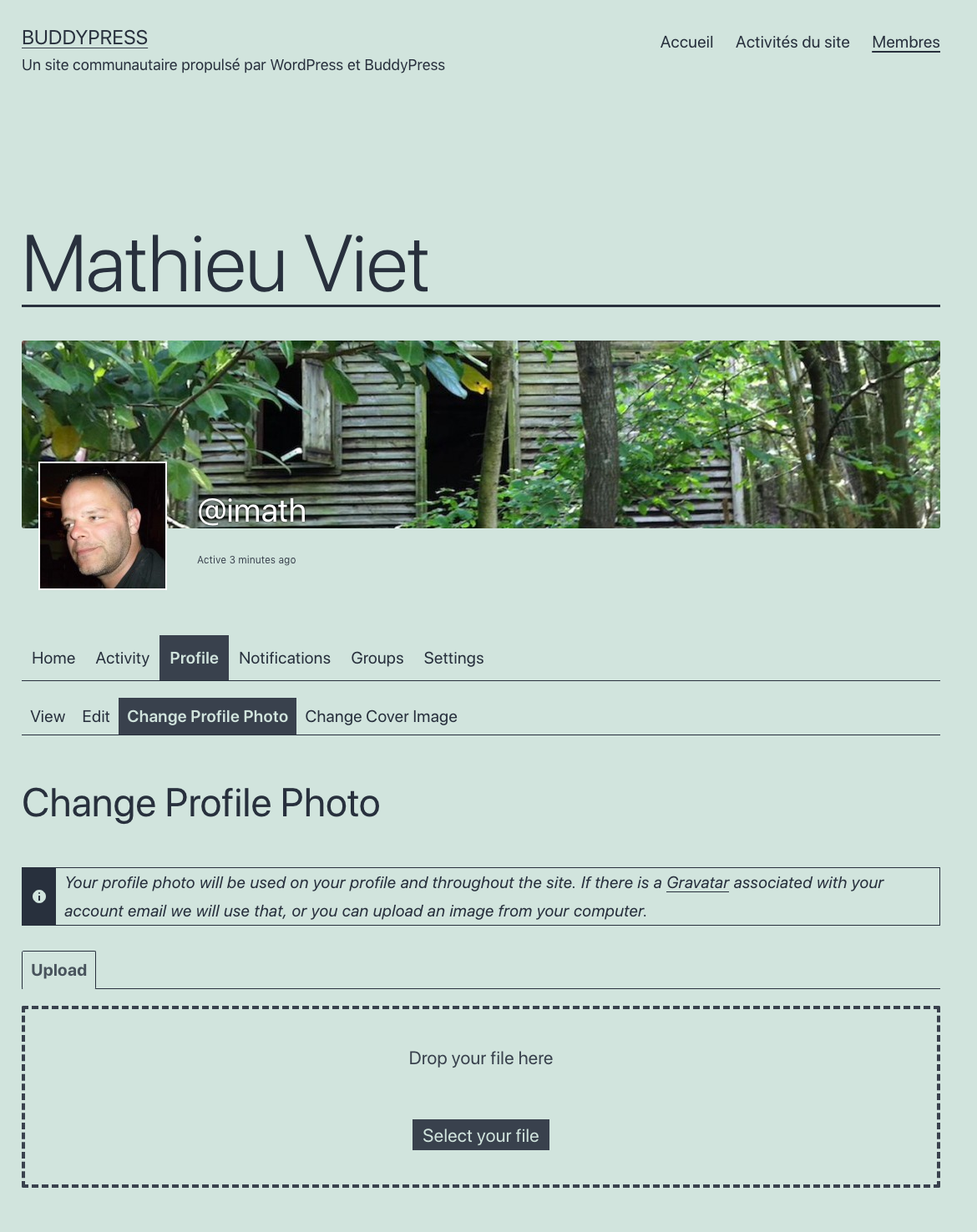
    Below is a screenshot I just made having the xProfile component active :

    avatar-xProfile on

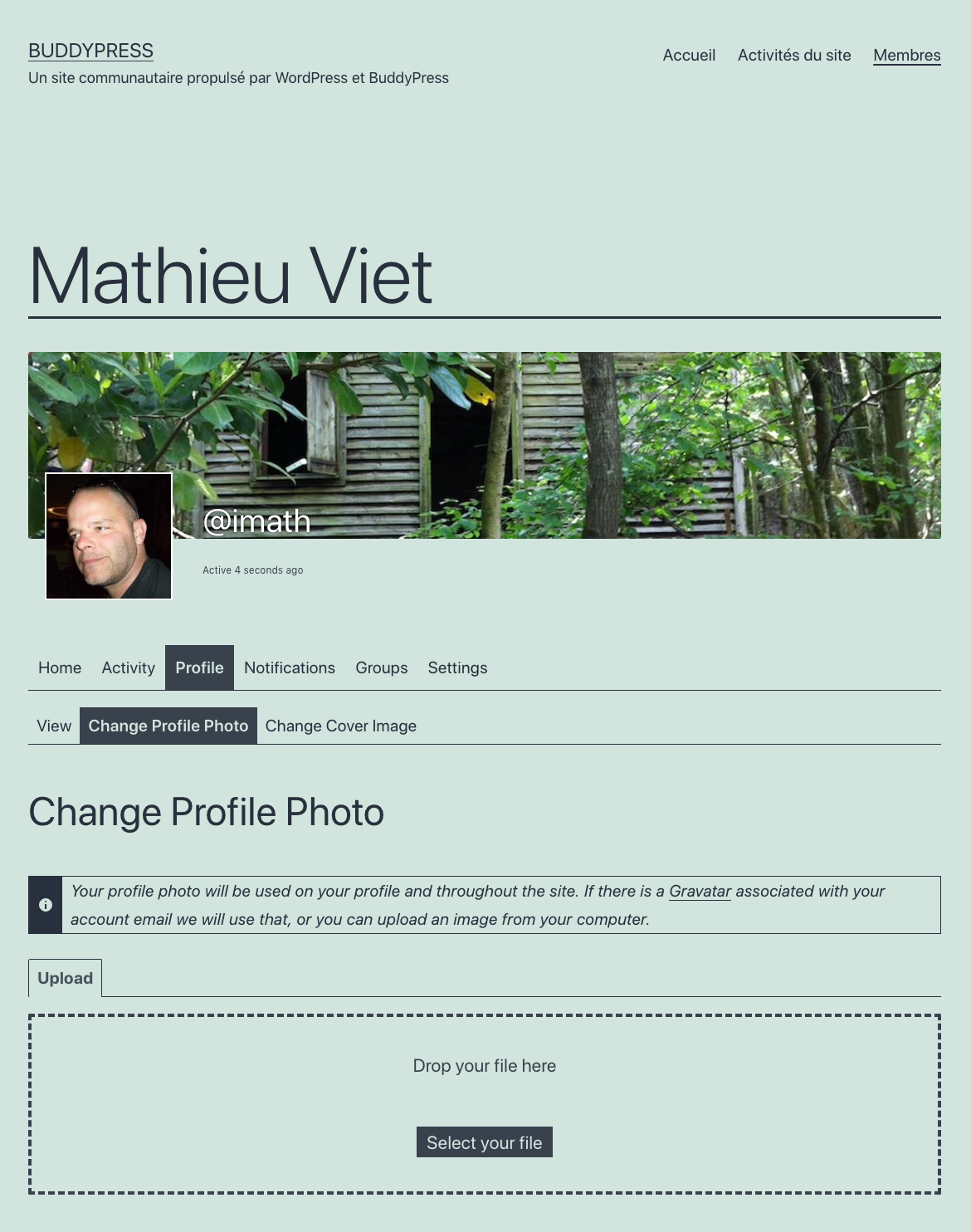
    Below is another screenshot I just made having the xProfile component inactive :

    avatar-xProfile off

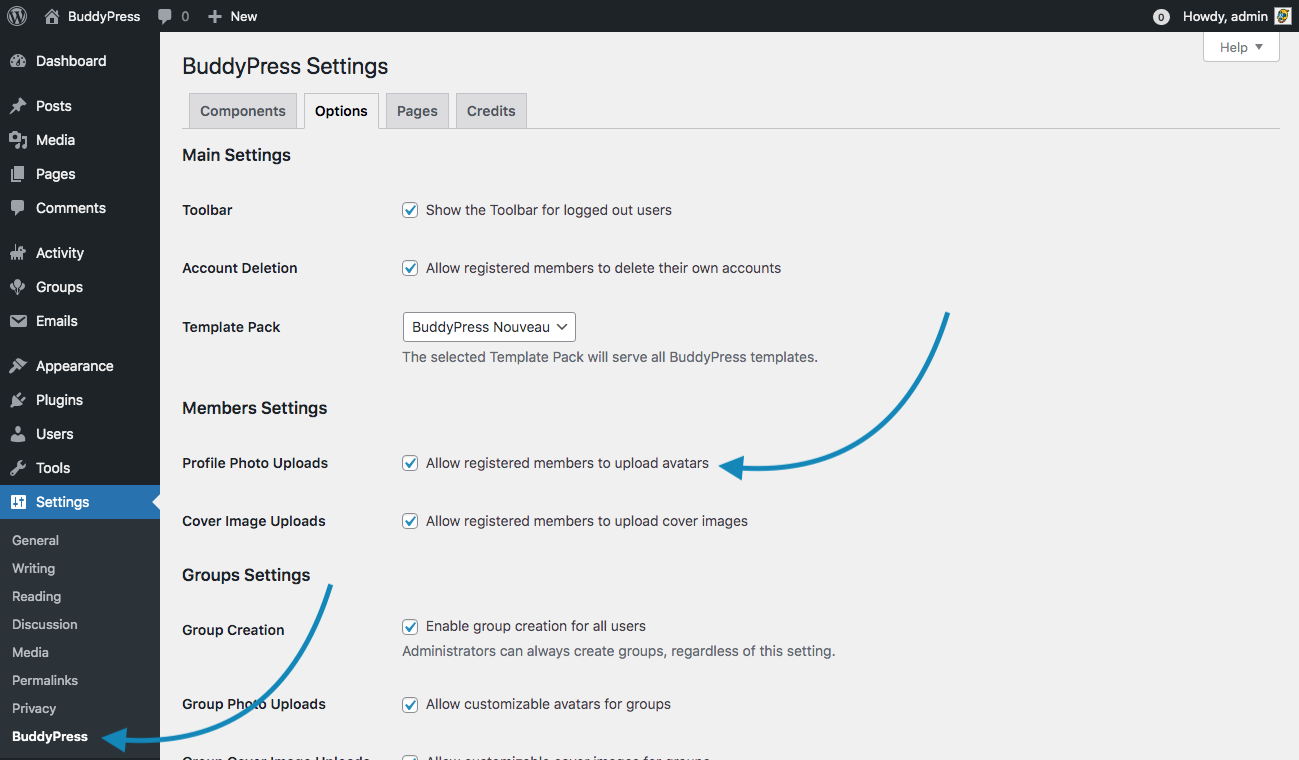
    To control whether or not to allow users to manage their avatars from their profile page, as you said you can use the BP option about “Profile Photo Uploads”. Below is a screenshot of the BuddyPress options screen (Settings > BuddyPress).

    BP Options screen

    If you uncheck “Profile Photo Uploads”, then users can’t manage their locally hosted avatars.

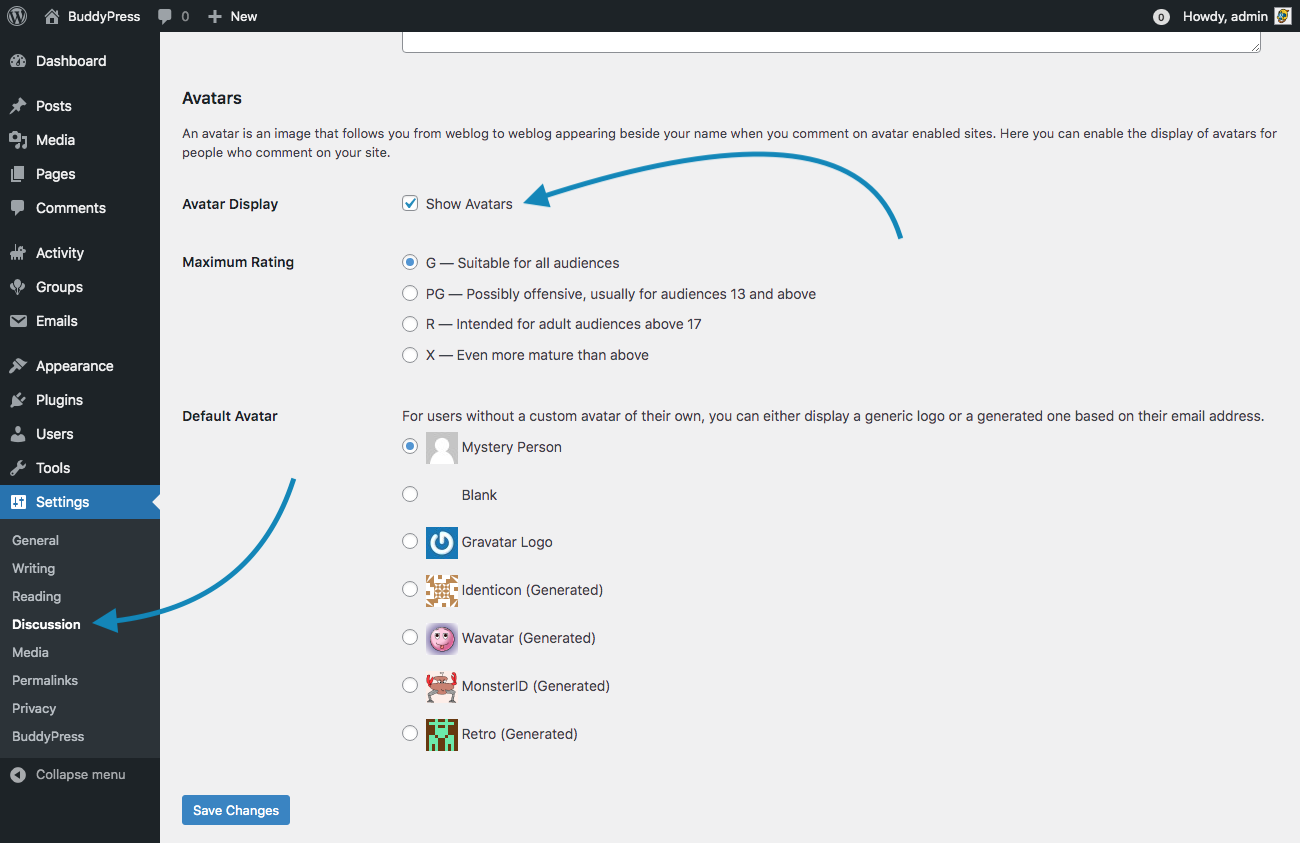
    And there’s also a WordPress setting you need to pay attention to. If you decide that Avatars shouldn’t be shown globally on your WordPress site, then users cannot manage their local avatars from the front end. This WordPress setting is available from the Discussion settings screen (Settings > Discussion). See the screenshot below :

    WP Discusion settings

    For instance, if you uncheck the “Avatar display” WP setting, then the page to manage avatars is not available even if “the Profile Photo Uploads” BP Option is checked. Here’s a screenshot below showing how a user’s profile page looks like when you globally disable Avatars in WordPress.

    Avatars globally disabled

    The page to manage user’s avatar is not available and the user’s profile header does not include the avatar.

    Again, I confirm everything works as expected in BuddyPress, the issue you’re mentioning is specific to the way you configured WordPress &/or BuddyPress.

    #317061
    iamthewebb
    Participant

    Hi, These are the forums for BuddyPress and that very much sounds like an Events Manager issue, although as I use the plugin I’d recommend you check Events – Settings – Formatting – Default event list format

    #317060
    Venutius
    Moderator

    What you could do as a temp measure is you couldstop the redirect happening by removing this elseif clause in buddypress/bp-code/bp-core-catchuri.php line 900:

    } elseif ( bp_is_register_page() && 'register' == $front_page_component && is_user_logged_in() ) {
    
    			/**
    			 * Filters the logged in register page redirect URL.
    			 *
    			 * @since 1.5.1
    			 *
    			 * @param string $value URL to redirect logged in members to.
    			 */
    			$bp->canonical_stack['canonical_url'] = apply_filters( 'bp_loggedin_register_page_redirect_to', bp_get_members_directory_permalink() );
    		}
    

    Obviously this will be over-written when the plugin gets updated next.

    gnu2k
    Participant

    Hello,

    I have a section in the BuddyPress user profile where all the events (from “Events Manager”) a user provides are listed.
    Unfortunately there are this placeholders “#_LOCATIONLINK – #_LOCATIONADDRESS, #_LOCATIONTOWN” listed as a bullet point directly under the event.
    Does anyone know how to get this out, and actually how to edit the displayed “My Events” section?

    Thank you and best regards

    #317050
    Julia
    Participant

    1. Which version of WordPress are you running?
    ⇒WordPress 5.6.1

    2. Did you install WordPress as a directory or subdomain install?
    ⇒As a directory

    3. If a directory install, is it in root or in a subdirectory?
    ⇒subdirectory? full pass /home/users/1/〇〇〇〇〇〇/web 

    4. Did you upgrade from a previous version of WordPress? If so, from which version?
    ⇒Yes. WordPress 5.5.3 
    But it is the first try to see wrong display in buddypress.
    I am beginner.

    5. Was WordPress functioning properly before installing/upgrading BuddyPress (BP)? e.g. permalinks, creating a new post, commenting.
    ⇒Yes properly.

    6. Which version of BP are you running?
    ⇒Version 7.1.0

    7. Did you upgraded from a previous version of BP? If so, from which version?
    ⇒Probably No.

    8. Do you have any plugins other than BuddyPress installed and activated? If so, which ones?
    ⇒bbpress Version 2.6.6
    Other plugins are unactive in the test.

    9. Are you using a standard WordPress theme or customized theme?
    ⇒a standard WordPress theme

    10. Which theme do you use ?
    ⇒Generatepress Version 3.0.2

    11. Have you modified the core files in any way?
    ⇒No

    12. Do you have any custom functions in bp-custom.php?
    ⇒No

    13. If running bbPress, which version? Or did your BuddyPress install come with a copy of bbPress built-in?
    ⇒bbpress Version 2.6.6
    copy ⇒Unknown

    14. Please provide a list of any errors in your server’s log files. https://codex.wordpress.org/Debugging_in_WordPress

    ⇒The code is adding.

    
     // WP_DEBUG debug mode
    define( 'WP_DEBUG', true );
    
    // /wp-content/debug.log 
    define( 'WP_DEBUG_LOG', true );
    

    ⇒No error message!
    ⇒No log file generated. In short, no bug?

    15. Which company provides your hosting?
    ⇒lolipop.jp[Japan]

    16. Is your server running Windows, or if Linux; Apache, nginx or something else?
    ⇒Linux(CentOS)
    ⇒ Apache

    17. Which BP Theme are you using?
    ⇒Buddypress Nouveau

    18. Have you overloaded any BuddyPress template files.
    ⇒Unknow

    19. Any other site customisations that might have a bearing on the issue?
    ⇒No.  After remove customisations code in bbpress, I checked it.

    20. What BP Template Pack is activated in your installation? You will see that under Dashboard > Settings > BuddyPress – Options page.
    ⇒Buddypress Nouveau

    Basic Trouble Shooting:

    1. Identifying whether you have a theme issue:
    ⇒I tried other two themes[ Onepress and Twenty Twenty-One],
    but the icon[×] trouble occurred in buddypress profile page.(Nothing happens)

    2. Plugins:
    ⇒In the bbpress is activated only, the icon[×] works completely.(The topic deleted!!)
    In the bbpress and buddypress set, the icon[×] trouble occurred in buddypress profile page.(Nothing happens)
    Both test, the other plugins are invalid(not active).

    3. BP Themes:
    Both Buddypress Nouveau and Legacy, same wrong display.(Nothing happens)

    I think it is something wrong with the icon[×] button? on forum section in buddypress.
    Nothing happens when that [x] is clicked.

    #317041
    giorgossin
    Participant

    Hi!
    I am using WordPress 5.6.1 and Buddypress 7.1.0.
    Suddenly the RSS displayed on the Activity, and all the activity of all the users as well, whatever they do it is visible, for everyone, without having any connection between them at all.
    What should I do to make the RSS invisible?
    What should I do to to hide the activity of all the users if they do not have any connection between them?
    I am asking you kindly, please someone help me, because I have a problem with this.
    Thanks a lot.

    #317039
    Julia
    Participant

    There is also an icon [x] implying that I can unsubscribe/unfavorite that item.
    However, nothing happens when that [x] is clicked. (your comment)

    I have same problem, too. Buddypress(7.1.0)+bbpress (2.6.6) installed.
    It seems that buddypress do not support bbpress favorite.
    Adding the favorite topic works, but Removing the favorite topic does not work.
    After [x] is clicked, buddypress is invalidated thereafter.
    I could check the [x] topic removed. In short it is the display bug in the buddypress.

    I have no answer to resolve display bug in buddypress.

    #317027
    mrplunk
    Participant

    I solved it. To remove it you need to edit general.php file in wp-content/plugins/buddypress/bp-templates/bp-legacy/buddypress/members/single/settings

Viewing 25 results - 2,676 through 2,700 (of 69,129 total)
Skip to toolbar