Search Results for 'buddypress'
-
Search Results
-
One thing about Buddypress that bothers me is the username vs display name. I have already managed to hide the display name field at registration and copy the value from the username, but users can still change their display name in their profile. Is there any way to prevent this?
If not, can you tell me how I let Buddypress use the username everywhere instead of the display name (for example, the header of the profile shows the display name, as well as the tab in your browser, etc)
Thank you very much, I hope someone can help me!
Topic: Login Bar on Homepage
I have a buddypress sidebar login form on my homepage. When I login via the sidebar form it redirects me correctly to the users member page.
However when I return to the index page of my site wordpress is not detecting that I am logged in. Every other page detects that I am logged in correctly.
I have tried reverting back to the default wordpress theme and the same thing occurred so its not anything to do with the theme. I added a wordpress function to detect if I am logged in and every time I visit the index page it says I am not logged in. Weird part are there are no issues with any other page.
Has anyone else run into this issue before? Any one have any ideas on what might be causing this issue?
So when you are logged in to your buddypress account and leave a comment on a normal wordpress post on the main page of site.
” hey @username check out this post”
I want the username that has been tagged to get a notification of this. Is there a plugin to do this or a script to achieve this?
Hello,
I am editing the WordPress registration form and everything is working fine. However, I cannot change the title of the page which shows after registering: the one saying “Check Your Email To Activate Your Account!”. I have found the line in the code where it says this, so I changed it, but for some reason it still didn’t change. (I have edited /buddypress/bp-themes/bp-default/registration/register.php)
Can someone tell me what I’m doing wrong? Thanks!
Topic: Adding membership types?
I’m attempting to create a site for two types of users, one is a list of content creators, and the other type of member would be users who want to track or interact with those content creators.
Can anyone recommend a way though for me to separate those users? I don’t necessarily want the content people browsing the list of the other members, and I also don’t want to have the other members join the content group.
I’ve been testing out BuddyPress for a while now and it seems to fit most of what I need (custom profile fields, membership lists, favoriting of users, etc.), but I also need to figure this part out as well.
Am I perhaps best served by integrating S2Member? Or does anyone have another recommendation?
Thanks!
Hello,
I’d like to add a “My Profile” link to the buddypress main nav that allows users to link directly to their user profile.
We’re running BP 1.9 and WP 3.7.1
I’ve read through several posts here that got me 90% of the way there — I can get a link to appear in the “profile” nav but not in the main nav that you see if you’re looking at the group page. You know, the nav that lists Home, Forum, Members …
I have added the following to bp-custom.php …
<?php

add_action('bp_setup_nav', 'add_myprofile_to_main_nav', 999 );

function add_myprofile_to_main_nav() {

global $bp;

bp_core_new_nav_item(

    array(

        'name' => 'My Profile',

        'slug' => $bp->loggedin_user->domain,

        'position' => 50,

        'show_for_displayed_user' => false,

    ));

}

?>
What do I need to do differently to get it to appear in the main nav for the groups pages instead of the profile nav? Should I be taking a totally different approach?
Hello, I use Pagelines DMS Framework. Sadly it doesn’t let you to assign page template from admin backend. Only from frontend.
So I need to Stop BP to redirect me from registration and activation pages – so I can assign templates to them. I don’t know the BP file to look for these two functions/actions.
Please, point me out. Or tell me how can I do it from ChildTheme’s buddypress.php.
Kind Regards,
DmitryHello
I just update the new vertion 1.9 and more plugins and i saw that only in the BP pages(groups,friends,forum)-all pages coming under buddypress.
Not only list of all the pages(links) in my website show under the BP,but i see Archives,list of categories,Blogroll and tools.
The vertions is:
wordpress 3.8
tachyon theme
s2Member131126
and more plugins…but i tried to Turn off /on each plugin and this not fix this.
Look for advice
Thank youTopic: dtree for buddypress docs
Hi,
i have been looking and looking for a way to create a Directory Tree of the Buddypress docs on my site. asocialstandard.com I am also investigating other options for the theme due to desperation. I would like the emphasis to be the Doc/Wiki/encyclopedia and groups/forums to evolve around it. The main problem is the easy way to view and search through the Doc/Wiki/Encyclopedia visually is not often performed.
Thanks for any advice
leigh
WordPress Version: 3.8
BuddyPress Version: 1.9The title explains the just of it but I will try to explain in further detail. Essentially, I want a secure registration that does not require inviting people. The key idea is to give them a password to either access the registration page or require them to provide a static passphrase for them to submit the form.
Password Protect. I have tried changing the “Register” page to password protected but that does not work because the way BuddyPress is coded, the page is no longer an actual post. I found this out when by using “print_r($post)” in the “Register” page.
Passphrase. I have tried adding a passphrase text field however I cannot find the .php file that handles the registration information. In addition, I would dislike editing the actual BuddyPress plugin if I do find it and cannot be replaced by a theme.
Hi,
I upgraded to buddypress 1.9..after doing so, the page formatting for activity, Groups, members were lost. IT now only shows a seies of text instead of the previous table-like layout of the contents.
wordpress version: 3.7
buddpypress plug-in: 1.9BTW, im running on localhost for now.
Thanks
Hi There,
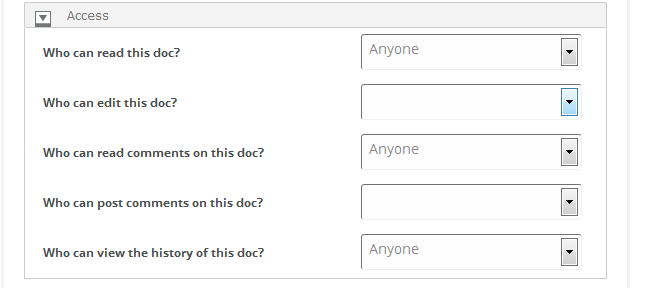
I am using BuddyPress Docs, and in Action Section it shows Anyone in first position
i.e.
Anyone
LoggedIn user
The Doc Author OnlyAll I want to reorder it like
The Doc Author Only
Anyone
LoggedIn userSee attached snapshot…
As of now I have
http://chaudhary.byethost9.com/buddypress/1.png
I want like this
http://chaudhary.byethost9.com/buddypress/2.pngIs there any way to do this, I am struggling with this but till now, didn’t any success.
Any help would be appreciated!!
Thanks
Shobhit
Hello…I hope someone can assist me with this…I have been researching this topic with mixed opinions and unable to find a exact solution…I am building a site that uses buddypress & bbpress…and all I want to do is restrict non-logged in members to view any profiles…unless they are logged in or register..
I have tried a pluggin called “Private BP” which is good, however this Blocks access to both Buddypress & BBPress and does not allow the option to choose…I need to keep BBPress open for anyone to view….I also tried “Private Community For BP Lite” – and this blocks access to the Entire Site, and again doesnt have the option to only block (1) thing.
The only thing I am trying to do is restrict viewing a member profile page, unless you sign in or register to the site….Can someone please help!…I would greatly appreciate it.
i want to create a homepage for each group and then embed buddypress elements into it alongside writing, links to other parts of my site, video’s and pictures to explain the group – most importantly the groups forum.
does anyone have any idea’s how i can do this? i would prefer to make the page appear within the buddypress area because i will be using the buddypress groups widget as my sites main menu (it has all the functionality i need).
Hi,
I have a fresh install of WP 3.8 + BP 1.9 and have issue with “adminsonly” visibility.
A previous post says that it was an issue for BP 1.8 too. In the documentation is said that display of hidden xprofile fields has been worked out.
In the profile field editor “default visibility”, there is no option for “admin only”. I checked “Only me” and the result in bp_xprofile_meta table is “adminsonly”.
BUT a member (user_role = subscriber) can view and even edit the field ! This is not what I expect … but is consistent with “only me”.
What did I do wrong ? Or is it a bug ?
Thanks for help!
And merry Christmas too!I just noticed a problem with the ” This is a notice to all users.” function of BuddyPress. While i can check the box and make the message visible to myself as an admin, and my other account with “Moderator” privileges, but not my normal users, which has “participant” privileges. How can this be fixed? I want the notice to be visible to all logged in users.
Thanx in advance and marry Christmas 🙂