Search Results for 'buddypress'
-
Search Results
-
Hi… since updating to PHP8.3 I am seeing the warning
Warning: Attempt to read property "id" on null in /home/[...]/wp-content/plugins/buddypress/bp-xprofile/bp-xprofile-template.php on line 558Any idea what’s up, please?
WP 6.7
BP 14.2.1
PHP 8.3Hi,
[21-Nov-2024 07:34:39 UTC] PHP Notice: Function _load_textdomain_just_in_time was called incorrectly. Translation loading for the
buddypressdomain was triggered too early. This is usually an indicator for some code in the plugin or theme running too early. Translations should be loaded at theinitaction or later. Please see Debugging in WordPress for more information. (This message was added in version 6.7.0.) in /wp-includes/functions.php on line 6114Can you please fix this problem?
Thank youI’m starting a website that’s dedicated to building a community around tabletop roleplaying games. The intent is to create a full community of people in the state of Arizona where we can become a
one-stop-shop for every aspect of the hobby.Among our primary goals is finding a way to make it easy for people to find each other and
make games happen. It’s the hobby’s biggest hurdle, and I think it’s one that’s easily addressed with the right tools in place. The idea is to let community members create detailed profiles and post ads for their tabletop games. From there, a matchmaking system sorts games and users and puts them together using an algorithm. I picture something like OKCupid’s matching algorithm—but for TTRPGs and groups of people.Based on what I’m reading on your site, BuddyPress offers a lot of the side benefits I’d want included in a tool like this. Obviously you’re not designed to be a matchmaking service, so I’m just here wondering what it would take to build something like this on top of your platform.
Let me explain the process of what I’m picturing:
1. Gamemasters (GM) post their game advertisement with full details about it using a form. (game system, style, player preferences, etc.).
2. Players build profiles specifying their availability, preferred games, playstyle and more through a matching form.
3. The system compares the game ads with player profiles, generating a weighted score to rank potential matches.
4. Based on a threshold score, matches are suggested to GMs and players.
5. Once there’s a match, the player or GM can reach out via the site’s chat tools/Discord {integrated together would be great too).
6. After chatting, they accept or reject the invite.
7. When both sides accept, the system fills the next available slot in the GM’s game,
8. This repeats until all the slots are full or the GM closes the ad.
9. The system then opens communication between all matched players using the site’s chat.We’re already running an analog version of this on Discord with a couple hundred users. It’s been pretty successful considering our small scale and limited capabilities—we’ve helped hundreds of people find games over the last year.
Now, we want to take it to the next level with a fully integrated website as a hub for everything TTRPG in the state. A store, blog, resource directory, and a ton of other features. This tool will just be a big part of it.
So, I’m no expert on websites (last one I built was in 2001), so I’m planning to have this site professionally developed. I really don’t know what’s possible these days and it’s intimidating to try and learn it all.
So with this vision in mind, do you think a tool like BuddyPress can be customized to do something like this?
I’m getting the following PHP Notice:
PHP Notice: Function _load_textdomain_just_in_time was called incorrectly. Translation loading for the
buddypressdomain was triggered too early. This is usually an indicator for some code in the plugin or theme running too early. Translations should be loaded at theinitaction or later. Please see Debugging in WordPress for more information. (This message was added in version 6.7.0.) in wp-includes/functions.php on line 6114Hello,
I have a follow up question to this old thread:
https://buddypress.org/support/topic/how-to-get-notification-count-code/chatty24 asked “Could that also happen in real time (without refreshing the page)?”.
I am having the same question. How can I ajaxify “bp_notifications_get_unread_notification_count( $user_id)”?
Thanks for any help!
WP 6.6.2, BP 14.2.1, Divi theme.
I added a bunch of WordPress users to my site from a csv file using the Import and export users and customers plugin. Worked well. But those users couldn’t figure out how to make friend requests, since they couldn’t “see” the other users that they could ask. After some fumbling through this forum and googling, I came across the “/members” slug. I seemed like exactly what I needed, a list of members with a button to send a friend request to each one. The only problem was that it didn’t show all the users. More ressearch found this post from 10 years ago. Seems the issue was/is that it only shows those users who have had some BuddyPress activity recorded. But since these were mostly new users, most had no activity. So I wrote a little bp-custom.php file containing:
function make_all_users_active() {
    $users = get_users();
    // repete_log(print_r($users, true), __FILE__, __LINE__);
    foreach($users as $user) {
        if (strlen(bp_get_user_last_activity($user->ID)) == 0) {
            // repete_log(sprintf("bp_update_user_last_activity(%s)", $user->ID), __FILE__, __LINE__);
            echo $user->ID . "<br>";
            bp_update_user_last_activity($user->ID);
        }
    }
}
add_action ('wp_loaded', 'make_all_users_active');
This solved the problem of not showing all the other BuddyPress members, but as far as I can tell, I’ve now got to tell all the users that if they’re interested in making friend connections, they have to go to the address bar, and type /members right after the domain name. That seems ridiculous! I guess I could add a page containing a link to that slug that they could click, but it would be nicer if I could make a page they could find as one of the site’s pages that would display the information from that slug, without having to click a link. Better still would be to be able to customize the BuddyPress drop-down menu to add an item for “All Members” that would display the slug’s contents…
Using WordPress 6.7
Installed as a root directory
Wordpress is working fine
Using BuddyPress 14.2.1
No other BuddyPress plugins installed
Using Themify theme Peak, no mods
No custom functions
Using bbPress 2.6.11
Hosted by ‘Omnipresents’ is in association with LiquidNet Ltd.
Server running Rocky Linux 8
I have not overloaded any BuddyPress template files
Template Pack BuddyPress NouveauI am trying to set up a forum. Everything is working so far except for recent post, comments, archives, categories are not appearing. Ive tried looking through the forum and looking around in Buddypress with no luck. Any ideas?
Hello,
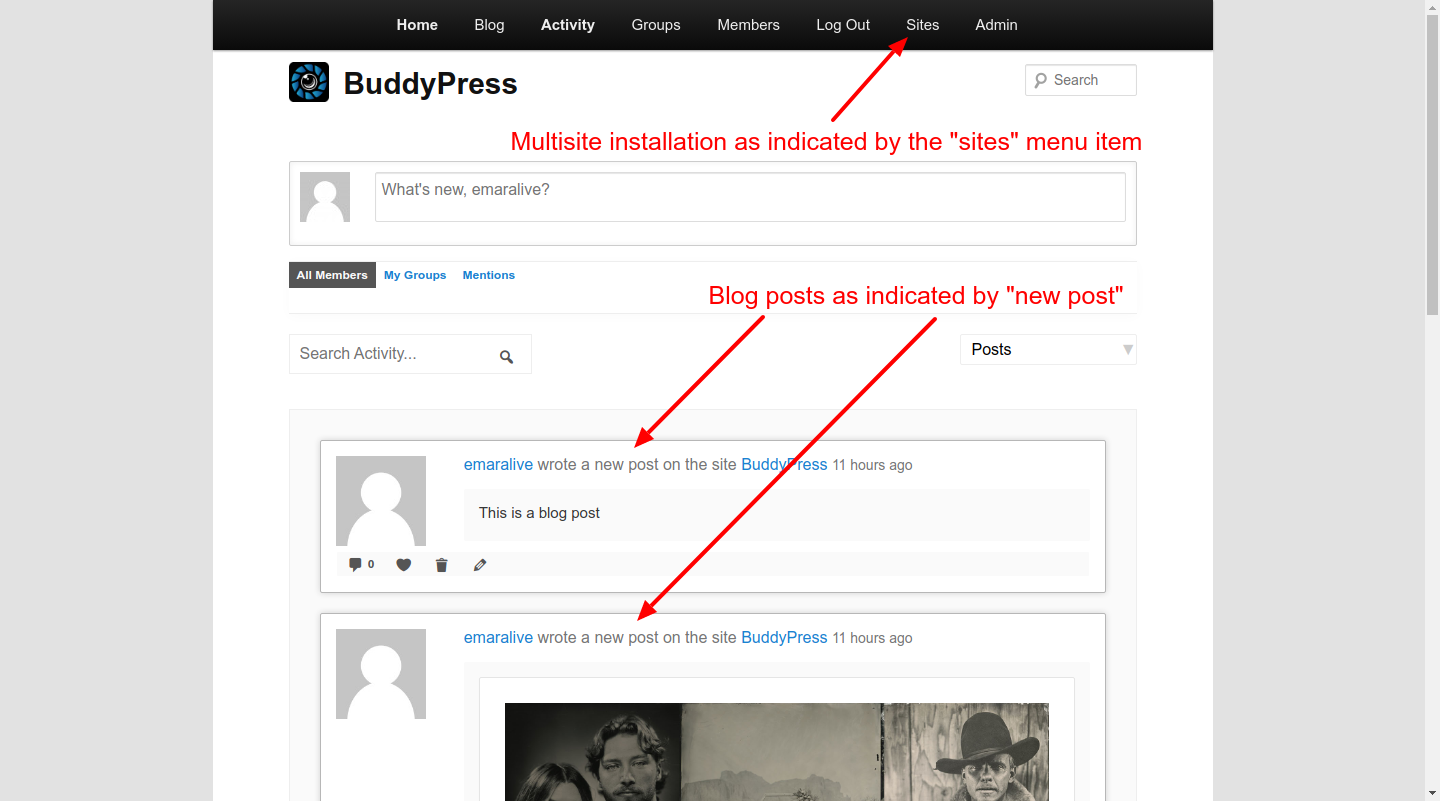
I am using WordPress and BuddyPress in latest version – in a multisite installation.
My problem is: WordPress post updates do not show in activity stream in none of my sites. They even are not visible in activity database in the dashboard. Other status updates do work fine. I surely enabled the option to have WordPress core updates in the settings.
I tried disabling all other plugins. Issue still persists.
Does BuddyPress has a problem with multisite? Do you have any idea?
Thanks!