Search Results for 'buddypress'
-
Search Results
-
Hi.
Wordpress version:3.3.2
Buddypress version:1.5.5As the Summary says, i cant create users or groups, im experiencing the same problem with them both. Im filling in group information as i should, pressing next, the page reloads and clears the previous information i typed in, nothing ends up in the database either.
I have read some stuff after searching on Google, but nothing that helps.
HEELP ME!

/Chichii
Hi people!
I’m studying Buddypress and I figured out that the option BuddyPress to WordPress profile syncing doesn’t really work.
Infact, buddypress creates a default field named “name”. If I change it, this value will be both name and nickname on the WordPress profile. Shouldn’t this change just the first_name value? Is it possible to have a chance to change via BuddyPress the first_name, the last_name and the nickname too?
Thanks!
We have a membership site. I got BuddyPress installed and functional. Now I would like to protect the community by requiring that someone log in before accessing any of the BuddyPress features. Working with WishList Member tech support I was advised to use these lines of code in each of the BP Template Pack files listed in step 3 of the setup.
1) “before this `
`
and after this ``
2) “
3) ` `
4) ` `
The file buddypress-protect.php contains the following code:
`You must be logged in to view this content.
`
So, the good news is that the community is protected, but the bad news is that the error message is not showing up. I get a page that shows a header and footer, but the rest is blank. I searched the internet trying to learn more about “include templatepath” and an obtuse post briefly mentioned that this will not work with BuddyPress. Is this true and is there a better way to do this?
I have a WordPress website, and I downloaded BuddyPress 1.5.5 and went through the installation wizard.
However, when I hover over one of the links in the dropdown menu at the top of the page, i can see a little break in the dark menu – i can see the background through the menu at that thin, horizontal break.
When you try to move the mouse down (e.g. under my account, the bottom link is sign out), then as soon as the mouse hits that break, the menu quits as though you moved the mouse off the menu.
Now, I also noticed that this break is positioned right where the WordPress 2011 theme begins. So basically, the dropdown menu messes up when it meets the header of my website.
Furthermore, when I scroll down a bit and try using the dropdown menu (you can’t see the header at this point), then it works just fine.
But I can’t exactly tell visitors to scroll down a bit if you want to login….
So is there a fix for this? I’m using the buddypress 2011 theme as well.
How exclude the author from signing a personal message? I found the two functions are responsible for this:
function get_recipient_links($recipients) {
if ( count($recipients) >= 5 )
return count( $recipients ) . __(' Recipients', 'buddypress');

foreach ( (array)$recipients as $recipient )
$recipient_links[] = bp_core_get_userlink( $recipient->user_id );

return implode( ', ', (array) $recipient_links );
}
function bp_get_the_thread_recipients() { global $thread_template, $bp; $recipient_links = array(); if ( count( $thread_template->thread->recipients ) >= 5 ) return apply_filters( 'bp_get_the_thread_recipients', sprintf( __( '%d Recipients', 'buddypress' ), count($thread_template->thread->recipients) ) ); foreach( (array)$thread_template->thread->recipients as $recipient ) { if ( $recipient->user_id !== $bp->loggedin_user->id ) $recipient_links[] = bp_core_get_userlink( $recipient->user_id ); } return apply_filters( 'bp_get_the_thread_recipients', implode( ', ', $recipient_links ) ); }How can this be done and put into the file bp-custom.php?
Howdy,
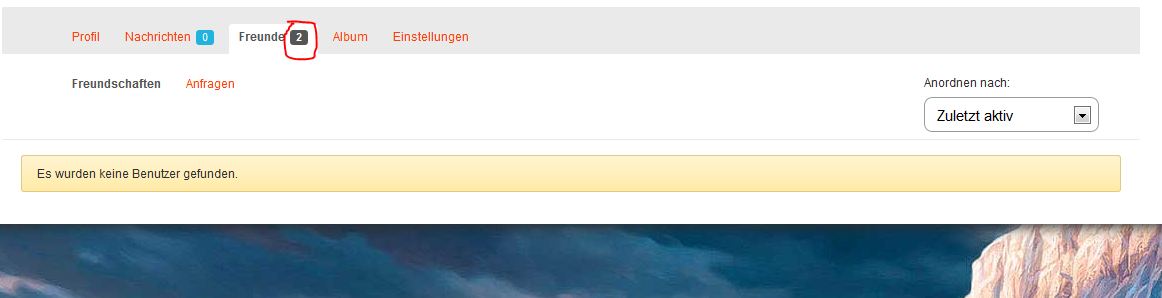
is it possible to reset the friends counter on the profile page? I’ve added two test-accounts as friends which I deleted after a reinstall of BuddyPress. Now I have “two friends” whose accounts do not exist anymore. How can I reset the counter?
Here: http://www.abload.de/img/pict6ykiu.jpg
Regards
Hi at all. i have a question that i think is interesting. I would like to know if there is a module or plugin that whem an user create a blog with buddypress multisite could choose an categorie or by other way or one way to show and pop up or advise that his blog could be for adult content like for example blogspot….
Someone knows about?
Thank’sHi all, my buddy press test site has been working great for a few weeks, then the bbpress post stopped posting to the activity stream after installing the activity refresh plugin. I then deleted the entire site and database and restored from a backup and still the bbpress forum posts will still not post to the activity stream. Is there something I can check to make sure it will post to the activity stream?
1. Which version of WordPress are you running? 3.3.2
2. Did you install WordPress as a directory or subdomain install? dir
3. If a directory install, is it in root or in a subdirectory? sub
4. Did you upgrade from a previous version of WordPress? If so, from which version? no
5. Was WordPress functioning properly before installing/upgrading BuddyPress (BP)? e.g. permalinks, creating a new post, commenting. yes
6. Which version of BP are you running? 1.5.5
7. Did you upgraded from a previous version of BP? If so, from which version? no
8. Do you have any plugins other than BuddyPress installed and activated? If so, which ones? BuddyPress Activity Plus, bbpress, BuddyPress Community Stats, BuddyPress Follow, BuddyPress Global Unified search, Select CubePoints Buddypress Integration CubePoints Buddypress Integration
9. Are you using the standard BuddyPress themes or customized themes? child theme
10. Have you modified the core files in any way? no
11. Do you have any custom functions in bp-custom.php? no
12. If running bbPress, which version? Or did your BuddyPress install come with a copy of bbPress built-in? 2.0.2
13. Please provide a list of any errors in your server’s log files. none
14. Which company provides your hosting? powweb
15. Is your server running Windows, or if Linux; Apache, nginx or something else? linuxThank you,
Chris
Hi
I am sure many of you already had the problem: not so savy internet users who are members of your community and just “do not get it” how to upload that stupid image for their avatar.
They don’t know the difference between html and jpeg or between 30KB and 30 MB …So the issue is … there is NO option for the admin to go to that user profile and upload the stupid avatar himself! Sounds logical that such a function must have been part of buddypress, but for whatever reason it’s not … and the way avatars are saved makes it impossible to just paste an image URL in the database somwhere .. because there is no such “somewhere” …
How did you solve the issue? Anyone can please help?
Thank you so much!
PS: using the older BuddyPress, before 1.5


Hey All,
Wanted to see if there was any built in way in buddypress to create a custom page for each comment. Right now, a comment link will open the topic page with a hash that will direct the browser to the specific comment. I would like each comment to have it’s own page. Is there a way I can easily tweak buddypress for this, or do I have to Create a custom wordpress page using the mysql data?