It’s frustrating because that’s almost it. I leave the Header navigation as blank because my buddypress/wordpress pages automatically fill in that menu. So when I am logged in all the pages I want to see are there. I only made my homepage and about page available to the nonmembers, and that works fine too. However, when a user is logged off, they can still see all the pages available to a logged in user aswell as the pages which are available to them. So instead of having one smooth menu for the non member, theres the members menu and below it a non members menu. Note this is only for logged out members everything is fine as far as signed in users are concerned.
PJ you do need to try and identify what files are the issue, Paul did ask that first time around, that info would allow both of us to have a clearer idea of what to look at.
Images paths are often the culprit in this sort of mixed resource scenario, which is why I mentioned them.
On a sidenote although it may seem an odd idea to run an entire site under https, there are those that advocate ALL sites changing to https regardless of whether they have obvious need for it such as payment gateway security.
You should make a child of bp-default and backup files and db just in case…
You don’t add or remove any pages from the code. The point is that it works from the built in wordpress default menu system. ( https://codex.wordpress.org/Navigation_Menus )
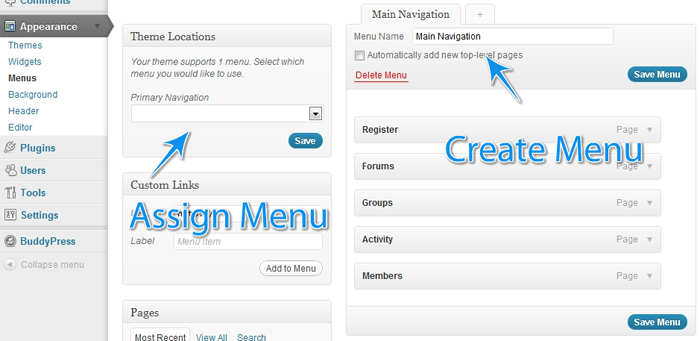
To get the second menu to appear – In your child theme’s functions.php file add:
`function register_my_menus() {
register_nav_menus( array(
‘primary’ => __( ‘Header Navigation’ ),
‘secondary-menu’ => __( ‘Alternative Menu’ ),
‘another-menu’ => __( ‘Another Menu’ )
) );
}
add_action( ‘init’, ‘register_my_menus’ );
`
I’m not sure what cause the problem but on two sites that use xprofile field (some just use minimal profil field) when some users try to edit and update their profil, nothing happen: no change and no message.
What makes me confuse is that on one site, I can make change as the administrator. On the other, I can’t. both use the lattest version of Buddypress (1.5.5) and I’ve tried to diseable other plugins for conflict, used the default theme and used the same name for the primary field (Name) and primary set of fields (base).
Any idea someone?
Just buddypress original for now. So in the ‘menu_ID’ do I just replace that with a ‘(then my page ID’ then im guessing a comma, then ‘(page Id)’ right?
Your browser’s warning says that some content is being served over http. You need to figure out *what* file is being requested then we can tell you if it’s a BuddyPress core problem, or your theme, or a plugin.
 PJ
PJParticipant
Paul,
Ideally I’d like to have the whole site forced https since I have a private ssl. So, WP+BP in all https if possible.
I did a fresh install of WP and just installed BP, so I doubt it’s an image issue. Is there a way to go totally https?
I also went to Settings > General and changed WordPress Address (URL) to have an https rather than http. Anytime I click BP parts of the site it goes back to regular http.
@mercime
I have reinstalled WP into a Sub-Folder. Still remain the same.
http://learningdigitalphotography.net/dev/registration
I think this plugin just don’t work…
I prefer the first option of serving different menus whether the user is logged in or not. Should I put that code into the themes header or funtion.php? Do I need to add to the given code it to specify which pages I want to hide from logged out users. Using latest version of wordpress and buddypress
Hello
when I use wp_mail :
$headers = ‘From : My Name ‘ . “rn”;
wp_mail(‘test@test.com’, ‘subject’, ‘message’, $headers);
}
add_action( ‘wp_footer’, ‘testmail’ );
my header is not working. I receive the mail the from section : noreply@mysite.com.
I think the problem comes with buddypress filters :
add_filter( ‘wp_mail_from’, ‘bp_core_email_from_address_filter’ );
how can I fix it or clean or reset it ?
because in all my site when wp_mail is used the from is the same.
I use it with my contact form.
Thx for help
Likely image urls are the culprit as is often the case with ssl connections. A certain amount of googling will fill you in on the ins and outs of using SSL and the warnings that are generated (it’s not broken SSL it’s just a warning that the page request has mixed resources)
Possibly BP needs to be doing some checks to see how the server is configured with respect to SSL, not something I have had cause to look at with BP.
You need to figure out and tell us what is being included over http. Also your WordPress and BuddyPress versions. Thanks.
BuddyPress Template (Pack) is an attempt to make it easier for people to understand how to get started to adapt their theme for BuddyPress. As it’s intended to be a single-use thing, it doesn’t make sense to go into BuddyPress core.
Why is Buddypress and Buddypress Template two separate plugins? It doesn’t make any sense.
Thanks! That was simple enough! (changing registration slug)…didn’t realize there was that feature in Buddypress now, and that it would be that easy! Here’s hoping it helps!
Is there a way to remove the “edit my profile” link that is next to the avatar in this new buddybar/adminbar merge?
PJParticipant
I added
`# BEGIN WordPress
RewriteEngine On
RewriteBase /
RewriteCond %{REQUEST_FILENAME} !-f
RewriteCond %{REQUEST_FILENAME} !-d
RewriteRule . /index.php [L]
RewriteEngine On
RewriteCond %{SERVER_PORT} 80
RewriteRule ^(.*)$ https://www.mysite.com/$1 [R,L]
# END WordPress`
To the .htaccess file and the entire site went https (I have a private SSL and dedicated IP).
I installed/activated BuddyPress and the entire site has a broken https with the following message:
Your connection to http://www.mysite.com is encrypted with 256-bit encryption. However, this page includes other resources which are not secure. These resources can be viewed by others while in transit, and can be modified by an attacker to change the behavior of the page.
The connection uses TLS 1.0.
The connection is encrypted using AES_256_CBC, with SHA1 for message authentication and DHE_RSA as the key exchange mechanism.
The connection is not compressed.
@mercime If i do the WP reinstallation manually, will that affect my site and SEO of my site?
Hello
in my website member Domain is
http://www.site.com/membername
i wanna show member Defualt posts ,not buddypress posts
to be like that
for example
http://www.wassimo.com/wassimo/topics
and thanks
This is a known issue and will be addressed soon. You could use google in the meantime. Thank you for your patience.
== Using cpanel (fantastico) … how can i reinstall wordpress, can this be the issue? ==
@allentan you will need to re-install WordPress. WordPress should be installed manually, e.g. via FTP, and NOT via webhost scripts which bring about numerous issues when BuddyPress is activated.” (reference)
== When i uncheck the boxes the right side of content gets cut short. It needs about 12-15px more. ==
That’s why I suggested in my previous post in D.) to copy styles used in Twenty Ten theme to correct the width of the BP elements. Look specifically for styles targetting #object-nav and #subnav
The search issue is known and will be addressed soon. Thank you all for your patience.


