I have been using various forum scripts in the past, with my wordpress site – smf was a fave, phpBB too. But the issue with third party scripts, was always the usual problem of integrating the forum script with wordpress.
But I have tried buddypress this year. Wow. I wanted to say a big thank you for a great script. Buddypress rocks.
A quick question. Any recommendations for nice buddypress templates?
Michelle
Irish census
There were some changes in BuddyPress 3.0 to the activation process.
You’re most likely using a custom theme or you have overriden the activation template.
View the second point in this thread to fix this:
BuddyPress 3.1.0 is now available!
About the email, we updated the email to add the activation code. To see this update, you can reinstall the emails and that should allow your users to copy the activation code. View the first point in the above thread to find out how to do that.
Hi,
1. So for this, you can create groups in BuddyPress with company name, also have member type feature using this plugin https://buddydev.com/plugins/buddypress-member-types-pro/ and create.
2. Create member types with the same name as your groups and they will be listed at the time of registration so one can choose to which company they belong and then you can use this plugin https://wordpress.org/plugins/bp-auto-group-join/ to let them auto join to the respective company groups. In this way, they will be joining their respective community group automatically when they register by choosing the member type.
Hope this makes sense.
Thanks
Hi! I’m trying to achieve this member structure with BuddyPress. Is it feasible?
See image: https://imgur.com/a/qb9SOaT
COMPANY 1
Employee 1 (unique email address)
Employee 2 (unique email address)
Employee 3 (unique email address)
COMPANY 2
Epmployee 1 (unique email address)
Company 3
Employee 1 (unique email address)
Employee 2 (unique email address)
Employee 3 (unique email address)
Employee 4 (unique email address)
Employee 5 (unique email address)
I’m building a B2B community where some companies will have up to 10 employees/members each. Each employee should have their own account (verified by an unique email address). Is it possible to add a superuser (username: Company Name) and than add subusers (Employees) to that superuser/company? Or are there any other creative way to achieve this?
Good morning!
Recently, we have been having issues with some members registering via Buddypress. It emails them the activation link but when they click it it takes them to a page that asks for the activation code which is just contained after the /activate/ section of the URL.
Is there a way to have the code be generated in the email for them to copy or better yet, just let the activation url activate it and not ask for a code afterwards?
Hi,
It depends on the functionality you want like if you want to allow members to have social learning then go for BuddyPress for Learndash and if wants to allow them to manage their account and orders from their profile then BuddyPress for Woocommerce. You can have both at the moment but as I said it depends on what you want.
Thanks
I have a subdomain on which I want to install BuddyPress but at the time of installation I get error like Installation failed: Could not copy file. Buddypress/bp-templates/bp-nouveau/buddypress/members/single/settings/capabilities.php. It is not possible to install BuddyPress on a subdomain.
Hi
I intend to use Learndash + Woocommerce + Buddypress
I already installed Learndash.
I need to sell my courses : I will install Woocommerce + Learndash/Woocommerce integration
I need to build a community : I will install BuddyPress
Which add ons am i supposed to use :
– BuddyPress for Learndash or BuddyPress for Woocommerce or both ?
Thanks in advance
Eric
Hello,
I know this has been asked before and I followed the suggestion from this thread:
https://buddypress.org/support/topic/block-activity-stream-types/
and tried adding this code to my the child theme functions.php and to bp-custom.php:
// Filter bbPress from updating activity stream
function imath_activity_dont_save( $activity_object ) {
$exclude = array( 'bbp_topic_create', 'bbp_reply_create',‘friendship_created’, ‘joined_group’, ‘updated_profile’, ‘updated_profile_photo’);

// if the activity type is empty, it stops BuddyPress BP_Activity_Activity::save() function
if( in_array( $activity_object->type, $exclude ) )
$activity_object->type = false;

}

add_action(‘bp_activity_before_save’, ‘imath_activivity_dont_save’, 10, 1 );
but it didn’t work, profile updates, profile photo updates, new friendships, forum topics and forum replies are still showing on the activity page 🙁
What am I doing wrong?
Thank you for your help.
No my code is from the file member-header.php * Buddypress – Users Header.
What you sent me is from * Groups Home.
This would be my code: https://pastebin.com/ck2wDwE2
Thx!
Not really the solution because I stumble again with the (‘) cutting in my php code.
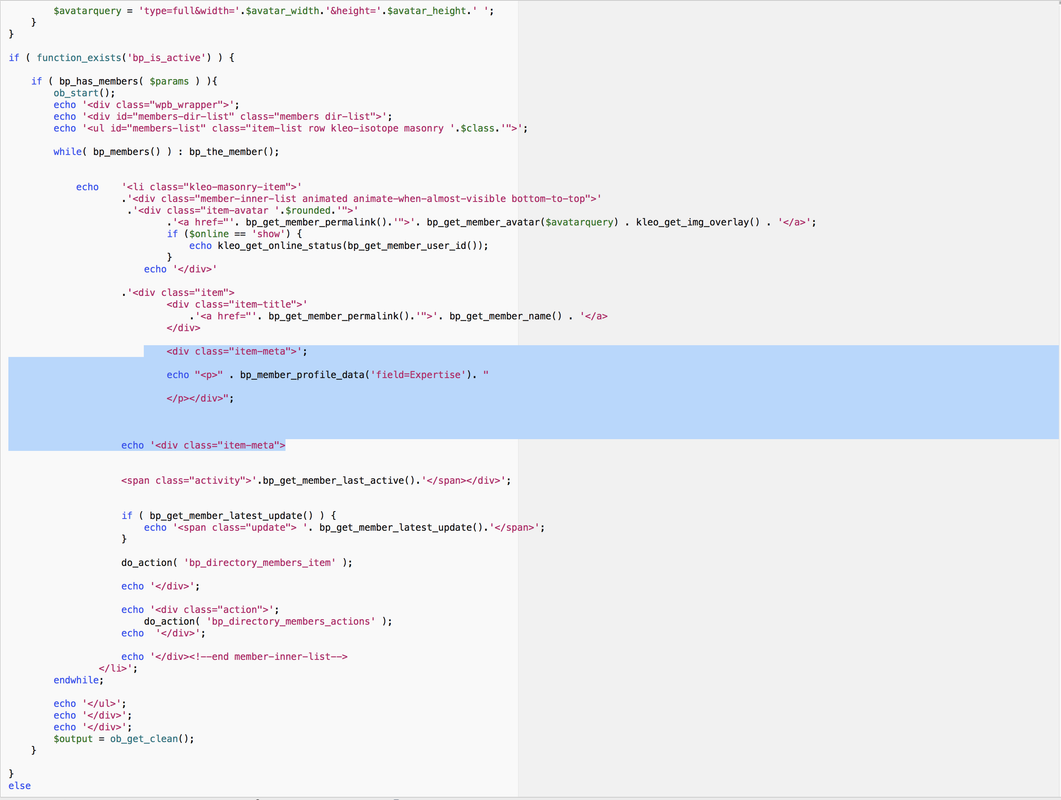
I’m actually trying this:
But this is the result:
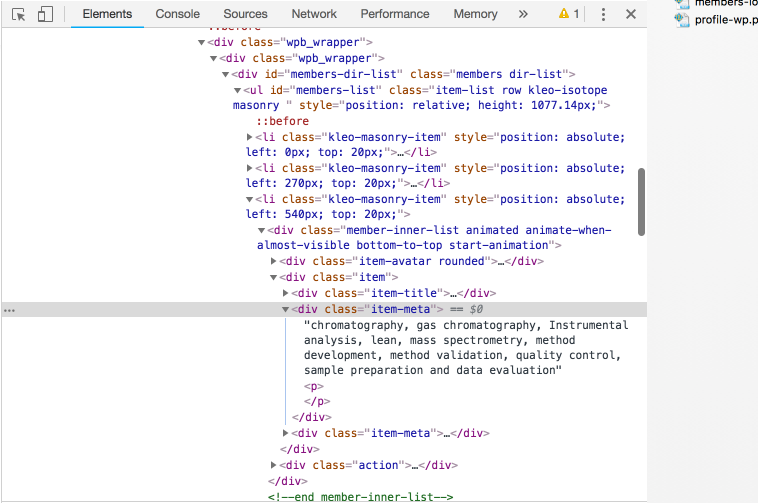
As you can see it works but the fields from “Expertise” are being printed before the <p></p> tags. I would like them to be printed inside the <p></p> tags.
Thx!
This workaround was for Buddypress 3.1.0 and in 3.2.0 this issue (bug) was fixed by BP developers. This means if you’re using BP 3.2.0 you’re group description should display correctly without having to modify any of the core BP files or through using a template override in your theme/child-theme.
I’ve upgraded my BP to 3.2.0 and removed my workaround and my group descriptions display perfectly.
You can go with this plugin https://wordpress.org/plugins/buddypress-admin-only-profile-fields/ to set the visibility to hidden/admin only.
Thanks
Got that.
Please try this plugin: https://buddypress.org/support/topic/terms-conditions-checkbox/
If it does not help you then please create an xprofile field and fill in the respective details like this :
Title: Terms of Service
Description: By checking this box you agree with our Terms of Service (with a link on Terms of Service to the TOS page)
Field type: checkboxes
Option: I agree ( default value: unchecked )
Visibility: just-me with option: enforce visibility
Thanks
@ipokkel okay lol….i had to restore my site to an earlier time, so….this fix was lost. totally sucks.
and, i updated to the latest version. which apparently came out after your fix was posted.
so here’s what you recommended:
For a temporary workaround this worked for me:
buddypress\bp-templates\bp-nouveau\buddypress\groups\single\cover-image-header.php
line 62
<?php echo esc_html( bp_nouveau_group_meta()->description ); ?>
replace with:
<?php echo bp_nouveau_group_meta()->description; ?>
reference: https://codex.wordpress.org/Function_Reference/esc_html
so i interpreted that location as:
wp-content\plugins\buddypress\bp-templates\bp-nouveau\buddypress\groups\single\cover-image-header.php
but when i got there, there was no line 62 as there had been before. even after the coffee this time… 🙂
here’s the contents of the cover-image-header PHP file that i see at that location now:
<?php
/**
 * BuddyPress - Groups Cover Image Header.
 *
 * @since 3.0.0
 * @version 3.2.0
 */
?>

<div id="cover-image-container">
	<div id="header-cover-image"></div>

	<div id="item-header-cover-image">
		<?php if ( ! bp_disable_group_avatar_uploads() ) : ?>
			<div id="item-header-avatar">
				<a href="<?php echo esc_url( bp_get_group_permalink() ); ?>" title="<?php echo esc_attr( bp_get_group_name() ); ?>">

					<?php bp_group_avatar(); ?>

				</a>
			</div><!-- #item-header-avatar -->
		<?php endif; ?>

<?php	if ( ! bp_nouveau_groups_front_page_description() ) : ?>
		<div id="item-header-content">

			<p class="highlight group-status"><strong><?php echo esc_html( bp_nouveau_group_meta()->status ); ?></strong></p>
			<p class="activity" data-livestamp="<?php bp_core_iso8601_date( bp_get_group_last_active( 0, array( 'relative' => false ) ) ); ?>">
				<?php
				/* translators: %s = last activity timestamp (e.g. "active 1 hour ago") */
				printf( __( 'active %s', 'buddypress' ), bp_get_group_last_active() );
				?>
			</p>

			<?php echo bp_nouveau_group_meta()->group_type_list; ?>
			<?php bp_nouveau_group_hook( 'before', 'header_meta' ); ?>

			<?php if ( bp_nouveau_group_has_meta_extra() ) : ?>
				<div class="item-meta">

					<?php echo bp_nouveau_group_meta()->extra; ?>

				</div><!-- .item-meta -->
			<?php endif; ?>

			<?php bp_nouveau_group_header_buttons(); ?>

		</div><!-- #item-header-content -->
<?php endif; ?>

		<?php bp_get_template_part( 'groups/single/parts/header-item-actions' ); ?>

	</div><!-- #item-header-cover-image -->

</div><!-- #cover-image-container -->

<?php if ( ! bp_nouveau_groups_front_page_description() && bp_nouveau_group_has_meta( 'description' ) ) : ?>
	<div class="desc-wrap">
		<div class="group-description">
			<?php bp_group_description(); ?>
		</div><!-- //.group_description -->
	</div>
<?php endif; ?>
where do i put that fix now?????
thanks in advance for any and all help.
Im trying to make that bp-custom.php and place it in /wp-content/plugins/ folder but when i write any code it makes my site come with the “site not working” error.. it feels like that file only makes it worse?
Got it from this page:
bp-custom.php
Prashant Singh, you seem quiet good to BP and coding within that area. If you know how to fix one of my following problems, you could save my day:
1. https://buddypress.org/support/topic/private-message-suggestions/
2. https://buddypress.org/support/topic/redirect-from-page-if-not-logged-in/
Thanks a lot:)
But there is something strange.
In case of “activity” it can not be acquired this way.
If it’s not too much trouble, give me a reply please.
https://buddypress.org/support/topic/how-to-change-design-only-for-specific-activities/
Thanks.
Ok, got that.
Please check this thread: https://buddypress.org/support/topic/how-to-hide-profile-menu-items-from-other-users/
There is a code snippet that might work for you. Just have to put your menu names.
Thanks


