Search Results for 'buddypress'
-
AuthorSearch Results
-
February 27, 2017 at 10:22 pm #264255
In reply to: Application-Post to forum
modemlooper
ModeratorThere is nothing like this. Would make a great plugin. BuddyPress allows people to request group membership for private groups. Change a group to private and the “join” group button becomes “request membership”
auto join plugin based on role https://www.buddyboss.com/purchase/buddypress-auto-group-join/
February 27, 2017 at 10:15 pm #264254In reply to: activity what shows plugin
ModeratorSounds like a good plugin, since this is not a support request I will go ahead and close the topic. More info on filtering the loops https://codex.buddypress.org/developer/using-bp_parse_args-to-filter-buddypress-template-loops/
February 27, 2017 at 8:31 pm #264250In reply to: [Resolved] Friendships component
Henry Wright
ModeratorIs the Friend Connections component activated when you go to Settings > BuddyPress?
February 27, 2017 at 7:41 pm #264236In reply to: 2017- Hiding The Menu Tabs on the Profile Page
February 27, 2017 at 6:33 pm #264226griffmix
ParticipantCan anyone help with this?
To re-iterate, when BuddyPress Extended Profiles (XProfile) is enabled, it breaks the site for any users that have uploaded something using the FancyProductDesigner plugin.
February 27, 2017 at 5:10 pm #264220deeCT
ParticipantHi there,
Thankyou for the reply.
The thing is, on your “site wide activity” page –
The first post here “wrote a new post” looks like a notification that the user wrote a post,
but it doesnt look like it shows the actual post or text the user posted?You have blanked this out, so does it show the actual text that a user posts?
Do you have a screenshot of this?Secondly, Any idea or screenshot of what the activity steam looks like with photos etc using that additional activity plus plugin?
Thirdly –
How does admin or anyone we can set moderate what the users post on the “site wide activity” page? ie how do we make this non- automatic and only show once we have approved?Do you have a screenshot of what the login/ register page in buddypress looks like?
ie I want users to register first before they can see the site wide activit ystreamThankyou!
February 27, 2017 at 2:35 pm #264213In reply to: Choose categories or tags for activities
ModeratorBuddyPress activity items aren’t WordPress posts so as far as I know you can’t associate categories or tags with them. However, activity items do have associated meta.
Take a look at these functions which will be useful to you:
bp_activity_add_meta()
bp_activity_update_meta()
bp_activity_get_meta()
bp_activity_delete_meta()
February 27, 2017 at 2:10 pm #264211In reply to: Custom Members-Loop and Pagination issues
ModeratorTry using bp_parse_args instead. That’s the way I’d recommend to filter the members loop (both pagination and the loop of members will be addressed)
danbp
ParticipantHi,
sorry, but we can’t help you as you use a premium theme. And it looks like you have to adjust your CSS.
To do that, or a similar thing, like creating a child-theme, you need to read your theme documentation first. You have also to search on this forum for any topic related to “button not showing”.
And if you want a good advice, develop your site locally, so you can fearless do and undo while testing. You should also setup your BP properly with WP and a Twenty something theme first, before activating any other plugin…
All this is also documented on the codex, which you should read attentively (it seems to me you messed a little your install at the moment…).
February 27, 2017 at 8:51 am #264203In reply to: Styling BuddyPress
ParticipantHi,
in brief: yes!
But it depends greatly of your CSS and design knowledge. Fortunately, you can access to the whole theme code used on buddypress.org, by clicking here.Official announcement of this was in 2014.
February 26, 2017 at 2:06 am #264180psnation
ParticipantAre you using a theme? You can add some custom CSS to make your changes. Press F12 to view the elements in Chrome. Themeforest has Buddypress themes too that you might be interested in. You change the design as for your original question.
February 26, 2017 at 1:57 am #264179In reply to: BuddyPress Newbie. Help needed on some issues
ParticipantI would suggest https://wordpress.org/plugins/buddypress-xprofile-custom-fields-type/ to create your profile fields. There also conditional field plugins that would allow you to set up different fields to members and doctors.
February 25, 2017 at 9:22 pm #264171In reply to: email notifications
hughb1
ParticipantI miss-edited that. That should have read I migrated away from vBulletin to BBpress and Buddypress. I’m sorry! I will try this plugin though. Thanks.
February 25, 2017 at 5:03 pm #264167In reply to: Username exposed on the profil
mrjarbenne
ParticipantHow is this different than Twitter, where my username is my @mention name? Although I agree that the Display Name and Username can cause confusion, you could tact in the opposite direction and embrace the username with something like this: https://github.com/r-a-y/buddypress-usernames-only
February 25, 2017 at 4:32 pm #264163In reply to: Is it BuddyPress appropriate for my web?
ParticipantThere’s a plugin that would cover you for the Profile change notifications. It’s over here:
https://github.com/calliaweb/Moderate-Buddypress-xProfile-Changes
February 25, 2017 at 4:29 pm #264162In reply to: Buddypress with Genesis framework?
ParticipantI would suggest asking this question in the Studiopress forums. It could be that the Genesis Connect plugin was required before BP enhanced their theme compatibility. BP now works in any well designed WordPress Theme. You can read more about that here, along with instructions on building out your own child theme to tweak how BP renders within your selected theme:
February 25, 2017 at 3:57 pm #264158ParticipantHi Dee,
I would suggest that you download the plugin and give it a try. If you already have a WordPress install, there isn’t anything to “buy”.
Once you log in, the Main activity stream has a central area where users can post updates:
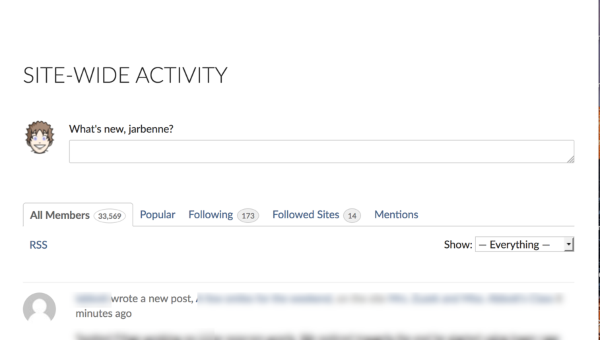
Allowing users to post media to the activity stream, rather than just text, is going to require an additional plugin. Although I don’t use it, this will do the trick: https://wordpress.org/plugins/buddypress-activity-plus/
Commenting on each other’s posts is there by design. If you go into Settings/Discussion you can set the Threaded Discussion depth in the same space you would manipulate this for blog posts.
Rating each other’s posts could be done with https://en-ca.wordpress.org/plugins/bp-reactions/
Allowing users to also post to the blog on the site (as well as the activity feed) will require you to elevate their permissions. By default, users who are Subscribers (WordPress Roles https://codex.wordpress.org/Roles_and_Capabilities) can post to the Activity Stream, but not to the blog post. If you promote them to Contributor, they can post articles to the blog post as well: given your wish to moderate those posts, you want Contributor rather than Author, so you can read the posts first before publishing. You can’t moderate the activity feed. Users can post there freely (like FB)
February 25, 2017 at 2:24 am #264151In reply to: Disabling Visibility Levels Feature
ParticipantYou could just hide the toggle with CSS. There’s probably a more elegant way I don’t know, but this will work in a pinch:
Add this to the style.css file of your child theme, or add it to the Custom CSS panel in the Customizer:
#buddypress .field-visibility-settings-toggle {
    display: none;
}
February 24, 2017 at 9:27 pm #264141In reply to: Duplicate Groups Component
shanebp
ModeratorRe #2 this is a much better approach than using group_meta…
https://codex.buddypress.org/developer/group-types/
Then use the group type to determine if your extra tabs should be added to a group via the BP_Groups_API
February 24, 2017 at 9:24 pm #264140In reply to: Duplicate Groups Component
ModeratorYou have 2 choices, both require some hours of work and good coding skills, which is why a ‘solution’ was never shown, just explained.
1. Create a new component based on the Groups component
2. Use groups_meta to add a field re ‘park’ and use that to determine if your extra tabs should be added to a group via the BP_Groups_API
https://codex.buddypress.org/plugindev/how-to-edit-group-meta-tutorial/
https://codex.buddypress.org/developer/group-extension-api/February 24, 2017 at 5:08 pm #264133In reply to: Show Active Directory Fields in profile
r-a-y
KeymasterFirst, you need to figure out how to fetch the Active Directory data for a user and how to display it. This isn’t dependent on BuddyPress.
Once, you’ve figured that out, you’ll need to hook into the BuddyPress profile template to add those fields.
If you are a WordPress developer, there are various hooks you could use. View the profile template:
https://buddypress.trac.wordpress.org/browser/tags/2.8.1/src/bp-templates/bp-legacy/buddypress/members/single/profile/profile-loop.phpAnd hook into any of the
do_action()hooks to display your AD data. To get the current user’s ID on a profile page, usebp_displayed_user_id().February 24, 2017 at 8:03 am #264121In reply to: hide members from search results
johanna75
ParticipantFor me, if a user set a data (like city) as “for me only” it will be normal that this member will not display in results if a search is done on his city name.
It’s a very basic privacy respect… How can buddypress dev let this king of error ????February 24, 2017 at 7:58 am #264120In reply to: Buddypress Future Suggestons
djsteveb
Participantinteresting recent discussion on the privacy thing here: https://buddypress.org/support/topic/hide-members-from-search-results/#post-264118 – hope others can chime in on best practices for the future.
An easy way to choose that gives put in and what gets left out of the main activity stream is a top issue I think for bp, as well as an easier way to manipulate page titles, meta descriptions, and other content on the bp-psudoe pages likes groups and member profiles is a consistent pain point for many.
hopefully media handling will get more standardized.
February 23, 2017 at 11:44 pm #264114In reply to: Can’t edit
ajsonnick1
ParticipantThanks R-a-y!
I’ll try that now.This was a clean install though where we didn’t have Buddypress originally.
February 23, 2017 at 11:16 pm #264112In reply to: Can’t edit
KeymasterCan you reinstall v2.8.1 just to make sure you are not experiencing any discrepancies?
Delete BuddyPress and reinstall the latest version and see if you are still running into problems.
-
AuthorSearch Results


