Previously, it was possible to eliminate the registration page entirely, which I had to do because of excessive spam sign-ups. However, after the latest update, I attempted to delete the page, only to find that BuddyPress pages are no longer accessible in the network admin panel. I even tried renaming the registration page to something obscure, but I’m still inundated with bot and spam sign-ups.
Is the BuddyPress team aware of what I perceive as a major setback in the latest update? Previously, I used a plugin (https://wordpress.org/plugins/user-registration/) to navigate around the weak registration page and I am still using it except that I have the main buddypress registration page causing problems which I cannot cancel. Perhaps I’m overlooking something. If so, could you provide suggestions on how to secure the BuddyPress registration page or eliminate it completely which I would prepare to do as
I’ve never been able to customize it
Mark M.
 Anonymous User
Inactive
@jaymzwayne if you want to rollback, activate BP Classic (to get the regular directory pages back into your regular WordPress pages), then deactivate BuddyPress and BP Classic. You’ll need to manually reset the « DB Version » for the one of version 11.4.0. Into the wp_options table the _bp_db_version option should be 13408. Only then download and activate a previous BuddyPress version (11.4.0).
Here’s the download link for 11.4.0:
https://downloads.wordpress.org/plugin/buddypress.11.4.0.zip
if it also helps to know the work around is i have youzify when i deactivate that then some of the problem goes away that is a plugin i paid for and it works great gives me alot of features that i dont want to loose when i have to mess with the themes side of things or buddypress i have to turn off youzify when done turn it back on is there a way i can go back to the 11 release of budddy press
Anonymous UserInactive
Hi @shemakeswebsites,
12.0.0 brings URL slugs customization, that’s a big improvement to have meaningful URLs for non English communities.
These communities are using different words for things like Activity, groups etc.. They can do so thanks to the l10n feature of WordPress. So a good way to reach your goal is to use a custom translation file. And I believe it’s the best way to do so, because the page title or labels won’t be enough to really reword all places where we use groups.
You can try to put your custom translation file into wp-content/languages/buddypress/buddypress-xx_XX.mo replacing the xx_XX with your locale maybe it’s even working with en_US.
Anonymous UserInactive
Hi @ingenxcomputers
If you are using BuddyPress version 12.0 and up, you can customize the title and the URL of these pages from the URLs tab of the BuddyPress settings: https://github.com/buddypress/buddypress/blob/master/docs/user/administration/settings/urls.md
If you need to include these pages into a WP Nav menu, please have look to:
https://github.com/buddypress/buddypress/blob/master/docs/user/administration/navigations/README.md
Evening
Does anybody know how to edit the signup/register page for new buddypress members?
I cant’t see it under pages or in the Buddypress plugin menu
Richard
Hello. Is there a way in BuddyPress that members will be able to view other member profiles? Say when I click to user in our Forum, it will redirect me to their profile.
The users are clickable right now but when I do click it, it redirects me to a restricted access page.
We are using Version 12.0.0
UPDATE: Hi, the issue seems like it came from youzify. Youzify issued an update today. After updating, the updated version of buddypress is now working.
Thank you for the quick response!
Anonymous UserInactive
@cb44
This is weird because if you activated BP Classic the undefined function your error log is reporting is included into BP Classic:
https://github.com/buddypress/bp-classic/blob/8e8ec62d07e1033a78922aa76a4699669fda31f8/inc/core/functions.php#L557
So it shouldn’t error. I’ll test bbPress again.
Anonymous UserInactive
@hengstigal Reading your error it looks like the BP Groups component is not active. Moreover I also see that your plugin Grimlock BuddyPress is not ready for version 12.0.0 of BuddyPress. I advise you to activate BP Classic : it’s the backwards compatibility plugin we’ve built on purpose for such a situation:
BP Classic
@cdb44 bbPress needs the same backwards compatibility plugin ^^. Please activate it. Moreover it looks like you’ve disabled deprecated functions loading probably using the BP_IGNORE_DEPRECATED constant into your wp-config.php file or elsewhere.
Hello Mathieu,
we are using BuddyPress in conjonction with BBPress.
We get this error :
Fatal error: Uncaught Error: Call to undefined function bp_core_get_user_domain() in /path/wp-content/plugins/bbpress/includes/extend/buddypress/members.php:229 Stack trace:
#0 /path/wp-content/plugins/bbpress/includes/extend/buddypress/members.php(100): BBP_BuddyPress_Members->get_profile_url(1)
#1 /path/wp-includes/class-wp-hook.php(324): BBP_BuddyPress_Members->get_user_profile_url(1)
#2 /path/wp-includes/plugin.php(205): WP_Hook->apply_filters(1, Array)
#3 /path/wp-content/plugins/bbpress/includes/core/abstraction.php(471): apply_filters(‘bbp_pre_get_use…’, 1)
#4 /path/wp-content/plugins/bbpress/includes/users/template.php(560): bbp_maybe_intercept(‘bbp_pre_get_use…’, Array)
#5 /path/wp-content/plugins/bbpress/includes/replies/template.php(1280): bbp_get_user_profile_url(1)
#6 /path/wp-content/plugins/bbpress/includes/replies/template.php(1189): bbp_get_reply_author_url(775)
#7 /path/wp-content/plugins/bbpress/includes/users/template.php(2019): bbp_get_reply_author_link(Array)
#8 /path/wp-content/plugins/bbpress/includes/users/template.php(1990): bbp_get_author_link(Array)
#9 /path/wp-content/plugins/bbpress/templates/default/bbpress/loop-single-forum.php(70): bbp_author_link(Array)
#10 /path/wp-includes/template.php(792): require(‘/path…’)
#11 /path/wp-content/plugins/bbpress/includes/core/template-functions.php(103): load_template(‘/path…’, false)
#12 /path/wp-content/plugins/bbpress/includes/core/template-functions.php(41): bbp_locate_template(Array, true, false)
#13 /path/wp-content/plugins/bbpress/templates/default/bbpress/loop-forums.php(35): bbp_get_template_part(‘loop’, ‘single-forum’)
#14 /path/wp-includes/template.php(792): require(‘/path…’)
#15 /path/wp-content/plugins/bbpress/includes/core/template-functions.php(103): load_template(‘/path…’, false)
#16 /path/wp-content/plugins/bbpress/includes/core/template-functions.php(41): bbp_locate_template(Array, true, false)
#17 /path/wp-content/plugins/bbpress/templates/default/bbpress/content-archive-forum.php(27): bbp_get_template_part(‘loop’, ‘forums’)
#18 /path/wp-includes/template.php(792): require(‘/path…’)
#19 /path/wp-content/plugins/bbpress/includes/core/template-functions.php(103): load_template(‘/path…’, false)
#20 /path/wp-content/plugins/bbpress/includes/core/template-functions.php(41): bbp_locate_template(Array, true, false)
#21 /path/wp-content/plugins/bbpress/includes/common/shortcodes.php(197): bbp_get_template_part(‘content’, ‘archive-forum’)
#22 /path/wp-content/plugins/bbpress/includes/core/theme-compat.php(549): BBP_Shortcodes->display_forum_index()
#23 /path/wp-includes/class-wp-hook.php(324): bbp_template_include_theme_compat(‘/path…’)
#24 /path/wp-includes/plugin.php(205): WP_Hook->apply_filters(‘/path…’, Array)
#25 /path/wp-content/plugins/bbpress/includes/core/sub-actions.php(477): apply_filters(‘bbp_template_in…’, ‘/path…’)
#26 /path/wp-includes/class-wp-hook.php(324): bbp_template_include(‘/path…’)
#27 /path/wp-includes/plugin.php(205): WP_Hook->apply_filters(‘/path…’, Array)
#28 /path/wp-includes/template-loader.php(104): apply_filters(‘template_includ…’, ‘/path…’)
#29 /path/wp-blog-header.php(19): require_once(‘/path…’)
#30 /path/index.php(17): require(‘/path…’)
#31 {main} thrown in /path/wp-content/plugins/bbpress/includes/extend/buddypress/members.php on line 229
Any advice to get our site back to life ?
Hello, i get the following error after Updating to 12.0. Could you please help me? 🙂
WordPress-Version 6.4.2
Aktives Theme: Cera (Version 1.2.0)
Aktuelles Plugin: BuddyPress (Version 12.0.0)
PHP-Version 8.1.26
Ein Fehler vom Typ E_ERROR wurde in der Zeile 350 der Datei /homepages/10/d383743307/htdocs/######/wp-content/plugins/buddypress/bp-core/deprecated/12.0.php verursacht. Fehlermeldung: Uncaught Error: Call to undefined function bp_get_groups_directory_url() in /homepages/10/d383743307/htdocs/######/wp-content/plugins/buddypress/bp-core/deprecated/12.0.php:350
Stack trace:
#0 /homepages/10/d383743307/htdocs/######/wp-content/plugins/grimlock-buddypress/inc/widget/fields/class-grimlock-buddypress-groups-section-widget-fields.php(155): bp_get_groups_directory_permalink()
#1 /homepages/10/d383743307/htdocs/######/wp-includes/class-wp-hook.php(324): Grimlock_BuddyPress_Groups_Section_Widget_Fields->change_defaults()
#2 /homepages/10/d383743307/htdocs/######/wp-includes/plugin.php(205): WP_Hook->apply_filters()
#3 /homepages/10/d383743307/htdocs/######/wp-content/plugins/grimlock/inc/widget/class-grimlock-base-widget.php(21): apply_filters()
#4 /homepages/10/d383743307/htdocs/######/wp-content/plugins/grimlock-buddypress/inc/widget/class-grimlock-buddypress-groups-section-widget.php(29): Grimlock_Base_Widget->__construct()
#5 /homepages/10/d383743307/htdocs/######/wp-includes/class-wp-widget-factory.php(62): Grimlock_BuddyPress_Groups_Section_Widget->__construct()
#6 /homepages/10/d383743307/htdocs/######/wp-includes/widgets.php(115): WP_Widget_Factory->register()
#7 /homepages/10/d383743307/htdocs/######/wp-content/plugins/grimlock-buddypress/inc/class-grimlock-buddypress.php(202): register_widget()
#8 /homepages/10/d383743307/htdocs/######/wp-includes/class-wp-hook.php(324): Grimlock_BuddyPress->widgets_init()
#9 /homepages/10/d383743307/htdocs/######/wp-includes/class-wp-hook.php(348): WP_Hook->apply_filters()
#10 /homepages/10/d383743307/htdocs/######/wp-includes/plugin.php(517): WP_Hook->do_action()
#11 /homepages/10/d383743307/htdocs/######/wp-includes/widgets.php(1858): do_action()
#12 /homepages/10/d383743307/htdocs/######/wp-includes/class-wp-hook.php(324): wp_widgets_init()
#13 /homepages/10/d383743307/htdocs/######/wp-includes/class-wp-hook.php(348): WP_Hook->apply_filters()
#14 /homepages/10/d383743307/htdocs/######/wp-includes/plugin.php(517): WP_Hook->do_action()
#15 /homepages/10/d383743307/htdocs/######/wp-settings.php(643): do_action()
#16 /homepages/10/d383743307/htdocs/######/wp-config.php(116): require_once(‘/homepages/10/d…’)
#17 /homepages/10/d383743307/htdocs/######/wp-load.php(50): require_once(‘/homepages/10/d…’)
#18 /homepages/10/d383743307/htdocs/######/wp-login.php(12): require(‘/homepages/10/d…’)
#19 {main}
BuddyPress has Emails by default, and we create these Emails normally as we create a normal Post in WordPress.
Now, these Emails are triggered by Situations, as you can see here– https://prnt.sc/iPp4iPfC5zvE
In BuddyPress, there’s no available situation to trigger the sending of Birthday Greetings Message to users, on the day of their Birthday.
Can BuddyPress add this feature soon?
Can BuddyPress make it possible that we can send Emails automatically to users on the day of their Birthday through an Email Situation trigger in BuddyPress Core?
Regards.
I have multiple non-Admin test accounts at my site that I use to test user experience. I’ve tried the passwords that should work to log in, to no avail. When I try to reset the password from multiple angles (using the password reset on the site, and from the initial signup email), I’m not receiving a password reset email. (not in spam folder either, and it’s been multiple hours since the first reset attempt)
In addition, when I try to log in from the site’s forum login button, it says “Method Not Allowed”.
I have Buddypress 12.0.0 and just installed the BP Classic plugin which didn’t solve either issue.
Pirates with Ben – About Pirates CSG
Thanks for any help!
Ben
Anonymous UserInactive
Anonymous UserInactive
Hi @yatesa01
About this:
> The option in customizer to use round profile images is no longer present after updating to 12.0.
It’s not an issue, we’re removed it on purpose, to avoid messing with the active Theme’s way of displaying an avatar.
https://buddypress.trac.wordpress.org/ticket/8273
You can easily get it back using this CSS rule:
.buddypress-wrap .avatar {
	border-radius: 50%;
}
Anonymous UserInactive
Hi @bmoreau92
Thanks for your feedback.
I agree it’s weird.
BP Classic also brings back the BP Legacy widgets. The Latest Activities is one of them. But this widget is only available if the BP Nouveau Template pack is active. It looks like although it’s the case this template pack is not loaded which is causing the error because one of its functions is used by the Latest Activities widget.
I’ve tried to reproduce an issue but wasn’t able. As it’s a premium theme, I cannot see what’s wrong.
If you do not need this BP Legacy widget, you can simply unhook it and it should fix the issue. You can add the following code into a bp-custom.php file for example.
function flatsome_weird_option_bug() {
	remove_action( 'bp_widgets_init', array( 'BP_Classic_Templates_Nouveau_Latest_Activities', 'register_widget' ) );
}
add_action( 'bp_after_setup_theme', 'flatsome_weird_option_bug', 6 );
@wingflap
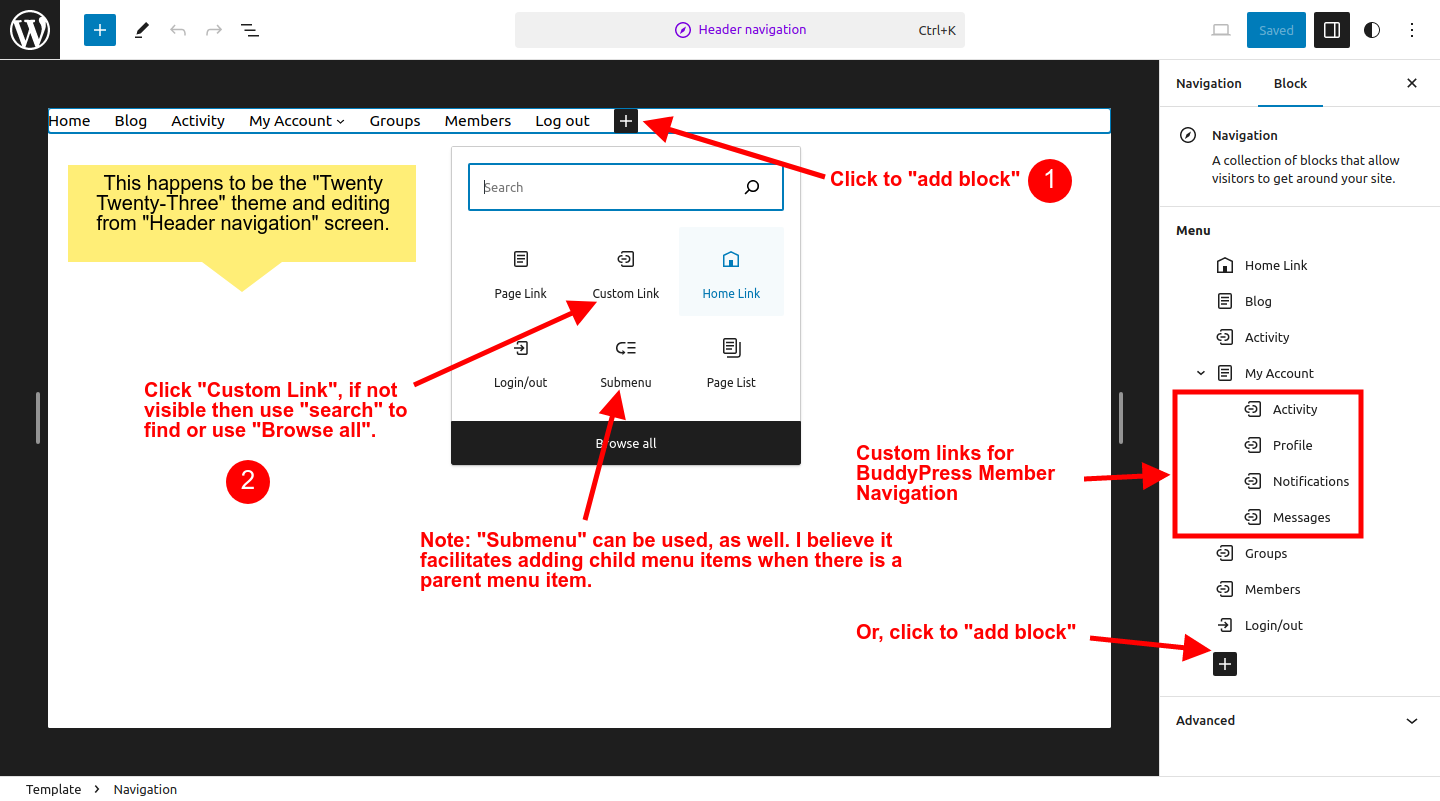
I’ll try this again, the 1st attempt seems to have gone away (into moderation, perhap?), nevertheless, I’ll attempt to illustrate the how to add “Custom Link” via 2 (two) Screenshots. The following should illustrate how to add a “Custom Link” and illustrates a setup for BuddyPress Member Nav menu items.
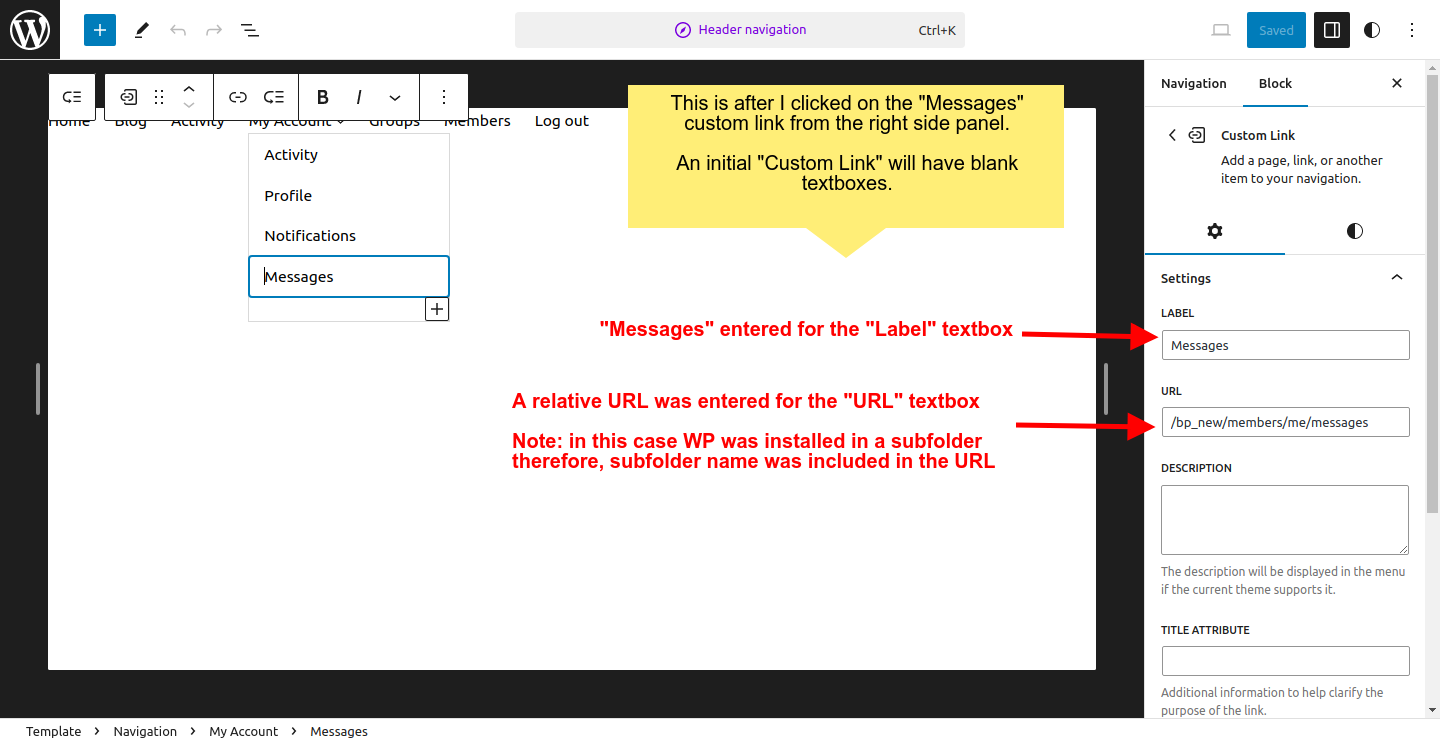
The next Screenshot, hopefully, illustrates how to enter info into the “Label” and “URL” textboxes. The “me” in the URL is converted/replaced by whomever happens to be the current “logged-in user“.
BuddyPress 12.0 function bp_core_get_user_domain deprecated
Hi !
Since version 12.0 I get a critical error.
WordPress debug mode gives me this message :
Deprecated: La fonction bp_core_get_user_domain est obsolète depuis la version 12.0.0 ! Utilisez bp_members_get_user_url() à la place. in /home/nudeoep/www/wp-includes/functions.php on line 6031
I installed BP Classic and it resolves the problem.
BUT when I try to change the options of my Flatsome Theme, I don’t see the regular screen but this :
Dernières notes publiées (BuddyPress)
Titre :
Nombre max. à afficher :
It’s weird !
Thanks in adavance four your help !
I received this message from WordPress :
WordPress a trouvé une erreur avec l’une de vos extensions, « BP Classic »
Une erreur de type E_ERROR a été causée dans la ligne 206 du fichier /home/nudeoep/www/wp-content/plugins/bp-classic/inc/templates/classes/class-bp-classic-templates-nouveau-latest-activities.php. Message d’erreur : Uncaught Error: Call to undefined function bp_nouveau_get_activity_filters() in /home/nudeoep/www/wp-content/plugins/bp-classic/inc/templates/classes/class-bp-classic-templates-nouveau-latest-activities.php:206
Stack trace:
#0 /home/nudeoep/www/wp-includes/class-wp-widget.php(535): BP_Classic_Templates_Nouveau_Latest_Activities->form(Array)
#1 /home/nudeoep/www/wp-admin/includes/widgets.php(276): WP_Widget->form_callback(Array)
#2 /home/nudeoep/www/wp-includes/class-wp-customize-widgets.php(1148): wp_widget_control(Array, Array)
#3 /home/nudeoep/www/wp-includes/class-wp-customize-widgets.php(1096): WP_Customize_Widgets->get_widget_control(Array)
#4 /home/nudeoep/www/wp-includes/class-wp-customize-widgets.php(714): WP_Customize_Widgets->get_available_widgets()
#5 /home/nudeoep/www/wp-includes/class-wp-hook.php(324): WP_Customize_Widgets->enqueue_scripts(”)
#6 /home/nudeoep/www/wp-includes/class-wp-hook.php(348): WP_Hook->apply_filters(NULL, Array)
#7 /home/nudeoep/www/wp-includes/plugin.php(517): WP_Hook->do_action(Array)
#8 /home/nudeoep/www/wp-admin/customize.php(123): do_action(‘customize_contr…’)
#9 {main}
thrown
Details of my configuration :
WordPress version 6.4.2
Thème actif : Flatsome (version 3.18.2)
Extension actuelle : BP Classic (version 1.2.0)
PHP version 8.0.30
Hi !
Since version 12.0 I get a critical error.
WordPress debug mode gives me this message :
Deprecated: La fonction bp_core_get_user_domain est obsolète depuis la version 12.0.0 ! Utilisez bp_members_get_user_url() à la place. in /home/nudeoep/www/wp-includes/functions.php on line 6031
I installed BP Classic and it resolves the problem.
BUT when I try to change the options of my Flatsome Theme, I don’t see the regular screen but this :
Dernières notes publiées (BuddyPress)
Titre :
Nombre max. à afficher :
It’s weird !
Thanks in adavance four your help !
Bruno
Anonymous UserInactive
Hi @priyam1234
Can you test the following code to see if that’s enough for ACF to load its fields UI?
function priyam1234_generate_post_type_ui( $args = array() ) {
	$args['show_ui'] = current_user_can( 'manage_options' );
	return $args;
}
add_filter( 'register_buddypress_post_type_args', 'priyam1234_generate_post_type_ui' );
About your questions on BP URL functions, you can read this developer documentation resource which includes some examples of use for most of the described functions:
https://github.com/buddypress/buddypress/blob/master/docs/developer/functions/rewrites.md
Anonymous UserInactive
yatesa01: I see from this other topic, it’s the Astra theme. I’m looking at it.
Here’s the ticket about the BP Blocks regression: https://buddypress.trac.wordpress.org/ticket/9037
Anonymous UserInactive
@wingflap
12.1.0 will be a minor release. There won’t be a 13.0.0 release just like the 13th floor often lacks in building. We’ll jump to 14.0.0 for our next major release.
How long will it take us to reach 14.0.0, it depends on the number of people who will contribute to it. 12.0.0 took us almost a year and 46 people contributed to it.
See: https://buddypress.trac.wordpress.org/ticket/9038
After upgrading to 12.0 on our site, which went through without any errors, I’ve noticed several issues. We do have the legacy plugin in place. Some of the stuff is minor–the block that displays the most recent active users now displays a single vertical line of avatars instead of spacing it out nicely in a grid (though it looks fine from the page editor), the round avatars that had been in the Nouveau theme for user profiles are now gone, and the layout of the tabs on the user profile page are all messed up and don’t look as polished as they did before.
On the back end, I don’t see the new URL tab in BuddyPress settings page, just the old Pages tab.
Good evening
When I send out invitations to join my site via Buddypress Invitations
THe invitations are going straight to people’s SPAM/JUNK folders
This defeats the purpose of sending invitations
Does anybody know how I can fix it?
Kind regards
Richard
07943321470


