Search Results for 'buddypress'
-
AuthorSearch Results
-
October 9, 2022 at 7:27 am #326550
hellojesse
ParticipantThe reason why developers prefer different platform is because doing new type of theme based on js framework and not on general wp template files and learn new js framework require a lot of time.
Another reason is lack of ducumentation for developers and code examples. Codex must be improved.
If Woocommerce has theme storefront for using features of woo and has also open source woocommerce mobile app, bouddypress can have the same. Dedicated theme wich gonna be very easily customized with blocks and template tags. Source code for customizing buddypress mobile app.
I love 💕 buddypress.
October 8, 2022 at 9:32 pm #326548In reply to: Unable to Manage Group Members
pgrafix
ParticipantSince this appears to be a bug and have yet to get a response here, I have created a ticket (https://buddypress.trac.wordpress.org/ticket/8752)
October 6, 2022 at 3:02 pm #326530In reply to: loading time Buddypress functions/plugin
Anonymous User 18187419
InactiveI would also like info about loading times etc. with Buddypress.
For example, my site is on shared hosting $35/month, when logged out then pages load super quick, approx. one second, when logged-in then significantly slower between two and three seconds.
October 6, 2022 at 6:21 am #326525In reply to: BuddyPress 10.4.0 Maintenance Release
EduardaSouza
ParticipantIs BuddyPress Safe ?
October 4, 2022 at 6:36 pm #326506In reply to: Public Course Progress
oscarsymes
ParticipantI am using BuddyPress intergrated with memberpress btw!
October 4, 2022 at 6:34 pm #326505Topic: Public Course Progress
in forum How-to & TroubleshootingParticipantI am creating a fitness courses website integrated with BuddyPress. Under the profile page we can currently see the % of the course that has been completed.
This information is only available to the user and I would like to make it so that everyone who is friends with said user can see their progress on the course that they have started. Is this possible?
TIA
October 4, 2022 at 4:55 pm #326504In reply to: Unable to Manage Group Members
ParticipantHave traced the issue to line 89 of /buddypress/bp-templates/bp-nouveau/buddypress/common/js-templates/group-members/index.php
88 <# if ( ! data.editing  && ! data.managingBan && ! data.removing ) { #>
89			{{data.role.name}}
90		<#} else {
If I remove
{{data.role.name}}the list of members is restored in both the front and back end. I have restored the code for now since it is this block of code that lists the members’ role in the group when viewing the group member list.October 4, 2022 at 8:54 am #326497In reply to: FOLLOW option
valuser
ParticipantPlease take a look at this plugin. It might work even with php 8.1!!!
October 4, 2022 at 6:22 am #326489In reply to: FOLLOW option
TahliaMacghey
Participantbuddypress profile which is not updated at WCFM profile
October 3, 2022 at 9:30 pm #326483David Bisset
ParticipantI think it’s worth considering turning optional components into plugins as long as discovery and onboarding are done REAL well. The plugin directory is definitely a way, but i’ve seen companies do one-click installs from inside the settings screens of the plugins themselves.
Also another subject – how often do we (the collective we) feature prominent, large, special, or niche BuddyPress powered sites? If developers see potential that might get them more involved in testing, etc. Problem is how to discover or find them on a constant basis. This goes back to a mention of mine of “marketing” earlier.
October 3, 2022 at 9:16 pm #326482Mathieu Viet
ModeratorYou’re welcome @dimensionmedia. No worries I understood your point 😁. I won’t talk more about this subject here and focus on BuddyPress instead. You made a very good point about the WordPress Plugins directory:
Ok, so if the WordPress repo is our advantage – then how do we use that advantage? how do we stand out (from member sites and other social plugins)? how do we feature BB plugins that are trust worthy and maintainable that avoid people having to dive into thousands of plugins in this “important advantage”? Good questions, looking forward to hearing more from people about them.
You’re right, I believe we can try to help Users with this kind of shortcuts:
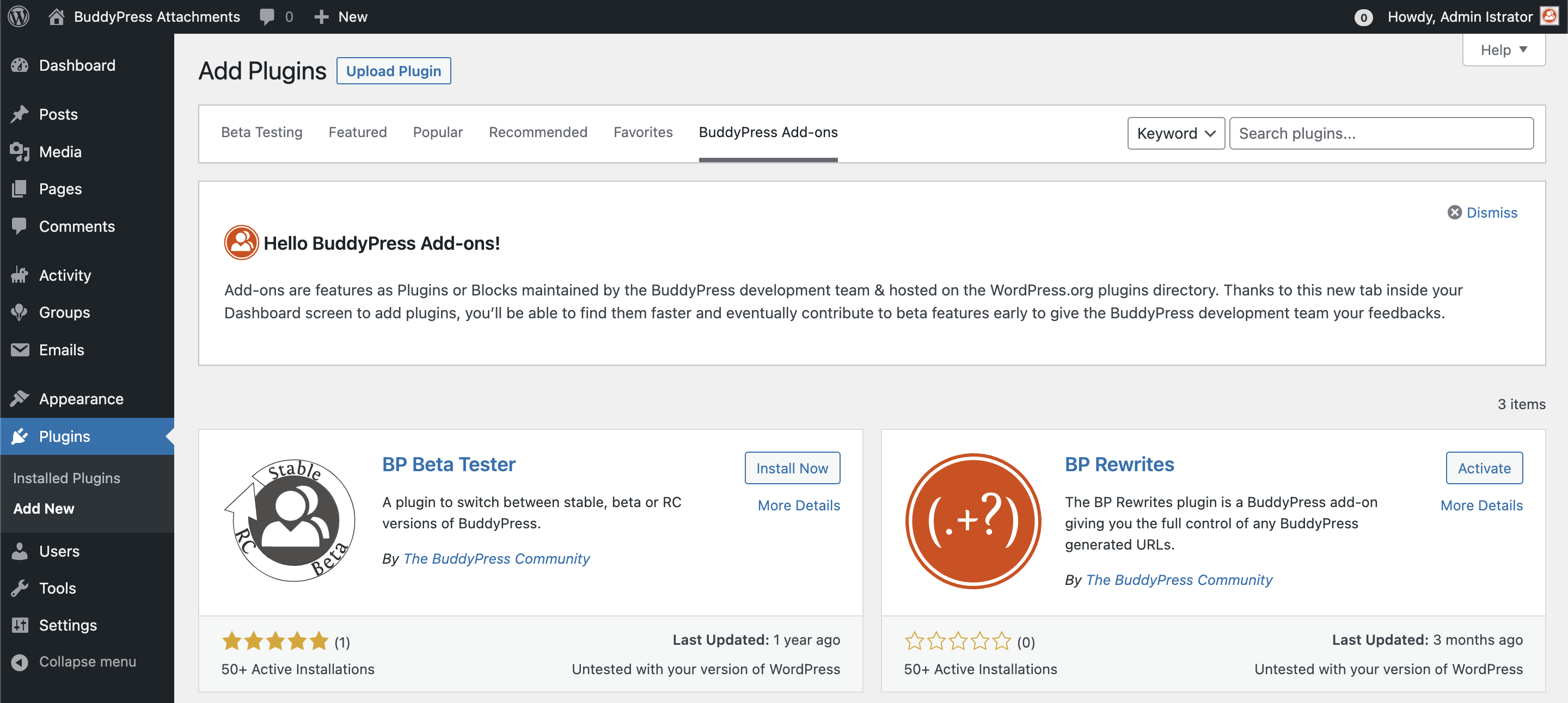
But we’d need more contributors to test/review BuddyPress plugins, which is maybe a too big dream I’m doing, I agree 😇
What I was meaning, was: It’s possible to transform optional components into plugins and preserve the current user experience and only install what they need, thanks to the WordPress.org API.
Another advantage of being into WordPress.org plugins directory are updates (semi or fully automatic). The Plugin team is also doing a great job to eventually “suspend” plugins in case of security issues or wrong behaviors.
October 3, 2022 at 8:08 pm #326481ParticipantThanks for the reply @imath. I was simply implying to look and see what they are doing – SOME of what they are doing I think fits into general interest (look at how they deal with media). They are doing research and it would be foolish to ignore some parts, even if it in the end it leads to ways we can mold it more toward BuddyPress thinking.
Sometimes you can lead my example, other times you can lead by taking something and making it better in some way.
There’s a balance with addons – too many and a user can get overwhelmed with choices and research but overall I lean toward simple as possible. Perhaps it’s something that is simple for a niche purpuse that uses BuddyPress “under the hood”. It’s not a great example but thinking about “how can I spin up a special kind of to-do app that I can add my friends and share and collab with, while still owning my data, control, etc”. Thought of this today while my kid was showing me what she does in Notion today.
Ok, so if the WordPress repo is our advantage – then how do we use that advantage? how do we stand out (from member sites and other social plugins)? how do we feature BB plugins that are trust worthy and maintainable that avoid people having to dive into thousands of plugins in this “important advantage”? Good questions, looking forward to hearing more from people about them.
I don’t believe BuddyPress is missing THAT many features. Part of this is also changing with the times. Which means maybe thinking a little differently – even if it’s me thinking differently from how I look at BuddyPress when I started with it so many years ago. ☮️
October 3, 2022 at 5:55 pm #326479ModeratorHi @dimensionmedia & @sunsetcowboy
Thanks a lot for your very interesting feedbacks 😍.
I think we’ve deliberately avoid the buddyboss subject because it has been talked a lot here https://wptavern.com/buddypress-plugin-usage-declining-remaining-contributors-discuss-path-forward and we end up talking more about this fork than BuddyPress 😇.
I believe we shouldn’t try to do features the same way they’re doing. We need to lead by example, to innovate, to carry on being good citizens of the open source and being supportive about WordPress choices (eg: going into blocks as much as we can).
I don’t think « customers » are into the BuddyPress « targets ». We want to provide totally free, open source & secure community features to WordPress sites and every human being. We’re trying to make wise & « general interest » oriented choices.
We have a very important advantage : we are into the WordPress Official Plugins directory, we should really use this advantage and split BuddyPress into smaller parts as it will always be easier to install Addons hosted on the WordPress Plugins directory.
The « lite » featured Buddypress idea is very interesting, it could be BP Core + BP Members, the only 2 required components.
And David, we really need to organize this « Buddy-World-Camp » 🙌😅. We also need to get together 😍
October 3, 2022 at 12:28 pm #326477sunsetcowboy
ParticipantOn a personal note, one thing I would like to see on BuddyPress is a complete Groups hierarchy with (multiple) parents, siblings and child groups. I reckon this would open a whole new market for things like geneology (big business).
Also I think you should take a good look at the rival product BuddyBoss, which, feature wise, is ahead of Buddypress in so many ways. A good media integration for example is a must have, likewise a file download system. BP could have the edge on its rival though, simply because the latter concentrates on Premium features.
Just my 2 cents
October 3, 2022 at 11:07 am #326476restorm
ParticipantBTW: I tried to send you a detailed request via your website, but there’s a bug in your “Contact Me” function. When I try to submit the message, I get an error saying “Could not verify the reCaptcha response.” But there is no reCaptcha function!
Here’s the request I tried to send:
“Hello! We are using the Formidable Forms plugin to generate surveys and reports. The reports are group-specific, so we need to attach the user’s group ID to the survey data.Formidable Forms has no integration with BuddyPress, but they can access the WordPress user profile metadata.
Can I hire you to write a routine that would copy the current user’s group ID from the BuddyPress tables into their WP user profile metadata?
I don’t have much money, so I’m hoping this wouldn’t be too complicated. Thanks!”
October 3, 2022 at 11:04 am #326475ParticipantI might be too close to BuddyPress since using it since the 0.1 days (yes, that version is right). I do agree more with the comments so far about the “product fit” and some of that “vibe” feels like some people talking about where WordPress itself (which BP relies on) although I feel WordPress still fills many holes and has a long life to it. But there are two factors I consider to be competitors that offer attractive, “modern/hip”, and easier (in same cases) solutions:
– TikTok, Instagram, etc. social networks – the trend of posting content OUTSIDE your site and not truly 100% owning it. These are the “Wix” and “Medium” versions that WordPress exists with. They are easier to setup and the social mass effect can’t be beat. It would be neat though to have a BP-lite that could setup a TikTok like video sharing network (perhaps that could intergrate with 3rd parties). I’m not sure if there’s a “build this feature and it will help big” here, since if a user or client wants to use them you can’t stop them. But appeal maybe to the niche (which BuddyPress has always done well) and the customizers out there that maybe want something like them, or something that has a slimed down feature set with an attractive new theme/look.
– BuddyBoss. Surprised this hasn’t been brought up. Look at what they are doing in terms of features. The past few freelance projects that the cilents could have used BuddyPress on for new projects, they went and paid for BuddyBoss. My observations has been because of the (1) marketing, (2) features, and (3) continued support (the mobile app also maybe played a part although I’ve heard disappointing experiences about that). I know some don’t like BuddyBoss because they’ve forked BP and (as far as I know) really haven’t contributed anything back (GPL, open source, etc.) But if you’re looking for features, look at what this for-profit company is doing (big and small) because logically they are likely listening to their base and current customers and their actions and focus might be some input.
I do support a BuddyCamp (I used to have a BuddyCamp Miami way back… in 2010 I think?).
Some good BuddyPress plugins have been difficult to recommend because of their maintenance or lack thereof, with no fault to the authors. But BuddyPress always needs SOME plugins when being used for projects. Might be also nice for other plugin companies (say Yoast?) to promote their BuddyPress support.
I would love to see a new theme but not sure yet what direction to offer further $0.02 on that.
No real comments from a coding perspective – there are developers here with more experience in that. A “BuddyPress lite” plugin if you’re talking about “restarting from another plugin” might be worth some discussion. Imagine just spending 5 minutes with a few clicks and you have your own private, secure social network just for your friends/family. Simple. Easy. Modern looking, works with modern tech, etc.
October 1, 2022 at 11:56 pm #326461Topic: How To: API Authentication for BuddyPress
in forum How-to & Troubleshootingchicagogregg
ParticipantHello,
I know the documentation says BP uses cookies for API authentication, but my install of BP allows any non-authenticated user to use the API and retrieve user data. (e.g. /wp-json/buddypress/v1/members/3)
I’ve also tried this through incognito/private browsers and also through curl from the command line.
Everything I’ve tried, without authenticating, returns the data.
I’ve also installed REST API Toolbox (plugin) – that helped me with requiring authentication for WP wp-json endpoints.
I don’t see a BP option anywhere to require authentication…
Am I missing something here?
Thank you in advance for the help!
-gregg
October 1, 2022 at 2:32 pm #326458ModeratorHi & thanks a lot for your feedback @user4forum
It’s funny you’re talking about BP Reply by email, as I’ve contributed for comment reply by email for WordPress a while ago and it stayed in the void! See https://core.trac.wordpress.org/ticket/52283
I guess we could use some code of it for BuddyPress 😅.
About BuddyDrive and Rendez-vous, I was their first contributor so I know them pretty well 😀. Some ideas I had when building BuddyDrive came back lately while working on BP Attachments.
More than being in BP Core, I believe users are expecting plugins to be maintained and we think moving them to BP Core will make this goal satisfied. I’m more interested in a BP Core restricted to the minimum and every other optional components to be packaged into BP Addons we can install and activate separately.
October 1, 2022 at 1:59 pm #326457ModeratorHi @djpaul thanks a lot for sharing your thoughts 😍. It’s true BuddyPress backward compatibility is preventing us to do breaking changes. I thought using a plugin to try to migrate to Rewrite API would help make the transition. Problem is not much plugin developers are testing it and we’re stuck.
Although a bit « radical », I like the idea of restarting from another plugin, it’s probably something we should consider: I agree it’s the safest way to avoid being stuck by backward compat and still have an old plugin for old users and plugin developers 😇.
I’ll be a bit provocative 😁. I’m wondering since Plugin developers never show up to contribute or test BuddyPress: is maintaining backward compatibility worth the pain?
Or is the fact we’re maintaining this backward compatibility is the reason why plugin developers are not very involved in contributing to BuddyPress ?
It’s a very tough choice to make as we’ve all put a lot of ourselves into the « old » plugin.
October 1, 2022 at 10:39 am #326448user4forum
ParticipantJust my opinion and just an AI translation:
Where are the sticking points?
BP core:
After 9 months with BP and several free BP plugins, there are still a lot of questions. Group handling and invitation are too complex and partly illogical. (Example: Group Owner is allowed to remove himself and then the administrator has to ‘intervene’). Furthermore, internal e-mail, where you have to select users based on their usernames (@…). Also not visually appealing and sometimes rather confusing in use. Other BP features (sorting/displaying members within groups!) that don’t work even on a WP default theme (Twenty Twenty-Two). Just annoying!In principle, the core plugin provides too little (in terms of functionality). Best example: Blogging and media. Something that defines WP at its core. In addition to two larger commercial “BP providers” and some ancient plugins in the WP repo, the selection and comparability is difficult if you want to use them for specific rights and groups. I understand that you want to offer an open and expandable system, but something “more” would be desirable or necessary.
BP mailing list:
Hardly any actions, but many (trivial) questions and no answers. On the other hand, technically interesting answers are often 10 years or more in the past (and unfortunately still up-to-date in principle), but where there is no attempt to test them in a current BP version.ToDo (Plugins into Core):
Directory: Very important! Of course you can use “BP Custom Fields” but there’s no option to do a filter search, based on different fields to exclude displaying other profiles – or I just can’t find the options. Tried “BP Profile Search”Why not just embed a few components “more tightly” into the core, why not simply take over the source code of others who simply “copy” BP themselves without returning anything to the community? There was an interesting discussion about this recently on another platform site.
Wishes:
– Rights management for pages/posts or for individual BP components (either private/public or at user level) – e.g. “User Access Manager”
– E-mail communication between each other without having to use the real e-mail address and being able to leave the borders of BP – e.g. “BP Reply By Email”It’s a pity, but currently STILL not enough for uncomplicated use and sometimes stopped in development. In addition, commercial providers who copy BP as well as other WP Social Media Group solutions that are more complete and appear more self-contained.
To name a few plugins that could be partially included:
Theme: BuddyX (free)
BP 11 (dev) &
BP Attachments (dev) (what does it do? Substitution of BuddyDrive?)
– bbPress (smarter integration)
– BP Profile Search (no filter options found)
– BP Reply By Email (should be core as option)
– BuddyDrive (should be Core)
– Buddpress Docs
– BuddyPress Xprofile Custom Field Types (should be core)
– BuddyPress Xprofile Conditional Fields (should be core)
– Rendez Vous (should be core as option)
– “BuddyPress XY Blog” (should be core)
– “BuddyPress XY Search”October 1, 2022 at 8:05 am #326447Paul Wong-Gibbs
KeymasterThe problem with asking contributors who put so much time into a project in its early days, is that those people often have rose-tinted glasses and inaccurate memories of what worked well and what didn’t, and what they wished they could have done differently. 🤩
BuddyPress at the start was “Facebook in a box”, and broadly remains the same today. Facebook, on the other hand, has changed dramatically.
If it were down to me, I am not sure if I would replace BuddyPress’ systems while building new things and break backwards compatibility on purpose, or decide to keep legacy BuddyPress secure, and have current generation contributors start on a new plugin.
Very few websites stay up as long as BuddyPress is old, so I think in reality, the impact of starting from a clean slate is all about attracting new users, rather than worrying about trying to get old sites to migrate (any old site isn’t going to change dramatically). You’d still have the same challenge – attracting new users! (You could build a migration script in due course).
I believe the actual question is, what does a self-hosted social network look like *today* (and what kind?), and where might it go in the future? Build toward that aggressively, and be bold and remove things that aren’t in that vision.
For me, my next would focus around concepts from Discord, Slack, TikTok, Instagram.
October 1, 2022 at 12:15 am #326441InactiveIf you know how to add code snippets to your site then this could help …
September 30, 2022 at 4:44 am #326420Renato Alves
ModeratorBefore diving into technical or feature suggestions since as a developer I’m automatically wired to go via that route, I thought about asking non-technical people about the product, BuddyPress, itself.
I recently participated in the WordCamp US and had the chance of talking to a few people, besides conversations I had online (Slack, etc). I think the overall feedback I gathered is that BuddyPress needs to find its product-market fit.
## Product-market Fit
The overall argument is that BuddyPress made sense when it was created because organizations needed a unique social network. Nowadays this is easily solvable with other tools that weren’t available at the time like Slack, Discord, Telegram, Facebook Groups, etc.
It’s much easier now to create social communities/networks using those tools than using BuddyPress. So as a project, we are not only competing against other open source projects but also with big companies which provide a solution to this problem in a much better way.
So far, all the conversation I’ve read about this issue sort of understands this new reality but the solutions presented miss this important point. So finding a new “place” for BuddyPress in this new scenario might actually be the most important thing we can do and that will define how we spend our resources going forward.
## BuddyPress’ problems
### Complexity
Before I became a BuddyPress contributor, I used to build small communities for clients. One of the first things I noticed about this niche was that all communities were the same but different. There was always a small tweak or a small feature on top of an existing component needed. BuddyPress was perfect for business. Clients didn’t know how to do it, so they hired me to build or extend it for them.
Even to this day, I still think BuddyPress suffers from this “problem”. If you are not a developer, BP is too hard to change. In BuddyPress’ marketing, it sells itself as flexible software, which is, but only if you are a developer extending or building something on top of it. Not to the regular users that install or try to use it.
I think this is an area where other tools thrive in comparison. People don’t usually build social networks with BuddyPress because it is open source. That also includes WordPress. They use WordPress because it is easy, a good solution for a problem at hand: “how do I make my own dam website?”.
Quoting feedback I got recently:
Every good product is a tool that helps people execute their creative vision, saves them time on boring tasks, or entertains in some way.
On top of that, BuddyPress is still considered expensive to many, be that due to the need to hire developers, to buy themes and plugins to accomplish their creative vision.
### Feature Set
I think BuddyPress has a strong foundation of features to create a social community. But as mentioned before, users are trying to execute this creative vision, so there is always something more needed.
This is an area where BuddyPress lacks as a project and in extensions (plugins that add features to BuddyPress) as well.
The most emblematic examples are the Follow Feature and the Media component. The first one because it is so basic in the land of social networks. And the latter in the lands of Instagram and photo apps. But the core BuddyPress plugin lacks both.
On top of that, features/components are pretty hard to integrate or extend as mentioned. Whereas other tools, provide an almost seamless experience, a rich set of features in a Jetpack-like style where you only need the click of a button to get something working and showing in the default theme.
### Conservatism
Here speaking as a contributor and observer of both WordPress and BuddyPress.
BuddyPress is still too conservative when it comes to changes or new features, however small they are. There seems to be a philosophy or approach that it’s practiced not against change but I’d argue that it is an almost “orthodoxical” concern to changes and new features which in my opinion is impeding the project to evolve.
A recent example was the introduction of PHPCS support which to me it would be considered a no-brainer but that it took more time to convince than I anticipated or expected.
And this is also an overall theme with BuddyPress. I see a willingness of the project to experiment and a desire to evolve but we still move at a very slow pace (even in the heyday of the project).
There is a “desire” to change and evolve but over years I also see a hesitation which “drags” the project a little bit.
### Low number of contributors
BuddyPress has been suffering from a low number of contributors in recent years. The reasons for that could be varied. It is also not clear if that’s actually a big problem for the project. I’d argue that it is not that big.
But it is clear that identifying what’s turning possible contributors away is a very good first step. And what we can do to revert that.
## Finally, some suggestions for the project
### Decide on a product market fit
This should have a high priority. Whatever we decide here will dictate how resources will be spent. What features will be built. What areas will have the most attention. IMO, this might be the most consequential decision for the future of the project.
### Improve the feature set
As mentioned previously, basic features of a social network are still missing in BuddyPress. Privacy, social networking, and following features are all missing. In the past, the argument I’ve always heard/read was that those features were better off served by plugins. Whereas users would be more likely to expect them inside the core plugin.
So I think BuddyPress needs a more complete set of social networking features. And that those features should be more integrated with each other and other parts of the site.
h3. Improve the project’s marketing
I think we need to do a better job of marketing what we offer. Not only look and feel but also of presenting information to the user.
–
That’s it! Not a lot of suggestions but I’m purposefully not adding technical suggestions to the project because I feel this is secondary. As long as we do not get into a new product market fit, we might not be addressing the real issue of the project.
=)
September 29, 2022 at 2:05 pm #326413Topic: Hide group activity from certain users
in forum How-to & Troubleshootingbaedyllion
ParticipantHello,
I’m trying to find a solution of mine in my buddypress website.
I want to hide group activity content of some users from certain users. The reason why I want to do this is I dont want my minor users to see the adults users’ shared content. I want my minor users to see content shared by other minor users, and I want my adult users to see content shared by other adult users.
I have a user meta called “year”. I have users who filled this user meta by “2006, 2007, 2008, 2009, 2010” and other users who filled this data by with 2005 and below.
So in my case I want the users with data of “2006, 2007, 2008, 2009, 2010” to see content of other users with the same data shared in group activity. And for users who have 2005 and below, I want them to see content of other users with the same data.
I’ve researched a lot on this but didnt get any luck on finding a solution.
I’d really appreciate If someone directs me in the right direction.
Cheers.
Baris.September 28, 2022 at 5:53 pm #326402ModeratorHi @ok2net @muhittinsahilli & @johnjamesjacoby 😉
Thanks a lot for your feedbacks 😍. Very interesting ideas!! I’ll add the « spam protection » one I received on Twitter to the list.
Just like John who gave the right example as a Project Lead, I’ll share my ideas 😁.
A first category of ideas is about getting more hands to help us build great things:
– A BuddyPress annual meeting like a BuddyCamp but online to welcome everyone on earth: a « World-BuddyCamp »
– As BuddyPress is more than just a plugin, we should probably have more « official » teams to compliment the BP Core one: Support, Theme, Docs, REST API, Marketing (?), …
– The BuddyPress.org network to host developer/contributors docs & Core development updates.
– A great BP Standalone theme for the BuddyPress.org site as well as a replacement for the BP Default theme.
– Providing recommanded Addons to help new users choose the right BP plugins for their need.À second category of ideas is about code:
– making BP Rewrites the default URL parser,
– going even more granular than we are, moving optional components as BuddyPress add-ons: this would probably help us to improve each feature and Core/Members with the basic features a user can expect from a community feature software.
– Blocks to standardize ways to share media/rich tools into activity streams, private conversations and why not Template pack & themes.
– Of course BP Attachments, user generated media to share with the BP community as well as giving WordPress Admins a new source for their editorial content.
– Private conversations revamped looking more like private chats / slack exploring WebRTC or Server-Sent Events.And finally I invite @dcavins, @espellcaste, @boonebgorges, @djpaul, @r-a-y, @mercime and all the members of the team to follow @johnjamesjacoby example! Let’s all share what we think BuddyPress is missing 😇
-
AuthorSearch Results


