Search Results for 'buddypress'
-
Search Results
-
I have created “Professional Experience” repeater field set and inside it I created :
- current job (yes or no)
- end date (date) hide when current job is yes
The issue is when I edit the profile the end date hid only in the first field not working on other fields. Also, it’s not working at all when I view the profile.
Does anyone have a solution, please?BuddyBoss Platform Pro v 1.2.0
Conditional Profile Fields for BuddyPress v 1.2.5
BuddyBoss Theme v 1.8.7Topic: Attachement File Size
I am starting my Buddypress journey… and I have a BIG question… but I am not sure WHERE or WHO to direct it to… I am open to suggestions…
I want my users to be able to add images to my buddypress platform… but camera phones take HUGE photos that are well over 2 MG… I figure all those files will add up and will COST me in hosting…
I can see that there is the ability to restrict file sizes… but then people will have to alter their photo size in order to upload… which they won’t take the extra time and step to do…
So how does all this content add up… is there a way to purge older files after a certain period of time… or clean up users data… that are no longer active…
BASICALLY… my question is how do you address the issue of storing data (photo files)
Sincerely
MaLeeIssue seems to be related to buddypress plugin. No sorting of members within bp groups possible (alphabetical, newest, oldest). After selecting one of the given options, nothing happens at all. One level above, sorting groups like size, name, etc. just works.
Tested with buddypress plugin activated only and with different themes like ‘twentytwentytwo’ and ‘buddyx’.
BP 10.0 – 10.0.2, WP 5.9.2, PHP 7.4
Hi –
Please advise how to migrate/duplicate/clone xprofile ‘fields’ from one site to another (not the values, the fields).
I want to use the same buddypress setup on multiple sites and don’t want to manually create the custom fields for each site.
Thanks
Therefore asking this question on both buddypress.org and bbpress.org support forums. Wondering that this issue has not been yet reported.
If bbpress is enabled hidden bp-groups are not visible for member/moderator or administrator wihin own groups in BP overview page. The number of hidden groups is reported correct under ‘My Groups’ but no icons are shown. Hidden groups are only viewable and accessible via search function.
Tested with these two plugins only activated. Standard WP Install without ‘bp-custom.php’.
Environment:
bbPress 2.6.9 (2.7-alpha), BP 10.0 – 10.2.0, WP 5.9.2, PHP 7.4 (Themes: WP TwentyTwentyTwo and BuddyX)Hi,
I did not want to show some things in the activity stream. After searching a long time I did find a snippet what did work.
function bp_activity_dont_save($activity_object)
	{
	$exclude = array(
     'bp_doc_created',
	 'bp_doc_edited',
	 'bp_doc_comment',
	'bbp_topic_create', //bbpress
    'bbp_reply_create', //bbpress
	'created_group',
	 'joined_group',
	);

	// if the activity type is empty, it stops BuddyPress BP_Activity_Activity::save() function

	if (in_array($activity_object->type, $exclude)) $activity_object->type = false;
	}
add_action('bp_activity_before_save', 'bp_activity_dont_save', 10, 1);
Is this the best way to do this? Or do you have a better sollution?
I cannot find the right term to exclude when someone updates in a group, does someone know that one?Then, I want to get rid off the options in the drop down menu on the activity stream. I did find some code what almost did the trick.
`add_filter( ‘bp_get_activity_show_filters_options’, function( $filters ) {
unset( $filters[‘bp_doc_created’] );
unset( $filters[‘bp_doc_edited’] );
unset( $filters[‘bp_doc_comment’] );
unset( $filters[‘bbp_topic_create’] );
unset( $filters[‘bbp_reply_create’] );
unset( $filters[‘created_group’] );
unset( $filters[‘joined_group’] );
unset( $filters[‘updated_group’] );
return $filters;
} );I think there should be a better way, so I hope someone can advice me with this.
Now i have a strange thing. The Forum topics and replies are not visible anymore in the dropdown so thats good.
The group creation and the group joining are not visible anymore so thats good.
I cannot find the group update term. Does someone know what Term i need?
And, the bp docs are still visible. This is strange because they are not showing anymore in the activity feed, but i cannot get them out of the dropdown menu.
Can someone help me to achieve this? Or give me a better sollution??
Sorry for any bad English
Thanks in advantage
Topic: Database Errors
Any advice on debugging the error below?
WordPress 5.9.2, BuddyPress 10.1.0, bbPress 2.6.9
(I haven’t upgraded to 10.2.0 yet, but I don’t see any fixes that seems to apply to this.)
It happens “once in a while” since upgrading to 10.1.0. (Four times since March 9th.)
It *might* be related to email notifications (mentions?) in a bbPress closed topic.[09-Mar-2022 17:13:53 UTC] WordPress database error You have an error in your SQL syntax; check the manual that corresponds to your MySQL server version for the right syntax to use near ') AND user_id = 1348 AND component_name = 'messages' AND component_action = 'new' at line 1 for query UPDATE wp_bp_notifications SET is_new = 0 WHERE item_id IN () AND user_id = 1348 AND component_name = 'messages' AND component_action = 'new_message' made by require('wp-blog-header.php'), require_once('wp-includes/template-loader.php'), include('/themes/generatepress/page.php'), generate_do_template_part, get_template_part, locate_template, load_template, require('/themes/generatepress/content-page.php'), the_content, apply_filters('the_content'), WP_Hook->apply_filters, bp_replace_the_content, apply_filters('bp_replace_the_content'), WP_Hook->apply_filters, BP_Members_Theme_Compat->single_dummy_content, bp_buffer_template_part, bp_get_template_part, bp_locate_template, load_template, require('/plugins/buddypress/bp-templates/bp-legacy/buddypress/members/single/home.php'), bp_get_template_part, bp_locate_template, load_template, require('/plugins/buddypress/bp-templates/bp-legacy/buddypress/members/single/messages.php'), bp_get_template_part, bp_locate_template, load_template, require('/plugins/buddypress/bp-templates/bp-legacy/buddypress/members/single/messages/single.php'), bp_thread_the_message, BP_Messages_Thread_Template->the_message, do_action('thread_loop_start'), WP_Hook->do_action, WP_Hook->apply_filters, bp_messages_screen_conversation_mark_notifications, bp_notifications_mark_notifications_by_item_ids, BP_Notifications_Notification::update_id_listTopic: Tutor LMS BuddyPress
After Tutor LMS updated to 2.0, I have not been able to access my group or profile. Since I am using this for my class, this feature is very important for assignments. Please help!
WordPress version 5.9.2
BuddyPress version 10.2.0Topic: BuddyPress 10.2.0
Here’s 10.2.0, please upgrade!
Topic: need help
Hello! i made a social platform using buddypress and buddyx but im having an issue. Under the activity feed whenever i post a status update it doesnt let me edit it (it does let me delete tho). Is it usually possible to edit? or do i need a plugin for this feature?
Hi
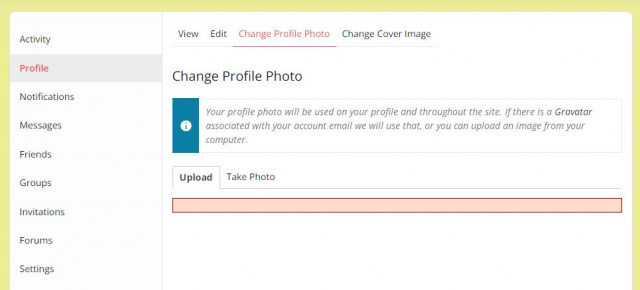
I have a problem, when I uploaded a photo, it showed a red belt as the joint photo:
https://si3.photorapide.com/invites/photos/2022/03/148l95.jpg
2 months before, the uploading was Ok, than suddenly, it didn’t work.
For the upload Cover Image is OK.
my WP is 5.9.2
Buddypress 10.1.0
Theme:BuddyX
Can someone help me ?
thank you so much !Using buddypress 10.1.0 and buddyx theme 4.3.3. WordPress 5.9.2 SportsFanRank.com
Newly created group types no longer appear when creating new groups.
When creating the group, the group types available to choose from only contain group types that were made weeks ago. The newly created group types do not appear when creating new groups, so we cannot select newly created group types.
Any guesses as to why this may be?
Administrator role is being used during this process.
Hello
I am having a problem.
I can list groups and if I click a group I got a white page and in brwoser tab shown “page not found ”
But just when I am loggedinWhen I am logged out and click any group it will be shown and I can join groups or see the inside of groups
Hope anybody can help me
Page: https://netzwerk-helden.com
thank you so much
MichaelWordpress: 5.8.3
BuddyPress: 10.1.0
URL: https://learn.rebeccagordonastrology.com/Why can’t a user that has access to a hidden group not be able to see that group on the groups page?
Thank you for your help.
Topic: Deleted user can still login
I have a BuddyPress installation as an intranet for our employees. When employees quit I go in and delete under “Users”. Even though they are deleted and not showing up in the users list anymore, their login still works! How do I actually delete or deactive a user?
Hi All,
I am extremely new to wordpress and buddypress development. I’ve been searching the forum and trying multiple plugins to find this answer without success. I was hoping someone might be able to point me in the right direction.I think buddypress will be able to do what I want but I just can’t say for certain right now.
I have been using the extended profile to allow a user to enter a bunch of information for their company product. I have created an extended profile with multiple tabs and each tab has multiple fields. that’s good
That is for category 1. What I need to do though, is create a whole different set of tabs with multiple fields but under category 2.
User 1 may only have the fields available for category 1 to fill out.
User 2 may only have the fields available for category 2 to fill out.
User 3 ma only have the fields available for category 1 AND category 2 to fill out.Then, it would be logged in, and visitors to site would only be able to see the profile information for the categories they are allowed to see.
If a plugin exists that would give us that functionality, great. If it’s something I’d have to code myself (and it could be done) that’s fine also. I’ve spent 2 days and my boss is anxious for an answer that we can do this.
Thanks
Topic: buddypress members widget
Hi all, pretty new here.
I’m using the buddypress members widget on my frontpage and it is showing the recent registered member or the active members. I don’t want visitors to choose, i only want to show the newest members. How can i remove this option? Can it be done with a snippet or in bp-custom.php?