Search Results for 'custom activity page'
-
Search Results
-
Topic: custom members loop
Hi guys, ive managed to almost get where I need to go with this thanks to the great explanations and code examples on these forums but Im stuck at the final hurdle! Basically what Im trying to create is an “in/out” board on our intranet which is a single page on the site which loops through all users and displays their last status update. All our staff will then use the status update function to update their whereabouts, eg “at lunch back at 2” or “meeting offsite until 3”
Ive managed to create a custom page template with a hacked up version of the members loop which so far gives me the avatar, username and last status update, but the final thing I need is the time/date of the last status update instead of the time the user was last active.
I could do this in the activity loop and Ive created a function in my functions.php to format the date the way I want it, but it seems this does not apply to the members loop.here is the code I am using in my page template:
<?php
/*
Template Name: In Out Page
*/
?>
<?php get_header(); ?>
<div class="sleeve_main">
	<div id="main">
		<h2><?php the_title(); ?></h2>
<?php if ( bp_has_members( bp_ajax_querystring( 'members' ) ) ) : ?>
    <?php do_action( 'bp_before_directory_members_list' ); ?>
  <ul id="members-list" class="item-list" role="main">
  <?php while ( bp_members() ) : bp_the_member(); ?>
     <li>
      <div class="item-avatar">
         <?php bp_member_avatar(); ?>
         <?php bp_member_name(); ?>
      </div>
       <div class="item">
        <div class="item-title">
            <?php if ( bp_get_member_latest_update() ) : ?>
               <span class="update"><?php bp_member_latest_update(array( 'view_link' => false )); ?></span>
            <?php endif; ?>
        </div>
        <div class="item-meta"><span class="activity"><?php bp_member_last_active(); ?></span></div>
        <?php do_action( 'bp_directory_members_item' ); ?>
        </div>
        <div class="action">
            <?php do_action( 'bp_directory_members_actions' ); ?>
       </div>
       <div class="clear"></div>
   </li>
 <?php endwhile; ?>
 </ul>
 <?php do_action( 'bp_after_directory_members_list' ); ?>
 <?php bp_member_hidden_fields(); ?>
<?php else: ?>
   <div id="message" class="info">
      <p><?php _e( "Sorry, no members were found.", 'buddypress' ); ?></p>
   </div>
<?php endif; ?>
		</div> <!-- main -->
</div> <!-- sleeve -->
<?php get_footer(); ?>
and this is the code to format the date in my functions.php :
function format_activity_date() {
  $activityDate=bp_get_activity_date_recorded();
  // Get GMT offset from root blog
  $root_blog_offset = get_blog_option( BP_ROOT_BLOG, 'gmt_offset' );
  // Calculate offset time
  $time_offset = $time + ( $root_blog_offset * 3600 );
  // Format the time using the offset and return it; date-i18n retrieves the date in localized format
  return '' . date_i18n("l, d/m/y, g:ia", strtotime($activityDate) + $time_offset) . '';
}
add_filter('bp_activity_time_since', 'format_activity_date');
from what I can tell, I dont want to be using the bp_member_last_active() function as this will return the last time the user did anything. Rather, I need to use some other function which will return the timestamp of the users last status update, but I cant get this part to work!
Any help much appreciated
cheersHello,
I have got a question. I have insert the following code to members/activity.php to include the post-form.
if ( is_user_logged_in()&&( '' == bp_current_action() || 'just-me' == bp_current_action() ) )

locate_template( array( 'activity/post-form.php', ), true ) ;
It did work fine till I insert the following code to the BP-Custom.php
function bp_change_activity_subnav_default() {if ( bp_is_user_activity() ) {
$args = array(
'parent_slug' => 'activity',
'subnav_slug' => 'mentions'
);bp_core_new_nav_default($args);
}
}
add_action('bp_setup_nav', 'bp_change_activity_subnav_default', 5);With this I want to redirect profile directly to the Mentions page. The code above is also working great, but together they don’t work. When directing to a subnav, the post-form does not show up. What I want is them to work together. Can someone help me where I make the mistake?
Thank you in advanced.
Clicking on “Load More” at the bottom of a group activity page does absolutely nothing (it works on user activity pages). I’ve tried with various browsers, caches cleared. Have disabled plug-ins, so it doesn’t seem to be that. Twenty-Fourteen theme. Some CSS customization, but nothing else. Running WP 3.8.1 and BP 1.9.2 (this was a problem with at least 1.9.1 as well).
Any smart thoughts would be much appreciated.
I’m new to Buddypress development and I’m creating a child theme of TwentyTwelve (for learning purpose) that integrates BuddyPress by custom templates.
By default,
bp_activity_action()outputs something like this on the activity stream page:wynonna posted an update in the group Blade Runner 2 days, 23 hours ago
All I want to do is to modify this output. How can I do it? Are there any parameters to this function or
bp_get_activity_action()?Thanks in advance.
Hi
I want to create a page that is displayed for for each group activity:
Sports group
When I clicked on the page, sports groups and activities in this group are members who show
I want to create this page?
What should I do?I know this topic has been covered in the past but the only solutions I’ve found have covered when BBpress and Buddypress we’re two different plugins. We all value our privacy and I’m seeing some red-flags go up from installing Buddypress already. My site is an ecommerce site and we’ve had some Facebook groups going for years now and I’d like to get them moved over to WordPress to have everything in the same place. Since it’s an ecommerce site, I have a lot of customers who already have profiles, and some made their username their email address. For obvious reasons, I don’t want to have those visible to any sort of web-crawlers since it will show activity once they log into their account to make a purchase on our site. I’d like to implement some sort of code to keep the members page search only, rather than having all the customers usernames or emails out in the open, and hide the rest of BuddyPress from non-logged in users. I just want to make sure everyones info is being protected and I’ve search for solutions everywhere and had no luck so far.
Hi! I have serious problem with my site on wordpress + buddypress. Please try register http://vlovs.com/registration and after registration and after login – user not can use his profile but his profile is create. That problem is with normal registration domain/registration but if user register his account with social login by loginradius its works normal. And my site very slow loading pages. Very please help me. My plugin’s list (67items):
Akismet
All In One SEO Pack
APC Object Cache
Awebsome! Online Registered Users Widget
BackWPup
bbPress Like Button
Better WP Security
BP Direct Menus
BP Facebook Style Friend Lists
BP Friends Suggestions Widget
BP Group Reviews
BP Profile Message UX
BP Profile Search
BP Redirect to Profile for Buddypress
BP Signup TOS SE
BP Webcam Avatar
BuddyMenu
BuddyPress
BuddyPress Activity Plus
BuddyPress Custom Profile Menu
BuddyPress Edit Group Slug
BuddyPress Facebook
BuddyPress Friends On-line (FOL)
BuddyPress Groups Extras
BuddyPress Group Tiny Chat
BuddyPress Like
BuddyPress Message Attachment
BuddyPress MyMood
BuddyPress Simple Google Map
BuddyPress Toolbar
BuddyPress Translations
BuddyPress Username Changer
Buddypress Xprofile Custom Fields Type
CodeStyling Localization
DB Cache Reloaded Fix
Easy Set Favicon
Easy Translator
Faster Image Insert
Feeligo
Friendship Meter
Google Language Translator
Groups
iFlyChat
Installation Profiles
Lazy Load for Videos
Login Logout Switcher
Members
Memory Game (Memorama)
MyArcadePlugin Lite
Place Login
qTranslate
Quick Cache
Remove Admin Bar
rtMedia for WordPress, BuddyPress and bbPress
SEO Friendly Images
Simple Visitors Counter
Skin Login
Sociable
Social Login for wordpress
User Activation Keys
User Groups
User Name Availability Checker for wordpress/buddypress
Video Chat
WordPress SEO
Wordpress Special Characters in Usernames
WP DB Optimizer
WP User Avatarand all plugins are active
Maybe some plugins are not compatibility with other plugins ?
2 months ago i change hosting to other and maybe problem with this ?
Please help me:( and sorry for my bad english. my email for contact – bboymaxstg92@gmail.comHi I am using Thesis Theme with WP 3.8 and BP 1.9
In thesis I can use template tags to customize my theme and what I am trying to do is have the current logged in user’s avatar appear in a floating nav menu that is on all the pages.
I found some snippets that worked but only on a strictly buddypress page on other pages that area was blank.
The other thing I would like to do is have the just post box for the activity stream, and the activity stream to show up on a specific page with out all the extras, sort of as a distraction free activity stream and post area with a link to the full stream.
If anyone can give me some suggestions I’d appreciate it.
For the most part, Buddypress is great! However, as a theme/php developer, its great strengths (ease if use and installation) also become its weakness. Customizing the Activity feed beyond CSS (ie: building your own template), the labyrinth of procedural code, the dated codex, and the hooks and actions becomes quite the challenge.
Now, if you just want to customize the title, change colors, or modify the layout a lot of that can be achieved by CSS.
But if you want to access activity data beyond it’s intended scope (say, for mobile app development, API layers, or just becasue you want to get your hands on it!) then this guide is for you!!
Prerequisites:
Basic PHP Knowledge
WP Theme development experience (even child-theme)
Experience using the fabled ‘functions.php’ and template tags.Ok, so if you meet the prerequisites allow me to share with you the best bp function ever (well, maybe not ever, but the best one for me, right now, haha)
take a look at
/wp-content/plugins/buddypress/bp-activity/bp-activity-functions.php–line:900ishand say hello to pandoras box!/** * Retrieve an activity or activities. * * bp_activity_get() shares all arguments with BP_Activity_Activity::get(). The * following is a list of bp_activity_get() parameters that have different * default values from BP_Activity_Activity::get() (value in parentheses is * the default for the bp_activity_get()). * - 'per_page' (false) * * @since BuddyPress (1.2) * * @see BP_Activity_Activity::get() For more information on accepted arguments * and the format of the returned value. * @uses wp_parse_args() * @uses wp_cache_get() * @uses wp_cache_set() * @uses BP_Activity_Activity::get() {@link BP_Activity_Activity} * @uses apply_filters_ref_array() To call the 'bp_activity_get' hook. * * @param array $args See BP_Activity_Activity::get() for description. * @return array $activity See BP_Activity_Activity::get() for description. */ function bp_activity_get( $args = '' ) { $defaults = array( 'max' => false, // Maximum number of results to return 'page' => 1, // page 1 without a per_page will result in no pagination. 'per_page' => false, // results per page 'sort' => 'DESC', // sort ASC or DESC 'display_comments' => false, // false for no comments. 'stream' for within stream display, 'threaded' for below each activity item 'search_terms' => false, // Pass search terms as a string 'meta_query' => false, // Filter by activity meta. See WP_Meta_Query for format 'show_hidden' => false, // Show activity items that are hidden site-wide? 'exclude' => false, // Comma-separated list of activity IDs to exclude 'in' => false, // Comma-separated list or array of activity IDs to which you want to limit the query 'spam' => 'ham_only', // 'ham_only' (default), 'spam_only' or 'all'. /** * Pass filters as an array -- all filter items can be multiple values comma separated: * array( * 'user_id' => false, // user_id to filter on * 'object' => false, // object to filter on e.g. groups, profile, status, friends * 'action' => false, // action to filter on e.g. activity_update, profile_updated * 'primary_id' => false, // object ID to filter on e.g. a group_id or forum_id or blog_id etc. * 'secondary_id' => false, // secondary object ID to filter on e.g. a post_id * ); */ 'filter' => array() ); $r = wp_parse_args( $args, $defaults ); extract( $r, EXTR_SKIP ); // Attempt to return a cached copy of the first page of sitewide activity. if ( 1 == (int) $page && empty( $max ) && empty( $search_terms ) && empty( $meta_query ) && empty( $filter ) && empty( $exclude ) && empty( $in ) && 'DESC' == $sort && empty( $exclude ) && 'ham_only' == $spam ) { if ( !$activity = wp_cache_get( 'bp_activity_sitewide_front', 'bp' ) ) { $args = array( 'page' => $page, 'per_page' => $per_page, 'max' => $max, 'sort' => $sort, 'search_terms' => $search_terms, 'meta_query' => $meta_query, 'filter' => $filter, 'display_comments' => $display_comments, 'show_hidden' => $show_hidden, 'spam' => $spam ); $activity = BP_Activity_Activity::get( $args ); wp_cache_set( 'bp_activity_sitewide_front', $activity, 'bp' ); } } else { $args = array( 'page' => $page, 'per_page' => $per_page, 'max' => $max, 'sort' => $sort, 'search_terms' => $search_terms, 'meta_query' => $meta_query, 'filter' => $filter, 'display_comments' => $display_comments, 'show_hidden' => $show_hidden, 'exclude' => $exclude, 'in' => $in, 'spam' => $spam ); $activity = BP_Activity_Activity::get( $args ); } return apply_filters_ref_array( 'bp_activity_get', array( &$activity, &$r ) ); }This magical function, dubbed
bp_activity_get()will allow you to get just about every piece and part of an activity feed even OUTSIDE of a bp loop. Not only that, but it allows for you to runfiltersthrough it, meaning you can grab activities by group, by member, sitewide, or just ONE activity if you want.Here’s a sample function I made that grabs the 8 most recent activities and puts the keys I found important into an array. If you’re familiar with the wp $post object, this is quite similar:
/**
* Dumps a list of the latest activities. May be used with pagination by setting $current_page
*
* @posts_per_page	INT, Default is 8.
* @current_page		INT, which page you are on, Default is 1.
*
* @var_dump 	ARRAY, activity items.
*/

function get_latest_activities($posts_per_page=8,$current_page=1) {
	$args = array (
		'page'	=>	$current_page,
		'per_page' => $posts_per_page
	);
	$pre_rec = bp_activity_get($args);
	$activities = $pre_rec['activities'];
	$results = array();
	foreach ($activities as $activity) {
		$record = array(
			'ID'		=> strip_tags($activity->id),
			'TYPE'		=> strip_tags($activity->type),
			'TIME' 		=> strip_tags($activity->date_recorded),
			'AUTHOR' 	=> strip_tags($activity->display_name),
			'TITLE' 	=> strip_tags($activity->action),
			'CONTENT' 	=> strip_tags($activity->content),
			'ITEM_ID'	=> strip_tags($activity->item_id),
			'REL_ID'	=> strip_tags($activity->secondary_item_id),
		);
		array_push($results, $record );
        unset($record);

    }
	foreach ($results as $record) {
		var_dump ($record);
		print "<br>###################<br>";
	}
}
So now, I could place any piece of the data, anywhere I want. You could also (if you wanted to) create template tags that are much more custom. You can also get the data outside of the loop, throw it in the <head> section for SEO purposes, and on and on and on. Maybe you want to throw a widget on your site with the latest activities? This method will do it.
Let me know if you have any questions, I hope this helps, because it took me way too long to figure this out and the current documentation did not help.
Hello,
I’m trying to select a component from the activity subnav menu (the “following” tab from a plugin) to show up as the landing page… However I can’t seem to figure out how to.Using define(‘BP_DEFAULT_COMPONENT’,’_____’); in bp-custom.php works for items in the top navigation, but not for subnav items. I’ve tried writing it out as define(‘BP_DEFAULT_COMPONENT’,’activity/following’) but that doesn’t work… It’s not plugin related since I can’t get any other subnav item to show up as the default, but all the top-level ones work fine. I’m probably just doing this wrong, but I’ve tried a few variations with no success.
Any suggestions?
(PS – Thanks, and happy new years!)Topic: Real Dynamic Menu's
Based on this discussion.
http://buddypress.org/support/topic/dynamic-menu-links/Wouldn’t it be nice if there was some sort of overwrite to all BuddyPress menu’s.
I mean those menu’s at the top of the Activity, Groups, Members and Profile pages, wouldn’t it be cool if they showed up on the WordPress Dashboard underneath Appearance > Menu.
Maybe that you can’t change the default links in the first place but you could easily reorder them by Drag&Drop, maybe even add custom link-items + CSS classes to those menu’s.I think it would make BuddyPress very easy to use. I still think the Menu function in WordPress that was created in version 3.0 is one of the best and powerful features the CMS has.
Topic: Extended Profiles deleted
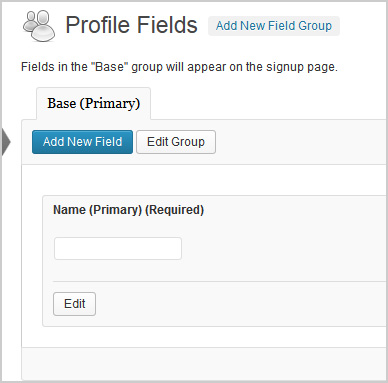
Hi,
The pic above shows what the extended profile field should look like. I had a plugin called Buddypress Real Names which allowed me to delete that field above. Silly me, now my extended profiles are not working. It shows blank under profile fields on my registration page and does not send a confirmation email to new users. However, if extended profiles are turned off, all works fine.
1. Which version of WordPress are you running?
3.7.12. Did you install WordPress as a directory or subdomain install?
Directory3. If a directory install, is it in root or in a subdirectory?
root4. Did you upgrade from a previous version of WordPress? If so, from which version?
No5. Was WordPress functioning properly before installing/upgrading BuddyPress (BP)? e.g. permalinks, creating a new post, commenting.
Wordpress seems to be working fine6. Which version of BP are you running?
1.87. Did you upgraded from a previous version of BP? If so, from which version?
No8. Do you have any plugins other than BuddyPress installed and activated? If so, which ones?
Yes.
Admin Toolbar Remover
All In One WP Security
AVH First Defense Against Spam Plugin
BP Profile as Homepage
BuddyPress
BuddyPress Activity Plus
BuddyPress Activity Privacy
BuddyPress Wall
Contact Form
Custom Meta Widget
Disable RSS
Dynamic Widgets
Email Login
EU Cookie Law Compliance
Facebook Friends Inviter
Google Analytics for WordPress
Google XML Sitemaps
Restrict Usernames
Velvet Blues Update URLs
W3 Total Cache
WordPress SEO
WP-SpamFree
WP Block Admin
WP Content Filter
WP FLogin9. Are you using the standard BuddyPress themes or customized themes?
Standard10. Have you modified the core files in any way?
No11. Do you have any custom functions in bp-custom.php?
No12. If running bbPress, which version? Or did your BuddyPress install come with a copy of bbPress built-in?
Not running bbPress13. Please provide a list of any errors in your server’s log files.
14. Which company provides your hosting?
Mweb15. Is your server running Windows, or if Linux; Apache, nginx or something else?
UnixHi guys
I have the site front page set to a static page (the Buddypress Activity page).
Now search isn’t working – if I submit from the search form, I get the front page (with search query appended i.e. http://www.site.com/?s=query&search=Search), not the search results page.
If I set the front page to show my latests posts (WP default), it works fine – just not when I change it to a static page.
Any ideas? Do I have to create a separate search results page? My theme (Razor) includes a custom search results layout that I’d want to hook up to this page. My coding skills are minimal so a dummy-proof solution would be great – otherwise I guess I’ll just dive in.