Search Results for 'private'
-
AuthorSearch Results
-
May 4, 2016 at 7:42 am #253123
In reply to: How to add voice message to status
haokei
ParticipantHi,
I’m looking for something like this too. So far, the closest thing is attached an audio file to the private message. Speakpipe is good but only directly to the owner of the site. It will be nice if there is a plugin to exchange private voice message.
Anyone?
May 3, 2016 at 2:07 pm #253107In reply to: Non-members can see child forums in groups
Artisantopia
ParticipantFurther testing:
– I’ve changed to TwentyFifteen theme
– deactivated all plugins except for BuddyPress and bbPressI still can’t see topics that the user should be able to see. And they can access a private forum they aren’t a member of.
Where do I even begin to figure out what is going wrong with this site?
May 3, 2016 at 1:55 pm #253106In reply to: Non-members can see child forums in groups
ParticipantI just ran 2 forum repairs:
– Recalculate private and hidden forums
– Repair BuddyPress Group Forum relationshipsand now I have a different problem. I’ve actually been experiencing this problem on and off now for about 2 weeks and I’m starting to pull my hair out!
So now if I go to the forum list (at the category level) I can see that there are topics in the child forums. But when I click through to the child forum it tells me “Oh bother! No topics were found here!” This is for a group that the user is a member of. There are definitely topics in that forum.
If I change the user from a Participant to a Moderator they can see the topics.
If I change them back to a Participant and then toggle the forum from private to public to private they can see the topics again. I have done this toggling of forum visibility several times over the past week and it only lasts for a day or two, then I’m back at this problem.
May 3, 2016 at 1:35 pm #253105In reply to: Removing options for private and hidden groups
shanebp
ModeratorCreate a template overload of this file:
buddypress\bp-templates\bp-legacy\buddypress\groups\create.phpThen, in your template overload, remove the html for the Private and Hidden options.
May 3, 2016 at 10:22 am #253094vaughancavca
ParticipantHi,
In the privacy options on the group creation page, I’d like to have the private and hidden group options taken out, as I only want users to have their posts public. How would I go about doing this?
http://thenetwork.cavcaventures.org
I’m on WordPress version 4.5.1 and BuddyPress version 2.5.2May 1, 2016 at 7:10 am #253059In reply to: user sending private message to users not his friend
binary10
ParticipantYou can try BuddyPress Private Messages for Friends Only
Note:This plugin hasn’t been updated in over 5 yearsApril 30, 2016 at 4:49 pm #253053In reply to: Private Message Delay in Sending
ModeratorI agree that there should be some indication or disabling when the button is clicked.
You can open an enhancement ticket here – use the same user & pw you use for these forums.
There is a plugin that will disable the button when sending public and private messages.
You can get it here:
https://wordpress.org/plugins/bp-profile-message-ux/Or here:
http://www.philopress.com/products/buddymessageux-free/April 28, 2016 at 9:09 pm #253012In reply to: user sending private message to users not his friend
@mcuk
ParticipantI was looking for a solution to this a while back, Shane provided one here:
https://buddypress.org/support/topic/private-message-friends-only/
the code goes into the bp-custom.php file.
Without it private messages can be sent to anyone, friend or not.
April 19, 2016 at 8:04 pm #252658In reply to: Private messages isn’t working
SlowSpeed
ParticipantThe thing is that I don’t know which plugin does the private messages..
Is it BuddyPress?Also what does it matter how long it takes to load? Is it connected to the private messages?
April 19, 2016 at 5:03 am #252619In reply to: Send E-mail to all Useres Members
sharmavishal
Participantthis is NOT for email but sending private messages. you want to send emails to all your users?
April 16, 2016 at 6:49 pm #252525In reply to: Group with multiple forums?
OpenRing
ParticipantYES WE CAN!!
We can combine simultaneously these 2 features below:
– Multiple forums assigned to 1 or more Groups
– Multiple groups assigned to 1 or more UsersJust using THIS PLUGIN: https://wordpress.org/plugins/bbp-private-groups/
This guy is a holy person!!!April 11, 2016 at 2:08 pm #252335In reply to: Complete chat system???
celziobiaz
ParticipantWell, there are several Group chat rooms integrated well with BuddyPress.
When you choose, you need to consider the following:
1 – You can install one on your server, but if you have more than 10 chatters, that will probably load your server. Most shared hosting services, do not allow to install a chat on the server as it is high cpu/mem consumer. In addition, sharing files is dead slow.2 – I recommend a group chat hosted service, it will offload all activity to a remote server, bandwidth is not a consideration. They work with CDN, so everything is pretty fast.
As for your question:
I am very much in favor of RumbleTalk chat plugin, works very well and integrate with your users base.– Ability to send any files (anything from videos, photos, music, etc.)
Yes -You can upload files, pdf,excel..etc, I think any file, but they have size limit
– Ability to text chat
Yes
– Ability to video or voice call to a friend
Yes – they have private chat (you need to allow it in the settings), you must be in ssl to use it (WebRTC)
– (Optional) ability to add other friends or users to the chat
Yes – you can allow facebook/twitter friends
– (Optional) ability to screen share (desktop sharing)
No – no screen sharing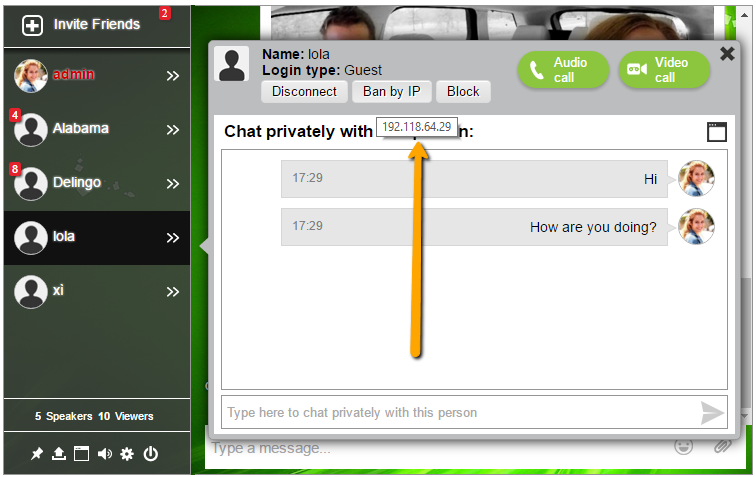 April 11, 2016 at 10:32 am #252325
In reply to: Changing the capabilities of admin
janhart
ParticipantThat is what I’m talking about:
Group roles
BuddyPress group members have three roles available to them.
Administrators: Administratorshave total control over the contents and settings of a group. That includes all the abilities of moderators, as well as the ability to:
Change group-wide settings (Admin > Settings). For instance, administrators can turn group forums on or off, change group status from public to private, and toggle on or off various other group functionality provided by plugins
Change the group avatar (Admin > Group Avatar)
Manage group members (Admin > Manage Members). More specifically, only group administrators have the power to promote members to moderators, or to ban individual users from the group
Delete the group (Admin > Delete)The individual who creates the group is automatically the group’s first administrator. As a result, each group must have at least one administrator, though the first admin can choose to appoint others.
Contents
Privacy Options →
Group roles →Create New Page
April 10, 2016 at 6:25 pm #252303In reply to: Private messaging user blocking/ignoring?
donburikun
ParticipantAre there any plans for the below:
– Official inclusion to Buddypress?
– Add the option so that when a user is blocked that only their private messages are blocked?
– Add the option so that when a user gets blocked they are not aware of it (shadow block)? In other words they will not receive any notification that they are being blocked.April 2, 2016 at 3:45 pm #252037Jojanonone
ParticipantThanks a lot @berkelmudez!!
Accidentally I noticed that activation emails were not being sent. And neither were notification emails, like when receiving a private message. Switched to Postman and all was sweet again.
WordPress 4.4.2
BuddyPress 2.5.2
bbPress 2.5.8April 1, 2016 at 5:44 pm #252014In reply to: Update Fail on 2.5.2
tammy1999
ParticipantEverything on the Main site is public. Everything on the Sub Site is private on only for members. I am using a Membership plugin to for the private site.
I don’t have BuddyPress activated via the Network. If I do that, then everything goes to the Main site, even though I have the root blog set at 2 for the subsite.
I only have BuddyPress activated on the Subsite and for the most part works great that way except for a couple of redirections to the Main site.
April 1, 2016 at 5:16 pm #252013In reply to: Update Fail on 2.5.2
danbp
ParticipantI can’t help you about confusion. What should be private and what should be public ?
BP handle with members, not with blog privacy.April 1, 2016 at 4:50 pm #252011In reply to: Update Fail on 2.5.2
ParticipantI have only had BuddyPress on the Subsite and added ( ‘BP_ROOT_BLOG’, $blog_id ) with the id of the subsite to the wp-config.php.
But when I change to network activation everything goes to the Main site. So, I am really confused about that now. Nothing with BuddyPress can show on the Main site because the subsite is all private.
March 27, 2016 at 8:18 pm #251843bradleyfried
ParticipantOkay, that worked! Now I can see all my WP members on the BP Members page.
The functionality for some users still appears to be limited, however.
– no friend request button on the other members in the list.
– no private message button on the other members in the list.
– no ability to join groups.
– no access to activity stream.etc.
-Brad
March 25, 2016 at 12:06 am #251787In reply to: Email Notifications Not Working
kamalski
ParticipantPaul – I’m having the same problem. I managed to install your PHP email debuger. I triggered a private DM in Buddypress and received “Email delivered – True”. However, there was no Buddypress notification email received on my inbox.
Anything else?
March 24, 2016 at 6:54 pm #251777In reply to: Private Message Friends Only
ParticipantHi @neijisly, I tried your updated code but had no success with it. Thank you for trying though!
Hi @shanebp, your code works great. Thank you! I don’t have any other plugins apart from BuddyBoss Global Search and BuddyBoss Edit Activity. So unless your code affects the functioning of another part of BuddyPress, then there shouldn’t be any conflicts.
While looking at messaging I have just noticed that Private Messages don’t send when you select a recipient via the autocomplete dropdown (get a failed message saying username is incorrect). However if you manually type out the same username, the message sends fine. I haven’t yet searched the forum on this matter though so there may already be a solution out there. I’ll have a look.
March 22, 2016 at 5:49 pm #251680In reply to: Private Message Friends Only
Moderatorafaik, there are no plugins.
But it’s a simple filter.
https://buddypress.org/support/topic/disable-or-hide-private-message-button/March 22, 2016 at 1:47 am #251643In reply to: How to delete a posts
r-a-y
KeymasterThanks for the post, however since you are referencing forums, you should post on the bbPress support site.
Edit – I see that you’ve already posted on the bbPress forums:
https://bbpress.org/forums/topic/how-to-delete-remove-posts-andor-threads/Just for reference:
* bbPress = forums
* BuddyPress = community (member profiles, groups, private messaging, etc.)bbPress adds forum support to BuddyPress.
March 20, 2016 at 8:38 pm #251571In reply to: How To Hide Pages To Unlogged Users
giorginho10495
ParticipantThanks @shanebp. I have installed BP Simple Private and then i have checked the “friends” box. The page Friends in fact is not accessible because when i clicked on this page it redirects me on the home page but it remains on the menu. I would like that it disappears from the menu too.
March 20, 2016 at 7:09 pm #251563In reply to: How To Hide Pages To Unlogged Users
ModeratorHave you tried:
https://wordpress.org/plugins/bp-simple-private/ -
AuthorSearch Results


