Skip to:
Content
Pages
Categories
Search
Top
Bottom

Search Results for 'questions'

Viewing 25 results - 2,476 through 2,500 (of 2,990 total)
  • Author
    Search Results
  • #8389
    Mark
    Participant

    Couple of questions regarding Buddypress 1.2 and bbPress integration: Is there going to be a way to somehow get to the admin interface for bbPress? And is there going to be a way to add and activate bbPress plugins?

    At the moment I don’t see anything in BP 1.2 that allows for either of those things to happen.

    #8341
    dotpk
    Participant

    I have around 15,000 members registered in my WPMU installation and I tried enabling Private Messaging in BuddyPress for a few days.

    Within around 2 weeks, 20,000+ messages were sent through Private Messaging – 99% of them being spam. Most of my members received messages through emails and got furious.

    I disabled Private Messaging around a month ago and have been visiting this forum frequently to see if there has been any solution.

    When the messaging was still enabled a month ago, I kept checking the messaging table in database and kept marking the users as spam who would send hundreds of messages in one go. I had successfully enabled recaptcha on the wordpress signup, but it was not useful as spammers were manually registering and sending lots of messages via scripts.

    I have got few questions:

    – Is there a way to at least disable the email notification globally for everyone, with an option of manually enabling for anyone who needs it?

    – Can someone help in adding recaptha on the compose message page? I am willing to pay for these services.

    – Is there is any other way someone can suggest to limit the spam via private messaging?

    Thanks in advance!

    dotpk

    symm2112
    Participant

    I wanted to test out 1.2 and loaded everything but now that it’s up, I’m not able to create any groups. Is there something I missed? I also wanted to test out deep integration. Are the old instructions for deep integration still relevant or are there new instructions?

    For instance, if I’m setting up bbpress, do I need to go through the whole install and set up the cookies, keys, and salts and THEN integrate with bp or will bp handle that portion by itself?

    I really like the group forum setup but i also want to have some forums that are for general or misc categories that I can’t see a reason to create a group for. I’ve seen some people asking and I know that the ones I’ve seen have said that if you want ANY forums that won’t belong to a group, you have to go deep integration route but has anyone thought of any workarounds?

    Thanks guys.

    r-a-y
    Keymaster

    You say you are using BP 1.1.3.

    When you upgraded from the BP 1.0 series, what choice did you make when you upgraded the forums?

    https://codex.buddypress.org/developer-discussions/buddypress-forum/

    Did you choose to keep the existing installation?

    Or did you choose to create a new installation?

    Also how dependent are you on your external version of bbPress?

    Besides the group forums, do your members post in other areas in your external bbPress?

    After answering these questions, we’ll have a better idea on how to proceed.

    #60604
    michelle88
    Participant

    I finally get a response :-) Thanks Bowe! I’ve tried to answer your questions below. I hope this helps:

    1. my version of WPMU is 2.8.6

    2. I installed WPMU as a directory install?

    3. I installed in the root

    4. No. I did not upgrade from a previous version of WPMU

    5. Yes. WPMU functioned properly before installing BuddyPress

    6. My version of BuddyPress is 1.1.3

    7. No. I did not upgrade from a previous version of BP

    8. I have the following 16 plugins other than buddypress installed and activated:

    -All in One SEO Pack

    -Announcement and Vertical Scroll News

    -bbPress Integration

    -Competition Manager

    -Contact Form 7

    -Custom Admin Branding

    -Image Widget

    -JR_news

    -Tags 2 Meta Generator

    -Live Countdown Timer

    -Ultimate Google Analytics

    -Vertical Response Widget

    -Wordpress Newsletter Subscription Opt-in for Sendblaster

    -WP-Polls

    9. I’m using the BuddyPress Default theme

    10. The only core files modified is footer.php

    11. No. I have no custom functions in bp-custom.php

    12. I installed bbPress using the Forums Setup in Buddypress

    13. List of errors in my server’s log:

    [Mon Jan 11 15:04:52 2010] [error] [client 82.128.52.89] File does not exist: /home/ystars/public_html/wp-content/plugins/custom-admin-branding/images/login_youngstars_gray.jpg, referer: http://my-domain.org/wp-login.php

    14. BYOhosting [dot]com provides my hosting

    Paul Wong-Gibbs
    Keymaster

    No problem with your post, I just don’t think anyone has gotten around to answer yet

    nig3d
    Participant

    sorry, have I been too much rude overwhelming you with these questions? Maybe I should rephrase them and write one post for each one :)

    nig3d
    Participant

    P.S.: I failed to mention that the second blog uses the buddypress theme too. Maybe I can achieve a more “secondary blog” customization changing the theme, am I correct?

    nig3d
    Participant

    I’m totally a newbie.

    I have a working buddypress/WP installation, I’m still working to get in the new mentality required to understand some processes.

    I have some questions:

    – what is Disable BuddyPress to WordPress profile syncing for?

    – I’m still trying to understand the blog philosophy of WP. It seems like that buddy press is a sort of social oriented blogs container. In this container the users could create a blog. I disabled the blog creation feature for the normal user and I have created just two blogs, now I have some trouble to understand:

    — once a new user is registered, is it registered to buddy press, to WP or to the single blog? It looks like it’s registered to buddy press, but a WP profile is created too, why?

    — it looks like the first created blog works as “main blog” , in fact, the header line title appears to be the name of the first created blog. If I switch to another blog, the header title won’t change. Is this meant to be? Anyway this feature doesn’t bother me, the only problem I’m having is that I’d like instead to customize the top-right tab menu, since I don’t want “Groups” and “Members” appears for the secondary blog.

    — on the secondary blog, while the “Recent Posts” widget works nicely, if I click on the “Blog” tab, the site will show me “The page you were looking for was not found.” Is it because the user is not a subscriber of the blog?

    –if this is the reason, how can I make a new user subscriber of both the blogs once registered? Another solution could be let the blog to be read even by not subscribers.

    – Is there a way to let the group be created only by the admin? If yes, can you show me how?

    – Is there somewhere an help page where I could have found the answer to my questions?

    Thank you for your really appreciated help!

    #60199
    designodyssey
    Participant

    I imagine we will see a first group of WP powerusers who just didn’t want to mess with WPMU. They don’t mind playing with trunk of BP and WP at the same time.

    Soon after though, we’ll see the pent up massess who want the functionality, but want no hiccups, plug and play. Support questions will likely shoot the moon. Hopefully that first group will be here to help.

    #8219

    With the WordPress/WordPressMU merge not too far ahead, the core devs have tossed around the idea of shifting some of the terms that we’re used to using here on the BuddyPress and WordPressMU side of things, and this post is meant to both keep everyone in the loop, and act as a discussion about the possible change. I’ll preface this by saying that none of this is set in stone, and I’m putting it out here to keep everyone informed and keep you ahead of the curve.

    So… To a normal WordPress user, the term “blog” typically means the “blog-river,” or the index.php/category.php/archive.php/single.php pages that encompass the actual “blog” part of the site. Since lots of plugins build WordPress out and away from the blog by using pages or creating their own custom pages (BuddyPress is a good example), calling each new sub-domain/sub-directory instance a new “blog” doesn’t always work anymore, since each instance can have its own pages, plugins, users, settings, theme, etc…

    Also MU was never really “multi-user” since WordPress alone allowed for multiple users. With WordPress becoming less of a blogging tool and more of a publishing platform, the term “blog” has also become a little more specific than saying “multi-blog,” and calling each new instance a “blog” isn’t accurate anymore either.

    So what’s being proposed/tossed around/theorized is this…

    Blogs = Sites

    Sites/Domains = Networks

    I doubt this will change much of the way that BuddyPress works, or any of the list items, etc… Even wordpress.com still calls them “blogs” but when talking back and forth to each other, people from the “single” WordPress side that haven’t been working with multiple “sites” have a hard time grasping the idea and wrapping their heads around what exactly the word “blog” means in relation to each “site” or “network” of sites.

    Also, if you’re paying attention to the WordPress code merge and the WordPress trunk, you’ll notice lots of files starting with “ms-” rather than “wpmu-“. This is in preparation for the renaming of these files and possible renaming and deprecating of the mu functions going forward, to bring them closer in line with how WordPress functions are named and work.

    Long story short, things are going to start to change a little bit on the WordPress front, and we’re going to start to see a lot more “single blog” users needing support. Since we’re all here helping each other, I wanted to set this discussion up so we can get ourselves on the same page, and get ready for what’s about to change for us in the coming months.

    I also wanted to thank the countless dedicated volunteers that help moderate and keep an eye on the forums and are there helping others with their questions. You’re help and time is greatly appreciated.

    #60167
    Anointed
    Participant

    @Andrea –thanks for the link and information. I will install the rc this week and play around a bit before posting the questions. I’m just hoping that Donccha is familiar enough with bp to understand my question in how it regards to wpmu.

    @JJJ I did not realize there were 2 separate lists already, user list – member list. That just may be the answer I was looking for. Do you happen to know if there is any documentation on how to filter for just the user list on a given blog for output display?

    Yes I had always planned on keeping the ‘root’ blog as the master bp site.

    #60152
    Paul Wong-Gibbs
    Keymaster

    The standard support questions which mercime linked to help us help you. Despite the fact that FB Connect is not BuddyPress and as such is a third-party plugin, there are plenty of existing threads in these forums about issues with FB Connect

    #8210
    Barbarossa
    Participant

    Hello,

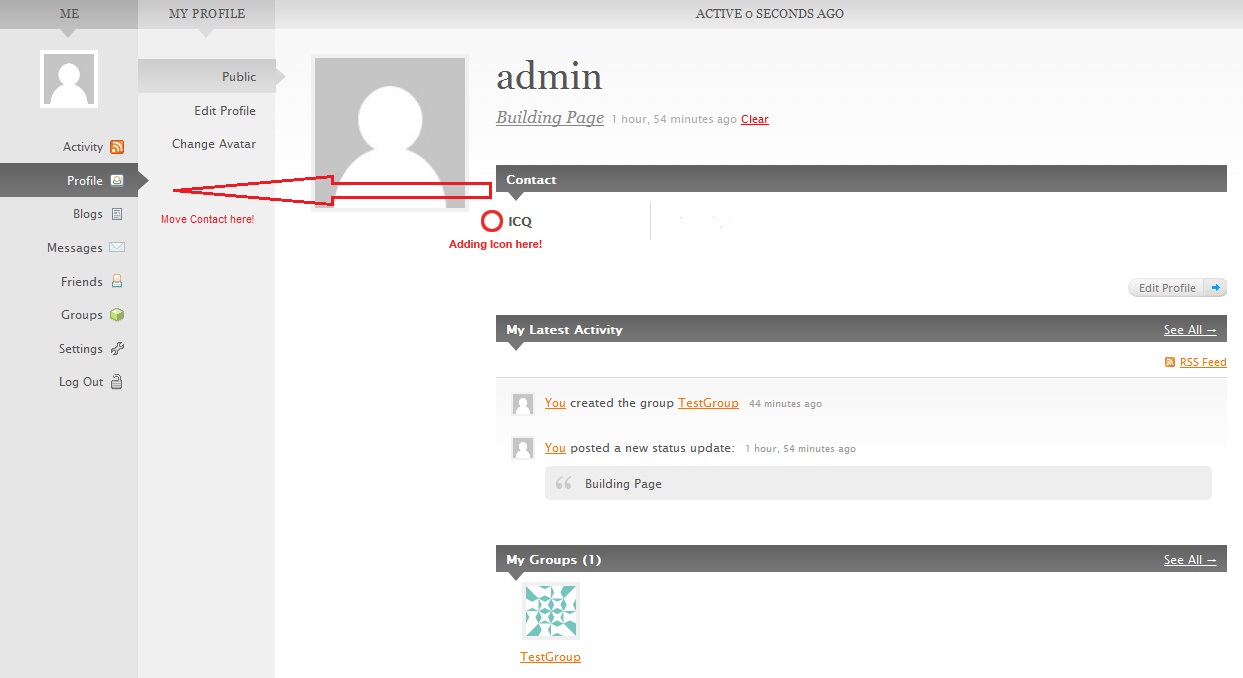
    i want to start a social network page with wp+bp.

    i installed wp-mu 2.8.6 + bp 1.1.3, now i want to customise the page and came to my end.. im am very newbie to php and html, so sorry for my dump questions.

    here is a imge to show how its to be meant:http://www.abload.de/img/testjre2.jpg

    as u can see i created a field group “contact” and a field “icq”

    now i want the field group move to the left menu and the field icq should have an icon instead of the text icq.

    how do i do that? could someone help me?

    sincerely yours

    #60041

    In reply to: BuddyPress Geo plugin

    Mike Pratt
    Participant

    I hate to be harsh, but this plugin is un-intuitive and without instructions or explanation.

    For instance, you are supposed to select the “which field represents the users location” Well, given there is a field for address, city, state and zip possible….what do you choose? Most Geo plugins use a mash-up of the complete address to search for an accurate location of the user.

    The plugin has signs of promise but questions remain. …like what’s up with the “Sponsored by Automattic” ??

    #59885
    Anonymous User 96400
    Inactive

    @Bowe

    setting up different group types is fairly easy. You just have to attach some groupmeta to the group, that basically let you add as many types as you’d like. Then you just check the metadata to figure out what type of group you’re in. Using the groups API you can then add different functionality for different groups.

    I’ve written a types-plugin for one of my sites. It doesn’t have an interface, though. The 3 types I needed are hardcoded into it, so it’s really not suited for a release at the moment. There’s also a lot of more stuff, like a shopping cart, part of that plugin. So, I’ve stripped the functions needed for group types out (hopefully al of them).

    First we need to add the addtional fields to our registration form:

    function sv_add_registration_group_types()
    {
    ?>
    <div id="account-type" class="register-section">
    <h3 class="transform"><?php _e( 'Choose your account type (required)', 'group-types' ) ?></h3>

    <script type="text/javascript" defer="defer">
    jQuery(document).ready(function(){
    jQuery("#account-type-normal_user").attr("checked", true);
    jQuery("#group-details").hide();
    jQuery("#account-type-type_one,#account-type-type_two,#account-type-type_three").click(function(){
    if (jQuery(this).is(":checked")) {
    jQuery("#group-details").slideDown("slow");
    } else {
    jQuery("#group-details").slideUp("slow");
    }
    });
    jQuery("#account-type-normal_user").click(function(){
    if (jQuery(this).is(":checked")) {
    jQuery("#group-details").slideUp("slow");
    } else {
    jQuery("#group-details").slideDown("slow");
    }
    });
    });
    </script>

    <?php do_action( 'bp_account_type_errors' ) ?>
    <label><input type="radio" name="account_type" id="account-type-normal_user" value="normal_user" checked="checked" /><?php _e( 'User', 'group-types' ) ?></label>
    <label><input type="radio" name="account_type" id="account-type-type_one" value="type_one" /><?php _e( 'Type 1', 'group-types' ) ?></label>
    <label><input type="radio" name="account_type" id="account-type-type_two" value="type_two" /><?php _e( 'Type 2', 'group-types' ) ?></label>
    <label><input type="radio" name="account_type" id="account-type-type_three" value="type_three" /><?php _e( 'Type 3', 'group-types' ) ?></label>

    <div id="group-details">
    <p><?php _e( 'We will automatically create a group for your business or organization. This group will be tailored to your needs! You can change the description and the news later in the admin section of your group.', 'group-types' ); ?></p>

    <?php do_action( 'bp_group_name_errors' ) ?>
    <label for="group_name"><?php _e( 'Group Name', 'scuba' ) ?> <?php _e( '(required)', 'buddypress' ) ?></label>
    <input type="text" name="group_name" id="group_name" value="" />
    <br /><small><?php _e( 'We suggest you use the name of your business or organization', 'group-types' ) ?></small>

    <label for="group_desc"><?php _e( 'Group Description', 'scuba' ) ?></label>
    <textarea rows="5" cols="40" name="group_desc" id="group_desc"></textarea>
    <br /><small><?php _e( 'This description will be visible on your group profile, so it could be used to present your mission statement for example.', 'group-types' ) ?></small>

    <label for="group_news"><?php _e( 'Group News', 'scuba' ) ?></label>
    <textarea rows="5" cols="40" name="group_news" id="group_news"></textarea>
    <br /><small><?php _e( 'Enter any news that you want potential members to see.', 'group-types' ) ?></small>
    </div>
    </div>
    <?php
    }
    add_action( 'bp_before_registration_submit_buttons', 'sv_add_registration_group_types' );

    Then we have to validate things and add some usermeta when a regitration happens:

    /**
    * Add custom userdata from register.php
    * @since 1.0
    */
    function sv_add_to_signup( $usermeta )
    {
    $usermeta['account_type'] = $_POST['account_type'];

    if( isset( $_POST['group_name'] ) )
    $usermeta['group_name'] = $_POST['group_name'];

    if( isset( $_POST['group_desc'] ) )
    $usermeta['group_desc'] = $_POST['group_desc'];

    if( isset( $_POST['group_news'] ) )
    $usermeta['group_news'] = $_POST['group_news'];

    return $usermeta;
    }
    add_filter( 'bp_signup_usermeta', 'sv_add_to_signup' );

    /**
    * Update usermeta with custom registration data
    * @since 1.0
    */
    function sv_user_activate_fields( $user )
    {
    update_usermeta( $user['user_id'], 'account_type', $user['meta']['account_type'] );

    if( isset( $user['meta']['group_name'] ) )
    update_usermeta( $user['user_id'], 'group_name', $user['meta']['group_name'] );

    if( isset( $user['meta']['group_desc'] ) )
    update_usermeta( $user['user_id'], 'group_desc', $user['meta']['group_desc'] );

    if( isset( $user['meta']['group_news'] ) )
    update_usermeta( $user['user_id'], 'group_news', $user['meta']['group_news'] );

    return $user;
    }
    add_filter( 'bp_core_activate_account', 'sv_user_activate_fields' );

    /**
    * Perform checks for custom registration data
    * @since 1.0
    */
    function sv_check_additional_signup()
    {
    global $bp;

    if( empty( $_POST['account_type'] ) )
    $bp->signup->errors['account_type'] = __( 'You need to choose your account type', 'group-types' );

    if( empty( $_POST['group_name'] ) && $_POST['account_type'] != 'normal_user' )
    $bp->signup->errors['group_name'] = __( 'You need to pick a group name', 'group-types' );

    if( ! empty( $_POST['group_name'] ) && $_POST['account_type'] != 'normal_user' )
    {
    $slug = sanitize_title_with_dashes( $_POST['group_name'] );
    $exist = groups_check_group_exists( $slug );
    if( $exist )
    $bp->signup->errors['group_name'] = __( 'This name is not available. If you feel this is a mistake, please <a href="/contact">contact us</a>.', 'group-types' );
    }
    }
    add_action( 'bp_signup_validate', 'sv_check_additional_signup' );

    And then we set up the group for the user (there are some constants in this function, so you’ll need to change that):

    /**
    * Create custom groups for skools, biz and org accounts
    * @since 1.0
    */
    function sv_init_special_groups( $user )
    {
    global $bp;

    // get account type
    $type = get_usermeta( $user['user_id'], 'account_type' );

    if( $type == 'normal_user' )
    {
    // Do nothing
    }
    elseif( $type == 'type_one' || $type == 'type_two' || $type == 'type_three' )
    {
    // get some more data from sign up
    $group_name = get_usermeta( $user['user_id'], 'group_name' );
    $group_desc = get_usermeta( $user['user_id'], 'group_desc' );
    $group_news = get_usermeta( $user['user_id'], 'group_news' );

    $slug = sanitize_title_with_dashes( $group_name );

    // create dive skool group
    $group_id = groups_create_group( array(
    'creator_id' => $user['user_id'],
    'name' => $group_name,
    'slug' => $slug,
    'description' => $group_desc,
    'news' => $group_news,
    'status' => 'public',
    'enable_wire' => true,
    'enable_forum' => true,
    'date_created' => gmdate('Y-m-d H:i:s')
    )
    );
    // add the type to our group
    groups_update_groupmeta( $group_id, 'group_type', $type );

    // delete now useless data
    delete_usermeta( $user['user_id'], 'group_name' );
    delete_usermeta( $user['user_id'], 'group_desc' );
    delete_usermeta( $user['user_id'], 'group_news' );

    // include PHPMailer
    require_once( SV_MAILER . 'class.phpmailer.php' );

    $mail = new PHPMailer();
    $mail->IsSMTP();
    $mail->Host = SV_SMTP;

    $auth = get_userdata( $user['user_id'] );
    $profile_link = $bp->root_domain . '/' . $bp->groups->slug . '/' . $slug . '/admin';

    $message = sprintf( __( 'Hello %s,

    we have created a group for your business or organization. To get more out of your presence on Yoursitenamehere please take some time to set it up properly.

    Please follow this link to fill in the rest of your profile: %s

    We wish you all the best. Should you have any questions regarding your new group, please contact us at support@yoursitenamehere.com.

    Your Yoursitenamehere Team', 'group-types' ), $auth->display_name, $profile_link );

    $mail->SetFrom("support@yoursitenamehere.com","Yoursitenamehere");
    $mail->AddAddress( $auth->user_email );

    $mail->Subject = __( 'Your new group pages on Yoursitenamehere', 'group-types' );
    $mail->Body = $message;
    $mail->WordWrap = 75;
    $mail->Send();
    }
    }
    add_action( 'bp_core_account_activated', 'sv_init_special_groups' );

    When you write a group extension we’ll have to swap the activation call with a function like the one below to be able to check for group types.

    /**
    * Replacement activation function for group extension classes
    */
    function activate_type_one()
    {
    global $bp;
    $type = groups_get_groupmeta( $bp->groups->current_group->id, 'group_type' );
    if( $type == 'type_one' )
    {
    $extension = new Group_Type_One;
    add_action( "wp", array( &$extension, "_register" ), 2 );
    }
    }
    add_action( 'plugins_loaded', 'activate_type_one' );

    The last thing we need to do is add our group type names to group and directory pages:

    /**
    * Modify the group type status
    */
    function sv_get_group_type( $type, $group = false )
    {
    global $groups_template;

    if( ! $group )
    $group =& $groups_template->group;

    $gtype = groups_get_groupmeta( $group->id, 'group_type' );
    if( $gtype == 'type_one' )
    $name = __( 'Type 1', 'group-types' );

    elseif( $gtype == 'type_two' )
    $name = __( 'Type 2', 'group-types' );

    elseif( $gtype == 'type_three' )
    $name = __( 'Type 3', 'group-types' );

    else
    $name = __( 'User Group', 'group-types' );

    if( 'public' == $group->status )
    {
    $type = sprintf( __( "%s (public)", "group-types" ), $name );
    }
    elseif( 'hidden' == $group->status )
    {
    $type = sprintf( __( "%s (hidden)", "group-types" ), $name );
    }
    elseif( 'private' == $group->status )
    {
    $type = sprintf( __( "%s (private)", "group-types" ), $name );
    }
    else
    {
    $type = ucwords( $group->status ) . ' ' . __( 'Group', 'buddypress' );
    }

    return $type;
    }
    add_filter( 'bp_get_group_type', 'sv_get_group_type' );

    /**
    * Modify the group type status on directory pages
    */
    function sv_get_the_site_group_type()
    {
    global $site_groups_template;

    return sv_get_group_type( '', $site_groups_template->group );
    }
    add_filter( 'bp_get_the_site_group_type', 'sv_get_the_site_group_type' );

    It’s quite a bit of code, but it should get you started. This hasn’t been tested with 1.2 btw.

    #59798
    symm2112
    Participant

    I’m almost embarassed that I didn’t realize that. I’ve been so focused on trying to learn or at least understand php that I overlooked and was looking for functions and variables.

    Thanks.

    #59795
    Andrea Rennick
    Participant

    “I would like to keep the home and blog slugs pointing to where they are, but fix the members and rest of the links to point to my root domain slugs.”

    Then hardcode the full URL in the header above. No functions, just a web address. Easy. Works.

    #59768
    symm2112
    Participant

    The trac suggestion made a lot of sense but this is what the code is in my header.php. I thought about my situation and the reason I can’t use the global nav option is because with this configuration, the home function seems to work as does the blog slug, but the members, groups, etc all point to sub.domain.com/members, which is obviously wrong since it should be pointing to domain.com/members. I would like to keep the home and blog slugs pointing to where they are, but fix the members and rest of the links to point to my root domain slugs.

    <li<?php if ( bp_is_page( ‘home’ ) ) : ?> class=”selected”<?php endif; ?>>” title=”<?php _e( ‘Home’, ‘buddypress’ ) ?>”><?php _e( ‘Home’, ‘buddypress’ ) ?>

    <li<?php if ( bp_is_page( BP_HOME_BLOG_SLUG ) ) : ?> class=”selected”<?php endif; ?>>/<?php echo BP_HOME_BLOG_SLUG ?>” title=”<?php _e( ‘Blog’, ‘buddypress’ ) ?>”><?php _e( ‘Blog’, ‘buddypress’ ) ?>

    <li<?php if ( bp_is_page( BP_MEMBERS_SLUG ) ) : ?> class=”selected”<?php endif; ?>>/<?php echo BP_MEMBERS_SLUG ?>” title=”<?php _e( ‘Members’, ‘buddypress’ ) ?>”><?php _e( ‘Members’, ‘buddypress’ ) ?>

    <?php if ( function_exists( ‘groups_install’ ) ) : ?>

    <li<?php if ( bp_is_page( BP_GROUPS_SLUG ) ) : ?> class=”selected”<?php endif; ?>>/<?php echo BP_GROUPS_SLUG ?>” title=”<?php _e( ‘Groups’, ‘buddypress’ ) ?>”><?php _e( ‘Groups’, ‘buddypress’ ) ?>

    <?php endif; ?>

    I guess these functions are being declared elsewhere but I’m not finding them, even in the functions.php. Any thoughts?

    Also, for plugin commander, it’s not so much the plugins that I’m worried about as much as I am wanting to set a standard widget configuration for all sub blogs that get created rather than have them blank on blog creation.

    also, on a side not, does anyone know what the wp_content_dir would be on a sub blog? I created a sub blog with a wordpress theme that created thumbnails automatically. The instructions say to upload some folders that it creates them in to wp-content/uploads but obviously there is no wp-content on a sub blog since the files are set to blogs.dir/6. If I put them in that folder, should that read it properly? Is there another variable that I should use to point that to blogs.dir/6/files?

    I looked at the bptest.org but I didn’t see anything like the front end I was looking for. Posthaste seems good I just wondered if it was easy/possible to actually put the post box on the site.

    Thanks again for all the help.

    #59747
    @mercime
    Participant

    switch_to_blog — when abused to get numerous queries from other blog/s, or get all widgets of the main site’s sidebar, or get sets of posts, etc — is going to be a “slow function” to run. But when used for main navigation which has what, 5 to 8 links, switch_to_blog runs in a split second wherever it is placed – I just prefer to place my main nav in header.php.

    If one is wary of switch_to_blog “overhead” for navigation, then easiest method is to look at source code of main site’s navigation and copy the navigation links there and paste to sub-blogs theme’s header.php or wherever they want to place it. Caveat to this method is, you’ll miss the automatic generation of new links when new plugins/components hook to bp_nav_items. This won’t happen when you use switch_to_blog and add restore_current_blog after the bp_nav_items block.

    #59744
    Paul Wong-Gibbs
    Keymaster

    Switch to blog is considered to be a slow function to run and I wouldn’t recommend putting it in a theme header!

    #59740
    @mercime
    Participant

    1. If I remember right, Jeff’s BP Privacy Options Plugin will allow the user to make profiles private. Just need to wait for the plugin upgrade for BP 1.2

    2/3/5A. cosmic buddy theme – I would suggest asking Brajesh, the theme author about how to do that

    5B. Yes you can create a Sitewide/global navigation bar in your blog’s themes, by using WPMU’s native switch_to_blog and restore_current_blog functions. Therefore, if you want the navbar of main site (blog_id_1) to be shown in you sub-blogs, you add the code below to your blog’s theme’s header.php

    <ul id="nav"
    <?php switch_to_blog('1') ?>
    //copy the code from header.php of either bp-default/bp-sn-parent theme
    //or the code used in main site plus any customized links you added in main site
    <?php do_action( 'bp_nav_items' ); ?>
    <?php restore_current_blog(); ?>
    </ul>

    You’ll get the correct URL’s which point to main site’s respective BP components.

    #59734
    Paul Wong-Gibbs
    Keymaster

    1) Not aware of any existing code that does this. However, your users would only have to go into their profile and change the ‘name’ field (this is what BuddyPress uses).

    2) I think the addon you want is called “Plugin Commander.”

    3) All of the core BuddyPress features are detailed on https://codex.buddypress.org/developer-docs/custom-buddypress-loops/ which you can use to integrate bits of functionality wherever you want. As far as third-party plugins goes, it is dependant on how the plugin author wrote their plugin.

    4) Have you looked at new BP theme on http://testbp.org/? That and BP 1.2 should be released mid/late January.

    5) Haven’t got time to discuss how to fix but look at trac.buddypress.org/ticket/1501

    symm2112
    Participant

    I’ve been working on converting my wife’s fan site for a band from a single wordpress magazine style theme over to buddypress to try to give more community interaction. I’ve been following and reading buddypress news for the last 6 months at least and we still haven’t launched because it seems like every time we get moving, some great features get added that make us need to wait for that. But i digress…

    I have a few features that I’m trying to accomplish for the site and i want to find out if i’m the only one that has looked for these, or if i’m just not finding how to do them anywhere.

    1. We imported our userlist from the old site over to the new wpmu/bp installation so that their users are already there and they can login immediately. in the event that some of them used their real names or email addresses as their usernames and don’t really want that listed in the member directory, is there any way to allow users to “hide” and not be listed in the member directory? We imported almost 1300 users and it would be nice to let the majority of them use their existing credentials but for the few that never wanted their username to be publicly listed, I’d hate to cause problems. I’ve loaded Jeff’s privacy plugin but that still doesn’t allow hiding from the member directory.

    2. we’ve modified the cosmic buddy theme, which is a widgetized theme, for use for the member blogs following the tutorial by pulling out the home.php with the rest. This seems to work well but I wanted to know if anyone knows of a way to “force” a particular widget to show up automatically on all created blogs? We’re using the group blog plugin but since we’re not using the bp default theme, we can’t use the theme it came with. The blog template seems to work well except that their is a sidebar in the theme and if someone creates a new group blog, until we find out that the blog is there, it’s going to show that it needs widgets added. We’d also like to “force” some widgets like recent comments and some ad blocks in there. Is there a way to do this or is it better to just hack the member theme some more and pull out the sidebar and hard code what we need in there?

    3. by these questions, it should be obvious that we’re pretty new to php and learning things. We’ve found that there are some bp themes that have great member profile pages that include things like their albums, their wire, and other info on that page. The cosmic buddy theme really only lists the wire on the page with the rest relying on navigating through the menu. Does anyone know of any tutorials to customize the profile page to pull in things from the other pages/plugins? For instance, we have the bb-picture album plugin from Manoj Kumar. If we want the gallery to show on the profile page, would that be hacking the profile page and just pulling in the code we need from the other pages?

    4. If I’m trying to make this a really user friendly site, does anyone know of any other front ends for wp other than posthaste? I really love the p2 theme that was mentioned in the other thread but we really need more of a magazine style theme so that won’t quite work and we are really trying to keep the theme consistent across all blogs rather than using something like p2 theme for the member blogs while using another for the home blog. I’ve already loaded posthaste and got it working but I haven’t found anything that includes the ability to insert images like the new front end on the p2 theme. would it be easier (and/or legal/ethical) to pull out the front end from someone else’s theme and import that into the current theme or would it be easier to find someone to assist with adding the insert image feature to the posthaste plugin on my site?

    5.Also, I know that this isn’t the right place to ask for questions on someone else’s theme, but is anyone using that theme that would know how to pull out the nav bar on my sub blogs? By converting the buddypress theme to a blog theme, it still leaves the nav bar alone so if my site is at blog.com and i have a group blog at sub.blog.com, the nav bar still shows the home, blog, members, forums, etc but all of those are all wrong because they point to sub.blog.com/members, etc. Is it possible/easy to create a global nav bar so that on all the sub blogs, the members/groups links all point back to the main blog or is it easier to just pull it out?

    Thanks for any and all answers you can give me on these features.

    Jeff Sayre
    Participant

    does the installation actually create “members”, “groups”, etc blogs

    No, those are simply slugs that are appended to the URI.

    To help us better troubleshoot your issue, please answer these questions.

Viewing 25 results - 2,476 through 2,500 (of 2,990 total)
Skip to toolbar