I attempted to do this but I’m unable to target the BASE group without also affecting the USER INFO group
I have the same issue.
This isn’t the most elegant solution but, assuming the Base group is the first in the Tabs array, it works.
Needs to be added to your theme’s functions.php file.
function bp_profile_remove_base_tab ( $tabs ){

        unset($tabs[0]);

    return $tabs;
}
add_filter( 'xprofile_filter_profile_group_tabs', 'bp_profile_remove_base_tab' );
@jason_hayes not sure where the theme from the homepage screenshot comes from.
I am working on a customized theme so can’t help with recommending something.
Hopefully someone with more experience will come along and be able to advise you.
Hi All,
Using KLEO theme.
The issue I do have is that the posts links are not working anymore.
I can’t find a way to get those links back to normal.
When clicking on a post link, I get an empty page – page not found.
See screenshot https://pic.li/bUWT
Any idea how to fix this?
Thanks
Are there any recommended themes?
Hi, unfortunately, it did not work. I have Astra theme. I have changed to another theme but still the problem exists
Hope this helps. put these codes into your theme functions.php file.
add_filter( 'bbp_get_reply_author_url', 'lp_member_profile_links' );
add_filter( 'bbp_get_topic_author_url', 'lp_member_profile_links' );
add_filter( 'bbp_get_author_url', 'lp_member_profile_links' );
function lp_member_profile_links( $url ) {
	if ( ! empty( $url ) ) {
		return $url . 'profile';
	}

	return $url;
}
@ildomandatore did you change anything (e.g. add/remove a plugin, change theme, etc.)?
There’s a helpful checklist in When Asking for Support
Welcome to BuddyPress.
Did you try to test it with Twenty Twenty-Two standard wp theme?
My site has its own login, register area but by some defaults (which I cannot yet figure out how to bypass or disable) users are directed to wp-login – this is disruptive to to the process and confusing/frustrating to users. I don’t want them directed to any pages asking to log into wordpress (which they get an error for trying to use their login info for my site) – Is there a way to redirect these to my specific buddypress/theme login, register, reset pages? I hope this is making sense.
I’m new to BuddyPress.
I’m running version 10.6.0 under WordPress 6.1.1.
Using the Nouveau theme, the group description only shows 2 characters. If I use the legacy theme, which I prefer, the description is shown, but then the Groups Navigation widget becomes unavailable.
I’m using the Colormag WP theme. Switching to a different overall theme does not solve the issue.
I see old references to this problem from several years ago.
Attaching a screenshot
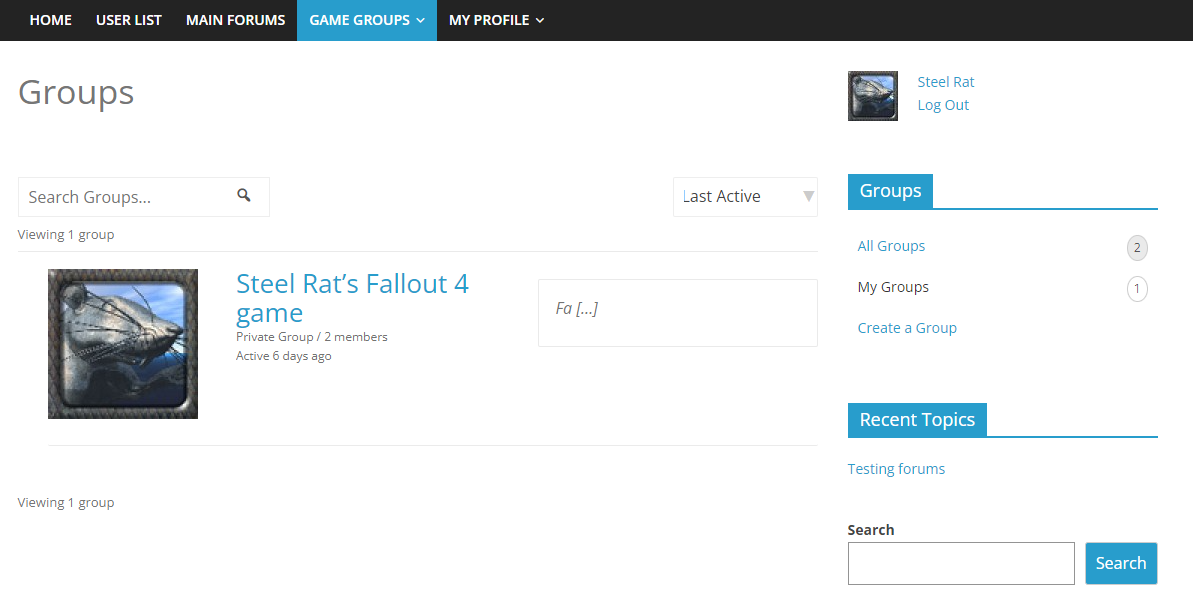
i said nothing, it was my fault. works like a charm. i was not correctyly updating to nouveau theme
 Anonymous User 18187419
Inactive
hi sonetian:
tested on default WP theme (Twenty Sixteen) and seems to work ok.
Added code using the Code Snippets plugin.
If it’s not working for you, then please ask for advice in the Forum on the BuddyDev website, they will assist you.
Hi @fawp
Thank you for responding and thank you for the template, I will ensure to follow that if I ever need help again.
I noticed it after configuring Paid Membership Pro.
I’ve not changed themes as I’m only aware of BuddyX and my customer won’t pay for BuddyBoss. What theme do you recommend I test it with?
Thanks
Hi @josiejackson
A few basic questions:
- Did Editing Basic Profile Group work before, i.e. is this a new error message, or has this been like this from the start?
- Did you try switching to a different theme, to see if the error still shows up?
There’s a good template to follow here that helps the community helping you troubleshoot what the problem might be.
Hi there,
I’ve got this error message appearing in Member profile when you clock on ‘Editing “Basic” Profile Group’
Warning: Undefined array key “public” in /homepages/20/d921393002/htdocs/clickandbuilds/MediaStarAlexo/wp-content/plugins/buddypress/bp-xprofile/bp-xprofile-template.php on line 917
Warning: Trying to access array offset on value of type null in /homepages/20/d921393002/htdocs/clickandbuilds/MediaStarAlexo/wp-content/plugins/buddypress/bp-xprofile/bp-xprofile-template.php on line 917
This field may be seen by:
I’m unsure how to fix this or how to remove the ‘Profile’ tab from Member Navigation. I’m new to Buddypress, currently using Version 10.6.0
I’m using the BuddyX Theme (Version: 4.4.4) Buddypress Nouveau along with Paid Membership Pro.
My customer wants to launch this Friday 18th and this is holding us back.
Please do let me know if any further information is needed.
Thanks in advance!
Anonymous User 18187419Inactive
Probably best to ask your theme developer & BSR developer about this.
I installed the plugin “Block, Suspend, Report for BuddyPress”.
But I noticed that on smaller screens not all buttons fit underneath the profile pic and so my Theme Gwangi will create a Button “More” with some type of submenu with more options.
See screenshot:
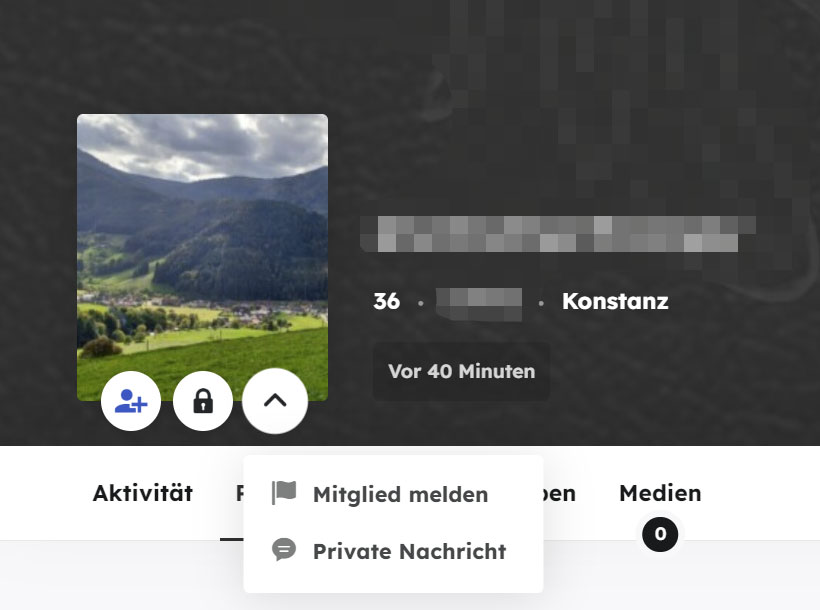
The most imprtant buttons for me are “Add as Friend” and “Private Message”
The Buttons “Bock user” and “Report User” are not soo important .
Is there a way to arrange the buttons in some other order?
I want the “Bock user” and “Report User” buttons in the submenu (More).
— too put some context.. i now run 40 micro communities on a different platform. I was only able to do that because the other platform – while it was a paid plugin and theme – had better community support and they listened to the users..
In the groups page the Selector does not work with the options “Newest”, “Oldest”, “Alphabetical” I have the latest version of WordPress 6.1 it is not a multisite installation, version BuddyPress 10.6.0 I have tried both with the Kadence theme and the BuddyX theme and both have the same problem.
Can someone please confirm if it is a problem only with my site?
My site is a private intranet and I can’t pass a link for them to test.
Is there a place where I can check that the new version of Buddypress works on the groups page with the “Newest”, “Oldest”, “Alphabetical” Selector?
Thank you very much.
@fawp: for the error log’s notices, it’s relative to your theme, it looks like it’s trying to get some activity information without making sure an activity loop is being processed.
For the member’s cover header issue, it will be fixed in next beta/RC release, see https://buddypress.trac.wordpress.org/ticket/8761
Thanks again for your contribution.
I wish to disable users from changing their email address so only admin can do it.
one way to delete the lines from general.php however when updating this will cause issues and come back. i need a code to enter into my child theme functions.php
<label for=”email”><?php _e( ‘Account Email’, ‘buddypress’ ); ?></label>
<input type=”email” name=”email” id=”email” value=”<?php echo bp_get_displayed_user_email(); ?>” class=”settings-input” <?php bp_form_field_attributes( ’email’ ); ?>/>
This is the field i want to make read only/disable
thank you
Hello. For years my site has had no problems with sending private message notifications via email until now. I can’t figure out what caused this to happen. My dating website is https://romancingrarehearts.com/ I don’t know if it’s a BuddyPress or WordPress issue. Can anybody help me with this problem please?
The version of WordPress I’m using is 6.1, and the version of BuddyPress is 10.6.0. And I’m using the WordPress theme twenty-fifteen.
Let me know if you need more information. Thanks for your time and help!
Hello @imath
I justed tested this beta version but I can see a bunch of errors in my debug log, please pardon my approach as i’m not so sure this is the proper way to share my log with you, im new to stuff like this.
Stack trace:

#0 /home/site.com/public_html/wp-content/plugins/buddypress/bp-activity/bp-activity-template.php(3580): array_filter()
#1 /home/site.com/public_html/wp-content/plugins/buddypress/bp-activity/bp-activity-template.php(3515): bp_get_send_public_message_button()
#2 /home/site.com/public_html/wp-includes/class-wp-hook.php(308): bp_send_public_message_button()
#3 /home/site.com/public_html/wp-includes/class-wp-hook.php(332): WP_Hook->apply_filters()
#4 /home/site.com/public_html/wp-includes/plugin.php(517): WP_Hook->do_action()
#5 /home/site.com/public_html/wp-content/themes/klein/buddypress/members/single/member-header.php(87): do_action()
#6 /home/site.com/public_html/wp-includes/template.php(785): require('...')
#7 /home/site.com/public_html/wp-content/plugins/buddypress/bp-core/bp-core-template-loader.php(222): load_template()
#8 /home/site.com/public_html/wp-content/plugins/buddypress/bp-core/bp-core-template-loader.php(67): bp_locate_template()
#9 /home/site.com/public_html/wp-content/themes/klein-child/functions.php(1276): bp_get_template_part()
#10 /home/site.com/public_html/wp-content/themes/klein/buddypress-full-content.php(9): klein_bp_member_head()
#11 /home/site.com/public_html/wp-includes/template.php(785): require('...')
#12 /home/site.com/public_html/wp-includes/template.php(718): load_template()
#13 /home/site.com/public_html/wp-includes/general-template.php(204): locate_template()
#14 /home/site.com/public_html/wp-content/themes/klein/buddypress.php(28): get_template_part()
#15 /home/site.com/public_html/wp-includes/template-loader.php(106): include('...')
#16 /home/site.com/public_html/wp-blog-header.php(19): require_once('...')
#17 /home/site.com/public_html/index.php(17): require('...')
#18 {main}
  thrown in /home/site.com/public_html/wp-content/plugins/buddypress/bp-activity/bp-activity-template.php on line 3580

PHP Warning:  Attempt to read property "activity" on null in /home/site.com/public_html/wp-content/plugins/buddypress/bp-activity/bp-activity-template.php on line 970
Anonymous User 18187419Inactive
Strange issue on my site.
Not new, been noticed at least two years ago.
– if a user has more than one pagefull of Pending Friends Requests, then these are shown as links “Page 2, 3, 4, > ” etc.
– but these links cannot be left-clicked, they do not respond.
– but they can be right-clicked to “open in new tab” etc.
– not an easy issue to recreate & troublshoot, you need at least 20 pending requests to spill onto pages 2, 3, etc.
Anybody got any ideas?
WP 6.0.3
BP 9.1.1
Twenty Sixteen Theme
Thank you for this, we’ve tried all of the above and unfortunately we’re still faced with the same issue
@rightanglecreative90 just to be clear about the above, does it mean that you tried all those recommendations (for example switching theme) and the register form is still missing in another theme?


