Search Results for 'theme'
-
Search Results
-
Hello. I’am using this theme https://themeforest.net/item/vikinger-buddypress-and-gamipress-social-community/28612259 and this plugin https://codecanyon.net/item/snax-viral-frontend-uploader/16540363.
I’m also, of course, using buddypress on my website- But for some reason, the notifications are showing blank. See example: https://imgur.com/a/CXL2yFF
Can I get a help, please ?
Good afternoon,
Have created a php file which we would like to integrate on the group post button, this is every time any user write a post and click on submit the post, apart from continue with it process, also execute my php file…, but I am unable to find where ti insert it.
Could anyone point me to the correct file and how to insert it?
We are using a child-Theme and BP-Nouveau.
Thks.Topic: Members page not populating
I am having trouble getting our intranet member page working. I have buddy press installed and set to the correct page, but when I go to the page I briefly see a message saying it is loading but doesn’t load anything up. The all members button shows the correct number of users in our system so it is linking to the DB correctly.
I did see a post about the last activity needing to be populated….I ran that script and it is populated correctly. We use the Woffice theme and all users are authenticated through LDAP.
Any thoughts on how to get this resolved?
Topic: Users can’t register
I created a fresh install of WordPress, removed all themes except TwentyTwenty and all default plugins. Installed Buddypress from the WP repository. Activated. This is a fresh install set up to troubleshoot this Buddypress problem in another install.
I can add users in the backend. If BP is disabled, users can register using the default registration.
No WP errors are created or logged. A single proxy error is thrown. Noted below with real domain masked.
Any suggestions?
********************
1. Which version of WordPress are you running?
Wordpress 5.5.32. Did you install WordPress as a directory or subdomain install?
Subdirectory3. If a directory install, is it in root or in a subdirectory?
subdirectory4. Did you upgrade from a previous version of WordPress? If so, from which version?
Fresh installation5. Was WordPress functioning properly before installing/upgrading BuddyPress (BP)? e.g. permalinks, creating a new post, commenting.
yes6. Which version of BP are you running?
Version 6.4.07. Did you upgraded from a previous version of BP? If so, from which version?
No. Fresh install8. Do you have any plugins other than BuddyPress installed and activated? If so, which ones?
None9. Are you using a standard WordPress theme or customized theme?
No10. Which theme do you use ?
Twenty-twenty11. Have you modified the core files in any way?
No12. Do you have any custom functions in bp-custom.php?
No13. If running bbPress, which version? Or did your BuddyPress install come with a copy of bbPress built-in?
None14. Please provide a list of any errors in your server’s log files. https://codex.wordpress.org/Debugging_in_WordPress
One error noted in proxy_error_log
2020/12/01 13:37:19 [error] 31520#0: *5156884 “/var/www/vhosts/DOMAIN.com/httpdocs/testing2/register/index.html” is not found (2: No such file or directory), client: 143.244.45.55, server: DOMAIN.com, request: “POST /testing2/register/ HTTP/2.0”, host: “DOMAIN.com”, referrer: “https://DOMAIN.com/testing2/register/”All debug options enabled in wpconfig but WP throws no errors or creates a log file.
15. Which company provides your hosting?
1and1 dedicated server16. Is your server running Windows, or if Linux; Apache, nginx or something else?
Apache & nginx17. Which BP Theme are you using?
None additional18. Have you overloaded any BuddyPress template files.
Touched none19. Any other site customisations that might have a bearing on the issue?
Fresh install20. What BP Template Pack is activated in your installation? You will see that under Dashboard > Settings > BuddyPress – Options page.
Buddypress Nouveau (but also tried with Buddypress Legacy)Hello,
I installed BP on my site and it was working well. But now, the “standard member front page” is gone. The page where you have your menu items: activity, messages, notifications, friends, groups, etc. What I mean by “standard member front page” is this: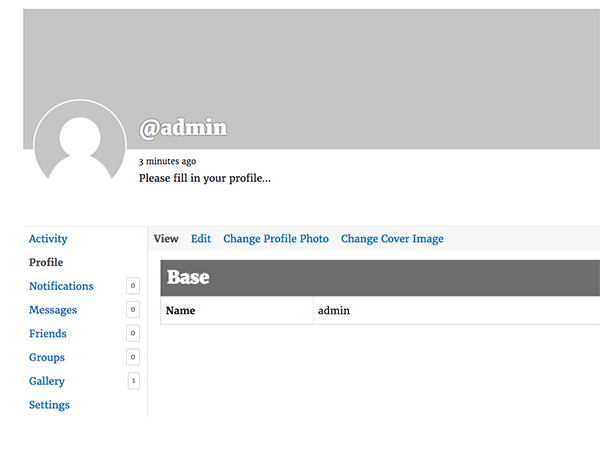
I don’t understand how this page can disappear. Now when you login the website defaults to a “you’re now logged in as X” page. And if you navigate to the member directory and click on your profile, there is just a list of your friends and groups. No activity, no messages, no notifications tabs.
In addition to BP, I’m using the Profile Builder plugin, and Profile Builder Customization Toolbox. In the Appearance> customization > BuddyPress nouveau settings, I have selected the enable default front page for member profiles. I also have selected the display the biographical info from the member’s WordPress profile.
WP version:5.5.3
BP version: 6.4.0
Theme: Werkstatt
website: queerarmenianlibrary.comI have looked for any documentation but I cannot find anything that explains this hook system. For example, in bp-nouveau/buddypress/members/register.php the hook bp_nouveau_signup_hook() shows up several times. The hook has two arguments which change depending where they are in the code.
How to hook into these from my child theme to add content?
hey there,
I have a multi-language E-learning Website and I want to add attribute { dir=”auto” } to the P element inside the activity-innerI navigated to buddyboss-theme/buddybress/activity/entry.php
but I didn’t found the P element I’m looking for I just found this
<div class=”activity-inner”><?php bp_nouveau_activity_content(); ?></div>so can you please guide me how to add my attribute on all P elements in the <div class=”activity-inner”> element
regards, Mohamed
Hello,
I want to remove the private group setting and the hidden group setting on the group creation screen. (I want the user to only create public groups)
I know the corresponding lines on the php files but I don’t know how to activate the changes made.
When I delete the lines and upload the new files to my child theme, nothing changes …Could you please tell me where I should make the changes and where I should put the new files?
Thank you very much !!
WordPress version 5.5.3
Buddy Press Version 6.3.0
I have confirmed with Themes Twenty Twenty and Twenty Thirteen. The issue persists in both themes besides the BuddyX Theme.ISSUE:
Junk characters in ‘Message’ appear in Text blocks as in example here …
/*
Click on the message title to preview it in the Active conversation box below./*]]>*/
OR in …
/*
Sorry, no messages were found./*]]>*/
Also in the text entry block at the top of the Member Activity page …
/*Profile photo of Raj Bhatia/*]]>*/
Change profile photo, tab buttons are displayed thus …
/*Upload/*]]>*//*Take Photo/*]]>*//*Delete/*]]>*/I get a “There was a problem performing this action. Please try again.” notice error when I try to click the “Accept Invitation” button on one of the groups on the group page (mydomain.com/groups).
This seems to be only happening when using Nouveau. I tried removing all plugins and using Twenty Seventeen or Twenty Twenty theme. Both give the error when I try to accept. When I try using Legacy instead, it works fine. It’s just Nouveau is broken. And it’s only where all groups are listed on the /groups page. Accepting in my manage profile area works fine.
Anyone else have this problem?
Hello,
i hope someone can help me because i am driving myself crazy at this point. im fairly new to wordpress and thought that i would give it a shot to try and have the themes custom post “video” show up in the activity stream as well as merge their comments. finding this link in the codex, https://codex.buddypress.org/plugindev/post-types-activities/i managed to have this in my bp-custom.php
 function customize_page_tracking_args() {

    if ( ! bp_is_active( 'activity' ) ) {
        return;
    }

    add_post_type_support( 'video', 'buddypress-activity' );


    bp_activity_set_post_type_tracking_args( 'video', array(
        'action_id'                         => 'new_video',
        'bp_activity_admin_filter'          => __( 'Published a new video', 'custom-textdomain' ),
        'bp_activity_front_filter'          => __( 'Video', 'custom-textdomain' ),
        'bp_activity_new_post'              => __( '%1$s posted a new <a href="%2$s">video</a>', 'custom-textdomain' ),
        'bp_activity_new_post_ms'           => __( '%1$s posted a new <a href="%2$s">video</a>, on the site %3$s', 'custom-textdomain' ),
        'contexts'                          => array( 'activity', 'member' ),
        'comment_action_id'                 => 'new_video_comment',
        'bp_activity_comments_admin_filter' => __( 'Commented a video', 'custom-textdomain' ),
        'bp_activity_comments_front_filter' => __( 'Video Comments', 'custom-textdomain' ),
        'bp_activity_new_comment'           => __( '%1$s commented on the <a href="%2$s">video</a>', 'custom-textdomain' ),
        'bp_activity_new_comment_ms'        => __( '%1$s commented on the <a href="%2$s">video</a>, on the site %3$s', 'custom-textdomain' ),
        'position'                          => 100,
    ) );

}
add_action( 'bp_init', 'customize_page_tracking_args' );
now only some of the activity shows up as there is no thumbnail image or a comment button. i might have misunderstood but i thought this would be all i needed. also i have alread enabled site tracking, indexing and allowed comments everywhere.
here is the themes cpt registration where var $post_type = ‘video’;:
	function register() {


			register_post_type( $this->post_type, array(
				'labels' => array(
					'name' => __('Videos', 'themify'),
					'singular_name' => __('Video', 'themify'),
					'add_new' => __( 'Add New', 'themify' ),
					'add_new_item' => __( 'Add New Video', 'themify' ),
					'edit_item' => __( 'Edit Video', 'themify' ),
					'new_item' => __( 'New Video', 'themify' ),
					'view_item' => __( 'View Video', 'themify' ),
					'search_items' => __( 'Search Videos', 'themify' ),
					'not_found' => __( 'No Videos found', 'themify' ),
					'not_found_in_trash' => __( 'No Videos found in Trash', 'themify' ),
					'menu_name' => __( 'Videos', 'themify' ),
				),
				'supports' => array('title', 'editor', 'thumbnail', 'custom-fields', 'excerpt', 'comments'),
				'hierarchical' => false,
				'public' => true,
				'exclude_from_search' => false,
				'query_var' => true,
				'can_export' => true,
				'capability_type' => 'post',
				'has_archive' => 'video-archive',
				'menu_icon' => 'dashicons-format-video',


"taxonomies"=>array("category"),
			));
			register_taxonomy( $this->tax, array( $this->post_type ), array(
				'labels' => array(
					'name' => __( 'Video Categories', 'themify' ),
					'singular_name' => __( 'Video Categories', 'themify' ),
				),
				'public' => true,
				'show_in_nav_menus' => true,
				'show_ui' => true,
				'show_tagcloud' => true,
				'hierarchical' => true,
				'rewrite' => true,
				'query_var' => true,
			));
			register_taxonomy( $this->tag, array( $this->post_type ), array(
				'labels' => array(
					'name' => __( 'Video Tags', 'themify' ),
					'singular_name' => __( 'Video Tags', 'themify' ),
				),
				'public' => true,
				'show_in_nav_menus' => true,
				'show_ui' => true,
				'show_tagcloud' => true,
				'hierarchical' => false,
				'rewrite' => true,
				'query_var' => true,
			));
			if ( is_admin() ) {
				add_filter('manage_edit-'.$this->tax.'_columns', array( $this, 'taxonomy_header' ), 10, 2);
				add_filter('manage_'.$this->tax.'_custom_column', array( $this, 'taxonomy_column_id' ), 10, 3);

				add_filter('manage_edit-'.$this->tag.'_columns', array( $this, 'taxonomy_header' ), 10, 2);
				add_filter('manage_'.$this->tag.'_custom_column', array( $this, 'taxonomy_column_id' ), 10, 3);
			}
		}
the site is https://balalatet.com/activity/ if you’d like to see
Please helpNot sure if this is a bug or just my experience.
In Buddypress Groups member’s pages, the arrows and page numbers pagination links return the ‘No Members were found’ message in groups with more than 20 members – meaning you can’t see the other members. I have Buddypress 6.3 and WordPress 5.5.3. Happens with no other plugins active and no matter the theme (have tested Twenty Fifteen-Twenty).
‘Order by’ options also return ‘No Members were found’ message. Search does the same.
I have tried BuddyPress repair tools. I even tried deleting ALL the other plugins (on the Staging site version). Nothing works – just seems broken.
Here is a video of it: https://vimeo.com/479876989/00919cb869
Can share a private link if necessary.
Topic: Issue Redirection
Hi,
Thanks a lot for the plugin and this site.
I have a problem with the plugin in order that redirects to the homepage when it should redirect to /members/ for example.
Also, /register/ redirects to the homepage too. If I deactivate the plugin, pages do work.
What can I do? Where is the problem?I’m using Kleo theme in cleanice.es
Thanks a lot,


