Thanks for the information guys, really appreciate it.
There’s still a little confusion in my head, lol :p.
My blog is at domain.com.
So, should I install WordPress Mu at domain.com or something like mu.domain.com, and then control the blog at domain.com from under mu.domain.com, and install buddypress under mu.domain.com?
Is this how it’s supposed to be setup?
The approach to take in a plugin is to hook into the various WP and BP actions and then reward achievements as and when appropriate. You need to record in the database which achievements have been obtained. And write the administration and user interfaces for BuddyPress as a custom component.
I am myself working on an achievements plugin. I had hoped to release a test version today but I can’t promise that, it’s looking unlikely. But we shall see..
I believe the WP/WPMU merge isn’t being released until WP 3.0. So yes before Christmas sounds realistic.
I want a registration form that looks something like this:
First name: …
Last name: …
Email address: …
Sign Up! (button)
This excellent plugin makes login with email address possible; a username is no longer needed!
Restructuring the registration form in WPMU/BP appears to be almost impossible. I’ve posted other questions about this, like here, but this post is an attempt to start at the top and go through it step by step.
1. Created a custom field “Last name” and made it required. It appears under “* Name:” on the form as “* Last name:”.
How can I rename “* Name:” on the form to “* First name:”?
2. Went into bp-core-signup.php to change the order of the registration form fields – or is there a better way? To move the ‘firstname’ and ‘last name’ fields to the top of the form I’ve moved this bit up:
echo '<div id="extra-fields">';

do_action( 'signup_extra_fields', $errors );

echo '</div>';
Unfortunately ‘Profile Picture (Avatar)’ is included in signup_extra_fields.
Why? Is there any way to remove this from the initial registration and move it to optional profile fields?
Or is there any way to move “Name” (or firstname+lastname) to the top of the form separate from the extra_fields?
Where and how are the extra_fields generated? How can I change their appearance, remove/edit text, etc.?
Solutions to this would be a good start. More problems later…
Andy on WordCamp 2009 in Italy (Milan) says “before christmas” 
Not sure if this is the right place to be posting this question, but anyway…
I am using BP 1.0.1 and bbPress 1.0 alpha 6.
When a WPMU site administrator joins a group in BuddyPress and makes a group forum post in BP, in the bbPress admin area, it shows the user as a regular member, instead of a Key Master (or whatever role you setup in bbPress’s user role map to sync with WordPress).
The only person who seems to be a Key Master is the bbPress user who is integrated with BuddyPress.
Is this the way it is supposed to work currently? Or am I doing something wrong?
Hello,
how can I change the backround of the search & login bar in bpmember at the top of the page with an *.jpg or *.gif ? I have attached a screenshot which shows the colored place which should be placed with the *.jpg or *.gif bg.
Can you help…
Well the code for that in the base.css is:
#search-login-bar {
border-top: 0px solid #f7740a;
background: #fff9df;
padding: 7px 20px;
}
how can this be usable ? How must the code be if the bg is search-bg.gif
the color ‘fff9df must be changed in the search-bg.gif
who can help ?
thx in adv.
best regards
tony
Here is the screenshot in the german forum:
http://forum.wordpress-deutschland.org/buddypress/53865-hintergrund-von-search-und-login-member-definieren.html
If you are not in a hurry then I would recommend waiting for awhile. At some point, BuddyPress will be configured to function on single-user WordPress. I do not have a timeline for this as it has to do with merger of the WPMU codebase into WP.
 3125432
Inactive
Just an update. Have played around with this a bit and sometimes the sitadmin dashboard Users section that allows you to select the preferred name to be displayed publicly works and sometimes it doesn’t.
I’m thinking that this may have something to do with the Buddypress General Settings: Disable Buddypress from WordPress syncing? This is a total mystery to me what that means or is supposed to do. Anyone?
Anyway, the fix that seems to work is a MySql query that anchors from the user id # and then you could structure it to replace the current data in the value field of the wp_bp_xprofile_data table with the data from the user_login field of the wp_users table.
I have no idea how to do create that query but I am sure it is pretty easy.
– Brian
roseeveltrp, you’re correct!
You need WordPress MU.
BuddyPress only works with MU at this moment in time.
Some day down the road BuddyPress will support regular WordPress, but not now.
Here’s a good guide for transitioning from WordPress standard to MU:
http://welcome.totheinter.net/2008/10/04/how-to-migrate-from-wordpress-to-wordpress-mu/
It helped me!
Hi,
I am a little bit confused with how BuddyPress is supposed to work. I have a blog running WordPress.
I wish to add a social networking layer, like BuddyPress promises, but its asking for WordPress MU.
So, if I am not mistaking I have to upgrade my WordPress Site to WordPress MU, and then setup BuddyPress?
Is there any specific guide or an article that can assist me in making the move?
I am not interested in subhosting blogs, just add a social networking layer to my current blog.
what version of jQuery we can expect to see in the next BuddyPress update?
Well, based on the new features of WP 2.8, which WPMU will merge into its codebase, I’m going to guess jQuery 1.3.2. Perhaps Andy has a different idea.
I have to do something similar. Not looking forward to it…
I’ve found this plugin:
User Import for BuddyPress (All Fields)
To export member data from another WordPress installation you could use this:
Users to CSV WordPress plugin
Haven’t gotten to testing this yet, so let me know if it works…
3215850Inactive
+1
I’ve been running a ning network and wordpress blog in parallel. Slightly integrated by way off rss feeds, but nowhere near enough. Likely to jump onto buddypress at some point.
I am looking to create a membership site using WPMU + Buddypress. The site is almost done but I need to create a membership component. Meaning, I want my clients to pay for the membership and then they get access. I have found a plugin for WordPress called memberwing (http://www.memberwing.com/). I am wondering if anyone has tried it.
I just need a push in the right direction.
3125432Inactive
Jeff,
Thank you for taking the time to try and help us! This may seem off topic but every person on this board should take a moment to say “Thank You!” to Burt and Jeff and Andy, and the countless others who work to help solve problems.
This is a shout out to each and all; could you check your db’s using phpadmin or whatever you use to examine your wordpress/buddypress database and tell me what ‘user_status’ setting you see for the admin, typically ID#1?
Thanks,
Brian
Look at line 1426 of that function:
add_action( 'init', 'bp_core_action_search_site', 5 );
In your bp-custom.php, you can stop that action by doing this:
remove_action( 'init', 'bp_core_action_search_site', 5 );
You’ll need to place that within a function.
See this for more info: https://codex.wordpress.org/Function_Reference/remove_action
Burt & Mike –
Thanks for the prompt reply. Tried upgrading both manually and with the built-in plugin install function. Also tried clearing out the BP tables from the database (the site has not launched yet) hoping that would kick things into shape.
2.7.1 was the first and only version of WPMU installed, upgraded BP from 1.0 to 1.0.1 and that’s when the themes died. Also, no hyphens in the themes’ directories.
Went through the code and was able to see what you were talking about in terms of setting the theme_root variable to /bp-themes/, but any idea why it would be doing so outside of member pages?
If the plugin is active, if I go to /wpmu-themes.php or /wpmu-blogs.php? in the WPMU backend, to activate themes all I see are the BP themes. Correct me if I’m wrong, but before it would also show me themes in the /themes/ directory as well. Is this an intended function? I’d prefer not to move my non BP themes into the bp-themes/ as disabling BP would then kill the site.
Any help you could provide would be greatly appreciated.
– Ben
(ben at gwstudentassociation dot com)
3206013Inactive
Hello,
Thank you for your reply, themes are (depo-clean and TerraFirma ), one more question does using WordPress admin bar will cause conflict ?
Thank you
3125432Inactive
hi –
I am using WordPress MU 2.7.1 and buddypress 1.0.1 and Facebuddy Theme 1.0
This has now happened twice in two days, where I logout at night and attempt to log on a little later only to see this “blue screen of death” message:
This user has elected to delete their account and the content is no longer available.
I have done nothing of the sort. All files are in place.
I will say that I have elected to delete some lines of code to remove some functions in the core files but they aren’t super critical, in my opinion.
Remove the log choice from the profile drop down menu
Remove the edit profile button
Remove the edit profile sub nav selection
Remove the blogs from the drop down menu in the search function
Change the destination and name of the logout in the top bar
Other items that I have been working with a programmer to implement is a SSO. So he had provided a plugin to an external membership software that works with WordPress MU to register new members by passing their field information. I am wondering if that might also be causing this. That can’t be though because the user records are just written to the database.
This is really tough. So much work done now twice in personalizing Buddypress.
Any ideas?
Thanks,
Brian
This is because BuddyPress currently runs only on WPMU, not the single-user version of WordPress
I have recently installed the latest version of WordPress (2. and when I upload the latest BuddyPress (1.01) and then try to activate it errors me out with the following:
“Fatal error: Call to undefined function: get_blog_option() in […]/html/wp/wp-content/plugins/buddypress/bp-core.php on line 425”
I then can’t login to wp-admin or view the WP page at all. I have to rename my plugins folder and to even be able to get back to the Dashboard.
Do the 2 versions even work together? Or am I just missing a step? Is anyone else having this issue??
I just don’t think anybody really knows. What version bp, wpmu, bbpress? That’s got to be somewhere around bbpress rc2 though. Not sure when bbpress went with the permalinks options. I can’t help you at the moment. I wiped my dev server’s bbpress, upgraded to bbpress rc2 and can’t get group forums to work at all. I can’t get that to work or wp/bbpress cookie integration. It’s the usual issue with conflicting, incorrect or just plain missing docs on how to make it happen properly.
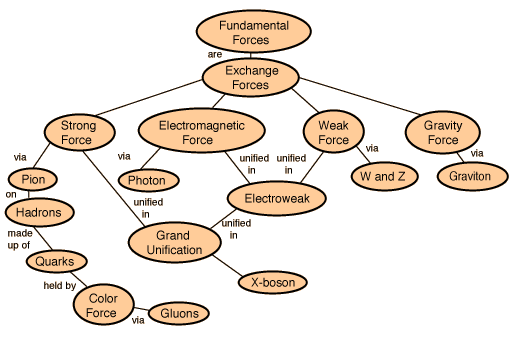
We have wordpress config settings, bbpress config settings, bp config settings. After careful and lengthy research, I’ve determined that it all is somehow related to this:
http://hyperphysics.phy-astr.gsu.edu/hbase/forces/imgfor/fforcon.gif
I guess I get to wait until Automattic decides that integration of their three products is actually important. This is a back burner issue with my dev server. I just don’t have the time to track down the problem at the moment.
Well, that is partially true. bp hijacks the theme root and alters it to point to /bp-themes when it detects an url that belongs to the member theme. Those urls are things that are of the form mysite.org/members, mysite.org/groups …
By default it only does this for the root blog of the installation. Blog id 1.
You upgraded from what ver of bp and what ver of wpmu? wpmu now will not allow theme directory names that have a dash in them. So the non-2.7.1 theme /themes/my-theme doesn’t work anymore. It has to be /themes/mytheme
Same goes for the themes that live in /bp-themes. Did you upgrade your bp member theme and the bp home theme also?
You didn’t leave a link to your site or specify what versions of bp and wpmu you used to be running so I’m just shooting in the dark here.
Hi,
is anyone of u already using a Job Board on his/her Community?
I found more or less two promising WordPress solutions:
1. http://www.wpjobads.com/
2. http://www.dailywp.com/jobpress-wordpress-theme/
The wpjobads.com solution seems to be a plugin, which isn’t modifying any WP core files.
The dailywp.com solution seems to be a complete theme, which shouldn’t be a problem, as long as it doesn’t require any altering of the original WP core files.
I’m especially interested if someone has experience with the dailywp.com JobPress Theme. It really does look feature rich and simple in the same way. Asking myself if it has to be used with a single installation of wordpress, or if it would be possible to use it with wpmu and buddypress?