Hi all, I’m really stuck on something and wondered if anybody could help – sorry if it’s super simple, I can usually get this stuff working pronto, but I’m clearly missing something here as I can’t get this working! I want a dynamic link to the buddypress profile in the function below, but nothing I try works! I need something like bp_loggedin_user_domain
Can anyone help with what I’d put here ,'url' => '' – here it is in full:
add_filter('wcmp_vendor_dashboard_nav', 'add_wcmp_vendor_dashboard_nav');

function add_wcmp_vendor_dashboard_nav($nav) {
   $nav['custom_nav'] = array(
       'label' => __('My Profile', 'dc-woocommerce-multi-vendor') // label of the menu
       ,'url' => ''
	 , 'capability' => true
       , 'position' => 1 //menu position
       , 'submenu' => array() // submenu items
       , 'link_target' => '_blank' // target window _blank or _self
       , 'nav_icon' => 'dashicons dashicons-admin-site' // menu icon wordpress dashicons resource (https://developer.wordpress.org/resource/dashicons/)
   );
It sounds like you introduced an error.
Probably easy to fix…
Check your php error logs.
You may need to turn on wordpress debug so that any error message is captured.
I am currently running the most up to date version of wordpress. Right now in the activity stream when you reply to a comment it shows the code along with the comment as seen below
<span class=”buddyverified-comment”> </span>Tyrone
I have done some troubleshooting on my end to try and fix this any help would be greatly appreciated to fix this
Lazy load will really speeds up a site, so it’s important to us. LiteSpeed Cache has image lazy loading which is compatible with the BuddyPress avatar uploading feature:
https://wordpress.org/support/topic/lazy-load-breaking-buddypress-upload-avatar-feature/
Thought that might help anyone who runs into this issue!
One solution I’ve found which works for BuddyPress and
Hello,
Hoping someone might be able to help me. I’m not able to get the avatar upload feature to work on any of my sites, it does the same thing on all of them, shows a small black box where the image uploads into and then only allows to crop a tiny part of the image resulting in very bad looking corner of an avatar.. Any help would be very much appreciated.
One of the pages I have the error on is: http://dev-greentv.pantheonsite.io/members/jaymcdonough/profile/change-avatar/ feel free to sign up to see the error on the profile that is created.
I’m using WordPress 5.0.2 and BuddyPress 4.1.0
Hi
I want to create a custom left menu for members.
http://mysiteurl/members/me/friends
the link does not work when I try this example. The section “[me]” remains the same. Should this field not appear as a user name?
I just want to create a left menu for members in the following way.
profile
messages
notifications
friends
settings
how can I do that?
WordPress : 5.0.1
Buddyppress : 4.1.0
versions I use
How can I edit the colors in BP extended profile area as well as the text? I need to remove the “white” background to either the color of my current theme or to something that’s not white.
Do I need to edit my sites theme CSS or is it BuddyPress CSS?
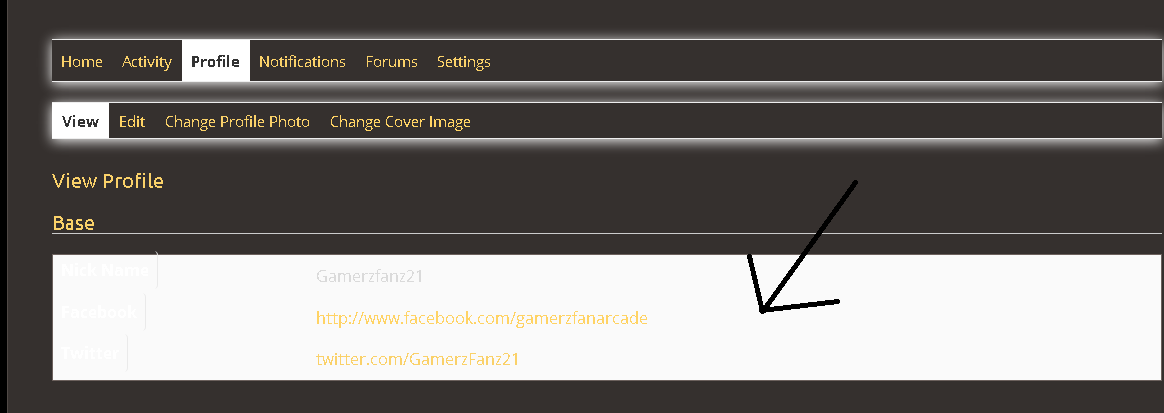
Wordpress V. 5.0.2
BP V. 4.1.0
URL: https://arcade.gamerzfan.com
Theme: Paraxe / Paraxe Child
Thanks in Advance.
take a look at https://wordpress.org/plugins/bp-profile-shortcodes-extra/ in this plugin there’s a group members list shortcode, you should be able to pick up what you need from there.
As far as I can tell people on my site start the process of creating an account with membermouse. So, yeah, I will try creating a new account again and see what I can figure out. I’ve made a bunch of test accounts for myself – so maybe I used the same email or something. I need clean up and delete a bunch of those anyway now.
So does buddypress usually use the regular wordpress login user name? If a site just uses bbpress and buddypress – people set up an acccount just through wordpress and bbpress/buddypress use that?
One thing about this is that since group creation is open to all users, creating a group would be a simple way to get post creation rights. You may want to look at BuddyPress Restrict Group Creation to limit who can create a group in the first place.
Using Healthcheck, and Twenty-Seventeen Theme:
With Buddypress enabled, I can accept friend requests that have been sent.
When WooCommerce is enabled, cannot accept friend requests. Is happening on various browsers, Safari & Chrome.
See Screenshots:
https://www.dropbox.com/s/zaujx9sx74vb44u/Screenshot%202018-12-26%2008.22.48.png?dl=0
(Nonce? This is the string at bottom in Chrome during infinite spin)
Shows friend request accepted – with only BuddyPress & Theme activated, when WooCommerce is activated, infinite load when try to accept the friend request.
If WooCommerce is activated, regardless of theme (ReHub or Twenty-Seventeen) cannot a
Site: https://makyn.me
BuddyPress: 4.1.0
Wordpress: 4.9.9
WooCommerce: 3.5.3
hey, Venutius;
yeah, I’ve been getting some of those thrown at me per error log* as well, but had them not high on my issues list, as long as the general functionality of the parents in question appeared to be ok yet (as far as superficial verdicts go, I guess). :/
Perhaps I should carry the issues you spotted to the respective entity owner.
Beyond that: yeah, shortcodes in general appear to be working well. Should we perhaps try out any other of yoour shortcodes to display properly in that test post? Maybe that serves as more clue?
cheers – lx
– – –
( * : as far as log perusal goes, I like https://de.wordpress.org/plugins/wp-log-viewer/ 🙂 for its grouping and filtering capacities; you may want to have a comparative look at that, perhaps.)
You’ll need to look at paid membership plugins.
There are some free versions in the WP repo.
With all the plugins deactivated apart from BuddyPress, did it work at all? Same goes with your theme. Do you have error logging switched on? I’m thinking there must be an error showing somewhere and you are just not seeing it.
See this page to see how to enable the error log https://codex.wordpress.org/Debugging_in_WordPress
The export data information should contain the personal information held by your plugins and wordpress, it should not contain data about plugins, I’m not sure how you would remove that, it’s not specifically a BuddyPress Question.
sorry, I only stumbled over your most recent response now. Apparently, this forum does not really send notifications on replies. Either way –
No, I’m not getting any errors. It just stays blank. I’ve tried 2 plugins to circumvent in the meantime (or rather drill into what they’re doing different, in case they work/ed), alas
which has me scratching my head.
I would very much prefer to get this going without having to use a plugin for a simple display job such as this. Bit I can’t seem to figure out why the solution I had in place stopped working.
Hi! it’s about a week I’m trying to add a notification counter to my Buddypress site’s menu, unfortunately without getting any results.
I have read many topics on this forum but I have not been able to use them because I do not have the php code skills and I have a site on WordPress.com (not wordpress.org), so it’s harder to edit the files.
So what I would like to know is: how can I add this counter to my menu using third-party plugins (eg “insert header and footers” or “code snippets”)? Is there a way to do it? I only need the counter because I’ve already created an icon in my menu that opens the notifications panel when clicked.
Thank you in advance for your help!
Install WordPress 5
Getting error from: rtmedia Activity plugin after installing latest WordPress.
Here’s error message:
This page isn’t working
is currently unable to handle this request.
HTTP ERROR 500
I increased memory limit, as per
define(‘WP_MEMORY_LIMIT’, ’64M’);
FYI, here’s log:
[16-Dec-2018 04:03:56 UTC] PHP Fatal error: Allowed memory size of 41943040 bytes exhausted (tried to allocate 8192 bytes) in /home/affirm/public_html/jammingwiththestars.com/wp-content/plugins/buddypress-media/app/main/controllers/activity/RTMediaBuddyPressActivity.php on line 455
[16-Dec-2018 04:03:56 UTC] PHP Fatal error: Allowed memory size of 41943040 bytes exhausted (tried to allocate 8192 bytes) in /home/affirm/public_html/jammingwiththestars.com/wp-includes/plugin.php on line 425
I had to disable the plugin so I could continue.
Has anyone else had similar issues.
Any help appreciated.
Jeff
Thanks for the replies @shanebp & @espellcaste !
So my goal is to develop a tournaments component and I had an idea to take BuddyPress Docs and strip it since it has integrations to other components, which I also require. Do you guys think it could work?
We have 250,000 users and unless we deactivate BuddyPress – it’s extremely slow with BuddyPress?
I had posted this into forum but with no replies
Yet – current WordPress 5.0 and current BuddyPress.
Cloud SQL is running ar 100% we need to upgrade or contact buddy press team about the issue.
Please contact them and provide the below server details and ask for support.
1. Google Cloud VM Instance Ubuntu 18.04 (3.75 GB RAM)
2. PHP 7.2, Nginx + FastCGI cache, Opcache, Redis, WP-Rocket plugin
3. Cloud SQL for the database (3.75 GB RAM)
You’re right, there is no flag etc.
But having a ‘prevent’ flag on the call would not work, because the actual fetch is performed in the same function that does the grouping.
See get_grouped_notifications_for_user in bp-notifications\classes\class-bp-notifications-notification.php
So a flag that skips the $group_sql in that function would be useful.
You can open an enhancement ticket here. Reference this thread. Even better if you can attach a patch.
If you are creating new custom post types then you can just add the same field group to the new post types. Fields can have the same names when used on different post types.
If I understand what you doing though, I’d probably set up a custom taxonomy of location for the custom post type, then you can create separate lists for each location and only need to add one more template file to your theme “taxonomy-location.php”
https://codex.wordpress.org/Function_Reference/register_taxonomy
thanks.
Solution found! It wasn’t a BuddyPress issue, it’s a wordpress issue!
I contacted WordPress and found a solution. I thought I’d post it in case it comes up with someone else again:
That should mean that single sign on is causing trouble. To test that, navigate to My Site –> Settings –> Security in your WordPress.com dashboard, and disable the ‘Allow sign in using WordPress.com accounts’ option
This means that you will no longer be able to access your wp-admin area with your WordPress.com login information though. We’ll need to make sure we set you up with an account for your wp-admin area.
We’ll need to set you up with a password for your username for wp-admin.
You’ll need to go to WP-Admin > Users and then select your username from the list.
The problem is that on WordPress.com the option to allow WordPress.com sign in replaces the regular registration form that BuddyPress uses to allow users to sign in. So we need to disable this option to let the user’s sign in using only their Buddy Press log in without a WordPress.com account.
Hope this helps someone else


