Search Results for 'activation email'
-
Search Results
-
Hi,
I created a test account using regular buddypress registration form.
On the “Activate Your Account” page, it said we have sent an email to you to activate your account.
I logged into my email, and clicked the link in the email to activate the account.
I keep getting this message:
———————————–
Invalid activation key
———————————–I even copied the key directly from email link and entered in to the activation field, still keep getting the “invalid activation key” message.
I then deleted the account from backend and resisted the new account again.
Again, it is same problem: invalid activation key.
What is the problem? How can I fix it?
Please advise.
Thank you.Hey BuddyPress community,
I’m experiencing a recent prevalence of failed activation emails with my BuddyPress installation. I am not an expert with PHP mail() or other SMTP issues, and I would love some advice on how better to diagnose the issue. Here is some relevant info:
- WordPress 3.8.1
- BuddyPress 1.9.2 (also in Trunk)
- Nginx + PHP5.5 + Memcached
- Google Apps email handling
My site is experiencing a period of very high growth, with between 150-200 attempted user registrations each day. On a typical day, most of these are successful. Activation emails are sent without a hitch, and accounts are activated normally. However, around 40-50 attempted activations are failing each day.
Some of these are (of course) due to typos in email addresses. Some are due to failure on behalf of the user to follow activation instructions. Some failures may even be due to spam filtering by the user’s email client.
I know for a fact, however, that a non-trivial number of these emails are simply failing to reach the recipient. On an average day I receive around 10 contact form inquiries from users who did not receive their activation email, and yet they provided a valid (and correct) email address. They have checked their spam folders and filters, and nothing was screened out.
Obviously, this is imposing an administration cost of dealing with manual account activations. It’s additionally costing me a lot of potential users who don’t go to the trouble to solicit help. This is a situation that I VERY MUCH would like to resolve ASAP, so that user registration on my site can proceed normally. If any of you have any insight into things I could try in order to diagnose the exact issue it would be hugely appreciated.
To provide a bit more additional info: there are a multitude of email domains for which this issue seems to be occurring, however I am frequently seeing this happen with non-mainstream email hosts.
- Hosts like gmx, live, web, bk, btinternet and others seem commonly filtered.
- Gmail, AOL, charter, and other “mainstream” hosts show up less frequently than I would expect given their market shares.
- .edu recipients get filtered a lot, but this is probably due to university policies and an unrelated issue.
Some other information that may be helpful is that I use DKIM and SPF keys (both of which are properly configured in DNS).
Anyways, I realize this is a very niche issue and may be difficult to resolve, but if there are any email experts out there I would really love to make progress on this, as I’m having to spend around 30 minutes per day dealing with users who are unable to activate (not to mention all the non-vocal user accounts which my site is losing).
Please let me know if I can provide any information to help better diagnose the issue!
Andrew
Hi
WP Ver 3.8.1
BuddyPress Ver 1.9.2
website linkWhen I register on the site , I am told an activation email has been sent but never receive it, I have tried this with many email address. I have disabled all plugins still I do not receive the activation email. I have switched to default theme and still no email received, however one did come through after about 24 hrs ( not good ) and when I clicked on the link I get taken to activate page but get the error Invalid activation key(see attached), copying the key from the url does not work either.
Any help would be greatly appreciated.
Thanks
DarHi all 🙂
So I’ve been having a weird error with BP.
When a new user registers, they receive an activation email, but they are activated by default. If the user attempts to log into an un-activated account, they are allowed through and can effectively bypass activation.
I checked the database and new users are inserted with user_status 0.
I’m on the latest version of WordPress and Buddypress, I’ve disabled all plugins and switched to the 2012 theme.
Any ideas?
Thanks for reading 🙂
I searched for an answer but only found older threads pointing me to a plugin that hasn’t been updated since early last year.
Is there a reason BuddyPress has frontend login and registration but will take users to the dashboard once they activate their emails?
Is there a way to remove dashboard access and/or redirect users to their profile after account activation?
I swear this was working until very recently and I just noticed it no longer is and can’t work out why…
I use a customised registration form.
In my functions.php I have
add_filter( 'bp_core_signup_send_activation_key', '__return_false' );and
add_action( 'bp_core_signup_user', 'my_user_signup', 5, 3 );
function my_user_signup( $user_id, $user_login, $user_password ) {
  global $wpdb;

  // WE SKIP BP ACTIVATION EMAIL, SO LET'S INCLUDE STEPS FROM bp_core_activate_signup HERE
    // Tell admin we have a new user
    wp_new_user_notification( $user_id );
    // Activate user
    $wpdb->query( $wpdb->prepare( "UPDATE {$wpdb->users} SET user_status = 0 WHERE ID = %d", $user_id ) );
    // Remove the activation key meta
    delete_user_meta( $user_id, 'activation_key' );

  // ...Bunch of other stuff to do with populating extra profile fields...

  // Now sign them on
  $signon = wp_signon( array('user_login' => $user_login, 'user_password' => $user_password, 'remember' => false) );

  //Redirect
  if ( is_wp_error($signon) ) {
    error_log( "auto-login error for user " . $user_id . " : " . $signon->get_error_message() );
  }
  else {
    wp_redirect( home_url('some-page') );
    exit;
  }
Now, in every case, it is logging the error “Your account has not been activated. Check your email for the activation link” and so failing to log them in and redirect.
Any ideas?
Hi, I was adjusting the registration.php file. Just changing the text eg. “Account Details/Profile Details” to “Create an Account/Create a Profile”
When I uploaded the page back, the layout is completely messed up.
http://unicefchallenge.com/register/
I’M GOING CRAZY, ANY ADVISE ASAP?Thank
`<?php get_header( ‘buddypress’ ); ?><div id=”content”>
<div class=”padder”><?php do_action( ‘bp_before_register_page’ ); ?>
<div class=”page” id=”register-page”>
<form action=”” name=”signup_form” id=”signup_form” class=”standard-form” method=”post” enctype=”multipart/form-data”>
<?php if ( ‘registration-disabled’ == bp_get_current_signup_step() ) : ?>
<?php do_action( ‘template_notices’ ); ?>
<?php do_action( ‘bp_before_registration_disabled’ ); ?><p><?php _e( ‘User registration is currently not allowed.’, ‘buddypress’ ); ?></p>
<?php do_action( ‘bp_after_registration_disabled’ ); ?>
<?php endif; // registration-disabled signup setp ?><?php if ( ‘request-details’ == bp_get_current_signup_step() ) : ?>
<h2><?php _e( ‘Create an Account’, ‘buddypress’ ); ?></h2>
<?php do_action( ‘template_notices’ ); ?>
<p><?php _e( ‘Please create the username and login information you would like to use on the Challenge site.’, ‘buddypress’ ); ?></p>
<?php do_action( ‘bp_before_account_details_fields’ ); ?>
<div class=”register-section” id=”basic-details-section”>
<?php /***** Basic Account Details ******/ ?>
<h4><?php _e( ‘Create an Account’, ‘buddypress’ ); ?></h4>
<label for=”signup_username”><?php _e( ‘Username’, ‘buddypress’ ); ?> <?php _e( ‘(required)’, ‘buddypress’ ); ?></label>
<?php do_action( ‘bp_signup_username_errors’ ); ?>
<input type=”text” name=”signup_username” id=”signup_username” value=”<?php bp_signup_username_value(); ?>” /><label for=”signup_email”><?php _e( ‘Email Address’, ‘buddypress’ ); ?> <?php _e( ‘(required)’, ‘buddypress’ ); ?></label>
<?php do_action( ‘bp_signup_email_errors’ ); ?>
<input type=”text” name=”signup_email” id=”signup_email” value=”<?php bp_signup_email_value(); ?>” /><label for=”signup_password”><?php _e( ‘Choose a Password’, ‘buddypress’ ); ?> <?php _e( ‘(required)’, ‘buddypress’ ); ?></label>
<?php do_action( ‘bp_signup_password_errors’ ); ?>
<input type=”password” name=”signup_password” id=”signup_password” value=”” /><label for=”signup_password_confirm”><?php _e( ‘Confirm Password’, ‘buddypress’ ); ?> <?php _e( ‘(required)’, ‘buddypress’ ); ?></label>
<?php do_action( ‘bp_signup_password_confirm_errors’ ); ?>
<input type=”password” name=”signup_password_confirm” id=”signup_password_confirm” value=”” /><?php do_action( ‘bp_account_details_fields’ ); ?>
</div><!– #basic-details-section –>
<?php do_action( ‘bp_after_account_details_fields’ ); ?>
<?php /***** Extra Profile Details ******/ ?>
<?php if ( bp_is_active( ‘xprofile’ ) ) : ?>
<?php do_action( ‘bp_before_signup_profile_fields’ ); ?>
<div class=”register-section” id=”profile-details-section”>
<h4><?php _e( ‘Create a Profile’, ‘buddypress’ ); ?></h4>
<?php /* Use the profile field loop to render input fields for the ‘base’ profile field group */ ?>
<?php if ( bp_is_active( ‘xprofile’ ) ) : if ( bp_has_profile( array( ‘profile_group_id’ => 1, ‘fetch_field_data’ => false ) ) ) : while ( bp_profile_groups() ) : bp_the_profile_group(); ?><?php while ( bp_profile_fields() ) : bp_the_profile_field(); ?>
<div class=”editfield”>
<?php if ( ‘textbox’ == bp_get_the_profile_field_type() ) : ?>
<label for=”<?php bp_the_profile_field_input_name(); ?>”><?php bp_the_profile_field_name(); ?> <?php if ( bp_get_the_profile_field_is_required() ) : ?><?php _e( ‘(required)’, ‘buddypress’ ); ?><?php endif; ?></label>
<?php do_action( bp_get_the_profile_field_errors_action() ); ?>
<input type=”text” name=”<?php bp_the_profile_field_input_name(); ?>” id=”<?php bp_the_profile_field_input_name(); ?>” value=”<?php bp_the_profile_field_edit_value(); ?>” /><?php endif; ?>
<?php if ( ‘textarea’ == bp_get_the_profile_field_type() ) : ?>
<label for=”<?php bp_the_profile_field_input_name(); ?>”><?php bp_the_profile_field_name(); ?> <?php if ( bp_get_the_profile_field_is_required() ) : ?><?php _e( ‘(required)’, ‘buddypress’ ); ?><?php endif; ?></label>
<?php do_action( bp_get_the_profile_field_errors_action() ); ?>
<textarea rows=”5″ cols=”40″ name=”<?php bp_the_profile_field_input_name(); ?>” id=”<?php bp_the_profile_field_input_name(); ?>”><?php bp_the_profile_field_edit_value(); ?></textarea><?php endif; ?>
<?php if ( ‘selectbox’ == bp_get_the_profile_field_type() ) : ?>
<label for=”<?php bp_the_profile_field_input_name(); ?>”><?php bp_the_profile_field_name(); ?> <?php if ( bp_get_the_profile_field_is_required() ) : ?><?php _e( ‘(required)’, ‘buddypress’ ); ?><?php endif; ?></label>
<?php do_action( bp_get_the_profile_field_errors_action() ); ?>
<select name=”<?php bp_the_profile_field_input_name(); ?>” id=”<?php bp_the_profile_field_input_name(); ?>”>
<?php bp_the_profile_field_options(); ?>
</select><?php endif; ?>
<?php if ( ‘multiselectbox’ == bp_get_the_profile_field_type() ) : ?>
<label for=”<?php bp_the_profile_field_input_name(); ?>”><?php bp_the_profile_field_name(); ?> <?php if ( bp_get_the_profile_field_is_required() ) : ?><?php _e( ‘(required)’, ‘buddypress’ ); ?><?php endif; ?></label>
<?php do_action( bp_get_the_profile_field_errors_action() ); ?>
<select name=”<?php bp_the_profile_field_input_name(); ?>” id=”<?php bp_the_profile_field_input_name(); ?>” multiple=”multiple”>
<?php bp_the_profile_field_options(); ?>
</select><?php endif; ?>
<?php if ( ‘radio’ == bp_get_the_profile_field_type() ) : ?>
<div class=”radio”>
<span class=”label”><?php bp_the_profile_field_name(); ?> <?php if ( bp_get_the_profile_field_is_required() ) : ?><?php _e( ‘(required)’, ‘buddypress’ ); ?><?php endif; ?></span><?php do_action( bp_get_the_profile_field_errors_action() ); ?>
<?php bp_the_profile_field_options(); ?><?php if ( !bp_get_the_profile_field_is_required() ) : ?>
‘ );”><?php _e( ‘Clear’, ‘buddypress’ ); ?>
<?php endif; ?>
</div><?php endif; ?>
<?php if ( ‘checkbox’ == bp_get_the_profile_field_type() ) : ?>
<div class=”checkbox”>
<span class=”label”><?php bp_the_profile_field_name(); ?> <?php if ( bp_get_the_profile_field_is_required() ) : ?><?php _e( ‘(required)’, ‘buddypress’ ); ?><?php endif; ?></span><?php do_action( bp_get_the_profile_field_errors_action() ); ?>
<?php bp_the_profile_field_options(); ?>
</div><?php endif; ?>
<?php if ( ‘datebox’ == bp_get_the_profile_field_type() ) : ?>
<div class=”datebox”>
<label for=”<?php bp_the_profile_field_input_name(); ?>_day”><?php bp_the_profile_field_name(); ?> <?php if ( bp_get_the_profile_field_is_required() ) : ?><?php _e( ‘(required)’, ‘buddypress’ ); ?><?php endif; ?></label>
<?php do_action( bp_get_the_profile_field_errors_action() ); ?><select name=”<?php bp_the_profile_field_input_name(); ?>_day” id=”<?php bp_the_profile_field_input_name(); ?>_day”>
<?php bp_the_profile_field_options( ‘type=day’ ); ?>
</select><select name=”<?php bp_the_profile_field_input_name(); ?>_month” id=”<?php bp_the_profile_field_input_name(); ?>_month”>
<?php bp_the_profile_field_options( ‘type=month’ ); ?>
</select><select name=”<?php bp_the_profile_field_input_name(); ?>_year” id=”<?php bp_the_profile_field_input_name(); ?>_year”>
<?php bp_the_profile_field_options( ‘type=year’ ); ?>
</select>
</div><?php endif; ?>
<?php do_action( ‘bp_custom_profile_edit_fields_pre_visibility’ ); ?>
<?php if ( bp_current_user_can( ‘bp_xprofile_change_field_visibility’ ) ) : ?>
<p class=”field-visibility-settings-toggle” id=”field-visibility-settings-toggle-<?php bp_the_profile_field_id() ?>”>
<?php printf( __( ‘This field can be seen by: <span class=”current-visibility-level”>%s</span>’, ‘buddypress’ ), bp_get_the_profile_field_visibility_level_label() ) ?> <?php _ex( ‘Change’, ‘Change profile field visibility level’, ‘buddypress’ ); ?>
</p><div class=”field-visibility-settings” id=”field-visibility-settings-<?php bp_the_profile_field_id() ?>”>
<fieldset>
<legend><?php _e( ‘Who can see this field?’, ‘buddypress’ ) ?></legend><?php bp_profile_visibility_radio_buttons() ?>
</fieldset>
<?php _e( ‘Close’, ‘buddypress’ ) ?></div>
<?php else : ?>
<p class=”field-visibility-settings-notoggle” id=”field-visibility-settings-toggle-<?php bp_the_profile_field_id() ?>”>
<?php printf( __( ‘This field can be seen by: <span class=”current-visibility-level”>%s</span>’, ‘buddypress’ ), bp_get_the_profile_field_visibility_level_label() ) ?>
</p>
<?php endif ?><?php do_action( ‘bp_custom_profile_edit_fields’ ); ?>
<p class=”description”><?php bp_the_profile_field_description(); ?></p>
</div>
<?php endwhile; ?>
<input type=”hidden” name=”signup_profile_field_ids” id=”signup_profile_field_ids” value=”<?php bp_the_profile_group_field_ids(); ?>” />
<?php endwhile; endif; endif; ?>
<?php do_action( ‘bp_signup_profile_fields’ ); ?>
</div><!– #profile-details-section –>
<?php do_action( ‘bp_after_signup_profile_fields’ ); ?>
<?php endif; ?>
<?php if ( bp_get_blog_signup_allowed() ) : ?>
<?php do_action( ‘bp_before_blog_details_fields’ ); ?>
<?php /***** Blog Creation Details ******/ ?>
<div class=”register-section” id=”blog-details-section”>
<h4><?php _e( ‘Blog Details’, ‘buddypress’ ); ?></h4>
<p><input type=”checkbox” name=”signup_with_blog” id=”signup_with_blog” value=”1″<?php if ( (int) bp_get_signup_with_blog_value() ) : ?> checked=”checked”<?php endif; ?> /> <?php _e( ‘Yes, I\’d like to create a new site’, ‘buddypress’ ); ?></p>
<div id=”blog-details”<?php if ( (int) bp_get_signup_with_blog_value() ) : ?>class=”show”<?php endif; ?>>
<label for=”signup_blog_url”><?php _e( ‘Blog URL’, ‘buddypress’ ); ?> <?php _e( ‘(required)’, ‘buddypress’ ); ?></label>
<?php do_action( ‘bp_signup_blog_url_errors’ ); ?><?php if ( is_subdomain_install() ) : ?>
http:// <input type=”text” name=”signup_blog_url” id=”signup_blog_url” value=”<?php bp_signup_blog_url_value(); ?>” /> .<?php bp_blogs_subdomain_base(); ?>
<?php else : ?>
<?php echo home_url( ‘/’ ); ?> <input type=”text” name=”signup_blog_url” id=”signup_blog_url” value=”<?php bp_signup_blog_url_value(); ?>” />
<?php endif; ?><label for=”signup_blog_title”><?php _e( ‘Site Title’, ‘buddypress’ ); ?> <?php _e( ‘(required)’, ‘buddypress’ ); ?></label>
<?php do_action( ‘bp_signup_blog_title_errors’ ); ?>
<input type=”text” name=”signup_blog_title” id=”signup_blog_title” value=”<?php bp_signup_blog_title_value(); ?>” /><span class=”label”><?php _e( ‘I would like my site to appear in search engines, and in public listings around this network.’, ‘buddypress’ ); ?>:</span>
<?php do_action( ‘bp_signup_blog_privacy_errors’ ); ?><label><input type=”radio” name=”signup_blog_privacy” id=”signup_blog_privacy_public” value=”public”<?php if ( ‘public’ == bp_get_signup_blog_privacy_value() || !bp_get_signup_blog_privacy_value() ) : ?> checked=”checked”<?php endif; ?> /> <?php _e( ‘Yes’, ‘buddypress’ ); ?></label>
<label><input type=”radio” name=”signup_blog_privacy” id=”signup_blog_privacy_private” value=”private”<?php if ( ‘private’ == bp_get_signup_blog_privacy_value() ) : ?> checked=”checked”<?php endif; ?> /> <?php _e( ‘No’, ‘buddypress’ ); ?></label><?php do_action( ‘bp_blog_details_fields’ ); ?>
</div>
</div><!– #blog-details-section –>
<?php do_action( ‘bp_after_blog_details_fields’ ); ?>
<?php endif; ?>
<?php do_action( ‘bp_before_registration_submit_buttons’ ); ?>
<div class=”submit”>
<input type=”submit” name=”signup_submit” id=”signup_submit” value=”<?php _e( ‘Submit’, ‘buddypress’ ); ?>” />
</div><?php do_action( ‘bp_after_registration_submit_buttons’ ); ?>
<?php wp_nonce_field( ‘bp_new_signup’ ); ?>
<?php endif; // request-details signup step ?>
<?php if ( ‘completed-confirmation’ == bp_get_current_signup_step() ) : ?>
<h2><?php _e( ‘Check Your Email To Activate Your Account!’, ‘buddypress’ ); ?></h2>
<?php do_action( ‘template_notices’ ); ?>
<?php do_action( ‘bp_before_registration_confirmed’ ); ?><?php if ( bp_registration_needs_activation() ) : ?>
<p><?php _e( ‘You have successfully created your account! To begin using this site you will need to activate your account via the email we have just sent to your address.’, ‘buddypress’ ); ?></p>
<?php else : ?>
<p><?php _e( ‘You have successfully created your account! Please log in using the username and password you have just created.’, ‘buddypress’ ); ?></p>
<?php endif; ?><?php do_action( ‘bp_after_registration_confirmed’ ); ?>
<?php endif; // completed-confirmation signup step ?>
<?php do_action( ‘bp_custom_signup_steps’ ); ?>
</form>
</div>
<?php do_action( ‘bp_after_register_page’ ); ?>
</div><!– .padder –>
</div><!– #content –><?php get_sidebar( ‘buddypress’ ); ?>
<script type=”text/javascript”>
jQuery(document).ready( function() {
if ( jQuery(‘div#blog-details’).length && !jQuery(‘div#blog-details’).hasClass(‘show’) )
jQuery(‘div#blog-details’).toggle();jQuery( ‘input#signup_with_blog’ ).click( function() {
jQuery(‘div#blog-details’).fadeOut().toggle();
});
});
</script><?php get_footer( ‘buddypress’ ); ?>’
Topic: Email Verification
Hi, The site that I’m working on is on a free server and all the activation emails goes to the spam folder. I had no choice and disabled the email verification with some hack that I found on this forum and it works fine. The problem is that after registration the screen that tells you to check your email is still appearing. I want to change the text in the screen to “Thank you for registering” or something like that but I can’t find the file that I should modify.
Those anyone have a clue how to do it?
Good Morning,
I’m hoping for any insight/assistance in troubleshooting new user registrations that aren’t being attributed to BuddyPress. I’ll try my best to summarize the issue and provide as much background info as possible:
Intended Usage:
We’re beta-testing a network configuration for a potential client project. This will ultimately include 50-100 domains for publishing content to multiple sites. BuddyPress will be utilized as user hub for submitting content to the network.
Setup & Environment:
WordPress 3.7.1 multisite-subdomain installation with wildcard-enabled primary domain and domain mapping successfully implemented (via WPMU plugin)
Fresh install of BuddyPress 1.9.1 activated only on the desired mapped subdomain (not network activated)
Subdomain theme is BP-compatible – Newspaper via ThemeForest
BP_ROOT_BLOG is defined in wp-config.php to the correct subdomain
BP_ROOT_BLOG is also defined in bp-custom.php (in wp-content/plugins) to the correct subdomain
Hosted on NGINX server (via Flywheel) with static IPThe Issue:
In testing with dummy user accounts, new user registrations on the BuddyPress subdomain are getting registered to the network’s primary site. What’s really strange is that the new user registration email is sent from the BP subdomain and the activation link also points back to the BP subdomain (http:subdomain/activate/?key=***********). When activated, the new user/member doesn’t show on the subdomain user list or on the frontend subdomain/members page, but does appear on the network admin user list.
After scouring the web for possible solutions and enlisting the help of our host’s support team, we’re at a collective loss for what could be causing the issue. Since this is a test deployment, I’m reluctant to publically share the URL. If needed I’m happy to provide via email or PM.
Thanks in advance for any suggestions, feedback or questions to get this resolved!
Hi! I have serious problem with my site on wordpress + buddypress. Please try register http://vlovs.com/registration and after registration and after login – user not can use his profile but his profile is create. That problem is with normal registration domain/registration but if user register his account with social login by loginradius its works normal. And my site very slow loading pages. Very please help me. My plugin’s list (67items):
Akismet
All In One SEO Pack
APC Object Cache
Awebsome! Online Registered Users Widget
BackWPup
bbPress Like Button
Better WP Security
BP Direct Menus
BP Facebook Style Friend Lists
BP Friends Suggestions Widget
BP Group Reviews
BP Profile Message UX
BP Profile Search
BP Redirect to Profile for Buddypress
BP Signup TOS SE
BP Webcam Avatar
BuddyMenu
BuddyPress
BuddyPress Activity Plus
BuddyPress Custom Profile Menu
BuddyPress Edit Group Slug
BuddyPress Facebook
BuddyPress Friends On-line (FOL)
BuddyPress Groups Extras
BuddyPress Group Tiny Chat
BuddyPress Like
BuddyPress Message Attachment
BuddyPress MyMood
BuddyPress Simple Google Map
BuddyPress Toolbar
BuddyPress Translations
BuddyPress Username Changer
Buddypress Xprofile Custom Fields Type
CodeStyling Localization
DB Cache Reloaded Fix
Easy Set Favicon
Easy Translator
Faster Image Insert
Feeligo
Friendship Meter
Google Language Translator
Groups
iFlyChat
Installation Profiles
Lazy Load for Videos
Login Logout Switcher
Members
Memory Game (Memorama)
MyArcadePlugin Lite
Place Login
qTranslate
Quick Cache
Remove Admin Bar
rtMedia for WordPress, BuddyPress and bbPress
SEO Friendly Images
Simple Visitors Counter
Skin Login
Sociable
Social Login for wordpress
User Activation Keys
User Groups
User Name Availability Checker for wordpress/buddypress
Video Chat
WordPress SEO
Wordpress Special Characters in Usernames
WP DB Optimizer
WP User Avatarand all plugins are active
Maybe some plugins are not compatibility with other plugins ?
2 months ago i change hosting to other and maybe problem with this ?
Please help me:( and sorry for my bad english. my email for contact – bboymaxstg92@gmail.comHi, I have 2 installs of BuddyPress and both are producing the same outcomes for the theme twentytwelve and the custom theme i’m building.
Members are signing up.
Activation email received.
Activation URL accessed.
Login – (With message, “your account is now active”)Then the members directory still only shows 1 user (administrator).
In the WP signups table, the account(s) i created via registering are still in there with activated date and column active set to 1.
I’m running BuddyPress 1.9 and WordPress 3.8.
Any help greatly appreciated as I can’t see any members who have signed up in the members directory. The profiles are working fine.
Topic: Invalid activation key
Just to preface, I’ve done everything to troubleshoot (including completely reinstalling wordpress with a new database and everything).
Everything seems to function properly except for when a new user gets the activation email and clicks the link to activate, it just goes to the activation page saying “Invalid activation key”. But… the user can log in fine and seems to be activated.
I’ve tried a lot of searching to no avail. Help please!
Topic: Activation Process
Hi – I am new to Buddy Press. When I register for one of my levels I get sent the activation email. When I click on the link it takes me to my home page (is that where it is supposed to go?) When I try to log in with the newly created account it gives me a message that says “Your account has not been activated. Check your email for the activation link.”
I am not sure where the process is failing.
testing site is at http://plc.bradstreets.netI am using WP 3.8 and BP 1.9
Dotty
Topic: 404 msg on my site.
Hi,
I’m using the Gridiculous theme and when I go to the activation email and click the link, it will take me back to my blog just fine, but in the middle of the blog it shows a 404 msg. and says “SORRY. WE CAN’T SEEM TO FIND THE PAGE YOU ARE LOOKING FOR.” How do I fix this? thx!
http:// getslimwithmary.comTopic: Registration does not work
Hi all,
My site, hiddencove.villagegate.com, is having registration issues pertaining to Buddypress. When Buddypress is not activated, registration works entirely. However, once activated, the register link on the log in page (accessed by clicking on the link to any of the three portals) simply redirects back to the log in, preventing new user registration.
We have tried adding the following code as well:
function my_disable_bp_registration() {
remove_action( ‘bp_init’, ‘bp_core_wpsignup_redirect’ );
remove_action( ‘bp_screens’, ‘bp_core_screen_signup’ );
}
add_action( ‘bp_loaded’, ‘my_disable_bp_registration’ );add_filter( ‘bp_get_signup_page’, “firmasite_redirect_bp_signup_page”);
function firmasite_redirect_bp_signup_page($page ){
return bp_get_root_domain() . ‘/wp-signup.php’;
}and subsets of it. When put into the theme’s function.php, it seemed to have no effect. When put in bp-custom.php, the registration page is activated and an email is received to activate accounts, but clicking on the activation link redirects you to the log in page, before you ever receive a password.
We are using WordPress 3.7.1 and Buddypress version 1.8.1, and have a network installation. Please note that we do have a multisite that currently only consists of the provided subdomain (hiddencove). Expansion is planned later but we are starting off as a multi-site from the get-go. This issue existed before switching to a multisite, and exists regardless of whether Buddypress is site- or network-activated. It persists when all other themes and plugins are disabled as well. We have tried rolling back to a previous version of WordPress (3.6) to check for compatibility issues, but issues persisted and we are back at 3.8.1.
Finally, registration is enabled in network settings, and the registration page has been set in Buddypress settings.
Thank you ahead of time for any leads you provide!
I am getting complaints from people trying to subscribe to my site that they are not getting login emails. In fact they seem to be going into junk folders. Is there a way to avoid this?
If there is no way to avoid, I am trying to edit the ‘join our site’ page to remind people to check their junk folder. However I am not able to edit the page at all. Whatever I write gets ignored. What am I doing wrong or if nothing, what can I do to edit the text on the page.
Thanks for any help in advance,
ChrisLatest WordPress and Buddpress versions. URL: houndlounge.co.uk
Hiyya,
Firstly.. My Info :
WordPress Version 3.7.1
BuddyPress Version 1.8.1
Site : duffitness.com/coachportal/ – this site is private and only accessible by registered coaches, however I have attached an image of the title I am referring to.Okay, so I can activate new accounts with Google Chrome, Firefox, Opera and Safari but IE(8) redirects to login without activating…
I can have users go to the activate page and enter the activation key but that is not very user friendly.
I do receive this message when other browsers activate, but they do still activate the account…
“Warning: unserialize() expects parameter 1 to be string, array given in /”mysitedirectory removed for privacy”/wp-content/plugins/buddypress-notifications-manager/loader.php on line 77”
I did locate the source of this warning and I have attached a screenshot of the code…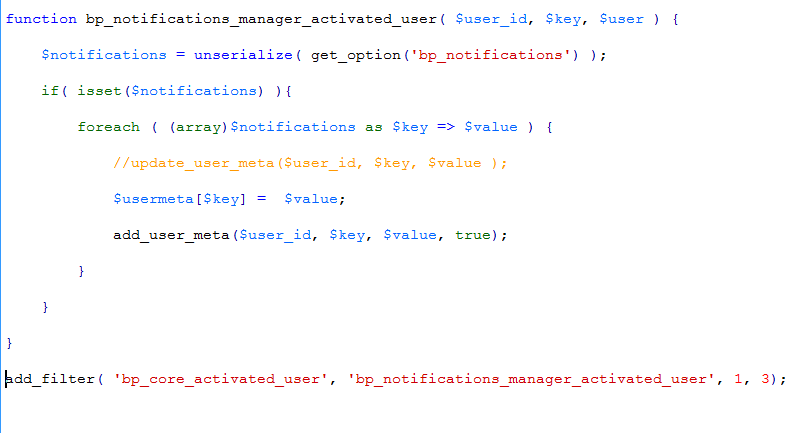
However, Upon disabling the notifications manager plugin I found that this is not the source of the problem. I now get no errors with any of the other browsers but IE redirects to log in without completing the activation process when a user clicks the link from their email and then returns the error…
“ERROR: Your account has not been activated. Check your email for the activation link.”
…when attempting to log in.Thanks for any insight into this problem… (Go figure it’d be IE that decides to be difficult, lol)
CasseyWe launched the website http://www.alzheimernetwerk.nl/ a couple days ago and everything went fine. But now new users no longer receive an activation email. I can’t seem to find where its going wrong…
If you could help, that would be great!
Cheers,
Carlijn
Topic: Username Validation
Hi, I am not entirely sure if this should be posted on the wordpress forums or here. I think that since this PHP script is using data in the buddypress registration page, that here is the place.
Anyway, I am trying to set up a website for my Minecraft Server that I have been hosting for the past few months. I am using the code below to only allow players with a premium Minecraft account to register on the website, in order to block spammers. The link in the code (http://www.minecraft.net/haspaid.jsp?user=) will print a boolean changing if the account name is valid or not. The name is put after the “=” and if it is valid, “true” will be printed, and if it isn’t valid “false” will be printed.
I am trying to make it that the name is checked before the account is made. What should happen is that the username is taken and checked on the Minecraft database, and allow the user to register if “true” is echoed, and if “false” is echoed, the registration will not be allowed to continue.
The issue is, that I am really not skilled in PHP at all, and I can’t find out why this code isn’t working. It makes no visible change to anything, and registration continues as if it wasn’t there. If anyone could give me a hand here, that would be great. Here is my Code.
<?php
/*
   Plugin Name: Minecraft Username Validator
   Description: Minecraft username Validation
   Version: 0.1
   Author: JeremyPark123999
*/

/* Register actions */
add_action('registration_errors', 'verify_mc_account', 10, 3);
add_action('admin_menu', 'add_mcval_options');

/* Check account on minecraft.net */
function verify_mc_account( $errors, $login, $email ) {
	//$user_info = get_userdata(1);
	$user_info = get_user_by('login', $login );
	$options = array(
        'timeout' => 5,
    );
    $mcacct = wp_remote_get('http://www.minecraft.net/haspaid.jsp?user='.$user_info->user_login);

    if ( $mcacct == 'false' ) {
        if ( $mcacct == 'false' ) {
            $errors->add('mc_error',__('<strong>ERROR:</strong> Minecraft account is invalid.'));
        } else {
            $errors->add('mc_error',__('<strong>ERROR:</strong> Unable to contact minecraft.net.'));
        }
    }
    return $errors;
}
/* Activation/Deactivation */
function set_mcval_options() {
    add_option('hide_me', 'false');
}

function unset_mcval_options() {
    delete_option('hide_me');
}

register_activation_hook(__FILE__, 'set_mcval_options');
register_deactivation_hook(__FILE__, 'unset_mcval_options');

/* Add admin menu */
function add_mcval_options() {
    if ( get_option('hide_me') != "true" ) {
        add_options_page('Minecraft Validator Options', 'Minecraft Validator', 8, 'mcval-options', 'mcval_options');
    }
}

/* Display options page */
function mcval_options() {
    ?>
<?php }
My website is at tumbleweed-mc.net
Topic: Registration Question
I am using BuddyPress on a Jobs website for the enhanced profile features. I do not need a forum or social media type community. I would like potential employers to be able to search registered people for potential job matches. I would also like Job Seekers to be able to create a Resume like profile. I created new profile fields and broke them into groups like Work Experience, Education, etc. When someone registers they fill out name, address, phone, and email. Then click Register (works great). They get an activation email sent to them (great) but when they log in they are sent to the WordPress dashboard (not great – very confusing). I need them to be sent to the page where they can complete the resume portion of the registration fields I created.
I have the testing site here: http://plc.bradstreets.net
Also the Avatar image in not letting them upload an image.


