Search Results for 'buddypress'
-
AuthorSearch Results
-
May 14, 2012 at 7:19 pm #134549
In reply to: Duplicate members
@mercime
Participant@bboywattsy looks like you’ve fixed the issue. Culprit = cache plugin?
May 14, 2012 at 5:40 pm #134544In reply to: BuddyPress Register with SMS?
carstiee09
ParticipantAnd it is possible to decode the register url? that the user can see the page?
May 14, 2012 at 5:20 pm #134542In reply to: Post showing in Activity Stream
May 14, 2012 at 5:17 pm #134541Participant@sonnyjitsu thanks for posting the issue/resolution
 May 14, 2012 at 3:24 pm #134536
In reply to: Buddypress Group Extras – Landing Page
DavidGMII
MemberAny ideas?
May 14, 2012 at 2:39 pm #134535In reply to: Fatal error on installing
Tumes80
MemberI am getting the error:
Fatal error: Allowed memory size of 33554432 bytes exhausted (tried to allocate 7680 bytes) in /data/19/2/23/83/2675083/user/2937305/htdocs/grundycounty/wp-content/plugins/buddypress/bp-core/bp-core-functions.php on line 950So I went to: https://codex.wordpress.org/Editing_wp-config.php#Increasing_memory_allocated_to_PHP
It says to:
Increasing memory allocated to PHPAlso released with Version 2.5, the WP_MEMORY_LIMIT option allows you to specify the maximum amount of memory that can be consumed by PHP. This setting may be necessary in the event you receive a message such as “Allowed memory size of xxxxxx bytes exhausted”.
This setting increases PHP Memory only for WordPress, not other applications. By default, WordPress will attempt to increase memory allocated to PHP to 32MB (code is at beginning of wp-settings.php), so the setting in wp-config.php should reflect something higher than 32MB.
WordPress will automatically check if PHP has been allocated less memory than the entered value before utilizing this function. For example, if PHP has been allocated 64MB, there is no need to set this value to 64M as WordPress will automatically use all 64MB if need be.
Please note, this setting may not work if your host does not allow for increasing the PHP memory limit–in that event, contact your host to increase the PHP memory limit. Also, note that many hosts set the PHP limit at 8MB.
Increase PHP Memory to 96MB
define(‘WP_MEMORY_LIMIT’, ’96M’);
I went into my wp-Config.php file and put this code: define(‘WP_MEMORY_LIMIT’, ’96M’);
into the end of the wp-config.php. I am still having an issue. Any suggestions?Thanks.
TumesMay 14, 2012 at 2:02 pm #134534Paul Wong-Gibbs
KeymasterAs the error message says, that’s an error with the buddypress-toolbar plugin. You need to contact the author of that plugin.
May 14, 2012 at 12:36 pm #134529KeymasterAgree that this error message should be improved. If you can make a patch, please submit it to https://buddypress.trac.wordpress.org/
May 14, 2012 at 12:34 pm #134528In reply to: I need help urgently…please
KeymasterBuddyPress wouldn’t be affecting this at all. Try the wordpress.org forums.
May 14, 2012 at 11:35 am #134523In reply to: fatal error
websitevala
Memberwhen i disable buddypress plugin then it’s ok site working is perfectly but when i reactivate buddypress it saw same error and i switch default theme of buddypress that time also i have problem
May 14, 2012 at 9:20 am #134515In reply to: fatal error
Memberwhen i login in site at top bar i saw that error it saw bp-members-notifications.php on line 76
i used latest version of buddypress and also use buddypress activity plus and in wordpress version 3.3.2 and wordpress theme is huddle but i can’t understand that error i also modify that file also but still sawing problem and that wise i can’t handle the theme file widget i can’t access the any widget to modify or change it so anyone who help me ???May 14, 2012 at 8:33 am #134512In reply to: Group directory
ParticipantThe one who creates the group is the Group Admin. So the easiest way to set up what you want would be to copy bp-default theme’s group-header.php file from https://buddypress.trac.wordpress.org/browser/tags/1.5.5/bp-themes/bp-default/groups/single/group-header.php into your child theme folder following the directory structure.
Open up group-header.php and change
``
to
``
and save file.May 14, 2012 at 8:08 am #134510In reply to: [fixed] BuddyPress + bbPress activity stream bug
Bandreus
MemberAs it turns out, it was the Add link to facebook plugin (https://wordpress.org/extend/plugins/add-link-to-facebook/) causing the issue. Activity streams started working fine as per usual after disabling the plugin.
Again, thanks a lot for the great support!
May 14, 2012 at 7:46 am #134507In reply to: Mentorship Requested: WordPress Dummy = Me
richardpd
MemberHi Jason
Goodluck with your quest. BTW I like green!
I setup my WP site with BuddyPress around 12 months ago & I still do not have BuddyPress working as I want it!! This is very frustrating for me. I have not had great help on this site here except from Mercime who is helpful.
I am though determined to get BuddyPress going as I want with my WordPress site because I am stubborn! It is very tempting to use alternative php forum software. There are a few good ones around which you can add to your site & say bye bye to BuddyPress hassles & problems etc.
Anyway keep me posted on how you get along & maybe we can help each other on this?
Best wishesMay 14, 2012 at 7:37 am #134506In reply to: How can I redirect users to the profile page
Hugo Ashmore
ParticipantThis is essentially a duplicate of this thread:
https://buddypress.org/community/groups/creating-extending/forum/topic/bp-profile-redirect-question/ which has had one response so please keep to that thread to avoid confusion.Closing this thread.
May 13, 2012 at 11:43 pm #134497In reply to: Is there an e-mail to buddypress group’s option?
energynet
ParticipantThanks for the feedback. Looks like they are working on it still, but no idea when it could come out.
May 13, 2012 at 11:16 pm #134494In reply to: Hierarchical forums for each group?
gary_mazz
Member@mercime: Thanks… change set 3654 https://bbpress.trac.wordpress.org/changeset/3654 looks interesting.
This is a major and awesome step in the right direction. Especially adopting the buddypress extension APIs. Excellent work !!! Now I need to figure what is needed to check it out.
3654 looks like it supports multiple forums per group. It looks like it also supports shared forums across groups.
I didn’t see anything to define a ‘preset’ list of forums on enable or group create.
Being able to define forums private to groups so they can’t be shared would be very useful, at least to remove clutter when you have many groups with 3-4 forums each.
It looks like forums can be part of categories (as a parent).
May 13, 2012 at 10:25 pm #134492In reply to: This is a notice to all users. Doesn’t work
@ChrisClayton
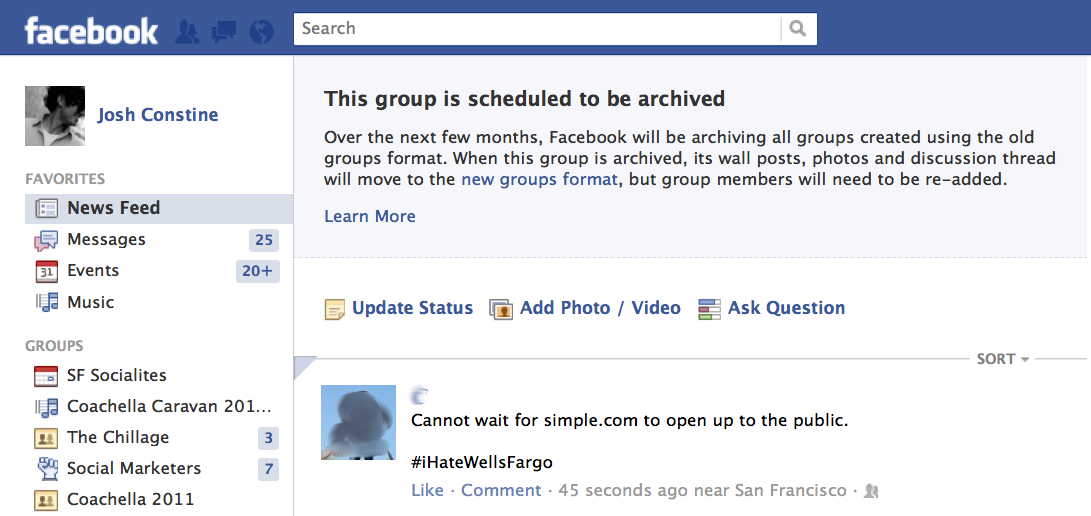
Participant@neodjandre – The way the feature works is somewhat deceptive, what it does is posts a message on the screen (rather than their inbox) similar to what facebook does here – https://tctechcrunch2011.files.wordpress.com/2012/01/facebook-groups-news-feed-error-message.png and it requires the template tag:
`
`As seen in the default theme sidebar – https://buddypress.trac.wordpress.org/browser/trunk/bp-themes/bp-default/sidebar.php#L26
May 13, 2012 at 10:22 pm #134491In reply to: Post showing in Activity Stream
Brajesh Singh
ParticipantHi @elangley,
sorry I could not reply earlier(was a little bit busy with some personal stuff).Just checked today the case by writing posts on sub network and It showed up correctly on my local install. I am using Sub directory install though(It should not affect the sub domain install I believe). Can you confirm if you already have BP_ENABLE_MULTIBLOG defined in your bp-custom.php or wp-config.php ?
@djpaul, @mercime, Thank you for the mention. My apologies for not responding to this topic earlier. I had got the notification.
May 13, 2012 at 10:10 pm #134490In reply to: User management and permissions.
Participant@o4tuna the way buddypress works in regards to roles and capabilities is being worked on by the core devs, half of it will be implemented in 1.6. Trac: https://buddypress.trac.wordpress.org/ticket/3740
May 13, 2012 at 10:02 pm #134489In reply to: Help! Compatibility pack confusion!
ParticipantMay 13, 2012 at 10:00 pm #134488In reply to: Hierarchical forums for each group?
ParticipantThere’s only one Group Forum per Group with no hierarchy. As for Sitewide Forums (the bbPress plugin), these forums are not associated to groups at all at this time. It’s in the roadmap to refactor/migrate Group Forums to Sitewide Forums @ BP 1.6. https://buddypress.trac.wordpress.org/ticket/3598
May 13, 2012 at 9:56 pm #134487In reply to: BuddyPress + bbPress
ParticipantMay 13, 2012 at 9:48 pm #134486In reply to: Mentorship Requested: WordPress Dummy = Me
Participant1. https://codex.buddypress.org/getting-started/ go to page links on the right sidebar and read them
2. Albums/Galleries
a. BP Album/BP Media – free
b. BP Gallery – premium
Pinterist https://wordpress.org/extend/plugins/tags/pinterest – but none that I know specifically for the Albums/Galleries listed above.though you could make a request with plugin developer
3. User Blogs – you need to “Create a Network” i.e., make it MultisiteMay 13, 2012 at 8:28 pm #134484In reply to: Removing Primary (Display Name) Profile Field
Prince Abiola Ogundipe
Participant@alexanderraoul, i am sure u can hide this with css
-
AuthorSearch Results