I shall bring a plus to the creators Buddy
First wanted to make a website on the Drupal system. But (long plagued) so tired from Drupal.
…..threw Drupal
Having worked with word/buddy/bb press – chose them
In the fight buddypress vs drupal, The winner buddypress. ….easier, logical, made for people ….do not have to suffer with each function.
Pleeeease. Register on my site (with avatar  ) (or comment any post) (more need comment)
http://abicte.com
The site will be a lot of veeeery interesting information. You can read the rest sometimes.
Raised important issues for people.
Your opinions needed!
And a forum dedicated to the relations, friends, male and female employees ….in general – psychology of relationships.
And a forum on health, where you can learn from people and doctors, the answers to your questions and discuss disease, medications, survey.
It is so important in life
Thanks in advance
reviews
The register form appears to be displaying when I visit the link?!
I’m afraid that you are asking theme specific questions and this support forum is really geared to buddypress itself and it’s default theme. Salutation does a have support forums and asking there will get you a far better response also they will have guides that you should read and follow.
The top tabs are accessed from /wp-admin/themes.php?page=sidebars-top-tabs you need to also do something about adding their behaviour in the Appearance > widgets page
@hnla Thanks for helping. What do I add to bp_init? I tried that in the functions.php but it didn’t do the trick/
hi, @janismo I cannot reproduce the bug you mention. It currently does not support the dropdown list change, but no “error” is visibly shown. Maybe you are using some tweaked code that I don’t know… could you provide more details about the bp_has_members loop customization you made? thanks!
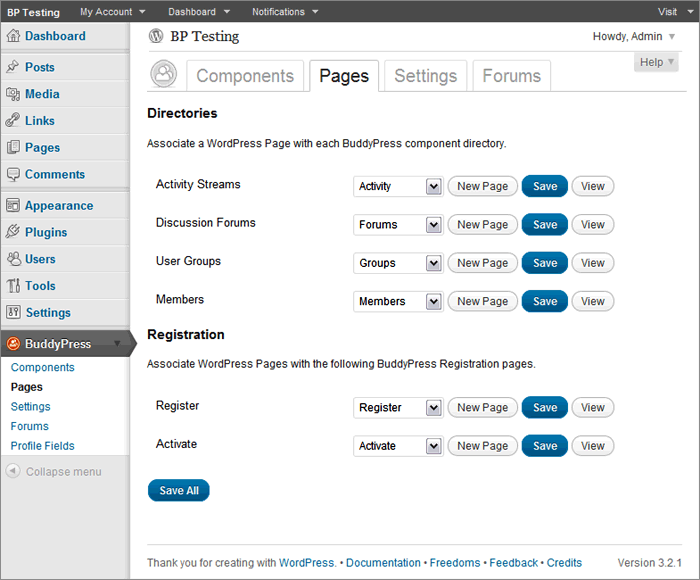
Hi! I just installed Buddypress and am developing a community site. I successfully set up pages for Groups, Forums etc, but I don’t get the Register page to work. I have defined a number of fields under the Buddypress settings, but when selecting http://tinnitusdialogue.com/register there is no registration form showing up. And I also don’t know how to link the register page to the Register button under the Register tab top right on http://tinnitusdialogue.com
Any help would be much appreciated!
Cheers,
Mag.
Thanks for responding.
I’m not clear what your answer means though (sorry, not a developer). Are you saying that Buddypress.org only controls the parts that go into the activity stream and no-one here deals with the way the forum posts are truncated and displayed in the Activity stream?
Is there another place I should be asking about this, then?
Thanks again,
Julie
With default theme, Is there a way to change the css to make the header full width across the browser. Like margin auto in default.css?
Also, Will it cause any issues with buddypress if I make a full width header?
Your right I must have added that somehow. thanks
@Hugo @mercime Thanks for your guidance. On a testing server I took down all plugins and gradually tested everything out the culprit was the Easy Mailchimp email subscriber plugin available here.. http://www.najeebmedia.com/wordpress-mailchimp-plugin-2-0-released
And without that plugin, comments work like a charm. I guess if this was my own post, I could set it to resolved
im redoing the process over cause now the buddypress login wont appear on the top anymore
i dont see it in the template packed themes list, i cant figure out where to edit the code. i have done it in the style.css and placed that same style.css in the child folder it created as well. Im new to wordpress so im not familiar with how it intergrated it to my current theme. i went to the plugin/buddypress and dont see a style theme in there. i did change the divs in the index.php of each folder as instructed by other links and that somewhat fixed the issue of the width. any thoughts?
Then this means that you have not completed Step 3 of the BP Compatibility process, i.e., fixing alignment and HTML structure of BP template files to use your own theme’s HTML structure. Check if your WP theme has already been “template-packed” in list near the end of the webpage linked to above.
I thought for a while the wordpress css was not working but actually it seems its just a matter of getting my background image to display within the pages that are buddypress specific. Any thoughts?
@mercime Ive copied across loop, loop-page, loop-home and single
Im not sure how much this impacts upon the buddypress format, but I am in the process of trying to get rid of the comments form out of these templates (loop, loop-page) as it is really ugly and I would prefer users commenting with Facebook, etc… still not 100% sure how i will do it, but reading up
thanks again.
http://pastebin.com/pcWjwxvD
http://pastebin.com/zgLVQv3c
http://pastebin.com/yCX8pGrk
http://pastebin.com/kv9taL2j
I have installed BuddyPress and everything seems to be working as it should, but when I went to the dashboard to get the forums installed and tweak a couple of things, I noticed that the BuddyPress option on my dashboard had disappeared. It was there just a minute ago, but vanished once I had set everything up.
http://mercime.files.wordpress.com/2011/11/bp-installation-wizard-08.gif
^ That’s what I should be able to see. Any idea why this could have happened? Everything else seems to be there and working fine.
Thanks for any assistance you can give me.
Hi everyone,
I’m currently working on a project and my client wants only the admins to be able to create groups, so I set that option in the BuddyPress admin area, easy peasy. But, the Create A Group button still appears on the front end. For now I am simply looking for a way to hide that button, and I’ve added the CSS @Mike Pratt suggested but the button remains. Any ideas?
What would be really cool (not that I have a clue how to do this) would be:
1.) BP functionality that automagically removes the Create A Group button when you select that only admins can create groups, that would be ideal.
or
2.) A way to change the URL of the Create A Group button for the members level, so you could create a Request A Group page with a form that a member can fill out requesting a group. That is what I’d like to do, but I’m at a loss for where to start in the code, and I’m not much of a PHP dev.
`function cc_admin_bar_links() {
global $wp_admin_bar;
//BE GONE DEMON!
$wp_admin_bar->remove_menu(‘bp-register’);
//AbraCaDabra! Once i wave my wand, you will become an Elephant!
$wp_admin_bar->add_menu( array(
‘id’ => ‘bp-login’,
‘title’ => __( ‘Log in and register’, ‘buddypress’ ),
‘href’ => wp_login_url()
) );
}
//Wave Wand.
add_action( ‘wp_before_admin_bar_render’, ‘cc_admin_bar_links’ );`
SORRY! Don’t mind my lame humor within comments. Just remove them
If this doesn’t work, you will need to contact wpmudev as they are probably doing something really weird 
hi @juanmaguerrero, great tutorial!
unfortunately, bug that @shawn38 has mentioned partly is still there. Go to site wide activities, switch to “updates” as drop down filter – everything still will work fine, but now refresh page and bug is back again. If you have custom bp_has_members loop on separate page, bug is always there. Have to say that for those, who really needs this functionality, it is not so terrible. thanks again!
hi @ChrisClayton, bp_has_activities( ‘object=groups&primary_id=…, …’) is a working solution for custom loop. Problem is that I need this loop to appear as a drop down filter in site wide activities, e.g. Everything, Updates, etc. That’s why I want to add this “, but cannot get how to tell it to use “object=groups&primary_id=1”, and if it is possible at all, since, as Paul mentioned, bp_dtheme_ajax_querystring() uses just few parameters.
“there is a plugin out there that tells you what template is being parsed”
I’m assuming your talking about ‘Reveal templates’ or is their another one?
“but it does not seem to work on buddypress.”
Yeah, BuddyPress does templating really weirdly. BuddyPress never talks to WordPress’ template loading functions which is why most of thoes types of plugins don’t work. The plugin should work after ‘theme compatibility’ comes, https://buddypress.org/2012/04/the-default-theme/
“do I understand correctly that there is no way to add simple filter which would return loop with specific IDs”
@janismo is the ‘include’ parameter what your after?
https://codex.buddypress.org/developer-docs/custom-buddypress-loops/the-activity-stream-loop/
`include optional
Pass an activity_id or string of comma separated ids to show only these entries.
Default value: false`
According to the codex, include=1,2,3 should only show activities with the Activity ID’s of 1, 2 and 3.
“I am using buddypress but are there any plugins for bp or wordpress that will do what I want?”
Nope. Not that i know of.
“I would also like it if when users clicked on their name it brought them to a full profile page with a list of posts underneath..”
Not sure what your asking here, it sounds like WordPress does this by default with their Author Archives?
“Im looking for a plugin that will provide a list of my authors with a short profile..”
If you require it in a plugin, you might need to hire someone to do it. https://buddypress.org/community/groups/bp-jobs-board/
WordPress has a function called wp_list_authors()
(see: https://codex.wordpress.org/Template_Tags/wp_list_authors)
By default, it will link to the WordPress Author archive, i just used the ‘author_link’ filter to make the author id go through `bp_core_get_userlink();` which will make it link to the User’s BuddyPress profile.
read: https://core.trac.wordpress.org/browser/tags/3.3.2/wp-includes/author-template.php#L273
and: https://core.trac.wordpress.org/browser/tags/3.3.2/wp-includes/author-template.php#L224
@mercime: Thanks for the reply. Guess I have to get someone to make it when I need it.
> Are there any plugins out there that make this easier for novice-coders?
Not really you will just have to bite the bullet and learn to code a little, or, and if you’re running a a site that you hope to capitalise on in some way then consider employing developers to handle this aspect – freebie help will only take you so far – quite far with mercimes help but ought to be considered a helping hand to kick start you off.
In view of the help in progress on the other thread this one is closed.