Search Results for 'buddypress'
-
Search Results
-
Topic: RTMEDIA HACKED?
Hey Guys,
I installed WordFence… and it notified me of a malicious file
uploads/rtMedia/tmp/upme.PhP.jpgFilename: wp-content/uploads/rtMedia/tmp/lc.PhP.jpg File Type: Not a core, theme, or plugin file from wordpress.org. Details: This file appears to be installed or modified by a hacker to perform malicious activity. If you know about this file you can choose to ignore it to exclude it from future scans. The matched text in this file is: $root = $_SERVER['DOCUMENT_ROOT']; $files = $_FILES['idx_file']['name']; $dest = $root.'/'.$files; if(isset($_POST['upload'])) {\x0d\x0a if(is_writable($root)) { \x0d\x0a\x0d\x0a if(@copy($_FILES['idx_file']... The issue type is: Suspicious:PHP/upload.docroot.6578 Description: Suspicious uploader that places files in docrootWhen I checked the directory /rtMedia/tmp I found a bunch of PDF files..
If you were to google “rtmedia/tmp pdf files” you will find a bunch of sites with random PDF files..Anyway.. RTMEDIA seems to be a popular Buddypress related plugin — im surprised I havent heard about this..
any thoughts @buddydev @imath and everyone else?
Hi,
My site is http://www.tipua.com, WordPress 5.2.3, Buddypress 4.4.0
I’m still struggling with reducing the default number of comments displayed on updates in the activity stream from 5 to 2.
Based on a couple of older posts here I’ve tried editing the function bp_dtheme_hide_comments() found in global.js at /plugins/buddypress/bp-themes/bp-default/_inc
However, that doesn’t work, can anyone point to where I need to make this change?
Any guidance you give me would be much appreciated.
Cheers
ChrisHi,
I want to receive mail when someone writes something in my topic on the website.
At the moment I do not receive anything.
Could you help?
Topic: Error 2019
Newly, this error has tormented me how to fix it.
Thanks to all friends’ attention and answers
I really want to know what the problem with the theme is.
Explain that WordPress is a multi-site network.
The theme was okay before.
php 7.3Fatal error: Uncaught Error: Call to undefined function bp_notifications_get_notifications_for_user() in /home/banoyeir/domains/mysite.com/public_html/wp-content/themes/jannah_v3.2.0/jannah/framework/plugins/class-tielabs-buddypress.php:120 Stack trace: #0 /home/banoyeir/domains/banoyeirani.com/public_html/wp-includes/class-wp-hook.php(286): TIELABS_BUDDYPRESS->get_notifications(”) #1 /home/banoyeir/domains/mysite.com/public_html/wp-includes/plugin.php(208): WP_Hook->apply_filters(”, Array) #2 /home/banoyeir/domains/banoyeirani.com/public_html/wp-content/themes/jannah_v3.2.0/jannah/templates/header/components.php(121): apply_filters(‘TieLabs/BuddyPr…’, ”) #3 /home/banoyeir/domains/mysite.com/public_html/wp-content/themes/jannah_v3.2.0/jannah/framework/classes/class-tielabs-helper.php(81): include(‘/home/banoyeir/…’) #4 /home/banoyeir/domains/mysite.com/public_html/wp-content/themes/jannah_v3.2.0/jannah/templates/header/nav-top.php(113): TIELABS_HELPER::get_template_part(‘templates/heade…’, ”, in /home/banoyeir/domains/mysite.com/public_html/wp-content/themes/jannah_v3.2.0/jannah/framework/plugins/class-tielabs-buddypress.php on line 120
Hi all,
Just wondering if I could get some advice on a multisite setup. I’ve done a lot of googling and read a bunch of previous posts but I’m still a bit uncertain on whether the setup I’m going for is possible.
Basically, I’d like to have BuddyPress on the main domain, bbPress on a subdomain (child site) but have them integrate just as nicely as if they were both on the same domain. I.e. user roles, activity feeds etc. But I don’t want any of the important buddypress and bbpress menus to be in Network Admin dashboard, since I never give my clients network admin access.
Is it possible to get this happening, and what would be the best way? From what I’ve read, if I network-activate BuddyPress some menus will go into the Network Admin dashboard?
Cheers!
Is there a way to restrict users from having a Buddypress profile based on their user role?
I am trying to have it where users who sign up are only able to shop through a standard WooCommerce account, but then users who are upgraded by a user role are given a public profile with the BuddyPress functionality.
Anyone should still be able to view the public profiles and members list on the site regardless of having an account, but I want users with the upgraded user role to be the only accounts that can post or be public on the members page.
Thanks
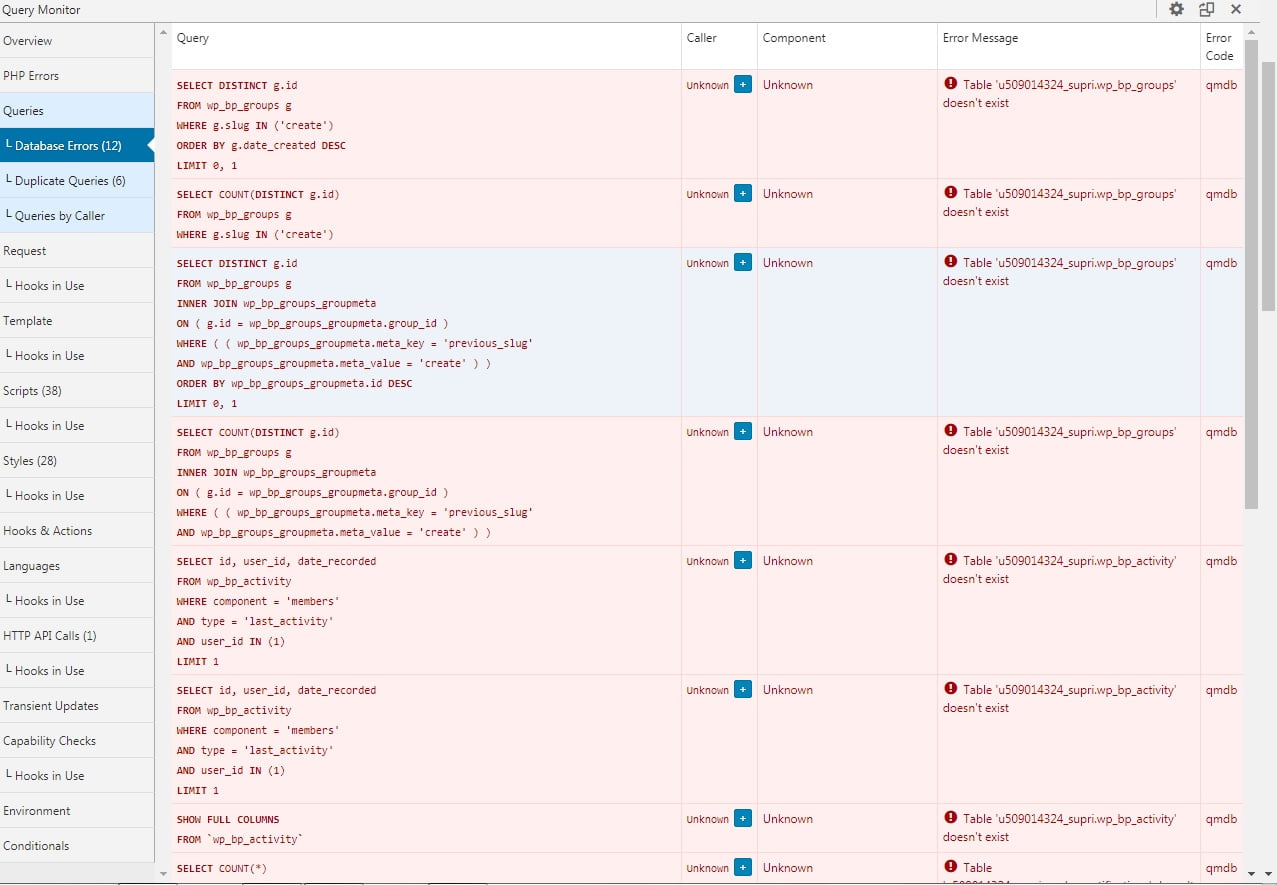
Topic: BuddyPress Tables Lost
Hello, good afternoon, I have a very serious problem, causing the malfunction of the community.
I’ve done all the installation and reinstallation procedures of the plugin, but the tables are not recreated.
I deleted the tables via PHP admin, but I can’t get them back there.
https://suprimatec.com/wp-content/uploads//2019/09/tables.jpg
BP Versão 4.4.0
WordPress 5.2.2 with the theme Jannah.I tried to upload the tables from another installation, but it didn’t work, is there anything I can do via php admin to connect the tables?
I already reinstalled WordPress, reinstalled the theme, but nothing works.
Hello!
I was trying to find a way of deleting users accounts but keeping their activity on the site.
The situation is that my site in an Intranet, so when people leave the company I don’t want them to show up on the directories or to be a part of the total members count and so on, which I can only achieve by deleting them (I’ve tried creating a role “invisible” with a rule to not appear in the directory but they still show up in the members count and in some other members widgets from my theme).
I used to have an option of deleting users and sending them to the trash, and with that they would stop showing everywhere but would keep all the activity done in the site; however, now I only have the option of permanently delete the user and so the activity disappears with it.I don’t know if this is something I should be solving with Buddypress or with the theme support.
However.Thank you!
Hi,
I activated a plugin that was not supposed to impact BuddyPress but did anyway. It added an attachment field to the bottom of the post form which is a required field.I deactivated and deleted that plugin but my form is still showing “add attachment.” I’m wondering if there is a way to restore BuddyPress to its original state?
I already tried deleting and reinstalling the BuddyPress plugin. Here is the page where I rid of “upload attachment”:
Thank you in advance for your help! 🙂
Hello,
Since two days, I try to display on a custom widget some information like the last active update of a group.
For exemple, on the Woffice demo (which uses buddypress) display a widget with the name of the group and the last active update “active 2 years, 1 month ago”.How to find the function to acquieve this ?
Thank you for your help.
Hey,
I recently uninstalled BuddyPress and deleted every buddypress datatable via phpMyAdmin, because the plugin caused some bugs and i wanted a fresh install.
Now, I tried to reinstall BuddyPress but as i install it, it creates no “activation” and “registration” page. I also looked into phpMyAdmin and there is not a single BuddyPress related datatable. Did i do anything wrong by deleting the tables, or has anyone experienced the same problem?I look forward to any answers!
Hello!
This is a follow up on this post, which has so far helped greatly.
https://buddypress.org/support/topic/disable-group-posts-from-main-activity-stream/This post shares how it is possible to hide group activity on the main activity feed. I would like one small adjustment to this, and that is to hide all group activity EXCEPT for when someone creates a group. For example:
“NAME created the group GROUP”
Is it possible to allow only these group updates, but not others from the main activity feed?
Thanks!
Topic: Extra fields not displayed
Hi!
I have installed BuddyPress Xprofile Custom Field Types but the fields is not displayed in profile
See image:

BR
Anders
SwedenHello everyone! 🙂
I have a site in Joomla that I would like to switch to WordPress. On this site, the Community Builder plugin is installed and I read that the WordPress correspondent is BuddyPress.I tried (with local sites, to do the tests) to migrate users from Joomla to WordPress wanting to keep the fields in CB. I tried to export from CB to CSV and import them into BuddyPress, using the “Import users from CSV with meta” plugin, and adding, on the BP side, the profile fields that are CB side and modifying the CSV to match.
Am I having a useless job or is this a good way? Are there any alternatives?
Thank you all!
Topic: create menues
Topic: create a register link
Hello everyone.
I just installed Buddypress on my site, however, my “activity” page isn’t working. The page is blank and doesn’t have an option for users to post updates. User activity doesn’t show up on it.
On Buddypress page settings, the correct page is selected for activity streams so I can’t figure out the problem. Any help is appreciated. I’ve been stuck for days.
Switching to 2019 theme didn’t help.