Search Results for 'buddypress'
-
AuthorSearch Results
-
September 26, 2018 at 3:22 pm #276815
In reply to: Placing profile avatar in item-nav
israel4lincelot
ParticipantNo my code is from the file member-header.php * Buddypress – Users Header.
What you sent me is from * Groups Home.This would be my code: https://pastebin.com/ck2wDwE2
Thx!
September 26, 2018 at 3:17 pm #276814In reply to: Members Masonry – Element
ParticipantNot really the solution because I stumble again with the (‘) cutting in my php code.
I’m actually trying this:
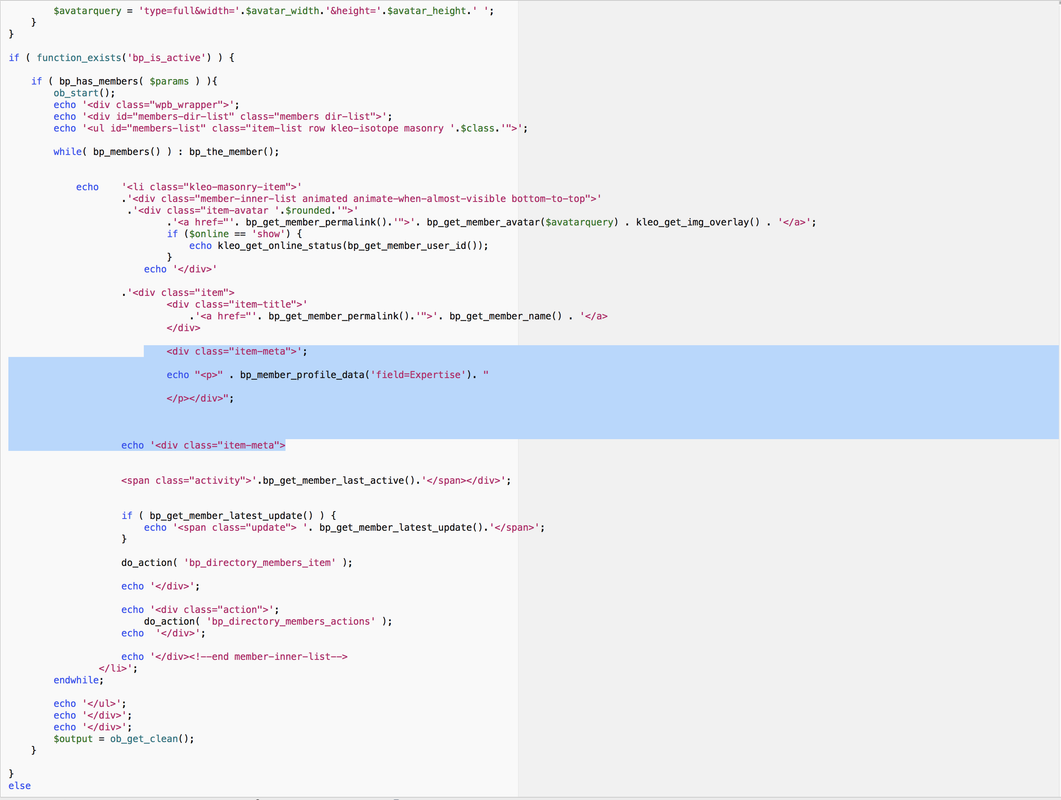
But this is the result:
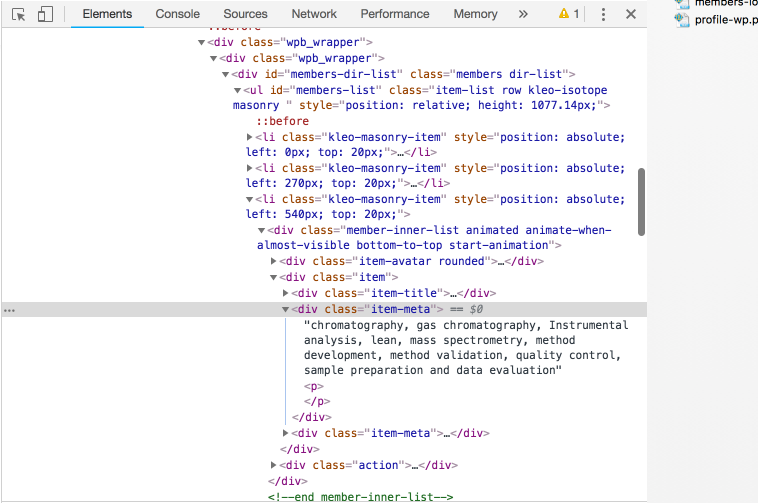
As you can see it works but the fields from “Expertise” are being printed before the <p></p> tags. I would like them to be printed inside the <p></p> tags.
Thx!
September 26, 2018 at 6:09 am #276793In reply to: Description Groups
Theunis Coetzee
ParticipantThis workaround was for Buddypress 3.1.0 and in 3.2.0 this issue (bug) was fixed by BP developers. This means if you’re using BP 3.2.0 you’re group description should display correctly without having to modify any of the core BP files or through using a template override in your theme/child-theme.
I’ve upgraded my BP to 3.2.0 and removed my workaround and my group descriptions display perfectly.
September 25, 2018 at 8:50 pm #276782In reply to: Alfabetical order by default
Prashant Singh
ParticipantHi,
Please check this thread: https://buddypress.org/support/topic/make-members-list-default-to-alphabetical/
Thanks
September 25, 2018 at 8:45 pm #276781In reply to: Field for data processing
ParticipantYou can go with this plugin https://wordpress.org/plugins/buddypress-admin-only-profile-fields/ to set the visibility to hidden/admin only.
Thanks
September 25, 2018 at 8:12 pm #276776In reply to: Field for data processing
ParticipantGot that.
Please try this plugin: https://buddypress.org/support/topic/terms-conditions-checkbox/
If it does not help you then please create an xprofile field and fill in the respective details like this :
Title: Terms of Service
Description: By checking this box you agree with our Terms of Service (with a link on Terms of Service to the TOS page)Field type: checkboxes
Option: I agree ( default value: unchecked )Visibility: just-me with option: enforce visibility
Thanks
September 25, 2018 at 6:13 pm #276770In reply to: Description Groups
lookingahead
Participant@ipokkel okay lol….i had to restore my site to an earlier time, so….this fix was lost. totally sucks.
and, i updated to the latest version. which apparently came out after your fix was posted.
so here’s what you recommended:
For a temporary workaround this worked for me:
buddypress\bp-templates\bp-nouveau\buddypress\groups\single\cover-image-header.php
line 62
<?php echo esc_html( bp_nouveau_group_meta()->description ); ?>replace with:
<?php echo bp_nouveau_group_meta()->description; ?>reference: https://codex.wordpress.org/Function_Reference/esc_html
so i interpreted that location as:
wp-content\plugins\buddypress\bp-templates\bp-nouveau\buddypress\groups\single\cover-image-header.phpbut when i got there, there was no line 62 as there had been before. even after the coffee this time… 🙂
here’s the contents of the cover-image-header PHP file that i see at that location now:
<?php
/**
 * BuddyPress - Groups Cover Image Header.
 *
 * @since 3.0.0
 * @version 3.2.0
 */
?>

<div id="cover-image-container">
	<div id="header-cover-image"></div>

	<div id="item-header-cover-image">
		<?php if ( ! bp_disable_group_avatar_uploads() ) : ?>
			<div id="item-header-avatar">
				<a href="<?php echo esc_url( bp_get_group_permalink() ); ?>" title="<?php echo esc_attr( bp_get_group_name() ); ?>">

					<?php bp_group_avatar(); ?>

				</a>
			</div><!-- #item-header-avatar -->
		<?php endif; ?>

<?php	if ( ! bp_nouveau_groups_front_page_description() ) : ?>
		<div id="item-header-content">

			<p class="highlight group-status"><strong><?php echo esc_html( bp_nouveau_group_meta()->status ); ?></strong></p>
			<p class="activity" data-livestamp="<?php bp_core_iso8601_date( bp_get_group_last_active( 0, array( 'relative' => false ) ) ); ?>">
				<?php
				/* translators: %s = last activity timestamp (e.g. "active 1 hour ago") */
				printf( __( 'active %s', 'buddypress' ), bp_get_group_last_active() );
				?>
			</p>

			<?php echo bp_nouveau_group_meta()->group_type_list; ?>
			<?php bp_nouveau_group_hook( 'before', 'header_meta' ); ?>

			<?php if ( bp_nouveau_group_has_meta_extra() ) : ?>
				<div class="item-meta">

					<?php echo bp_nouveau_group_meta()->extra; ?>

				</div><!-- .item-meta -->
			<?php endif; ?>

			<?php bp_nouveau_group_header_buttons(); ?>

		</div><!-- #item-header-content -->
<?php endif; ?>

		<?php bp_get_template_part( 'groups/single/parts/header-item-actions' ); ?>

	</div><!-- #item-header-cover-image -->

</div><!-- #cover-image-container -->

<?php if ( ! bp_nouveau_groups_front_page_description() && bp_nouveau_group_has_meta( 'description' ) ) : ?>
	<div class="desc-wrap">
		<div class="group-description">
			<?php bp_group_description(); ?>
		</div><!-- //.group_description -->
	</div>
<?php endif; ?>
where do i put that fix now?????
thanks in advance for any and all help.
September 25, 2018 at 3:36 pm #276758In reply to: Redirect from page if not logged in
ajuuls
ParticipantIm trying to make that bp-custom.php and place it in /wp-content/plugins/ folder but when i write any code it makes my site come with the “site not working” error.. it feels like that file only makes it worse?
Got it from this page:
September 25, 2018 at 2:12 pm #276745ParticipantPrashant Singh, you seem quiet good to BP and coding within that area. If you know how to fix one of my following problems, you could save my day:
1. https://buddypress.org/support/topic/private-message-suggestions/
2. https://buddypress.org/support/topic/redirect-from-page-if-not-logged-in/September 25, 2018 at 11:22 am #276743mutoha
ParticipantThanks a lot:)
But there is something strange.In case of “activity” it can not be acquired this way.
If it’s not too much trouble, give me a reply please.
https://buddypress.org/support/topic/how-to-change-design-only-for-specific-activities/Thanks.
September 25, 2018 at 8:32 am #276733In reply to: Hide specific user profile tabs
ParticipantOk, got that.
Please check this thread: https://buddypress.org/support/topic/how-to-hide-profile-menu-items-from-other-users/
There is a code snippet that might work for you. Just have to put your menu names.
Thanks
September 25, 2018 at 8:08 am #276725ParticipantOk, got that.
Please check this thread: https://buddypress.org/support/topic/adding-xprofile-fields-to-members-directory-list-items/
Thanks
September 25, 2018 at 2:54 am #276712wettowel
ParticipantHey guys I need some help with php/buddypress.
Im trying to create a custom member directory for my website that displays online users…I am very new to php, I have looked at the documentation but i don’t understand what i am doing wrong.
Things i have done thus far:
I created a new directory called “buddypress” in my theme (my theme is Divi), I then copied the “members” folder from buddypress and put a duplicate in my new “buddypress” folder within my theme. After that i renamed the “members-loop.php” file to “online-members-loop.php”, and created a new page called “online members”.
I didn’t make any adjustments to the code at this point and tried to see if it worked… It did not, my online members page is still just blank. I then tried to edit some things within the “online-members-loop.php” file i now have. I changed “<?php if ( bp_has_members( bp_ajax_querystring( ‘members’ ) ) ) : ?>”
to this: “<?php if ( bp_has_members( ‘type=online’ ) ) : ?>”
I tried to load the page again annnnddd… nothing, nothing at all. It was at this point i knew i was doing something incredibly wrong because even before altering code, the members page didnt load anything.
If anyone could help a newbie out i would greatly appreciate it 🙂
September 25, 2018 at 1:11 am #276710In reply to: Buddypress registration page password field
Participant@vapvarun is there a plugin you can recommend that will allow me to override the ‘group directory listing’ of all groups — that page?
i merely want to add a header image to display above the list of groups on the group directory page. that’s all.
i’ve tried (unsuccessfully) to get my site to use its layout options on the page that displays all groups…but no, the buddypress settings are overriding my wish to place an image above the listing of all groups on the group directory page.
i hate to ask you how to modify template files….but i think that may be what i have to do.
is there a way to accomplish this with CSS?
all i want is to have an image display above the list of all the groups on the ‘group directory page’….how to get that done? i do not care the method, i just want it to be there. of course the less code i can use to do this the better, and i do not want to use a plugin to achieve this, but at this point i am desperate!!
the buddypress template seems too strong to me, i can’t seem to find a way to get the page to do what i want for a layout.
is this better done with a plugin? it’s a buddypress template that seems unable to be altered. so i have no idea what to do next.
thank you in advance for any and all assistance! 🙂
September 24, 2018 at 8:28 pm #276704In reply to: Private Message suggestions
ParticipantThis is the old code i was talking about. Dont know if it helps to see and modify so it works somehow:
https://buddypress.org/support/topic/autocomplete-all-users-on-the-compose-screen/September 24, 2018 at 8:24 pm #276703In reply to: Site Wide Activity
shanebp
Moderator> activate site wide activity.
Do you have the Activity Streams component activated in BuddyPress settings?
Do you have the Site Tracking component activated in BuddyPress settings?
Are you trying to add a custom post type to the Activity Stream?
If so, please use gist to share your code.September 24, 2018 at 7:10 pm #276700In reply to: Hide members
Participantso, @shanebp forgive me if resurrecting this thread is a bad idea, but it has the information in it that i have a question on, and i figured it’s easier to use this one to talk about my issue rather than create a new thread and link back here.
i looked at the bp-custom.php file you linked to for this issue and i’m unsure where i can find the correct code to use with it….because i am actually not trying to merely hide members from the directory, but am instead trying to hide them from the directory and ALL other users on the site. i want to make it so that the user profiles basically are unreachable…along with each user’s information.
so i believe (not sure, but i believe) that to achieve this is i would need to make sure the profiles are handled in one of the following ways:
– password protected from view, accessible only to admins/keymaster
– never loaded at all somehow, via bp-custom.php
– the template for user profiles is blanked out somehow, so information is never put in them
– get the buddypress profile for users — when clicking on an avatar — just redirect to the main site pageof course, i have no idea if these guesses are the way to achieve the goal i really want….which is to have only one profile used (i’m using woocommerce’s account screen for their profiles)……i have no need for a buddypress profile to be used in addition to the woocommerce account profile page that i have them already using.
i honestly just want each user’s personal profile page in buddypress to be disabled. so they can’t see their own profile or any profile of others.
whether that involves forwarding users to the site main page when they click on a user, or (ideally) not being clickable at all, or….oh, i don’t know. as long as no buddypress profile is viewable by any member in any way. not even by the buddypress user themselves.
and yes — this would also include hiding member names from search.
note: i don’t care if they can see the member list in the hidden group forums; that is the only place i care to see members listed. but i don’t want those member avatars to be clickable in a hidden group forum. not ever.
thoughts????
September 24, 2018 at 4:37 pm #276697In reply to: Blank notifications in Buddypress
perteus
ParticipantHi, i have problem with this issue
I have WPForo and BuddyPress (but issue was same with bbpress) And if somebody reply on topic when i have subcribion, i have in notification menu blank title. Only Date and time send and action menu. In my Database in wp_bp_notitications is
id	13677
user_id	3
item_id	394
secondary_item_id	49
component_name   community
component_action wpforo_new_reply
date_notified	2018-09-24 13:48:17
is_new		1
September 24, 2018 at 2:02 pm #276694In reply to: Members Masonry – Element
Participantohh ok got that.
/**
* Buddypress Members masonry
*
*
* @package WordPress
* @subpackage K Elements
* @author SeventhQueen <themesupport@seventhqueen.com>
* @since K Elements 1.0
*/

$output = '';

extract(
shortcode_atts( array(
'type' => 'newest',
'member_type' => 'all',
'number' => 12,
'class' => '',
'rounded' => "rounded",
'avatarsize' => '',
'width_height' => '',
'online' => 'show'
), $atts )
);
//var_dump($avatarsize);

$params = array(
'type' => $type,
'scope' => $member_type,
'per_page' => $number
);
if ($rounded == 'rounded') {
$rounded = 'rounded';
}

$avatarquery = '';
if( $avatarsize == 'large' ) {
$avatarsizewh = explode( 'x', $width_height );
if( isset( $avatarsizewh[0] ) && isset($avatarsizewh[1] ) ) {
$avatar_width = $avatarsizewh[0];
$avatar_height = $avatarsizewh[1];
$avatarquery = 'type=full&width='.$avatar_width.'&height='.$avatar_height.' ';
}
}

if ( function_exists('bp_is_active') ) {

if ( bp_has_members( $params ) ){

ob_start();
echo '<div class="wpb_wrapper">';
echo '<div id="members-dir-list" class="members dir-list">';
echo '<ul id="members-list" class="item-list row kleo-isotope masonry '.$class.'">';

while( bp_members() ) : bp_the_member();

echo '<li class="kleo-masonry-item">'
.'<div class="member-inner-list animated animate-when-almost-visible bottom-to-top">'
.'<div class="item-avatar '.$rounded.'">'
.''. bp_get_member_avatar($avatarquery) . kleo_get_img_overlay() . '';
if ($online == 'show') {
echo kleo_get_online_status(bp_get_member_user_id());
}
echo '</div>'

.'<div class="item">
<div class="item-title">'
.''. bp_get_member_name() . '
</div>';

echo "<div class=item-meta><p>".
bp_member_profile_data('field=Expertise')."
</p></div>";

echo '<div class="item-meta">

<span class="activity">'.bp_get_member_last_active().'</span></div>';

if ( bp_get_member_latest_update() ) {
echo '<span class="update"> '. bp_get_member_latest_update().'</span>';
}

do_action( 'bp_directory_members_item' );

echo '</div>';

echo '<div class="action">';
do_action( 'bp_directory_members_actions' );
echo '</div>';

echo '</div><!--end member-inner-list-->
';
endwhile;

echo '';
echo '</div>';
echo '</div>';
$output = ob_get_clean();
}

}
else
{
$output = __("This shortcode must have Buddypress installed to work.","k-elements");
}
Please try this code.
Thanks
September 24, 2018 at 12:58 pm #276692In reply to: Members Masonry – Element
ParticipantDoes not work. I think it’s because de line I’m writing is within an echo already.
Full code:
<?php

/**

 * Buddypress Members masonry

 *

 *

 * @package WordPress

 * @subpackage K Elements

 * @author SeventhQueen <themesupport@seventhqueen.com>

 * @since K Elements 1.0

 */
$output = '';
extract(
shortcode_atts( array(
'type' => 'newest',
'member_type' => 'all',
'number' => 12,
'class' => '',
'rounded' => "rounded",
'avatarsize' => '',
'width_height' => '',
'online' => 'show'
), $atts )
);
//var_dump($avatarsize);$params = array(
'type' => $type,
'scope' => $member_type,
'per_page' => $number
);
if ($rounded == 'rounded') {
$rounded = 'rounded';
}$avatarquery = '';
if( $avatarsize == 'large' ) {
$avatarsizewh = explode( 'x', $width_height );
if( isset( $avatarsizewh[0] ) && isset($avatarsizewh[1] ) ) {
$avatar_width = $avatarsizewh[0];
$avatar_height = $avatarsizewh[1];
$avatarquery = 'type=full&width='.$avatar_width.'&height='.$avatar_height.' ';
}
}if ( function_exists('bp_is_active') ) {
if ( bp_has_members( $params ) ){
ob_start();
echo '<div class="wpb_wrapper">';
echo '<div id="members-dir-list" class="members dir-list">';
echo '<ul id="members-list" class="item-list row kleo-isotope masonry '.$class.'">';while( bp_members() ) : bp_the_member();
echo '<li class="kleo-masonry-item">'
.'<div class="member-inner-list animated animate-when-almost-visible bottom-to-top">'
.'<div class="item-avatar '.$rounded.'">'
.''. bp_get_member_avatar($avatarquery) . kleo_get_img_overlay() . '';
if ($online == 'show') {
echo kleo_get_online_status(bp_get_member_user_id());
}
echo '</div>'.'<div class="item">
<div class="item-title">'
.''. bp_get_member_name() . '
</div><div class="item-meta"><p">
<?php echo bp_member_profile_data('field=Expertise'); ?>
</p></div><div class="item-meta">
<span class="activity">'.bp_get_member_last_active().'</span></div>';
if ( bp_get_member_latest_update() ) {
echo '<span class="update"> '. bp_get_member_latest_update().'</span>';
}do_action( 'bp_directory_members_item' );
echo '</div>';
echo '<div class="action">';
do_action( 'bp_directory_members_actions' );
echo '</div>';echo '</div><!--end member-inner-list-->
';
endwhile;echo '';
echo '</div>';
echo '</div>';
$output = ob_get_clean();
}}
else
{
$output = __("This shortcode must have Buddypress installed to work.","k-elements");
}September 24, 2018 at 12:33 pm #276688In reply to: Two membership directory
ParticipantOk, please check this: https://codex.buddypress.org/developer/member-types/
BuddyPress had introduced member type concept and using this you can create multiple directories.
There is a paid plugin https://www.buddyboss.com/product/buddypress-member-types/ that you can check. But still, the payment and free level security need some sort of customization.
Thanks
September 24, 2018 at 9:24 am #276679In reply to: Two membership directory
ParticipantHi,
You can check this plugin: https://wordpress.org/plugins/buddypress-shortcodes/
But still, it will need customization to add different fields there.
Thanks
September 24, 2018 at 9:22 am #276678ParticipantYou can check buddypress-notifications.js file and I think you need to add new listener there. Then only you can run your script just after that, but editing a core file is never recommended.
Thanks
September 24, 2018 at 7:19 am #276674ParticipantHi,
You can put code like this:
function buddypress_notifications_layout() {
	global $bp;
	if ('notifications'== $bp->current_component){
              wp_enqueue_script('test', 'http://example.com/wp-content/themes/twentyfifteen-
              child/js/test.js', array('jquery'), '1.0', true);
        }
}
add_action('wp_enqueue_scripts', 'buddypress_notifications_layout');
Thanks
September 23, 2018 at 8:05 pm #276668In reply to: Error 500 on wp-admin/admin-ajax.php
ParticipantHi,
There may be possibilities that wpforo is not compatible with BuddyPress so please report to all of them after checking these issues.
Thanks
-
AuthorSearch Results


