@Guru06 Please use ‘backticks’ to display code as noted below the posting window or escape the markup.
Am I suppose to do this after I have updated WordPress to 3.0 or before I update? Or should I do the update and activate BuddyPress then change the keys?
Hi thanks for your reply, I did it like this:
and ended up with:
Parse error: syntax error, unexpected T_STRING in /home/*removed*/public_html/wp-content/plugins/buddypress/bp-themes/bp-default/forums/forums-loop.php on line 66
@hnla – thank you.
So, the proper css for the function would be:
`ul.activity-list li.highlightpost-mine {
background: #ebf7ff url(/images/ctr.png) no-repeat;
background-position:100% 99%;
padding: 4px;
-moz-border-radius: 6px;
-webkit-border-radius: 6px;
-moz-box-shadow: 2px 2px 2px #ebf7ff;
-webkit-box-shadow: 2px 2px 2px #ebf7ff;
margin:40px;
}
div.activity-comments ul li {
background: #ebf7ff url(/images/ctr.png) no-repeat;
background-position:100% 99%;
padding: 4px;
-moz-border-radius: 6px;
-webkit-border-radius: 6px;
-moz-box-shadow: 2px 2px 2px #ebf7ff;
-webkit-box-shadow: 2px 2px 2px #ebf7ff;
}`
Can anyone help me set this up for my buddypress site? I’m a broke college student so I can’t pay anyone to do it. I wish I could, would anyone out there like to help a kid out? contact me please: noisetrend@gmail.com
I’m using:
Si Capthca
BuddyPress Humanity Plugin
BP Signup Xtra (with required birthdate and checkbox)
Extra Profile Fields that require text input.
Bad Behavior with HTTP:BL enabled…
I’ve not noticed any spam logins yet…. knock on wood/cross fingers.
@pcwriter, it took a while for me to think of that way, but after turning off blog creation for about the 3rd time and contemplating keeping it at all, I thought of just doing it this way and it ended up being a better process for the user while killing those instaspam blogs. which btw, with all the other available strategies for blocking spam, it ends up being a very effective barrier to spam blog creation.
@nahummadrid
Now that is a brilliantly simple and effective tactic that I’m adding to my arsenal!
I wish new blogs worked like comments, meaning that the first post by a new member has to be approved before the blog is active. Once the first post has been approved the blog would then become active and viewable by the public.
Can someone help me figure out how to do step 3?
First off, when ever I change and edit things then upload the file, there is no change on the site.
Secondly, the default buddypress template HTML structure is not the same as what is shown in the example:
`[HEADER]
[FOOTER]
`
Actual structure:
`[HEADER]
[SIDEBAR CONTENT]
[FOOTER]
`
No matter what I do nothing works. what’s missing?
@pcwriter
Thanks, I will read these docs.
you can block them all together (but will need to remove the previous ones manually)
https://wordpress.org/extend/plugins/buddypress-block-activity-stream-types/
otherwise there is a few hacks in previous threads on how to filter on the activity array and unset items.
@PJnu: Yep so far I’ve tried a bunch of popular plugins and they work and look fine! BP-Slick is a Child Theme of the standard Theme and inherits a lot of it’s templates. The templates I’ve added are build with the same classes and template structure so this means that all plugins which are developed for BP-Default (I think all plugins are) are working fine.
Plugins that are really extensive (BP-Media, CourseWare etc) might require some additional styling, but these modifications can be shared in the support group. Everyone who has bought the plugin can upload/download new templates, styles and tweaks for the Theme. So if something does not behave as expected, chances are that me (or someone else) has fixed it and has put it up for grabs in the “goodies” section of the support group! 
Ok, this is new… or at least hasn’t been a problem for awhile here…
Try searching for something like “deleting tweets in activity”
Find a result…click it… page not found…
FYI… can find what I’m looking for, but can’t get to it…
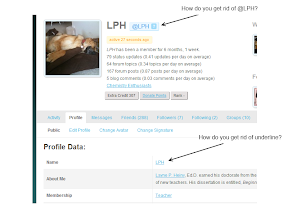
How can @username and underlining be removed from the profile page? Firebug is of no use to me 
 PJ
PJParticipant
@Bowromir have you tried the theme with most of the popular buddypress plugins to see that the plugin works well with them? I’ve had a few awesome themes that strangely didn’t work well with BP. The video demo seems to show you’re quite comfy with BP so that’s a great sign.
@boonebgorges — or anyone with good coding experience –
The AuthWP.php ran into a snag today.
The admin account in wpuser was changed to match my initials (all in capital letters). When the browser is pointed to the mediawiki install then the user id is changed from all capitals to the first being a capital letter and the following are all lowercase. How can this behavior be stopped so that my wpuser account in capitals is matched up with my mediawiki account that is all in capital letters?
Can AuthWP.php be modified so that the code for matching my userid is inserted.. if $wpuser==LPH (wp-user database) then use LPH (from mediawiki user database – user_id==1)?
Something like:
`if($wpuser==LPH)
ID == LPH
return true;`
This would be added to:
`function AuthWPUserLoadFromSession($user, &$result) {
// Is there a WordPress user with a valid session?
$wpuser=wp_get_current_user();
if(!$wpuser->ID)
return true;
$u=User::newFromName($wpuser->user_login);
if(!$u)
wp_die(“Your username ‘”.$wpuser->user_login.”‘ is not a valid MediaWiki username”);
if(0==$u->getID()) {
$u->addToDatabase();
$u->setToken();
}
$id=User::idFromName($wpuser->user_login);
if(!$id) {
wp_die(“Failed to get ID from name ‘”.$wpuser->user_login.”‘”);
return true;
}
if($id==0) {
wp_die(“Wikipedia ‘”.$wpuser->user_login.”‘ was not found.”);
return true;
}
$user->setID($id);
$user->loadFromId();
wfSetupSession();
$user->setCookies();
$user->saveSettings();
$result=true;
return true;
}`
I removed/commented out the create a blog option from the member registration form while still keeping blog creation on. I only left access to the bp create a blog form for users is_loggedin Only. By tucking it away within the member profile for the member to create a blog later during their profile detailing/editing process, I was able to get to the point where I only needed to delete crap members that get in, not crapmembers + crapblogs that get created at one time wasting all my low number blogIDs!
At the end of the day, if you’re running BPmu you don’t really need to have insta-blog. The option to create a blog is link within the member profile “dash” that they can get around to when they feel settled. I’ve found it’s easier for the user to get their profile up and running first and then breathe and think of a good blog name/url after they’ve logged in for the first time.
but if you really really want instablog, which really isn’t that instant due to the wp-admin of it all. Plus, it’s not really instant because there are too few frontend posting options in member themes for the user to start posting right away, so no need for instablog in registration process, so just indicate to your user that they can do that part later. if you still want blog creation at first registration, then you can keep up the good fight by zapping spammers and their blogs.
@Bowromir
1 – Phew!
2 – Cool!
3 – Umm… no more for now 
Have you contacted the author of the buddypress-ajax-chat plugin?
There is not anything new in BP 1.2.6 that will address any spam issues. Spam blogs, however, is a problem with multisite WordPress in general (not specific to BuddyPress). It still sucks, of course.
O MY GOD, I am so sick of deleting spam blogs! Does anyone know if the new version of BP coming out will have anything built in to prevent these spam blogs?
gPress is a very good plugin, but it does not work, because no menue options in the admin panel are clickable. I dont know why…?


